Hotpot.ai is a web toolbox of separate AI image tools: art generation, background and object removal, upscaling, colorizing, restoring, logo generation and app-store graphics, sold through credit packs rather than subscription tiers. What decides whether it suits you is whether a free but non-commercial tier, followed by pay-as-you-go credits for full resolution and commercial rights, fits how you plan to use the output.

What is Hotpot.ai?
Hotpot.ai is made by Panabee, LLC and runs only in the browser, with no mobile app. Its tools run on Stable Diffusion, offered in Normal, Premium and Budget tiers through Hotpot's own API documentation.
What you can make with Hotpot.ai

Hotpot.ai generates images and logos from a text prompt, and edits existing photos with a background remover, an object remover, a photo upscaler, a colorizer, a restorer and a face enhancer. Templates cover Instagram, Facebook, LinkedIn and YouTube posts, plus game assets and backgrounds.
Generated app-store screenshots can be placed onto iOS and Android device mockups. There is no vector editor and no way to generate an editable vector logo: output is raster. There is no video generation or editing tool, no print-ordering service, and no licensed stock library; the "AI Stock Photos" tool generates stock-style images from a prompt rather than drawing from a licensed collection.
Working with other people
There is no brand kit, no real-time collaboration and no comments or approval workflow. A SaaS API exists for adding Hotpot's tools to another app or workflow, including a dedicated Stable Diffusion API, though access requires payment or contacting Hotpot directly; self-hosted options are offered to enterprises wanting more privacy and architectural control. Hotpot.ai runs only on the web.
Hotpot.ai pricing: what each plan gives
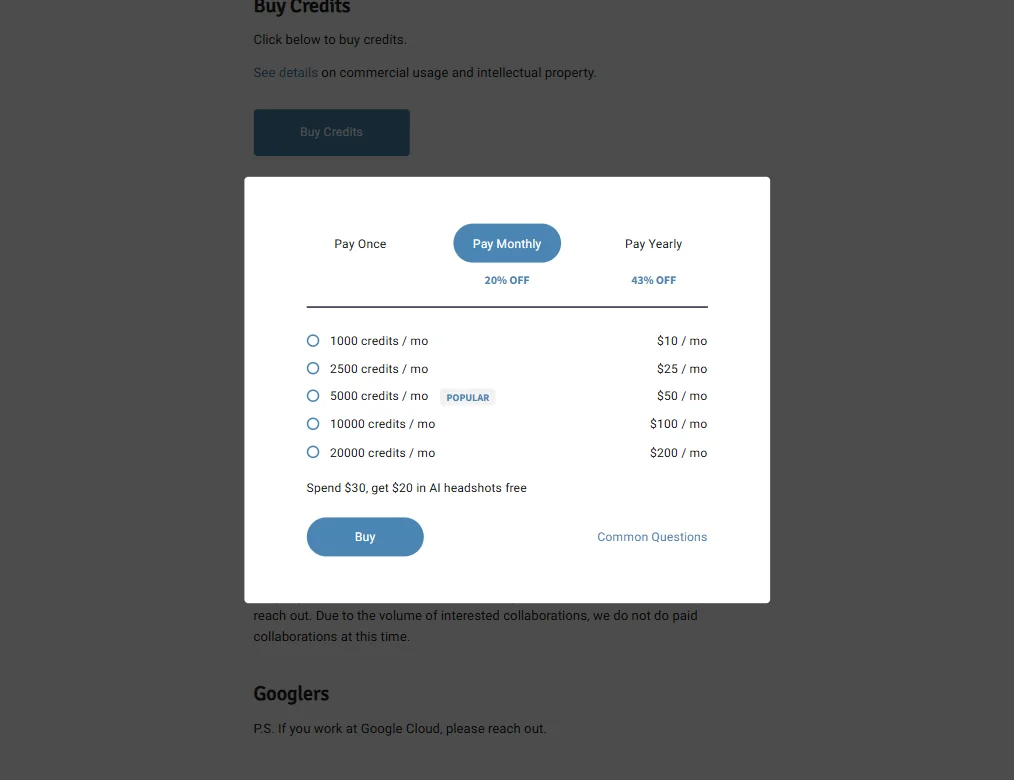
Hotpot.ai does not sell subscription tiers with different features. Instead, credits can be bought monthly, yearly or as a one-time pack, all unlocking the same tools. Paying monthly, 1,000 credits cost $10 a month, 2,500 cost $25, 5,000 cost $50, 10,000 cost $100 and 20,000 cost $200. Paying yearly lowers those same allowances to $8.33, $20.83, $41.67, $83.33 and $166.67 a month, billed as one yearly total. One-time packs are also sold with no subscription at all: 1,000 credits for $12, 2,500 for $30, 5,000 for $60, 10,000 for $120 and 20,000 for $240.
A free tier needs no account and has no end date, so there is no time-limited trial on top of it. Free output is licensed CC BY-NC, meaning it can only be used non-commercially; buying credits or a license is required for full resolution and for commercial use.
Privacy and support
Hotpot.ai's privacy policy does not mention GDPR anywhere. Sign-in runs through Google or Firebase for an individual account, and there is no enterprise single sign-on.
Support is a self-serve help page covering login and credit issues, with a contact form for anything else; there is no live chat or phone line.
Who Hotpot.ai suits
Hotpot.ai suits people who want a set of separate, single-purpose AI image and photo tools without committing to a subscription, and developers who want API access to Stable Diffusion for their own app. Its one-time credit packs also suit anyone who wants to pay once rather than recur.
It suits less well teams that need a brand kit, real-time collaboration or a review workflow, since none of those exist. It also does not fit anyone who needs vector output, video tools, print ordering or a licensed stock library, and the free tier is not an option for commercial work, since it is licensed non-commercial only.
How Hotpot.ai compares
Hotpot.ai scores 4.0 out of 10 among the AI graphic design tools we rate. These three do the same job and are the closest to it, compared on what each vendor publishes.
Canva
Hotpot.ai's paid plan starts at $10 a month with a free tier that needs no account; Canva starts higher at $18 but includes far more: video editing, stock photos and fonts, print ordering, 4 export formats against Hotpot.ai's none, and a brand kit. Canva also runs across 5 platforms and connects to 6 apps; Hotpot.ai is web only with no integrations. Both offer AI image editing such as background removal, and both allow commercial use of paid output.
Pick Canva if you need video editing, export options or a brand kit.
Pick Hotpot.ai if you want a no-account free tool for quick image edits.
Adobe Express
Adobe Express and Hotpot.ai cost almost the same, $9.99 and $10 a month, and both have a free plan. Express adds video editing, a stock library, a brand kit, social scheduling and editing together in real time, none of which Hotpot.ai offers. Hotpot.ai keeps to image generation, AI image editing, mockups and an API, with commercial use allowed.
Pick Adobe Express if you want video, stock, a brand kit and team editing.
Pick Hotpot.ai if you mainly need quick AI images and mockups.
DesignsAI
Hotpot.ai has a free plan that needs no account; DesignsAI does not, though DesignsAI's paid tier is close by at $9.90 against Hotpot.ai's $10. Hotpot.ai includes AI image editing such as background and object removal, and product mockups; DesignsAI has neither. DesignsAI instead includes a brand kit and connects to 14 apps through its workflow automation feature, well ahead of Hotpot.ai's none. Hotpot.ai does not state GDPR compliance; DesignsAI does.
Pick DesignsAI if you want a brand kit and workflow automation across more apps.
Pick Hotpot.ai if you want free image editing with no account needed.
Frequently Asked Questions
Is Hotpot.ai free to use?
There is a free tier that needs no account, but its output is licensed CC BY-NC for non-commercial use only. Full resolution and commercial rights require buying credits.
How does Hotpot.ai pricing work?
Instead of feature-based plans, Hotpot.ai sells credit packages: monthly from $10 for 1,000 credits up to $200 for 20,000, yearly at a lower per-month rate, or one-time packs starting at $12 for 1,000 credits with no subscription at all.
Does Hotpot.ai have an API?
Yes, including a dedicated Stable Diffusion API alongside its general SaaS API, plus self-hosted options offered to enterprises. Access requires payment or contacting Hotpot directly rather than a self-serve key.
Can I use Hotpot.ai output commercially?
Only once you buy credits or a license. Free output is licensed CC BY-NC, which restricts it to non-commercial use.