
Founded in 2023 and based in San Francisco, Gumloop closed a $50M Series B led by Benchmark recently. That's a substantial bet on a two-year-old tool, and it tells you something about where investor money is flowing on AI agent builders right now.

What is Gumloop?
A canvas-based AI workflow and agent builder aimed at business teams who want to automate complex processes without writing much code. The pitch, stripped down: you drag nodes onto a visual canvas, connect them, and the system runs multi-step AI tasks while your team does other things.
It's not trying to be Zapier. Zapier connects apps and fires triggers. Gumloop is attempting to orchestrate AI agents that can reason, query data, and take action across your tooling. That's a meaningfully different category. Whether it actually delivers on that in practice is a separate question.
Gumloop Features: Workflows, AI Agents & Automation Capabilities

The canvas is the product. You build workflows visually, connecting nodes that represent actions, agents, or data sources. Underneath that, Gumloop supports multiple AI models. OpenAI and Anthropic are the headline names, with Google's Gemini and DeepSeek also in the mix.
Trigger options cover most practical scenarios. Webhooks, scheduled runs, Slack, form submissions, email, and an API. Code sandboxes are listed as a feature too, which is a genuine surprise. Most no-code tools draw a hard line there. Conditional logic is in. So is workflow queuing with error handling and policy application, though how sophisticated that error handling is in practice is worth checking.
The integration picture is less vague than it was. Gumloop publicly documents Salesforce and Slack as named connectors. So are BigQuery, Gmail, and Microsoft Teams. The company advertises 200+ native integrations in recent content and references 100+ MCP servers separately. We cross-referenced those claims against community posts and found them cited consistently, so we're treating them as directionally accurate, even if no single master list is published in one place. Honestly, the lack of a clean public integration index is still a friction point for anyone doing a serious stack evaluation.
Gumloop Automation Power: How Complex Can Your Workflows Get?
This is where Gumloop's ambition is clearest. The tool is designed for multi-agent orchestration, not linear task chains. Agents can hand off to other agents, reflect on their own outputs, and loop back. That's a higher ceiling than most no-code automation tools offer.
Community feedback consistently points to the canvas becoming unwieldy at scale. When a workflow gets large, visual builders tend to fight you. Not unique to Gumloop. The category's oldest problem, honestly.
On infrastructure, Gumloop runs a platform called Gumstack, which sits across your deployment and monitors all AI activity organization-wide, covering audit logging, usage tracking, and guardrails. For enterprise teams worried about AI outputs going sideways, that layer is genuinely useful. We don't buy the framing that it's a standalone differentiator, but combined with VPC isolation and SOC 2 Type II compliance, it builds a credible enterprise story. Recurring background tasks are supported. Parallel execution too, with concurrent run counts depending on tier.
Gumloop AI Agent Capabilities: What Can It Actually Do Autonomously?
Five named agent templates ship out of the box. A Data Analysis Agent for querying your data warehouse. A Support Agent that triages bugs and creates tickets. A CRM Agent managing deals and researching prospects, plus a Meeting Prep Agent and a Call Analysis Agent for surfacing patterns from recordings.
Pointed squarely at sales and support functions. Not a generic toolkit. These are starting points, not finished products you deploy with one click.
The reflection capability is the interesting piece. Agents can evaluate their own outputs before returning results, which matters when you're querying something like BigQuery and need the output to actually be useful rather than just technically valid. The Data Analysis Agent shown in Gumloop's own docs demonstrates multi-step reasoning on funnel data, and it's a solid demo. Whether it holds up against messy real-world data is harder to judge from here. We're cautiously optimistic. Cautiously.
Human-in-the-loop support exists. Team members can intervene in active agent runs. Table stakes for anything touching sales or support workflows, and Gumloop has it.
Is Gumloop Easy to Set Up Without Code?
The 14-day trial requires no credit card conversation. Five thousand credits per month, one active trigger, two concurrent runs. Tight, but usable for testing something real before committing.
Gumloop offers what they call Gumloop University, covering docs, workshops, and structured learning cohorts. That's more deliberate than most tools at this stage, and it signals they know the onboarding gap is real. Early user comments suggest the canvas clicks quickly for simple workflows. Multi-agent setups take longer to wrap your head around.
Fair. That's true of every visual builder in this category.
The Slack integration supports @Gumloop tagging, meaning agents are reachable directly from where teams already work. That kind of access point reduces setup friction in practice, and we kept seeing it mentioned as a reason people stuck with the tool past initial evaluation.
Gumloop pricing: what each plan gives
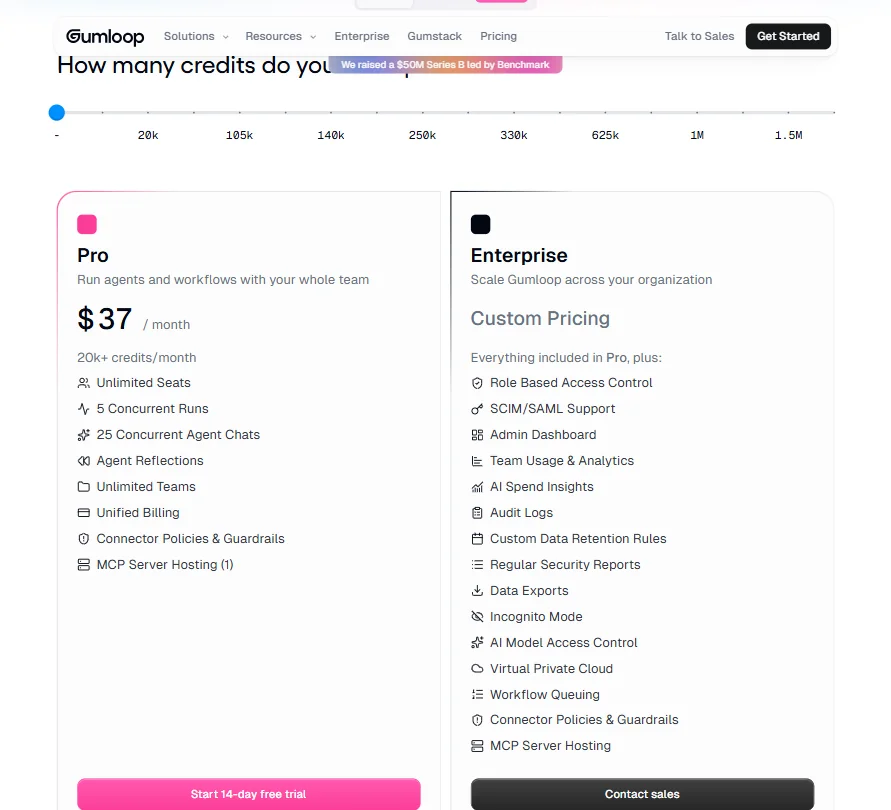
Gumloop offers a 14-day free trial of Pro, not an indefinite free tier. Real difference. You can use the product and decide without a deadline forcing your hand.
Pro starts at $37 per month. What that gets you specifically: 20,000+ credits per month, unlimited seats, five concurrent runs, and 25 concurrent agent chats. Those figures are on the pricing page. Enterprise is custom pricing, as expected, and adds Role Based Access Control, SCIM/SAML support, an Admin Dashboard, and a handful of other controls including Virtual Private Cloud and Workflow Queuing.
At $37 per month, Gumloop is priced below where you'd expect an enterprise-adjacent AI agent platform to sit. That either means the Pro tier is more constrained in practice than the feature list suggests, or they're pricing aggressively to drive adoption before raising rates post-Series B. Both are plausible. We're genuinely not sure which.
Ask about the refund policy before you pay.
For comparison, Make starts lower and publishes a clearer integration count. For non-technical teams who primarily need apps connected, that transparency matters more than most vendors acknowledge.
Gumloop vs n8n: Which Automation Platform Wins?
n8n is the honest comparison for technical teams. Open-source, self-hostable, wide integration library with clear documentation. Developers like it precisely because it doesn't abstract away complexity.
Gumloop goes the other direction entirely. It's trying to make multi-agent orchestration accessible to business teams who aren't going to write Python. Different audience. The tools reflect that.
n8n wins on integration transparency. Its library is long and well-documented. Gumloop advertises 200+ native integrations but doesn't publish a single consolidated list, which is a real gap when you're checking whether a tool connects to your stack. Not great.
Gumloop wins on the AI agent layer. The named agent templates and the Gumstack monitoring infrastructure don't have a direct equivalent in n8n's current offering. If what you're building is genuinely agent-driven rather than app-to-app automation, Gumloop's architecture fits better.
The enterprise security story also favors Gumloop. SOC 2 Type II, SCIM/SAML, RBAC, VPC. n8n has enterprise options, but the compliance packaging is different and less prominently positioned.
Who Should Use Gumloop? (And Who Shouldn't)
Sales and support teams at mid-sized companies. Clearest fit. The templates map directly to those functions, the Slack integration works where those teams live, and human-in-the-loop gives managers a safety net.
Enterprise IT teams with security requirements. The compliance posture is real and documented. Not always true of tools this young.
Solo operators and very small teams. The 14-day trial window is short enough that you'll want to move fast, and $37 per month is reasonable only if you're running workflows with real volume. Light use is probably overpriced relative to alternatives.
Developers who want full infrastructure control. Look at n8n instead. Gumloop isn't built for that use case and doesn't pretend to be.
Gumloop Review Verdict
Two years old, $50M raised, enterprise security in place, and a multi-agent architecture that makes genuine sense for the use cases it targets. That's not nothing.
The gaps are real though. The integration library still lacks a single public master list, and there are no substantial review volumes on G2 or Capterra yet, which means we're working with limited independent data and that always makes us more cautious. What user feedback we did find suggests a tool that's genuinely capable but shows rough edges in complex deployments.
For the right team, it's worth a serious evaluation. We wouldn't put a critical business workflow on it without testing first. The 14-day trial exists for exactly that reason. Use it.
How Gumloop compares
Gumloop scores 7.3 out of 10 among the AI agent builders we rate. These two do the same job and are the closest to it, compared on what each vendor publishes.
Relevance AI
Relevance AI lets you branch a workflow with conditional logic; Gumloop has no branching feature in its workflow builder. Relevance AI is also cheaper to start, $29 a month against Gumloop's $37 a month. Gumloop counters with a self-hosted option on its Enterprise plan, deploying into your own VPC, which Relevance AI does not offer, and Gumloop names HIPAA compliance where Relevance AI does not.
Pick Relevance AI if you need conditional branching and lower monthly cost.
Pick Gumloop if you need self-hosting on your own VPC and HIPAA.
Dust
Dust has a free plan that never expires, though its 500 credits are a one-time allocation rather than a monthly refresh; Gumloop has no free plan, only a 14-day trial that rolls into a paid Pro subscription. Dust builds agents through a step-by-step form guided by an AI copilot rather than a visual canvas, while Gumloop keeps a drag-and-drop builder. Gumloop connects to a stated 250 apps against Dust's 20, and Gumloop costs $37 a month against Dust's $32.4 a month.
Pick Dust if you want a free plan and don't need a visual canvas.
Pick Gumloop if you want a visual drag-and-drop builder and more app connectors.
Frequently Asked Questions
Does Gumloop have a free plan?
Not a permanent one. There's a 14-day free trial of Pro, but no permanent free plan. Constrained, but real enough to test a meaningful workflow before paying anything.
How does Gumloop compare to Zapier for AI workflows?
Zapier connects apps and fires triggers. Gumloop is attempting something different: agents that reason across steps, query data sources like BigQuery, and reflect on their own outputs before returning results. For basic "when X happens, do Y" automation, Zapier is more mature and has a longer documented integration list. For workflows where you need AI to actually think between steps, Gumloop's architecture is better suited to that. Different tools solving different problems, and conflating them doesn't help anyone.
Is Gumloop suitable for non-technical teams?
That's the claim, and the canvas builder does lower the floor compared to code-first tools. The agent templates for sales and support give non-technical users a concrete starting point. Community feedback is consistent though: the learning curve steepens quickly as workflows grow in complexity. Gumloop University, their documentation and cohort program, exists because onboarding isn't trivial. We'd call it accessible rather than easy.







