
Every score is worked out from the vendor's own pages · How we score →Disclosure
SAASINSPECTOR
Connected Papers logo

Connected Papers Review

Connected Papers is a visual literature discovery tool: enter one paper and it draws a graph of related work, clustered by shared citations and references. It is best for getting a quick picture of a research field and finding its earlier and later papers, without any AI reading or writing.

Visit Connected Papers →From $10/mo (Academic, billed quarterly)

Research-based review. Features and prices are checked on the vendor's own website, and the score is worked out from those facts. We haven't tested it hands-on yet.

The verdict

Worth paying for if you explore new fields often and like a visual map of related work, but it does not read, summarize or write anything for you.

Pros

  • The free tier includes every feature and 5 graphs a month.
  • Prior Works and Derivative Works views show a field's earlier and later papers.
  • Academic costs a third of Business on quarterly billing for the same features.
  • An Academic Library license gives a whole institution unlimited graphs, with email, IP or single sign-on access.

Cons

  • It has no AI reading, answering, summarizing or writing features.
  • There is no monthly billing; the shortest term is a quarter.
  • There are no shared projects or libraries, no API and no paper alerts.
From $10/mo (Academic, billed quarterly)Free plan YesFree trial No
3.8/10

Spec Score

Connected Papers against 13 literature search tools
#13
of 13 literature search tools
-2.1
vs the average
89%
from published facts
Ahead of other literature search tools
Pricing+1.5
Behind other literature search tools
Reading and analysing papers-5.8Access, teams and privacy-2.5Systematic reviews-1.9Finding papers-1.8Citing and writing-0.9
Every criterion
Tap a row for the facts
Finding papers4.5
-1.8 vs 6.3 avg9 of 20 points
Searches a database of papersyes3 / 3
Answers a research question from the literatureno0 / 2.5
Map of connected papersyes1.5 / 1.5
Alerts for new papersno0 / 1.5
Shows if later papers support or dispute a paperno0 / 1.5
Why these numbers

Searches a database of papers: You search for an origin paper, then explore the graph of related papers around it.

Answers a research question from the literature: Connected Papers builds similarity graphs from citation data; it has no AI reading, answering or writing features.

Map of connected papers: Each graph analyses around 50,000 papers and shows the few dozen most connected to the origin paper. Prior Works and Derivative Works views show ancestors and later papers. Multi-origin graphs on every plan.

Alerts for new papers: No alerts for new papers. The mailing list sends product updates only.

Shows if later papers support or dispute a paper: Graphs show how similar papers are by shared citations; they do not mark whether a paper supports or contradicts another.

Reading and analysing papers0.0
-5.8 vs 5.8 avg0 of 25 points
Ask questions of a paperno0 / 2
Pulls data from many papers into a tableno0 / 2
Summarises papersno0 / 1.5
Answers show the passage they came fromno0 / 1.5
Reads tables and figuresno0 / 1.5
Writes a literature review for youno0 / 1.5
Why these numbers

Ask questions of a paper: Connected Papers builds similarity graphs from citation data; it has no AI reading, answering or writing features.

Pulls data from many papers into a table: Connected Papers builds similarity graphs from citation data; it has no AI reading, answering or writing features.

Summarises papers: No AI summaries. The paper panel shows the paper's own details.

Answers show the passage they came from: No AI answers to ground. Connected Papers builds similarity graphs from citation data; it has no AI reading, answering or writing features.

Reads tables and figures: Connected Papers builds similarity graphs from citation data; it has no AI reading, answering or writing features.

Writes a literature review for you: It helps you find papers for a review (prior and derivative works) but does not write one.

Systematic reviews0.0
-1.9 vs 1.9 avg0 of 10 points
Screening with include and exclude decisionsno0 / 3
AI help with screeningno0 / 2
Removes duplicate referencesno0 / 2
PRISMA flow diagramno0 / 1.5
Risk of bias assessmentno0 / 1.5
Why these numbers

Screening with include and exclude decisions: No screening workflow.

AI help with screening: No screening workflow.

Removes duplicate references: No reference deduplication.

PRISMA flow diagram: No systematic review or PRISMA workflow. Connected Papers builds similarity graphs from citation data; it has no AI reading, answering or writing features.

Risk of bias assessment: No study quality assessment.

Pricing9.0
+1.5 vs 7.5 avg18 of 20 points
Monthly price, cheapest paid plan (academic rate if offered)$10/mo9 / 10
Yearly price, sold by the year onlydoes not applyn/a
Why these numbers

Monthly price, cheapest paid plan (academic rate if offered): Academic plan, quarterly. $6/mo when billed annually.

Citing and writing4.5
-0.9 vs 5.4 avg6.8 of 15 points
Works with Zotero, Mendeley, EndNote and othersnot published, typical value used2 / 3.5
Export formatsnot published, typical value used2.5 / 2.5
Helps you write and adds citationsno0 / 1.5
Browser extensionno0 / 1.3
Word or Google Docs add-inno0 / 1.3
Why these numbers

Helps you write and adds citations: Connected Papers builds similarity graphs from citation data; it has no AI reading, answering or writing features.

Browser extension: No browser extension is offered; it runs in the browser.

Word or Google Docs add-in: No Word or Google Docs add-in.

Access, teams and privacy4.0
-2.5 vs 6.5 avg4 of 10 points
University or library licenceyes3 / 3
Shared projects with your teamno0 / 2
APIno0 / 2
Mobile appno0 / 1
Works in languages other than Englishnot published, half points0.5 / 1
Does not train AI on your datanot published, half points0.5 / 1
Why these numbers

University or library licence: Institution-wide licence by quote, with email, IP and SSO access.

Shared projects with your team: Group plans let an administrator assign premium seats; there are no shared projects or libraries. Single graphs can be shared by link.

API: No API is offered on the home, about or pricing pages.

Mobile app: No iOS or Android app is offered.

yesnonot published average for literature search tools
How the Spec Score works

Scored from what Connected Papers publishes on its own site. Not a hands-on test.

Compared with 13 literature search tools. Facts checked 29 Oct 2026.

A fact the vendor does not publish gets half the points, or the typical value for a number, and says so. It never counts as a no. How we score.

Connected Papers is a visual tool for finding academic papers: you enter one paper and it draws a graph of related work, clustered by how much the papers share in citations and references. It has no AI features, so what decides whether it suits you is whether you want a map of a field to explore by eye rather than an assistant that reads and summarizes papers.
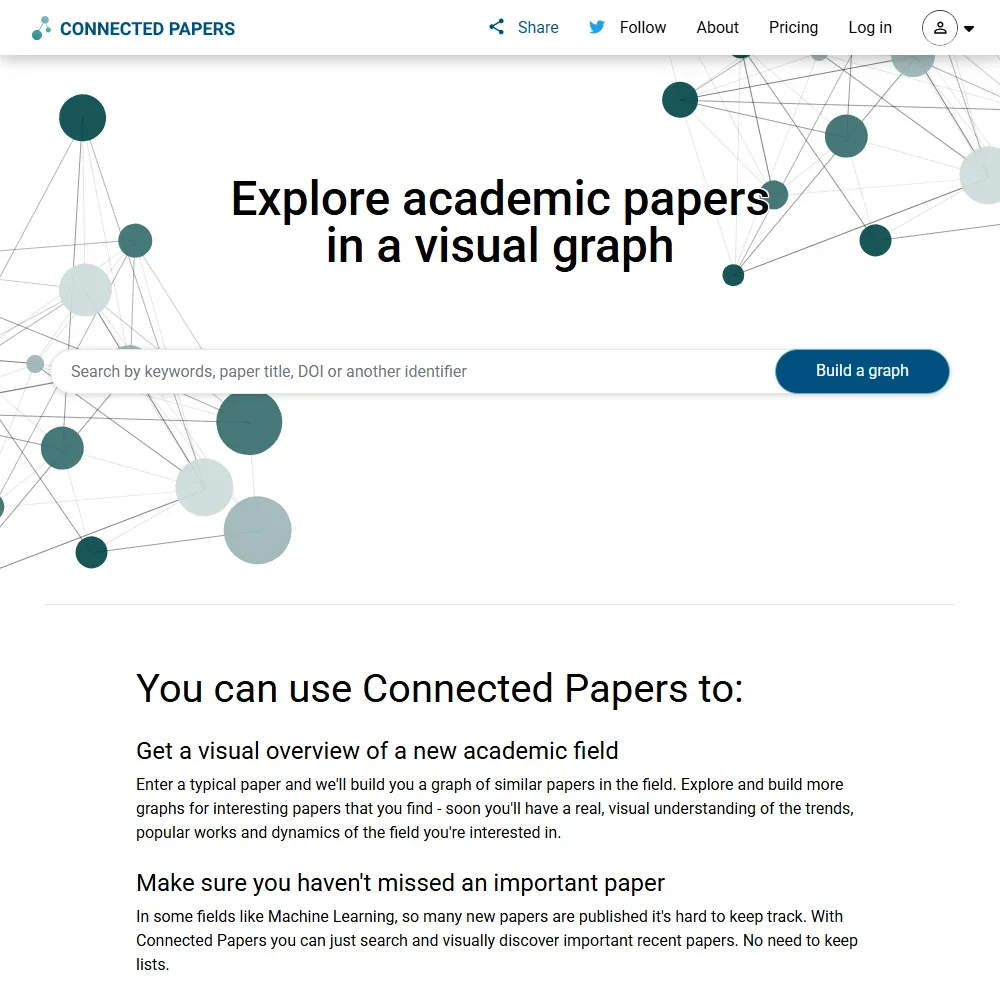
Connected Papers homepage screenshot
Connected Papers, Homepage

What is Connected Papers?

Connected Papers is a literature discovery tool that runs in the browser. Its database is connected to the Semantic Scholar Paper Corpus, and every graph is built from that citation data. There is no browser extension and no iOS or Android app.

It does one job. Connected Papers builds similarity graphs from citations; it does not read, answer questions about, summarize or write anything, and you cannot upload your own documents. The free tier includes every feature, so the paid plans differ from it in the number of graphs you can build each month.

Finding papers with Connected Papers

Building a graph. You search for an origin paper, and Connected Papers analyzes around 50,000 papers to find the few dozen most connected to it. Its similarity measure rests on co-citation and bibliographic coupling: two papers count as close when they are cited together or cite the same work. A force-directed graph then places the papers so that similar ones cluster together.

The graph comes from citation links, not from the text of the papers. You can also build multi-origin graphs from several starting papers, on every plan.

Looking back and forward. The Prior Works view shows the older papers your graph draws on, the ancestors of the field, and the Derivative Works view shows later papers that build on it. Together they help you find the papers to read for a literature review, though Connected Papers does not write the review.

Reading a result. Clicking a paper opens a panel with the paper's own details. There are no AI summaries, and the graph shows how similar papers are by shared citations, not whether one paper supports or contradicts another.

What it does not do. There is no chat with a PDF, no data extraction, no figure analysis, no screening workflow, no PRISMA support, no reference deduplication and no study quality assessment. There are no alerts for new papers either; the mailing list sends product updates only.

Working with other people

Single graphs can be shared by link. Group plans let an administrator assign premium seats to members at the same per-seat prices, but there are no shared projects or libraries.

For universities, the Academic Library license is an institution-wide plan with unlimited graphs for all students and staff, priced by quote, with access by email, IP address or single sign-on. There is no API and no Word or Google Docs add-in.

Connected Papers pricing: what each plan gives
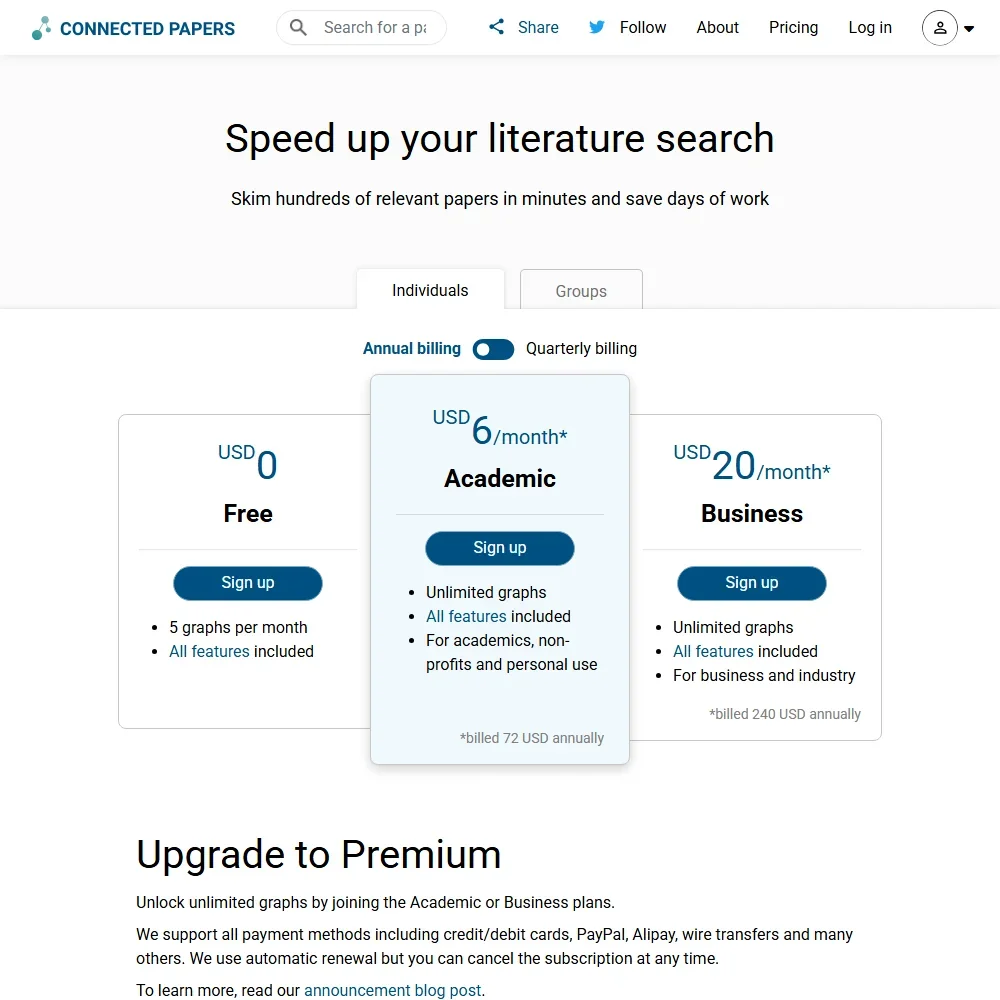
Connected Papers pricing screenshot
Connected Papers, Pricing

The free tier includes every feature and gives you 5 graphs a month. Paid plans unlock unlimited graphs, and the shortest term sold is a quarter; there is no month-to-month option.

  • Academic: $10 a month, billed $30 quarterly, or $6 a month billed $72 a year. For people at academic institutions, non-profits and anyone using Connected Papers for personal use.
  • Business: $30 a month, billed $90 quarterly, or $20 a month billed $240 a year. For commercial use.
  • Academic Library: priced by quote for whole institutions.

Academic and Business include the same features, and Academic costs a third of Business on quarterly billing. Paying yearly works out 40% cheaper than quarterly on Academic and 33% cheaper on Business. Plans renew automatically and can be cancelled at any time. A scholarship program offers discounted or free Premium access to researchers who cannot afford it.

Who Connected Papers suits

Connected Papers suits students and researchers starting on an unfamiliar topic who want to see the shape of a field from one known paper, find its foundational work and spot the newer papers that build on it. The free tier's 5 graphs a month cover occasional use, and the Academic plan is inexpensive for anyone who works this way every week. Libraries can open it to all their students and staff through the Academic Library license, with sign-in by email, IP address or single sign-on, and individual researchers who cannot afford a plan can apply to the scholarship program.

It suits less well anyone who wants AI help reading papers, extracting data or writing, since none of that is offered. Teams that need shared libraries, an API or a systematic review workflow will need other tools, and buyers who want to pay month by month cannot, since the shortest term is a quarter.

Frequently Asked Questions

How much does Connected Papers cost?

The free tier gives 5 graphs a month with every feature. Academic costs $10 a month billed quarterly or $6 a month billed yearly, and Business costs $30 a month billed quarterly or $20 a month billed yearly. Institution-wide licenses are priced by quote.

Does Connected Papers use AI?

No. Connected Papers builds similarity graphs from citation data using co-citation and bibliographic coupling. It has no AI reading, answering, summarizing or writing features.

Where does Connected Papers get its papers?

Its database is connected to the Semantic Scholar Paper Corpus. You cannot upload your own documents; every graph starts from a paper in that corpus.

Who can buy the Academic plan?

The Academic plan is for people at academic institutions and non-profits, and for anyone using Connected Papers for personal use. Commercial use needs the Business plan.

Connected Papers is featured in

Alternatives to Connected Papers

See all Connected Papers alternatives →

Other AI Research Tool options we've reviewed.

Anara logo

Anara

Researchers, PhD candidates, biopharma teams, clinical practitioners, and R&D engineers who need accurate, cited AI answers across large document libraries

7.3
Rank #1 of 8 paper readers
Best:Reading and analysing papers10
Weakest:Systematic reviews0
Institution licence: noPaper search: yesScreening: noResearch answers: yes
From $12Free plan
100% from published facts · checked 14 Sep
→
Scite logo

Scite

Individual researchers, labs, and small teams doing deep research

5.8
Rank #8 of 13 literature search tools
Best:Finding papers8.5
Weakest:Systematic reviews0
Institution licence: yesPaper search: yesScreening: noResearch answers: yes
From $20Free plan
100% from published facts · checked 14 Sep
→
Claude logo

Claude

Writers, researchers and developers who want voice, memory, projects and code execution free, with deep research on paid plans

7.8
Rank #12 of 20 AI assistants
Best:Where it works10
Weakest:Pricing6
Free plan: yesFree trial: noAPI: yes
From $20Free plan
100% from published facts · checked 16 Oct
→
Google NotebookLM logo

Google NotebookLM

Research, analysis, and learning from uploaded sources

4.9
Rank #4 of 8 paper readers
Best:Reading and analysing papers10
Weakest:Systematic reviews0
Institution licence: noPaper search: noScreening: noResearch answers: no
Price not publishedFree plan
80% from published facts · checked 14 Sep
→
Elicit logo

Elicit

Systematic literature reviews and academic research

7.8
Rank #1 of 13 literature search tools
Best:Reading and analysing papers10
Weakest:Citing and writing5.8
Institution licence: yesPaper search: yesScreening: yesResearch answers: yes
From $19Free plan
99% from published facts · checked 14 Sep
→
Gemini logo

Gemini

Google users who want an assistant that reads their Gmail, Calendar and Drive, with images and voice on the phone

7.9
Rank #9 of 20 AI assistants
Best:What it can do10
Weakest:Privacy and trust5.5
Free plan: yesFree trial: noAPI: yes
From $4.99Free plan
97% from published facts · checked 14 Oct
→

User reviews

Review Connected Papers

Your rating

Reviews are moderated and appear once approved.