Every score is worked out from the vendor's own pages · How we score →Disclosure
SAASINSPECTOR
TypingMind logo

TypingMind Review

TypingMind is a bring-your-own-key AI chat app that puts models from many providers, including local ones, in one interface. It is best for people who already hold API keys and want to pay only for the tokens they use, with an app they buy once.

Visit TypingMind →From $99/mo

Research-based review. Features and prices are checked on the vendor's own website, and the score is worked out from those facts. We haven't tested it hands-on yet.

The verdict

Worth buying if you hold API keys and want one interface for many models without a monthly app fee, though AI usage is always billed separately by the providers.

Pros

  • One interface works with models from 12 AI providers plus local models through Ollama or LM Studio.
  • Personal licenses are one-time purchases with no renewal, usable on 5 devices.
  • The personal app keeps your data on your device, and buyers also get a self-hosted web app.
  • TypingMind is SOC 2 Type 2 certified and never uses your conversations for training.

Cons

  • No plan includes AI usage, so every model is paid per token to the provider through your own API key.
  • Web search, file uploads and image generation need the Extended license or higher, and Project Folders need Premium.
  • There is no live spoken conversation mode; voice works through dictation and read-aloud.
From $99/moFree plan YesFree trial Yes
6.4/10

Spec Score

TypingMind against 20 AI assistants
#18
of 20 AI assistants
-1.0
vs the average
100%
from published facts
Ahead of other AI assistants
Privacy and trust+2.0
Behind other AI assistants
Pricing-4.9Where it works-1.3
Every criterion
Tap a row for the facts
What it can do8.0
-0.0 vs 8.0 avg32 of 40 points
Deep research reportsyes2.5 / 2.5
Voice conversationno0 / 2
Remembers you across chatsyes2 / 2
Projects that keep files and chats togetheryes2 / 2
Makes imagesyes1.5 / 1.5
Why these numbers

Deep research reports: Needs your own SerpAPI and Firecrawl API keys.

Voice conversation: Offers voice input (with optional auto-send) and text-to-speech read-aloud, but no live spoken conversation mode.

Projects that keep files and chats together: Premium licence and up.

Makes images: Extended licence and up, through image model plugins such as GPT Image.

Where it works6.0
-1.3 vs 7.3 avg12 of 20 points
Where it runs1 platform2 / 6
Team workspaceyes4 / 4
Why these numbers

Where it runs: Counted from platforms. Installs as a web app (PWA) on Mac, Windows, Linux, iOS and Android; no app-store apps.

Team workspace: TypingMind Teams, sold separately from personal licences.

Pricing2.1
-4.9 vs 7.0 avg4.6 of 22 points
Cheapest paid plan, monthly$991.5 / 7
Full use on the cheapest paid planpaid add-on0.6 / 3
Why these numbers

Cheapest paid plan, monthly: Cheapest paid plan on the monthly term. Personal licences are one-time purchases with no renewal. Prices are the list prices; a 50% off countdown offer also shows on Premium, the Bulk licence and Teams Professional.

Full use on the cheapest paid plan: The licence buys the app; model usage is billed by OpenAI, Anthropic, Google or another provider to your own API key.

Privacy and trust8.5
+2.0 vs 6.5 avg15.3 of 18 points
Does not train AI on your datayes4.5 / 4.5
SOC 2yes1.5 / 1.5
GDPRyes1.5 / 1.5
Ways to reach support2 support channels1 / 2.5
Why these numbers

Does not train AI on your data: What the AI provider does with prompts depends on that provider's API terms.

GDPR: Has a GDPR statement and a Data Processing Agreement.

Ways to reach support: Counted from support_channels.

yesnonot published average for AI assistants
How the Spec Score works

Scored from what TypingMind publishes on its own site. Not a hands-on test.

Compared with 23 AI assistants. Facts checked 29 Oct 2026.

A fact the vendor does not publish gets half the points, or the typical value for a number, and says so. It never counts as a no. How we score.

TypingMind is a chat app for AI models where you bring your own API keys and pay the AI providers directly for what you use. The app itself is sold as a one-time personal license or as a monthly team workspace, and no plan includes AI usage. What decides whether it suits you is whether you are comfortable managing API keys and per-token bills in exchange for one interface across many providers.
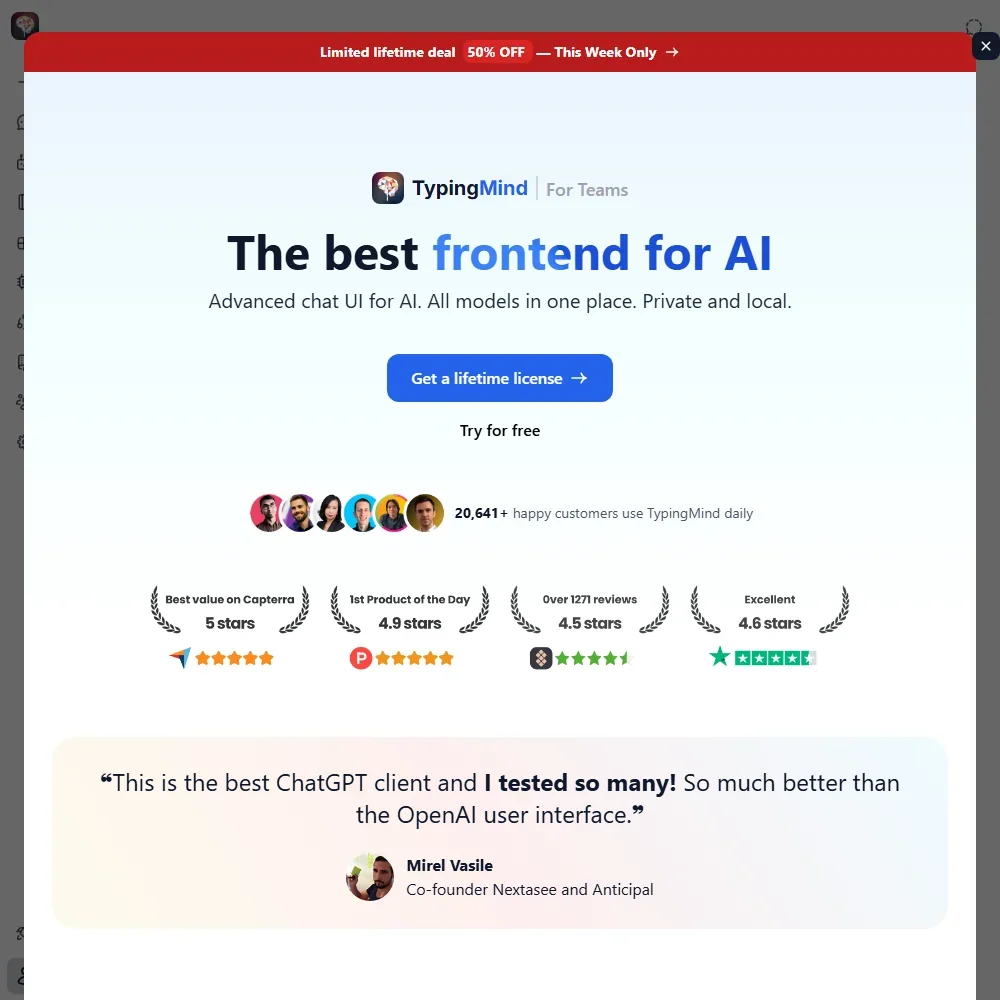
TypingMind homepage screenshot
TypingMind, Homepage

What is TypingMind?

TypingMind is run by Typing Technology Co. Ltd. Its founder, Tony Dinh, started it as an advanced chat interface, and it is now a front end for models from many providers. It runs in the browser and installs as a web app on Mac, Windows, Linux, iOS and Android.

The personal app keeps your data on your device and needs no account, with cloud sync as an option. After you buy a license you also get an offline static web app to host yourself. TypingMind Teams is a hosted workspace, and it can be self-hosted too.

What you can do with TypingMind

TypingMind supports models from 12 AI providers: OpenAI's GPT models, Anthropic's Claude models, Google's Gemini models, DeepSeek, Mistral, Moonshot Kimi, Perplexity Sonar, xAI Grok, Z.ai GLM, OpenRouter, Groq and local models through Ollama or LM Studio. You add an API key for each provider, the model list follows each provider's catalog, and custom endpoints such as Azure, AWS Bedrock and Hugging Face can be added. TypingMind has no models of its own.

Web search comes on the Extended license and up, through search plugins such as Perplexity Search. A Deep Research plugin plans multi-step research with live web search and content analysis, and it needs your own SerpAPI and Firecrawl API keys. Extended and up also add uploads of PDF, DOCX, XLSX and Markdown documents, vision and image generation through plugins such as GPT Image.

The built-in Toolbox plugin has the AI write Python or JavaScript, run it in your browser on your device and give you the result in the chat. Memory lets TypingMind remember useful information about you across conversations. Project Folders, on the Premium license and up, build dedicated workspaces with their own chat history and knowledge bases.

You can dictate messages with your microphone, with optional auto-send, and have replies read aloud, but there is no live spoken conversation mode. Plugins and MCP servers connect TypingMind to Slack, Zapier, GitHub, Notion, Google Drive, Figma, Make, n8n, Todoist, Supabase, Firecrawl and Azure AI Search, and the knowledge base can pull from GitHub, Google Drive and Notion.

Working with other people

TypingMind Teams is an AI workspace for your team, sold apart from the personal licenses. Teams plans add an Integration API, and the Teams Professional plan and up add single sign-on, directory sync and OAuth 2.

TypingMind pricing: what each plan gives
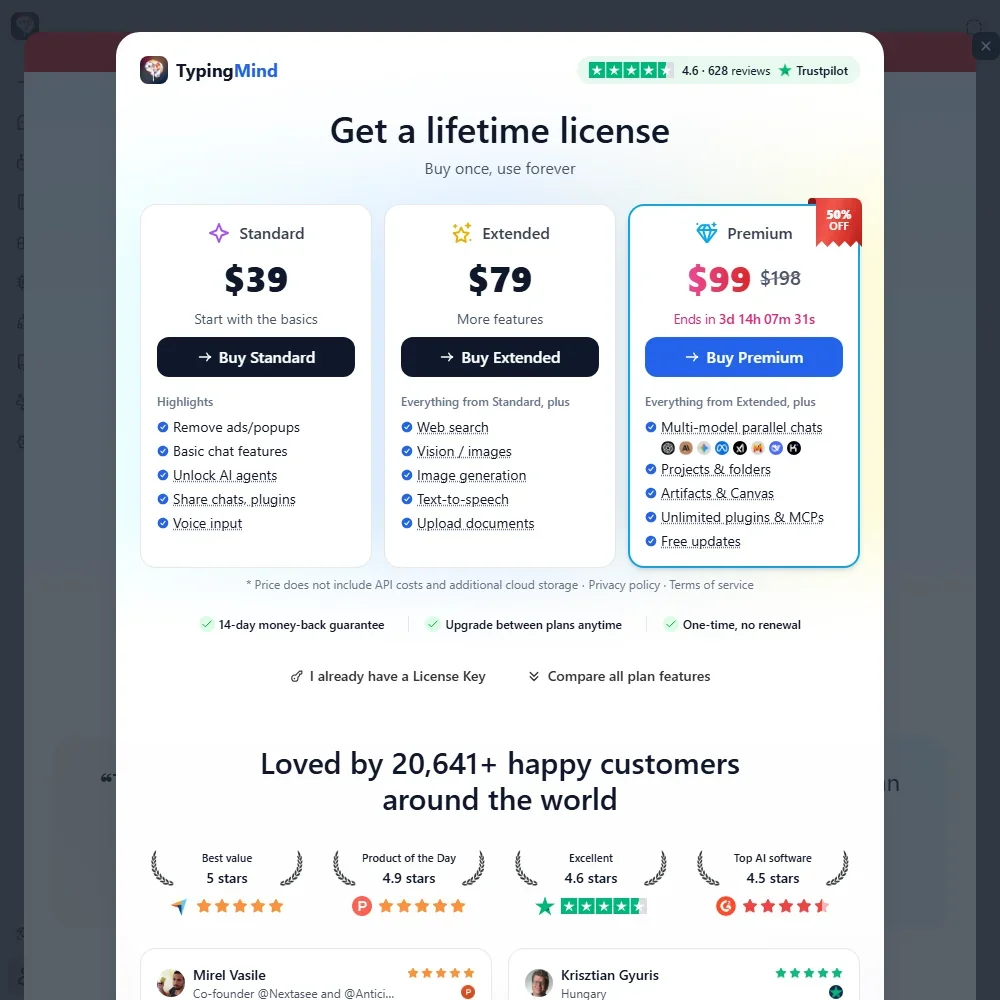
TypingMind pricing screenshot
TypingMind, Pricing

No TypingMind plan includes AI usage. Model costs are billed per token by OpenAI, Anthropic, Google or another provider to your own API key.

The Free version works with your own OpenAI API key, but chat history is not saved, a popup appears every few minutes and some other features are limited.

Personal licenses are one-time purchases with no renewal, and each license key works on 5 devices. The Standard license costs $39, the Extended license $79 and adds web search, file uploads and image generation, and the Premium license $198 and adds Project Folders. A Bulk license for 10 users costs $790. Personal licenses come with a 14-day money-back guarantee.

TypingMind Teams plans include 5 seats each, with extra seats at $8 per seat a month. Teams Starter costs $99 a month, or $83 a month billed yearly; Teams Growth costs $199 a month, or $166 billed yearly; and Teams Professional costs $599 a month, or $499 billed yearly. Teams plans start with a 14-day free trial. Business is priced on request, from $18,700 a year.

Privacy and security

TypingMind does not train on your chats: "All of your conversations on the TypingMind system are strictly confidential and never used for training purposes." What happens to your prompts at the AI provider depends on that provider's API terms.

TypingMind is SOC 2 Type 2 certified and has a GDPR statement and a Data Processing Agreement. Single sign-on is on Teams Professional and up. Support runs by email at support@typingmind.com and through a help center.

Who TypingMind suits

TypingMind suits people who already have API keys, or are happy to get them, and want one chat interface across many providers, including local models, while paying only for the tokens they use. Its one-time personal licenses, on-device data and self-hosted option suit anyone who wants to buy the app once and keep it.

It suits less well anyone who wants a single bill that covers AI usage, since every plan leaves the model costs to your own API keys. Web search, file uploads and image generation need the Extended license or higher, Deep Research needs further API keys, and the team plans are a separate monthly product starting at 5 seats.

Frequently Asked Questions

How much does TypingMind cost?

Personal licenses are one-time payments: $39 for Standard, $79 for Extended and $198 for Premium. Teams plans start at $99 a month for 5 seats, or $83 a month billed yearly. AI usage is paid separately to the provider through your own API key.

Which AI models can I use in TypingMind?

Models from OpenAI, Anthropic, Google, DeepSeek, Mistral, Moonshot, Perplexity, xAI, Z.ai, OpenRouter and Groq, plus local models through Ollama or LM Studio and custom endpoints such as Azure, AWS Bedrock and Hugging Face. Which models appear depends on the API keys you add.

Is TypingMind a one-time purchase?

The personal licenses are: you buy once with no renewal, and each key works on 5 devices. TypingMind Teams is a monthly or yearly subscription.

Does TypingMind train AI on my chats?

No. Conversations on TypingMind are never used for training, and what the AI provider does with your prompts depends on its own API terms.

TypingMind is featured in

Alternatives to TypingMind

See all TypingMind alternatives →

Other AI Productivity Tool options we've reviewed.

Glean logo

Glean

Large companies that want AI search and agents across their own apps, bought through a sales team

Unranked: no like-for-like peers
Free plan: noFree trial: yesAPI: yes
Price not publishedNo free plan
→
Asana logo

Asana

Teams that plan across many projects with goals, portfolios, timelines and intake forms

7.2
Rank #7 of 9 AI work management tools
Best:Privacy and trust8
Weakest:Working with others7
Free plan: yesFree trial: noAPI: yes
From $13.49Free plan
73% from published facts · checked 26 Sep
→
ChatGPT logo

ChatGPT

People who want images, voice, memory and deep research in one assistant, starting on a free plan

8.8
Rank #1 of 20 AI assistants
Best:What it can do10
Weakest:Privacy and trust6.2
Free plan: yesFree trial: noAPI: yes
From $8Free plan
100% from published facts · checked 16 Oct
→
Jamie logo

Jamie

Professionals who want private meeting notes with no recording kept, and storage and processing in Europe

6.8
Rank #15 of 20 AI meeting assistants
Best:Where it works10
Weakest:What it captures4.5
Keeps the meeting video: no
From $27 (€25)Free plan
87% from published facts · checked 21 Sep
→
Read AI logo

Read AI

Anyone who wants a personal meeting coach on the free plan, plus in-person meetings captured through the phone app

8.2
Rank #6 of 20 AI meeting assistants
Best:Where it works10
Weakest:Privacy and trust7.5
Keeps the meeting video: yes
From $19.75Free plan
98% from published facts · checked 21 Sep
→
monday logo

monday

Teams who want board-based projects with AI meeting notes and answers about their whole workspace built in

8.1
Rank #4 of 9 AI work management tools
Best:Privacy and trust10
Weakest:Working with others4
Free plan: yesFree trial: noAPI: yes
From $12Free plan
96% from published facts · checked 22 Sep
→

User reviews

Review TypingMind

Your rating

Reviews are moderated and appear once approved.