SAASINSPECTOR
Turbologo logo

Turbologo Review

Small business owners, founders, and non-designers who need a full brand kit quickly and affordably

Visit TurbologoFrom Free to design; pay once to download (one-time payment)

Research-based review. We analyzed vendor documentation, customer reviews on G2, Capterra, and Reddit, and live pricing — not hands-on testing yet. We update as our team puts tools through real workflows.

The verdict

Turbologo is a web-based AI logo generator and brand kit tool built for founders, solo operators, and small business owners who need a complete brand identity without hiring a designer. For a one-time payment, users get a logo, brand kit, social media templates, and access to an AI website builder. It earns solid marks for accessibility and value, but falls short for professional or collaborative design workflows.

Pros

  • One-time payment model with no recurring monthly subscription fees makes it budget-friendly for small businesses.
  • Generates a full brand kit including business cards, social media covers, email signatures, and letterhead templates in a single session.
  • Exports files in SVG and PDF formats, making logos print-ready for physical applications like signage, T-shirts, and menus.
  • Fast core workflow allows users to generate logo concepts quickly by entering business name, industry, and style preferences.
  • Brand kit generator automatically produces color palettes and font pairings without manual design work.
  • Includes an AI website builder as an ambitious add-on beyond the core logo creation functionality.
  • Social media templates for Instagram and Facebook are bundled into the platform at no extra cost.
  • Real usage volume of 90 million claimed logos suggests a mature, functional product rather than an untested tool.

Cons

  • No Figma export or Adobe integration limits compatibility with professional design workflows.
  • No API documentation was found, restricting developers or agencies from building on top of the platform.
  • Team collaboration features are not mentioned, making it unsuitable for multi-user or agency use cases.
  • The AI Video feature listed in navigation lacks clear documentation, leaving its actual functionality unclear.
  • The claimed 90 million logos processed cannot be independently verified, raising questions about transparency.
  • Scope is limited to solo operators and small businesses, meaning it won't meet the needs of scaling brands or enterprises.
From Free to design; pay once to download (one-time payment)Free plan YesFree trial No

What is Turbologo?

Three tiers. One-time payments. No subscription anywhere on the pricing page. That's the structure, and it's genuinely unusual in a category where Looka and Tailor Brands both push you toward monthly billing the moment you want a usable file.

Turbologo homepage screenshot
Turbologo — Homepage

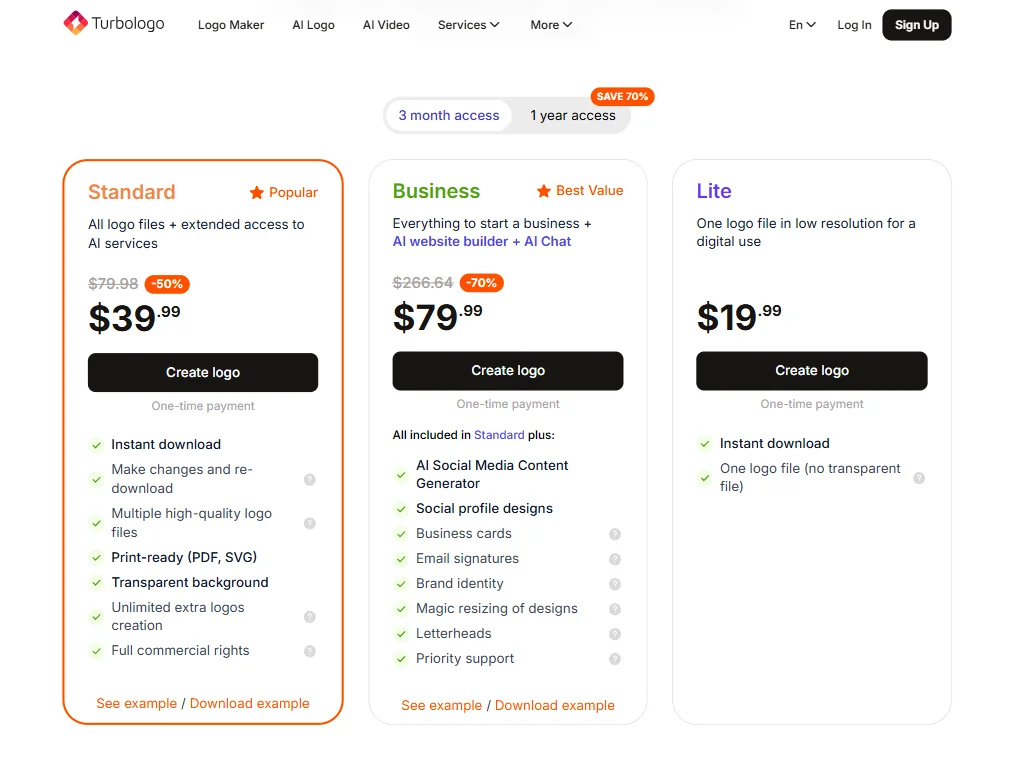
Turbologo is a web-based AI logo generator that bundles brand kit creation into a single purchase. You answer a few prompts about your business, the AI generates logo options, you customize, and then you pay once to download. The Lite plan runs $19.99 and gives you one logo file in low resolution, no transparent background included. Standard runs $39.99 (down from a listed $79.98, so a 50% promotional discount at time of writing) and adds multiple high-quality logo files, print-ready PDF and SVG formats, transparent background, unlimited extra logo creation, and full commercial rights. Business comes in at $79.99 (listed as 70% off from $266.64) and layers on an AI social media content generator, social profile designs, business cards, email signatures, brand identity tools, magic resizing, letterheads, and priority support. All one-time.

Founded in 2018, Turbologo has processed a claimed 90 million logos. Hard to verify. But that kind of volume suggests a real user base, not a ghost product.

Honestly, the scope surprised us. Most competitors stop at the logo and maybe a color palette. Turbologo tries to hand you a functioning brand identity in one session.

Turbologo Features: Logo, Graphics, UI & Brand Design Capabilities

Turbologo features screenshot
Turbologo — Features

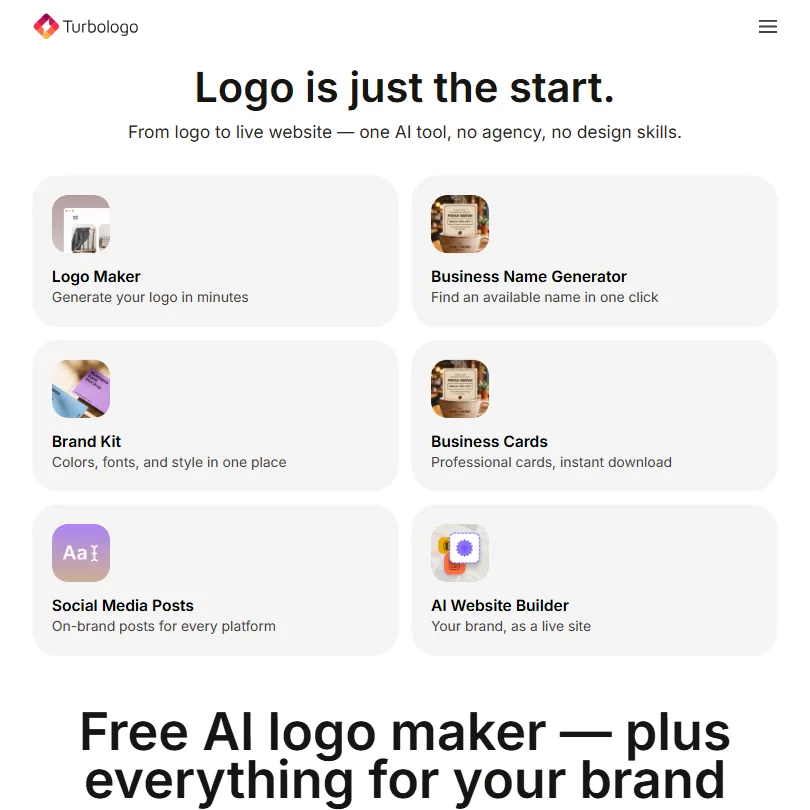
The core workflow is fast. You enter your business name, pick an industry, choose a style direction, and the AI generates a batch of logo concepts. From there, you edit colors, fonts, icons, and layout in a browser-based editor. Export formats include SVG and PDF, so the files are print-ready for signage, merchandise, or whatever physical application you need.

Beyond the logo, the brand kit generator produces color palettes and font pairings automatically. The Business tier adds social profile designs and magic resizing of designs, which matters if you're pushing assets across multiple platforms with different dimension requirements. Turbologo also includes a documented AI Video Generator, capable of producing branded advertisements, product clips, and logo animations from text prompts, logos, or photos. It draws on models including Veo, Kling, and Seedance, and exports MP4 at up to 1080p. That's more infrastructure than we'd expected from a logo tool.

What's missing is also worth naming. No Figma export. No Adobe integration. No API documentation we could find. Team collaboration features aren't mentioned anywhere on the site. Working alone, that's fine. Handing assets to a developer or a design team means downloading files and emailing them manually. Not ideal.

Turbologo has advertised more than three million possible logo-template variants. We can't verify the icon library count specifically, but for logo work the range is more than sufficient.

Turbologo Design Quality: How Good Are the AI-Generated Results?

This is where the reviews get interesting. Trustpilot patterns we kept seeing were consistent: reviewers praised the variety of initial concepts and the speed of generation. Non-designers specifically called out how approachable the customization felt.

The criticism that surfaced repeatedly was about originality. Several reviewers noted that logos can feel generic, especially for businesses in saturated categories like food, fitness, or consulting. The AI is pulling from recognizable visual patterns, and that shows. If your brand requires something genuinely distinctive, you'll feel that ceiling quickly.

That tracks with what we'd expect from any AI logo tool at this price point. Looka gets the same complaint. So does Wix Logo Maker. The tools aren't bad, they're working within the logic of pattern-matching rather than original concept development. Reddit threads from 2024 surface occasional frustration with outputs feeling "template-y." Fair. Though a few commenters also noted they spent 20 minutes on Turbologo and left with something they liked, which is the whole value proposition.

Turbologo Templates & Assets: How Deep Is the Library?

The template library is solid for what it is. Social covers for LinkedIn and Facebook are included. Business card layouts, letterhead, and email signatures round out the package. The Business tier adds AI social media content generation on top of that, which nudges it toward ongoing content use rather than just a one-time brand setup.

What it isn't is a general design tool. You won't be building pitch decks here. The library is focused on brand identity assets and stays in that lane. For a first brand kit, the depth is more than adequate. For ongoing content creation at volume, you'd want something with broader template coverage, closer to what Canva offers.

No community asset marketplace. No user-contributed content. What the platform lists is what exists. That's a real limitation compared to tools like Picsart, which carry far larger ecosystems of community-created assets.

Is Turbologo Easy to Use for Non-Designers?

Yes. The interface runs on guided prompts, not blank canvases. You're not staring at an empty artboard wondering where to start. The AI does the first heavy lift, and you're editing rather than building from scratch.

Trustpilot reviewers in small business contexts consistently called it intuitive. The product is clearly designed for someone who last opened Photoshop in 2009, if ever. That's not a criticism, it's an accurate description of who it serves and how well it serves them.

The website builder is a bit more of a stretch. Building a site is categorically harder than generating a logo, and the reviews on that feature specifically were sparse. Not negative. Just thin.

Web-only. No desktop app, no mobile app. That's fine for most workflows but worth knowing upfront.

Turbologo Pricing: Is It Worth It vs Hiring a Designer?

Turbologo pricing screenshot
Turbologo — Pricing

Three plans, all one-time. Lite at $19.99 covers a single low-resolution logo file with no transparent background, digital use only. Standard at $39.99 adds print-ready files, transparent backgrounds, unlimited extra logo creation, and full commercial rights. Business at $79.99 adds the full brand identity suite including business cards, email signatures, social profile designs, and priority support.

Both Standard and Business show promotional pricing, 50% and 70% off respectively, against listed regular prices. Whether those discounts are permanent or time-limited isn't clear from the pricing page. We'd treat the current prices as the real prices until the page says otherwise.

The refund situation is genuinely messy and worth flagging before you commit. Turbologo's homepage currently mentions a 30-day refund window, while its Terms specify a conditional seven-day period. Under the Terms, one-time purchases are eligible for cancellation within seven days only if the files haven't been downloaded or used. Some individual logo-template pages still advertise a seven-day guarantee separately. Three different signals, none of them consistent. We don't buy the 30-day framing as a reliable safety net.

Against a freelance designer, even a low-end Fiverr engagement for a logo and basic brand kit runs $150 to $300. Turbologo's Business tier at $79.99 comes in well below that. For a bootstrapped founder, the math works on cost alone.

Turbologo vs Looka: Which AI Design Tool Wins?

Looka is the closest direct competitor. Both generate AI logos, both produce brand kits, and both target non-designers running small businesses. The pricing structures diverge sharply. Looka operates on a subscription model for brand kit access. Turbologo is one-time. For a founder who needs a brand identity once and won't revisit it constantly, Turbologo's model wins on cost.

Both produce serviceable logos that do the job for a business that needs to look credible quickly. Neither produces work that would replace a real designer for a brand that needs to stand out in a crowded market. That's not a knock on either tool specifically, it's just the ceiling of the category.

Looka has slightly more documentation and a clearer support structure from what we read. Turbologo counters with a more complete one-time bundle. Pick based on how you'd rather pay, mostly. Tailor Brands is the other name that surfaces in this category, though it skews toward LLC formation and business setup, which is a different product even if the surface looks similar.

Who Should Use Turbologo? (And Who Shouldn't)

Solo founders launching something fast. That's the fit. Someone who needs a logo, a business card design, and a social profile cover by end of week, without hiring anyone.

Bootstrapped startups who want a brand identity before they've built the product. Also a reasonable use case.

Design teams, creative agencies, anyone who needs collaboration features. Look elsewhere. The platform doesn't support it, and there are no integrations with professional design tools to compensate.

Brands where visual distinctiveness is a genuine competitive advantage. The AI will get you to "good enough," not "memorable," and if your logo needs to work hard in a crowded market, that ceiling will frustrate you. A tool like Adobe Firefly won't solve the logo problem directly, but it opens more creative possibilities if you're prepared to do the work yourself.

Businesses planning to scale brand assets over time. The one-time model is great upfront. It doesn't naturally grow with you.

Turbologo Review Verdict

Turbologo does what it advertises. Fast AI logo generation, a reasonable brand kit, vector files included, one-time payment. The pricing is concrete and public, the tier structure is legible, and the AI video capability is more developed than we'd expected from a tool in this category.

The gaps are real. The refund policy is inconsistent across the site, which is a legitimate transparency problem, not just a minor footnote. Collaboration doesn't exist. The AI output ceiling is low for anyone with serious brand ambitions. Support documentation, outside of the video feature, remains thin.

Not great on the refund messaging. Fine on everything else for its intended use case.

We'd recommend it for a first brand identity, with the expectation that you'll outgrow it. A fast, affordable starting point for a founder who needs to look credible by Friday. Not a long-term brand design platform, and it isn't trying to be.

Frequently Asked Questions

Does Turbologo offer a free plan?

You can design and preview logos at no cost. The free access lets you work through the full creation process and see results before paying anything. You pay only when you want to download actual files. The Lite plan starts at $19.99 for a single low-resolution file, which is the lowest entry point if you just need something basic for digital use.

What file formats does Turbologo export?

SVG and PDF are the print-ready vector formats, available from the Standard plan up. PNG and JPEG cover digital use. The Lite plan gives you one logo file in low resolution without a transparent background, which limits it to screen use only.

Is Turbologo's one-time payment actually a one-time payment?

Based on the pricing page and consistent review patterns across Trustpilot and Reddit, yes. Users describe it as a single purchase. No subscription language appears anywhere on the pricing structure we reviewed. That said, the refund window is murkier than the payment model. The homepage says 30 days, the Terms say seven days with conditions attached, and some product pages say seven days without conditions. Worth reading the Terms before you download anything.

Turbologo is featured in

Alternatives to Turbologo

See all Turbologo alternatives →

Other AI Design Tool options we've reviewed.

User reviews

Review Turbologo

Your rating

Reviews are moderated and appear once approved.