

We pulled vendor docs, Reddit threads from late 2024 and early 2025, and scattered Product Hunt commentary before putting this Syllaby review together. The company launched in 2022 out of Durham, NC. The pitch is specific: a small business owner goes from "what do I even post about?" to a finished, scheduled video without ever touching a timeline editor. That's the promise. It's a tighter premise than most tools in this category bother to make.
What is Syllaby?
Starts with a search box. You put in your industry or niche, and Syllaby surfaces questions real people are actually typing online. From there, it generates a script, builds visuals through one of its AI video models, drops in subtitles, applies a voice, and queues it up for publishing.
That loop, ideation to creation to scheduling, is the whole product.
The model situation is what caught our attention first. Syllaby runs across Google VEO 3 and Seedance, giving users actual choices between generation engines. Most tools at this price bracket pick one model and treat it as a fixed dependency. Offering two is a meaningful difference, not a marketing footnote.
Honestly, we didn't expect that at $29.
Syllaby Features: Scheduling, AI Content & Analytics

The scheduling limits are spelled out clearly across tiers. Basic at $29/month caps you at 20 scheduled posts over a two-week window. Standard at $78/month moves that to 60 posts over four weeks. Premium at $153/month lists unlimited scheduled posts. Those aren't estimates, those are the numbers on the pricing page.
Voice cloning is threaded directly into the video creation workflow, not tacked on as a separate tool. Basic includes one voice clone, Standard gives you three, and Premium bumps that to five. That progression makes sense for the audience they're targeting. A solo creator doesn't need five clones. An agency experimenting with multiple brand voices might.
Analytics are the gap we kept running into. No clear documentation of reporting dashboards, audience insights, or performance tracking appeared anywhere we looked, not in vendor docs, not in user threads. Basic publish-and-forget metrics might exist. We can't confirm them. For anyone running content with a goal beyond posting, that's a real problem.
We don't buy the "complete platform" framing until that story gets told.
Syllaby Platform Support: Which Networks Does It Cover?
Instagram and TikTok for vertical output. YouTube and Facebook for horizontal. The pricing page shows all four as supported channels, and the tool handles both aspect ratios, which is genuinely useful for creators working across format types without wanting to re-export anything.
What's missing: LinkedIn, X/Twitter, Pinterest. For a large chunk of small business owners, LinkedIn is where the actual clients are. No sign of it in the current documentation.
Fair. It's a focused tool. But knowing that before the trial ends matters.
Syllaby AI Content Creation: Caption & Copy Quality
Scripts and subtitles come out of the same generation pass as the video. You're not connecting a separate caption tool. That integration is real and it saves steps.
User feedback from 2024 Reddit threads and Product Hunt comments lands in a consistent place: the scripts come out passable, sometimes decent, occasionally generic. The familiar complaints show up. Safe language, templated structures, topics that miss niche-specific nuance. Nothing catastrophic, nothing to brag about either.
The keyword research layer is what Syllaby leans on hardest to differentiate itself. The argument is that your content starts from real search demand, not a blank page or a random idea. That's a reasonable philosophy. Whether it surfaces genuinely useful topics in a saturated niche is a different question, one that depends heavily on the industry.
Character consistency across scenes is listed as a feature. Faceless video creators have dealt with wildly inconsistent visuals between clips for years. Syllaby says it solves that. We've seen that claim from other tools before.
Is Syllaby Easy to Use?
Built for people with no editing background. Full stop. Web app plus iOS and Android apps are all available, and the mobile push is recent, which tracks for a tool aimed at creators who aren't sitting at a desk all day.
What we kept seeing in user feedback is a consistent pattern. The generation side is accessible. Getting in, picking a topic, and producing something? Fine. Fixing specific things the AI got wrong, adjusting a particular scene or line? Apparently more friction than the homepage suggests.
Syllaby publicly documents multilingual content creation across more than 20 named languages and offers 60+ voice options across the platform. English, French, German, Spanish, Arabic, Chinese, Japanese, Korean, Hindi, and others are explicitly listed in enterprise-facing documentation. That's a meaningful footprint for teams serving non-English audiences.
Not great on the editing flexibility side. Solid on the language coverage.
Syllaby Pricing: Is It Worth It for Creators & Agencies?
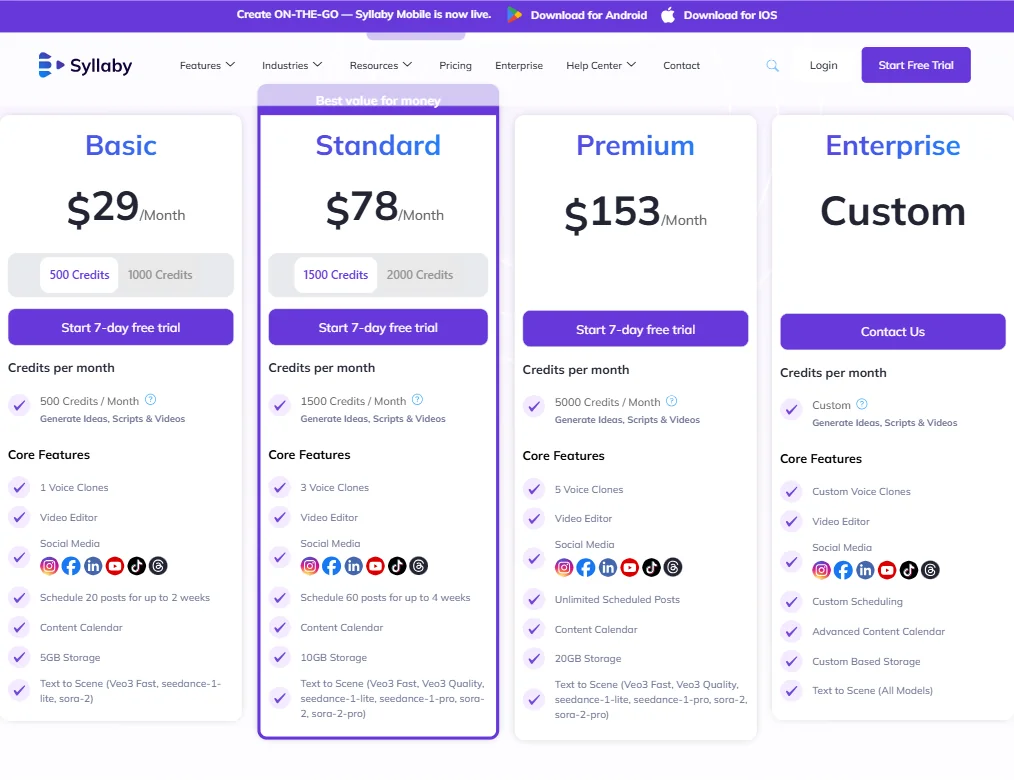
Four public tiers: Starter at $9 a month (monthly billing only, 100 credits), then Basic at $29, Standard at $78 and Premium at $153 per month. Enterprise on request. There is no permanent free plan. No refund policy is publicly stated on the pricing page, which is the kind of quiet omission that frustrates people after the card has already been charged.
The credit structure runs across tiers too. Basic ships with 500 credits per month, Standard with 1,500, and Premium with 5,000. Credits cover idea generation, script output, and video creation together, so the math on how far they stretch depends on your production volume.
At $78/month, Syllaby is competing on price with tools like SocialBee, which offers strong scheduling, content libraries, and recycling logic without any AI video generation. The comparison isn't clean, because the products do different things. But the dollar amounts are in the same conversation, and buyers will run that comparison whether we frame it or not.
Pure scheduling without video creation? Look elsewhere at that price.
Syllaby vs InVideo: Which Social Media Tool Wins?
InVideo is the most direct overlap. Both target non-editors. Both generate AI video for social. InVideo has been around longer and has a substantially larger third-party review trail to cross-reference. G2 and Capterra entries, user comparison threads, the usual.
Syllaby's clearest point of separation is the ideation layer. InVideo assumes you already know what you want to make. Syllaby tries to hand you the topic before you even start. That front-of-funnel piece is what separates the two workflows more than anything downstream.
The 250,000 videos created stat on Syllaby's homepage is the number they're leading with for social proof. Creation count, not user count. That distinction matters when evaluating traction claims from a tool that launched three years ago.
That tracks for an early-stage product, though.
Who Should Use Syllaby? (And Who Shouldn't)
Small business owners posting faceless video to TikTok or Instagram Reels with no editing background. That's the core fit.
Creators with existing production setups. That's not this tool.
Agencies with real reporting requirements and multi-client workflows will run into the analytics and team feature gaps fast. Something like Vista Social is built with that operational structure in mind from the ground up. Syllaby isn't.
Syllaby Review Verdict
The idea-to-published-video collapse is what Syllaby actually delivers, and for a narrow user type, it delivers it without requiring editing skills or outside tools. The multi-model video generation across VEO 3 and Seedance is a concrete differentiator at the $9 to $153 price range. The keyword-driven ideation is a real workflow feature. The scheduling is functional.
The problems are equally concrete. LinkedIn isn't supported. Ask about analytics and the refund policy, since neither is published. With no G2 or Capterra presence, there's almost no independent review trail to check against.
We've seen worse products at higher prices. We've also seen better-documented ones at the same price. For the specific person this is built for, the 7-day trial is worth taking. Go in knowing what it doesn't do yet.
Frequently Asked Questions
Does Syllaby have a free plan?
No. No permanent free tier exists, and the cheapest plan is Starter at $9 a month. Worth knowing before the card goes in.
What AI models does Syllaby use for video generation?
Google VEO 3 and Seedance. Users can pick between them depending on the visual output they want. That's more model flexibility than most tools at this price actually ship with, and it's one of the more concrete reasons to take Syllaby seriously as a product right now.
Is Syllaby good for agencies?
Probably not as a primary tool. The Enterprise plan exists and implies team features, but the documentation is vague on what those actually include. Agencies with real client reporting needs and multi-account management requirements will hit the gaps fast. The product is built for solo creators and small business owners, and that's where it performs best.











