Founded in 2022 and headquartered in Singapore, Spacely AI has accumulated over 580,000 registered users. We cross-referenced that figure against Trustpilot, Reddit, and Product Hunt, and came away with a clearer picture than the homepage offers. User count and user satisfaction are, as usual, different things.

What is Spacely AI?
An AI rendering tool built for interior design, architectural visualization, and real estate staging. Feed it a sketch, a 3D model, or a photo of an existing room, and it outputs a photorealistic render. The company claims sub-60-second turnaround. That's the pitch. Narrow by design.
Stable Diffusion via Replicate runs underneath, with proprietary fine-tuning layered on top. The tool lives in the browser, but there's also a native SketchUp extension through the Extension Warehouse. That integration is what separates it from most competitors chasing the same use case. Designers can stay inside their existing workflow rather than running exports and re-imports every iteration. That actually matters.
Spacely AI Features: Logo, Graphics, UI & Brand Design Capabilities

No logo generation here. No brand kits, no vector output, no social templates. Not a general-purpose design tool in any direction.
What it does cover: AI render generation from room photos or sketches, a Background Generator, and an "Empty the Room" function that strips furniture from an image. Auto-Furnish fills a space with generated pieces. View Extender adjusts angles post-render. Style transfer is in there too, letting you feed a reference image and ask it to match the aesthetic.
The SketchUp extension is the most distinctive feature in the product, and it's listed on the pricing page alongside Revit compatibility. Worth flagging: the Revit extension is not generally available. It's in development, with users directed to join a waitlist. The intended behavior, rendering directly from existing Revit 3D views without an export round trip, isn't live yet. The pricing page lists it as if it is. That's a meaningful distinction.
API access opens on Studio and above. Private mode and watermark-free output require a paid plan. Commercial licensing ships on every tier, including the free one. Fair call for a tool aimed at working professionals.
Honestly, the feature set is coherent. It doesn't overreach. That's fine when the core thing holds up.
Spacely AI Design Quality: How Good Are the AI-Generated Results?
Complicated. The homepage shows impressive renders. The Trustpilot record, thin as it is with only two entries at the time of our research, tells a messier story. Complaints about output consistency and support response showed up in both. Too small a sample for a verdict, but not nothing.
Reddit threads from 2024 and 2025 surface a recurring frustration. Users who fed it clean 3D model exports got cleaner outputs. Users starting from rough sketches or low-resolution room photos got muddier results. That tracks with how Stable Diffusion-based pipelines generally behave. Garbage in, garbage out, with some flair.
4K downloads are gated to paid tiers, which means the free plan is really a demo rather than a working setup. We're skeptical that 40 trial credits constitute a meaningful test when the output resolution is capped before you even start.
Spacely AI Templates & Assets: How Deep Is the Library?
No traditional template gallery. Not a Canva-style asset browser. What Spacely AI offers instead is style presets and reference-image matching. You pick a visual direction or supply your own reference, and the AI attempts to replicate it.
Reasonable for a rendering tool. Pre-built room templates would actually be less useful to a working architect than a style-transfer system. Fair. But users without a strong reference image are somewhat adrift. The tool rewards professionals who already know what they're trying to produce.
Is Spacely AI Easy to Use for Non-Designers?
Probably not. The workflow assumes you have a room to start from, whether that's a SketchUp file, a 3D model, or a real space. There's no blank-canvas path for someone without a design background.
The web interface itself isn't complicated. Upload, select a style, generate. For realtors doing virtual staging, the learning curve is genuinely low, and several Reddit users mentioned exactly that use case. Interior designers get more mileage from the SketchUp extension. Architects iterating on visual concepts before full production renders are the clearest fit.
General creatives needing broader capabilities. Krea handles a wider range of tasks if the use case isn't specifically interior rendering.
Spacely AI Pricing: Is It Worth It vs Hiring a Designer?

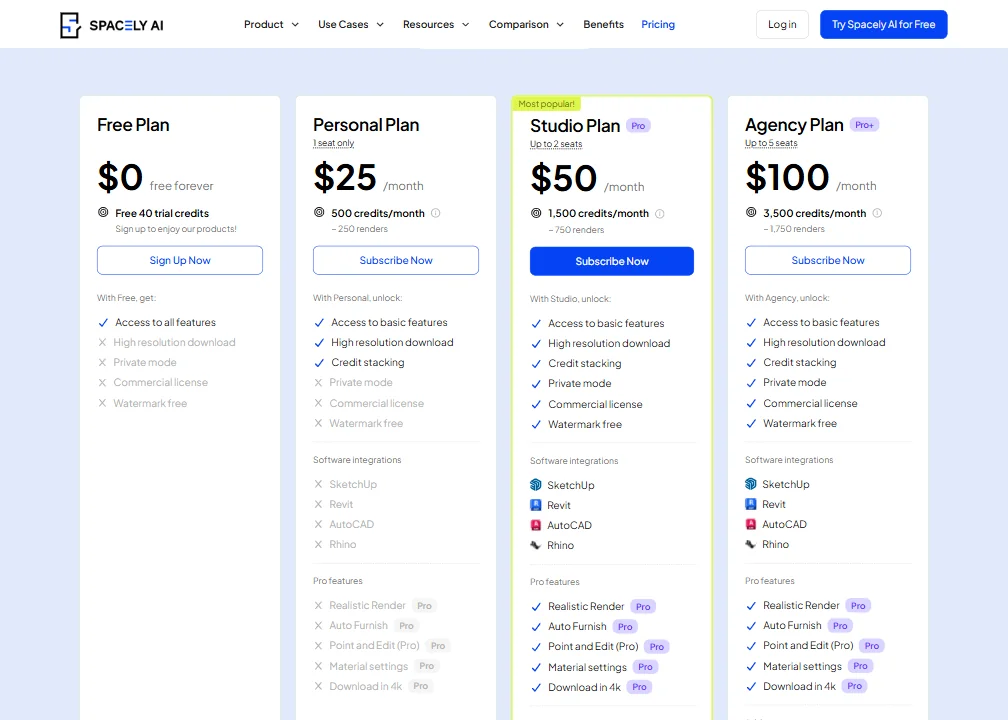
The pricing page we reviewed lists four tiers. The Free Plan gives 40 trial credits, which the vendor describes as roughly 20 renders. Personal runs $20/month billed at $240 yearly, with 500 credits per month and about 250 renders. Studio sits at $40/month billed at $480 yearly, covering up to 2 seats and 1,500 credits per month. Agency lands at $80/month billed at $960 yearly, with up to 5 seats and 3,500 credits monthly.
No credit card required for the free tier. No stated expiration on those credits either, which is decent. The refund policy is not publicly visible, and that's a real problem. The FAQ apparently references one, but we couldn't locate actual terms in anything publicly accessible. That's the kind of gap that generates Trustpilot complaints.
Note: our vendor data references a Starter plan at $12.75/month billed yearly, which may reflect an earlier pricing structure or a regional variant. The pricing page in our research shows the Personal, Studio, and Agency naming. We'd check current pricing directly before committing.
Versus hiring a designer for rendering work, even the Agency plan at $80/month is cheap. That comparison isn't hard to win. The real question is whether output quality clears the bar for client-facing work. Based on what we read, it does for some users and doesn't for others.
Spacely AI vs Midjourney: Which AI Design Tool Wins?
Different tools for different workflows. Midjourney is a general-purpose image generator with exceptional aesthetic output. It has no concept of a floor plan, a SketchUp file, or a room layout. You prompt it and it renders something visually strong that may or may not resemble a real space.
Spacely AI works from real inputs. It's constrained by your actual room or model. That constraint is the feature. A designer who needs a client-ready render of a specific room they've already modeled doesn't want Midjourney's creative latitude. They want fidelity to the model.
Midjourney wins on raw image quality for open-ended creative work. Spacely AI wins when the project requires spatial accuracy. Those aren't competing for the same job. Adobe Firefly is the more relevant comparison for creative professionals already in the Adobe stack, but it doesn't handle architectural rendering the way Spacely does.
Who Should Use Spacely AI? (And Who Shouldn't)
Realtors doing virtual staging. Clearest fit. Quick turnaround, low overhead, output that works for listings.
Interior designers working in SketchUp are the second obvious group. The native extension removes a lot of friction. Architects iterating on visual concepts before full production renders are also well-served.
General creatives, social media designers, marketers. Wrong tool entirely. Solo designers who need team collaboration features will also hit a wall fast. There's nothing built for shared workflows.
Spacely AI Review Verdict
Spacely AI does one thing and mostly does it. Render quality is inconsistent based on user reports, the refund policy is invisible, and support response times are slow on entry-level plans. Not great.
The SketchUp extension is the strongest argument for paying. Without it, the tool competes on more equal footing with cheaper or free alternatives. The 580,000 user count suggests real adoption. The Trustpilot signal, sparse as it is, doesn't reinforce confidence in the post-signup experience. And the Revit integration being listed on the pricing page while the actual extension sits behind a development waitlist is the kind of thing that erodes trust quietly.
At the Personal plan's $20/month, the risk is low for someone squarely in the target audience. For everyone else, the tool simply isn't built for them.
Frequently Asked Questions
Does Spacely AI have a free plan?
Yes. Signing up gets you 40 trial credits, no credit card required. No expiration is stated on those credits, so it functions as a real trial rather than a countdown. The catch is resolution. Free-tier outputs are lower quality, and 4K downloads require a paid plan. For professional use, the free plan is a test drive, not a working setup.
Does Spacely AI work with SketchUp?
Yes, and it's one of the tool's actual differentiators. There's a native extension available through the SketchUp Extension Warehouse, letting designers generate renders directly from their models without an export round trip. Revit is listed on the pricing page too, but the extension is in active development and currently available only through an early-access waitlist. Not the same thing as a live integration.
Is Spacely AI good for commercial use?
Commercial licensing is included on every plan, including the free tier. Reasonable policy for a tool aimed at working designers and realtors. What we'd flag is the unclear refund policy and the output inconsistency reported across multiple user sources. For client-facing work, run a thorough test on your specific input types before committing to a paid plan.