SAASINSPECTOR
Relume logo

Relume Review

Web designers and developers building marketing websites with Figma, Webflow, or React

Visit RelumeFrom $26/mo (Starter plan)

Research-based review. We analyzed vendor documentation, customer reviews on G2, Capterra, and Reddit, and live pricing — not hands-on testing yet. We update as our team puts tools through real workflows.

The verdict

Relume is a browser-based AI design tool built exclusively for marketing websites, helping designers skip the blank-page phase by generating sitemaps, wireframes, and style guides from a text prompt. With a library of over 1,000 components and exports to Figma, Webflow, and React, it earns strong marks for its core use case. However, its narrow scope, absent live chat support, and confusing pricing make it a focused specialist tool rather than a broad design platform.

Pros

  • AI Sitemap Generator rapidly produces multi-page site structures from a single text prompt, acting as a powerful discovery shortcut for designers.
  • Exports to multiple platforms including Figma, Webflow, React with Tailwind CSS and Shadcn UI, and Claude Design, giving teams flexibility.
  • Library of over 1,000 real components specifically built for marketing websites ensures relevant, production-ready design elements.
  • Wireframing 2.0 with improved AI and new Pricing Sections components shows active, fast-paced product development as of September 2025.
  • Browser-based workflow means no desktop install required, and a Chrome extension adds additional convenience for designers.
  • Relume Library MCP allows AI-powered access to the component library directly, benefiting teams with more advanced workflows.
  • Active Slack community provides peer support and real-world workflow insights from a user base of over one million designers.

Cons

  • No logo design, social template, presentation design, or built-in image generation capabilities, making it unsuitable as an all-in-one creative tool.
  • Tightly scoped to marketing websites only — not suited for app design, dashboards, or other product UI work.
  • Live chat support is absent, which is a notable gap when users run into billing issues or urgent problems.
  • Billing complaints appear with regularity on Trustpilot, suggesting the pricing or account management experience creates friction.
  • Pricing structure is described as confusing enough to trip users up, adding unnecessary friction before purchase.
  • AI-generated sitemaps and wireframes are starting points rather than finished products, requiring additional designer effort to refine.
From $26/mo (Starter plan)Free plan YesFree trial Yes

Over a million users for a tool that most people outside the Figma-to-Webflow bubble have never heard of. That's the Relume situation. We pulled vendor docs, read through G2 and Reddit, cross-referenced Trustpilot, and the picture that came back was specific: strong at one narrow job, genuinely weak at a few adjacent ones, and priced in a way that trips people up in predictable ways.

Relume homepage screenshot
Relume — Homepage

Relume launched in 2020 out of Melbourne. September 2025 dropped Wireframing 2.0, with improved AI and 30 new Pricing Sections components added to the library. They're not coasting.

What is Relume?

Browser-based. Built for marketing websites specifically, not apps, not dashboards, not SaaS product UI. That focus is the whole strategy, and it mostly holds.

The core loop starts with a text prompt. Describe a business, and Relume generates a sitemap. From the sitemap, it builds wireframes using a library of over 1,000 real components. Style guide goes on top. Then you export to Figma, Webflow, or React with Tailwind CSS and Shadcn UI, and there's also a Claude Design export that reflects where they think AI-assisted design is heading. That's the whole product, more or less.

There's a Chrome extension. There's also a Relume Library MCP for teams wanting AI access to the component library directly. Honestly, for marketing site work, they're closer to eliminating the blank-page phase than most tools we track in this category.

Slack community is active. Email support exists. Live chat doesn't. Worth keeping in mind if billing becomes an issue, because it does become an issue for some people, and the resolution path is slow.

Relume Features: Logo, Graphics, UI & Brand Design Capabilities

Relume features screenshot
Relume — Features

Let's be direct about what's missing. No logo generation. No social templates. No presentation design, no image generation, nothing adjacent to brand collateral. Wrong tool entirely for those jobs.

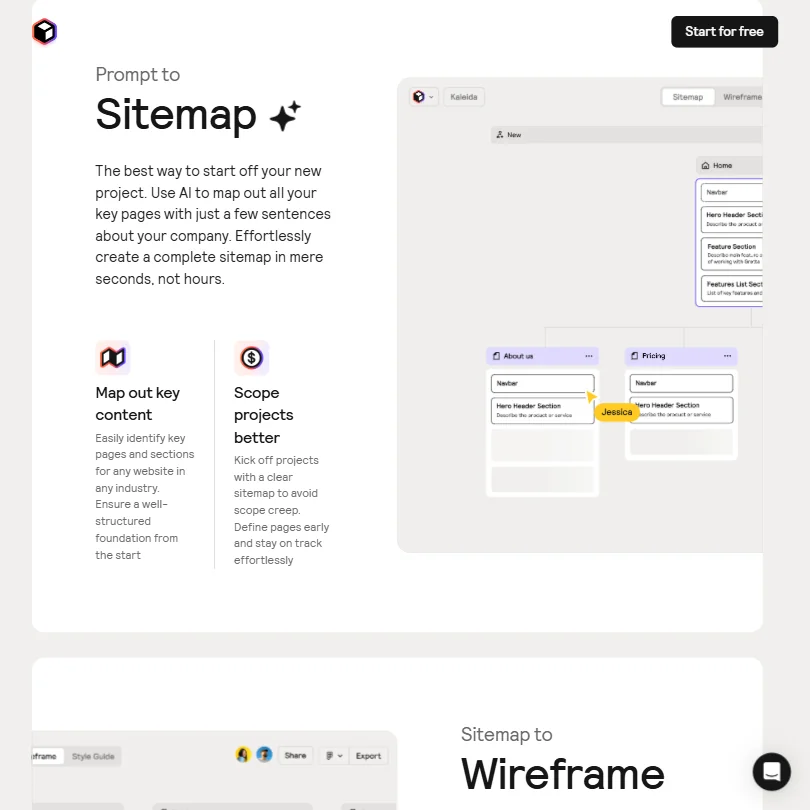
What it does is tightly scoped. The AI Sitemap Generator produces multi-page site structures from a single prompt, fast. Designers on Reddit described it as a discovery shortcut rather than a finished deliverable. That framing is accurate. You're not shipping the sitemap. You're using it to skip the planning conversation with a client.

Wireframes sit on top of the sitemap. Components are real, not placeholder blobs. Structured enough to hand to a developer, which matters for Webflow builds where component structure has downstream consequences in the final build.

The Style Guide Builder handles colour, typography, and spacing. It's a design system for the project at hand. Not a full brand identity from scratch. Fair. It covers what a marketing site needs to look consistent, and stops there.

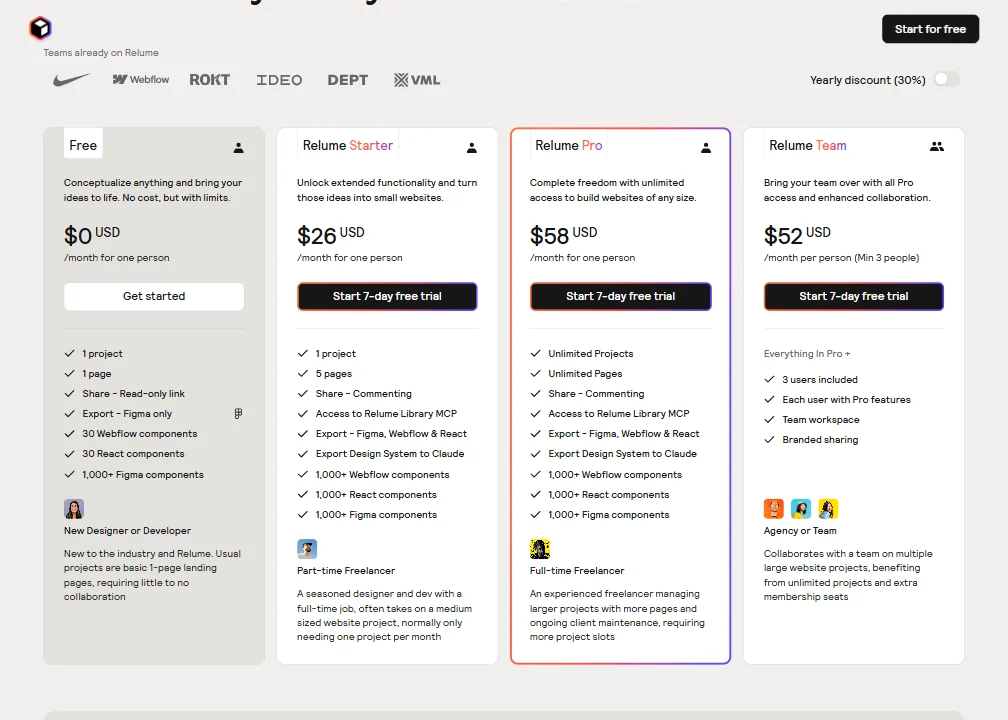
Team collaboration lives behind the Team plan. Three seats minimum, at $52 per person per month according to current pricing, with a shared workspace, commenting, and branded sharing. Functional for small agency teams. Nothing exotic.

Relume Design Quality: How Good Are the AI-Generated Results?

Better than expected for structure. Worse than expected for copy.

The wireframes are structurally sound because they pull from a real component library. That's the meaningful distinction from tools that hallucinate plausible-looking but unbuildable layouts. Framer produces more polished-looking outputs from the start, but Relume's outputs are more workable for a designer who intends to customise. Different priorities, not a clear winner.

The AI-generated placeholder copy is where we'd lower expectations hard. G2 reviewers consistently noted the text needed significant rewrites before anything went near a client. The pattern we kept seeing in those threads: designers using Relume for layout logic and dropping in their own copy entirely. That's probably the right workflow. Don't rely on it for words.

Component quality improved with Wireframing 2.0. The library claims hold up. We cross-referenced component counts against Slack community posts from active users, and 1,000+ is a real number, not a marketing exaggeration.

We're skeptical of how reliably the AI picks the right components without prompting. Several Reddit threads described time spent correcting component choices after generation. The AI gets structure right more often than it gets specific component selection right. Solvable, eventually. A real friction point today.

Relume Templates & Assets: How Deep Is the Library?

The library is the product. Over 1,000 components built around marketing site patterns: heroes, pricing sections, testimonials, CTAs, and a few others. The September 2025 update added pricing-specific components, which suggests they're plugging gaps based on actual user demand rather than guessing.

Social templates don't exist here. Neither do presentation files or print-ready assets. The library is deep and narrow, deep for marketing websites, absent for everything adjacent to that category.

The Figma export is copy-paste vector components into an existing file. The Webflow export maps to Finsweet Client-First, a specific Webflow methodology. If your team doesn't use Client-First, the export structure will need reorganisation. Not a dealbreaker, but it surfaced in Reddit threads often enough to flag.

No Adobe export. No Sketch integration. If your team lives in Adobe XD or Sketch, Relume is not talking to you. We don't buy the "works for all designers" framing on the homepage. It works for designers on the Figma-to-Webflow pipeline. Specifically that pipeline.

Is Relume Easy to Use for Non-Designers?

Depends entirely on what you mean by non-designer.

A developer with no formal design background can probably generate a sitemap and a wireframe without much friction. The prompt-to-structure workflow is genuinely accessible, and the component library is labelled clearly. Relume University covers the fundamentals and it's free.

A marketing manager expecting a client-ready site with no technical help. Harder. Much harder. The tool outputs wireframes, not finished sites. You still need Figma or Webflow to get to something shippable, and the gap between "Relume output" and "live website" is not small by any measure.

We read several comments from people who came in expecting something closer to Wix and felt misled. That's a positioning problem Relume hasn't fully solved. The tool accelerates design work for people who already know what to do with a wireframe. Not an end-to-end builder. Not close to one.

The Chrome extension adds value for specific research-to-component workflows. Nice addition. Doesn't change the fundamental learning curve for someone arriving cold with no design or dev background.

Relume Pricing: Is It Worth It vs Hiring a Designer?

Relume pricing screenshot
Relume — Pricing

The structure is specific and worth spelling out. The Free plan gives you one project and one page, with export limited to Figma only and 30 Webflow components plus 30 React components. The Starter plan runs $26 per month, covers one project and five pages, and opens up Webflow and React export alongside Figma. The Pro plan is $58 per month and removes project and page limits entirely.

Then there's the Team plan. Fifty-two dollars per person per month, with a minimum of three people. That means you're committing to at least $156 per month before a fourth seat exists. That's where the confusion happens in practice.

Two Trustpilot reviewers complained about charges associated with free-trial conversion, but neither linked the issue explicitly to the three-seat minimum. A third reviewer described getting a prompt refund after forgetting to cancel. Trustpilot currently shows only five reviews total, so none of this is statistically meaningful. The billing complaint pattern is consistent enough to flag, though. No public refund policy is a gap they should close.

For a freelance designer doing two or three marketing sites a month, $58 for Pro is defensible. The time saved on sitemap and wireframe work is real. For a solo developer trying to stretch Relume into a full site-building solution, the math gets worse quickly.

Relume vs Uizard: Which AI Design Tool Wins?

Uizard aims at product designers. App mockups, user flows, prototype screens for SaaS interfaces. Relume aims at marketing sites. They're not competing for the same user in any meaningful sense, even though both tools generate wireframes from prompts.

Uizard's AI pulls toward mobile and product UI. Relume's pulls toward landing pages and multi-page marketing sites. Relume wins on component depth for web marketing work without much contest. Uizard wins if you're mocking up a SaaS dashboard or a mobile app flow.

The Webflow export is where Relume separates itself cleanly. Uizard doesn't export to Webflow natively. For agencies on that stack, that gap matters. Both tools have free tiers. Both are worth a trial before any money moves.

Framer comes up in this comparison regularly. Framer builds more polished outputs faster and publishes directly. Closer to an end-to-end builder than Relume is. If the goal is a live site by Friday, Framer is a more natural fit. Different tool, different moment in the workflow.

Who Should Use Relume? (And Who Shouldn't)

Freelance web designers on the Figma-to-Webflow pipeline. Core fit. The tool was built for them.

Small web agencies doing volume, three to five marketing sites a month, where component consistency across projects has real value and the Team plan's cost is absorbed by client billing.

Developers who need structural starting points. Not finished designs, but solid scaffolding to work from before the build starts.

Not a fit for brand designers who need logo work or print assets. Not a fit for teams building product UI. If your stack doesn't include Figma or Webflow, the export value drops considerably and the pricing case weakens with it.

Marketing managers building their own sites without a designer. The tool will frustrate them, and we'd steer them elsewhere.

Relume Review Verdict

One job, done well. Sitemap generation is fast and genuinely useful. The component library is real and the depth holds up. Figma and Webflow integrations work. The September 2025 Wireframing 2.0 update added real substance, not just changelog filler.

The gaps are real too. AI copy needs rewrites, consistently. The Team plan pricing math catches people off guard. The billing complaint pattern on Trustpilot is too small a sample to generalise from, but consistent enough to take seriously given there's no clear public refund policy attached to it.

For designers already embedded in the Figma-to-Webflow workflow, Relume at $58 per month on Pro earns its place if the volume of marketing site work justifies it. Outside that stack, the case weakens fast. The MCP integration for Claude is a smart bet on where AI-assisted design is heading. They're building toward something.

Not a perfect tool. A useful one, for the right person.

Frequently Asked Questions

Does Relume export to Figma?

Yes. The Figma export works as a copy-paste of vector components into an existing file, and it also exports the style guide as a design system. It's one of the stronger parts of the product and a primary reason the tool makes sense for designers already working in Figma rather than starting from scratch in another environment.

Is Relume free to use?

There's a permanent free plan and a 7-day free trial on both Starter and Pro. The free plan limits you to one project, one page, and Figma-only export. We'd recommend burning through the trial before paying anything, because the tool is narrow enough that you'll know quickly whether the workflow fits how you actually operate.

Can Relume build a complete website?

No. Relume generates sitemaps and wireframes that you then take into Figma or Webflow to build and publish. It's a design acceleration tool, not a site builder. The gap between a Relume wireframe and a live site requires another tool and real design or development time to close. People who expect otherwise tend to be frustrated by it.

Relume is featured in

Alternatives to Relume

See all Relume alternatives →

Other AI Design Tool options we've reviewed.

User reviews

Review Relume

Your rating

Reviews are moderated and appear once approved.