SAASINSPECTOR
Uizard logo

Uizard Review

Product managers, startup founders, and non-designers who need rapid UI prototyping and wireframing without coding or advanced design skills

Visit UizardFrom $19/mo (Pro, billed annually)

Research-based review. We analyzed vendor documentation, customer reviews on G2, Capterra, and Reddit, and live pricing — not hands-on testing yet. We update as our team puts tools through real workflows.

The verdict

Uizard is a browser-based UI design and prototyping tool built for product managers, founders, and non-designers who need to create clickable mockups quickly without relying on a designer. Its flagship Autodesigner 2.0 feature generates editable screens from text prompts or hand-drawn sketches, and the sketch-to-wireframe converter has earned genuine praise from real users. Scored based on aggregated user feedback and vendor claims, it's a practical early-stage tool but shows gaps when scrutinized beyond its marketing.

Pros

  • The sketch-to-wireframe converter accurately interprets hand-drawn napkin sketches into structured wireframes, saving non-designers significant time in early-stage product conversations.
  • Autodesigner 2.0 can generate a set of editable, clickable screens from a text prompt, screenshot, or sketch photo, making rapid prototyping accessible to non-designers.
  • A wireframe mode switcher allows toggling between low-fidelity and high-fidelity design views, helping gather stakeholder feedback without distraction from visual details.
  • Transition animations are supported, making prototypes feel closer to real apps rather than static mockups.
  • Real-time collaboration is built in, allowing teams to work on designs simultaneously.
  • A Figma plugin and React/CSS developer handoff exist, giving it reasonable integration into existing workflows.
  • Pre-built templates and a drag-and-drop editor make it usable without any formal design training.
  • The free tier fills a genuine gap for product managers and founders who need quick UI mockups without hiring a designer.

Cons

  • The vendor's marketing claims, such as 100,000 users, lack sufficient context and cannot be independently verified.
  • The tool targets non-designers specifically, which likely means it falls short of the flexibility and control that professional designers require.
  • AI-generated output quality may diverge from what Uizard's marketing implies, based on patterns seen in third-party Capterra and G2 reviews.
  • As a browser-based tool, it may have limitations in performance or offline accessibility compared to native desktop design applications.
  • Developer handoff via React and CSS export may not meet the fidelity standards expected by professional engineering teams.
  • The AI generation features are proprietary and opaque, making it difficult to predict or control output consistency across projects.
From $19/mo (Pro, billed annually)Free plan YesFree trial Yes

Copenhagen, 2018. That's where Uizard started, and the founding premise hasn't changed much since: product managers and founders need to mock up interfaces fast, and they shouldn't need a designer to do it. We pulled their documentation, read through a fair number of G2 and Capterra write-ups, and cross-referenced Reddit threads from the past year. What we kept seeing was a tool that delivers on a narrow promise pretty well, and quietly disappoints on everything adjacent to it.

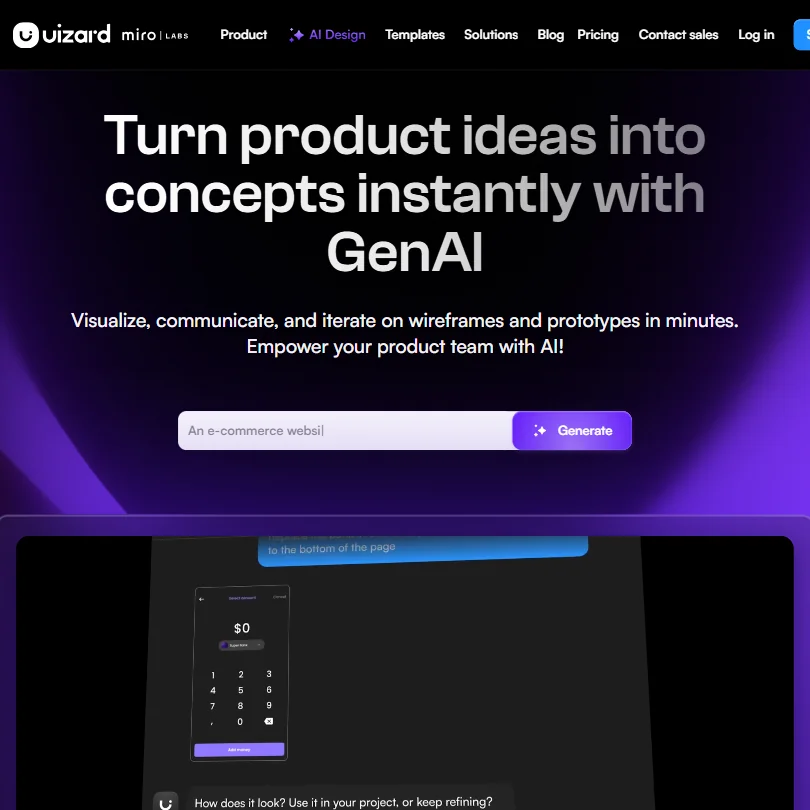
Uizard homepage screenshot
Uizard — Homepage

Our research is aggregated, not hands-on. That distinction matters here, because the gap between Uizard's marketing copy and what reviewers actually describe in practice is the more interesting story.

What is Uizard?

Browser-based. No installation. The core of it is Autodesigner 2.0, a proprietary AI model that takes a text prompt, a screenshot, or a photo of a hand-drawn sketch and produces a set of editable multi-screen prototypes. That's the headline. Type something like "a fitness tracking app with a dark theme" and get something you can click around in within minutes.

Past the AI generation, it's a drag-and-drop editor with wireframing, pre-built templates, transition animations, and real-time collaboration. A Figma plugin handles export. React and CSS handoff exists. On paper, a lot of ground covered for a tool pitched squarely at non-designers.

Uizard claims a user base over 100,000. We'd want more context on that figure, but for a free-tier product filling a real gap, it's not implausible.

Uizard Features: Logo, Graphics, UI & Brand Design Capabilities

Uizard features screenshot
Uizard — Features

The sketch-to-wireframe converter is the feature that shows up most in positive reviews. You photograph a napkin sketch. The tool interprets it into a structured wireframe. Multiple Reddit threads from non-designers describe this alone saving hours in early product conversations. That tracks with what the vendor claims, which is not always the case.

The wireframe mode switcher lets you toggle between low-fidelity and higher-fidelity views, which is a genuinely useful workflow when you're collecting stakeholder feedback and don't want people fixating on color choices. Transition animations are supported, so prototypes can feel closer to a working app than a static mockup.

AI image generation is included across plans, quota-limited by tier. No background removal tool appears in the documentation. No logo generation either. The **custom brand kit**, which handles colors and typography, is locked to the Business plan at $39 per month and above. Honestly, that's a frustrating gate for a tool that specifically targets bootstrapped founders. Brand coherence matters most to exactly that audience.

Viewers and commenters are free on all plans. That's genuinely good policy. We've seen worse from tools at twice the price. Real-time collaboration works, based on user reports, though a handful of Capterra reviewers flagged occasional sync lag on larger files.

What Uizard doesn't do: logo creation, print-ready output, or presentation design. Fair. It's not trying to be those things. Worth knowing before you buy in expecting a full creative suite, though.

Uizard Design Quality: How Good Are the AI-Generated Results?

Competent. Predictable. Those are the two words that kept appearing in our research across review threads and YouTube walkthroughs. Autodesigner 2.0 produces screens that look like generic SaaS dashboards, clean enough, not distinctive. For early-stage wireframing, that's acceptable. You're communicating an idea, not shipping a product.

G2 reviewers in product management roles consistently praised the speed. From prompt to clickable prototype in under five minutes is real, not a marketing claim. The frustration appears later, when users try to customize beyond what the drag-and-drop editor comfortably allows. Component flexibility is limited compared to Figma, and that gap becomes more obvious as design complexity grows.

We're skeptical that most users would move AI-generated screens directly into a development handoff without significant rework. What we read consistently described the output as a starting point, not a finish line. That's a reasonable way to use it. Just don't go in expecting otherwise.

Uizard Templates & Assets: How Deep Is the Library?

Mobile apps, web dashboards, landing page layouts. The usual categories are covered. Useful starting points, though nothing we'd describe as deep. The free plan includes 10 templates. We couldn't find a precise total count in Uizard's documentation, which is a minor transparency issue.

The asset library gives you UI components and icons, plus a basic image set. AI image generation adds flexibility, but the Free plan caps that at 3 generations per month, Pro at 500, and Business at 5,000. If you're leaning on AI-generated imagery heavily, you'll be rationing credits on the lower tiers.

Reddit threads from 2024 surface a recurring complaint that the component library feels thin when you're building something that strays from standard app patterns. Not great. It's a prototyping tool that ships with enough to get started, not a full design system library.

Is Uizard Easy to Use for Non-Designers?

Probably its strongest argument. Non-designers in PM and founder roles consistently describe onboarding as fast, no steep learning curve. The drag-and-drop editor is accessible enough that users report producing something shareable in their first session. When we cross-referenced onboarding documentation with user reports, the experiences described were consistent. That kind of consistency is a good sign.

The text-to-UI flow is simple enough that someone who's never opened Figma can navigate it. That's not an accident. Uizard has clearly made accessibility the product priority, and it shows.

Where ease of use breaks down is in finer editing. Aligning elements precisely, working with nested components, or doing anything requiring granular control gets clunky. Power users notice this quickly. Non-designers often don't push that far, so the gap may never surface for the core audience. A designer considering Uizard as a faster alternative to Figma, though, will hit that ceiling fast.

Uizard Pricing: Is It Worth It vs Hiring a Designer?

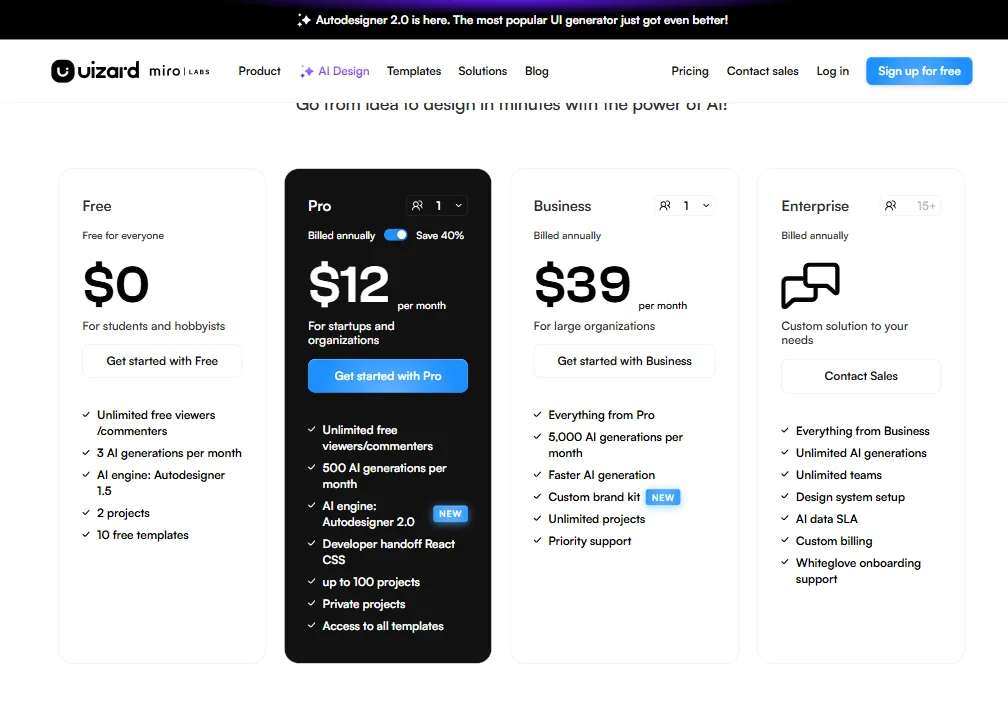
Uizard pricing screenshot
Uizard — Pricing

Four tiers. Free, Pro at $19 per month billed annually, Business at $39 per month, and Enterprise at custom pricing for teams of 15 or more.

The Free plan is honest. You get 3 AI generations per month, 2 projects, and 10 templates. Enough to test the core functionality and make a real call about whether the tool fits. Pro at $19 adds 500 AI generations per month, up to 100 projects, private projects, Autodesigner 2.0, and React CSS developer handoff. Business at $39 unlocks 5,000 AI generations per month, faster AI generation, the custom brand kit, unlimited projects, and priority support. The jump from Pro to Business is significant in feature terms, particularly around the brand kit and generation volume.

The refund policy isn't publicly stated anywhere we could find. That's a problem. Not a dealbreaker for individuals, but if you're evaluating this for a team, you want to know what happens if it doesn't work out.

Against hiring a designer for even a few hours, $39 per month is nothing. That comparison holds for the target audience. Against Balsamiq at $9 per month for dedicated wireframing, the math gets closer. Against Figma's free tier for teams already using it, Uizard has to justify the switch specifically on AI generation. Sometimes it can. Not always.

Locking the brand kit to the $39 tier when you're selling to early-stage startups who care most about brand coherence is a strange call. We'd feel better about the value proposition if it dropped to Pro.

Uizard vs Figma: Which AI Design Tool Wins?

Wrong question, mostly. These tools don't compete for the same user at the same stage. Figma wins on component depth, developer handoff precision, and design system management. It's not close if you have any design experience. Uizard wins in the first hour for someone who has never opened a design tool.

A product manager with no design background can produce a clickable prototype in Uizard before they'd finish Figma's onboarding. That specific advantage is real and worth money to the right team. That team will probably end up in Figma eventually as the product matures, which is likely why Uizard added the Figma plugin export. Smart move.

For teams that need Figma-grade output, our Figma review covers the full picture. The short version: Uizard is the better entry point, Figma is the better long-term tool.

Framer is a closer fight for the web-focused use case. If the prototype needs to look like a real website rather than an app wireframe, Framer has more sophistication on that side. Different audience, though.

Who Should Use Uizard? (And Who Shouldn't)

Product managers at early-stage startups. That's the fit. Someone who needs to communicate a UI idea to a developer or investor and doesn't want to learn Figma first.

Non-technical founders validating an app concept. Uizard makes that process faster and cheaper than the alternatives. You get something clickable, you can run user tests, you move on.

Experienced designers looking for a faster Figma. You'll hit the limitations quickly. Also, teams that need tight developer handoff with precise specs: Uizard's handoff provides React and CSS one component at a time, reviewers report missing TypeScript support, and transferring complete designs into development is a manual, fragmented process.

Agencies. The collaboration features are decent but not built for client-heavy workflows. The brand kit being Business-only is a friction point. Look elsewhere.

Uizard Review Verdict

Uizard does what it says it does. For non-designers who need a prototype fast, Autodesigner 2.0 produces workable screens from a prompt, the wireframe scanner is clever, and the Free plan gives you enough to make a real evaluation. These aren't small things.

The problems are real, though. Brand kit behind a $39 paywall is a bad call for the stated target audience. An invisible refund policy isn't acceptable. Several reviewers noted that support beyond the knowledge base is slow, and documentation is thin in places.

The design output is competent, not impressive. Fine for prototyping, a problem if you're expecting finished-quality screens. The component library is shallow for anything beyond standard app patterns. These aren't fatal flaws. They're the shape of what the tool actually is.

Free or Pro tier, clear expectations, specific use case. That's where the recommendation holds. It's a fast sketchpad. Use it for what it is.

Frequently Asked Questions

Does Uizard work for complete beginners with no design experience?

Yes, and that's genuinely its strongest case. The text-to-UI generation and drag-and-drop editor are accessible enough that users with no design background consistently describe getting something shareable in their first session. You won't produce something polished enough for a developer to build from without rework, but for communicating an idea or testing a concept, no design experience required. That's not a small thing for the audience Uizard is actually chasing.

Can you export Uizard designs to Figma?

There's a Figma plugin that handles this, and it's the main export path for teams moving from early prototyping into more detailed design work. We saw it mentioned positively across multiple user reviews as a sensible handoff step. CSS and React export are also available, though Uizard exports one component at a time rather than a full project, TypeScript isn't supported, and reviewers generally describe the output as requiring cleanup before it's usable in development.

Is Uizard's free plan actually usable or is it a teaser?

More usable than most. Autodesigner 2.0 is accessible on the Free plan, and AI generation is included (capped at 3 per month). The main walls are project limits (2 projects) and the brand kit, which requires Business at $39. For someone validating whether the tool fits their workflow, the free plan gives you enough to make a real call. That's an honest free tier. Not common enough.

Uizard is featured in

Alternatives to Uizard

See all Uizard alternatives →

Other AI Design Tool options we've reviewed.

User reviews

Review Uizard

Your rating

Reviews are moderated and appear once approved.