
Pitch is a presentation workspace where an AI agent builds on-brand decks from a prompt and your files, and teams edit, share and track them together. It has a free plan and three paid plans priced per seat. What decides whether it suits you is how much you lean on the AI, since every plan runs on AI credits, and whether you need features such as PowerPoint export, link tracking or the API that start on higher plans.

What is Pitch?
Pitch is made by Pitch Software GmbH, based in Berlin, Germany. It runs in the browser, with desktop apps for macOS and Windows and mobile apps for iOS and Android.
Its AI is Pitch Agent, which writes and designs slides, edits them through chat and keeps each deck in line with your brand. Around the agent, Pitch offers templates, real-time collaboration and decks shared as live links.
Making a presentation with Pitch
You describe what you need, pick a template and Pitch Agent builds the full presentation. You can attach a file for the agent to use as context, and you then refine individual slides by chatting with it. More than 150 templates designed by experts give you a starting point if you prefer to build a deck yourself.
Brand controls keep the output consistent. You can set brand guardrails and a brand tone, upload media and custom fonts to a workspace asset library, and create a branded template built from your company's domain.
Pitch Agent can generate images to fill in your content, though for now it replaces an existing image rather than adding one to an empty slide. It can also edit a selected image through quick actions in the agent chat, such as enhancing it. Charts can be built from data imported from Google Sheets.
Existing decks come in as PowerPoint files, including presentations exported to .pptx from Keynote and Google Slides. Finished decks export to PDF, as a compressed or high-quality file, and to PowerPoint from the Plus plan up. There is no direct export to Google Slides, though a PowerPoint file can be opened there.
Decks can also be shared as live web links and pitch rooms. Advanced links track visits, slide views and time spent on each slide; they start on Team, and custom domains for shared links and pitch rooms also start on Team.
Working with other people
Several people can work on one deck in real time, with contextual comments and slide assignments to share out the work. Dedicated commenter roles are on Team and Business.
Pitch connects to Slack, Notion, HubSpot, Calendly, Figma, Google Drive, Google Sheets, Google Analytics, ChartMogul, Box, Unsplash, Giphy, Brandfetch, YouTube and Vimeo. Its MCP server lets Claude and ChatGPT work with Pitch on any plan. The Pitch API, which works with Zapier, Make, HubSpot workflows or your own code, is on Business and up.
Pitch pricing: what each plan gives
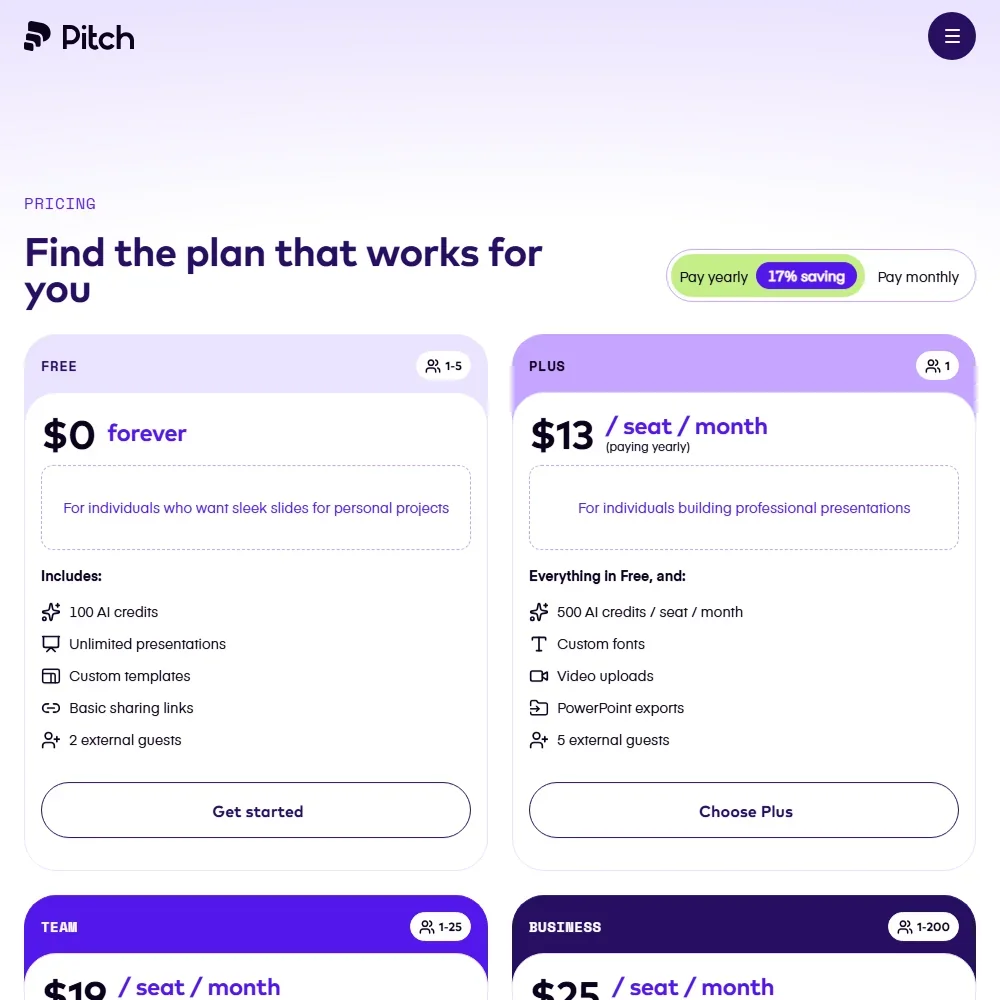
The Free plan lets you make unlimited presentations with up to 5 members and 2 external guests, basic sharing links and 10GB of storage. It includes 100 AI credits that do not renew once used. Exported PDFs, PowerPoints and public presentations on Free carry a small Pitch logo, and PowerPoint export is not included. There is no standard free trial of the paid plans.
Plus costs $15 per seat a month, or $13 billed yearly, for one member. It gives 500 AI credits a month, PowerPoint export and removes Pitch branding from downloads and share links. Team costs $23 per seat a month, or $19 billed yearly, for up to 25 members, with 500 AI credits per seat, 25 advanced links and custom domains.
Business costs $30 per seat a month, or $25 billed yearly, for up to 200 members, with 750 AI credits per seat, unlimited advanced links and the API. Credits renew with the subscription and are shared across the whole team, and extra credits can be bought. Enterprise, for 30 or more seats, is priced on request.
Privacy and security
Pitch holds a SOC 2 Type I report, available on request from its sales team. It is fully compliant with the GDPR and the California Consumer Privacy Act, and data is stored in the EU, in Ireland.
Single sign-on with SAML and SCIM provisioning are on the Enterprise plan. Support runs through an in-app contact form and email at support@pitch.com, Monday to Friday from 9 a.m. to 11 p.m. CET, with a help center alongside. Enterprise adds priority support and a success manager.
Who Pitch suits
Pitch suits teams that make a lot of decks and want them to look the same every time: an agent that drafts from a prompt and files, brand fonts and assets in one library, and live editing with comments and slide assignments. It fits decks sent outside the company, where a shared link shows who viewed which slide and for how long, and where data must stay in the EU.
It suits less well anyone who wants to keep using the AI for free, since the free credits do not renew. Free users also cannot export to PowerPoint and see Pitch branding on exports, link tracking and custom domains start on Team, and the API and single sign-on need Business and Enterprise.
Frequently Asked Questions
Is Pitch free to use?
Yes. The Free plan gives unlimited presentations, up to 5 members, 2 external guests and 100 AI credits that do not renew. Exports and public presentations on Free carry Pitch branding, and PowerPoint export starts on Plus.
How much does Pitch cost?
Plus is $15 per seat a month, or $13 billed yearly. Team is $23 per seat a month, or $19 billed yearly. Business is $30 per seat a month, or $25 billed yearly. Enterprise is priced on request.
Can Pitch turn a document into a presentation?
Yes. You can attach a file for Pitch Agent to use as context when it builds the deck, and you can import PowerPoint files directly, including decks exported to .pptx from Keynote and Google Slides.
Where does Pitch store my data?
Pitch stores data in the EU, in Ireland, and is fully compliant with the GDPR. It holds a SOC 2 Type I report, and single sign-on with SAML is on the Enterprise plan.