
Automation tools launched in 2023 tend to arrive with a lot of ambition and thin evidence. Our research into Lutra AI pulled from vendor documentation, Product Hunt comments, and what we could find across Reddit threads and community forums, since Lutra has no presence yet on G2 or Capterra. That absence tells you something on its own. The product is genuinely interesting. Whether it's ready to replace the tools already running your stack is a different question.
What is Lutra AI?
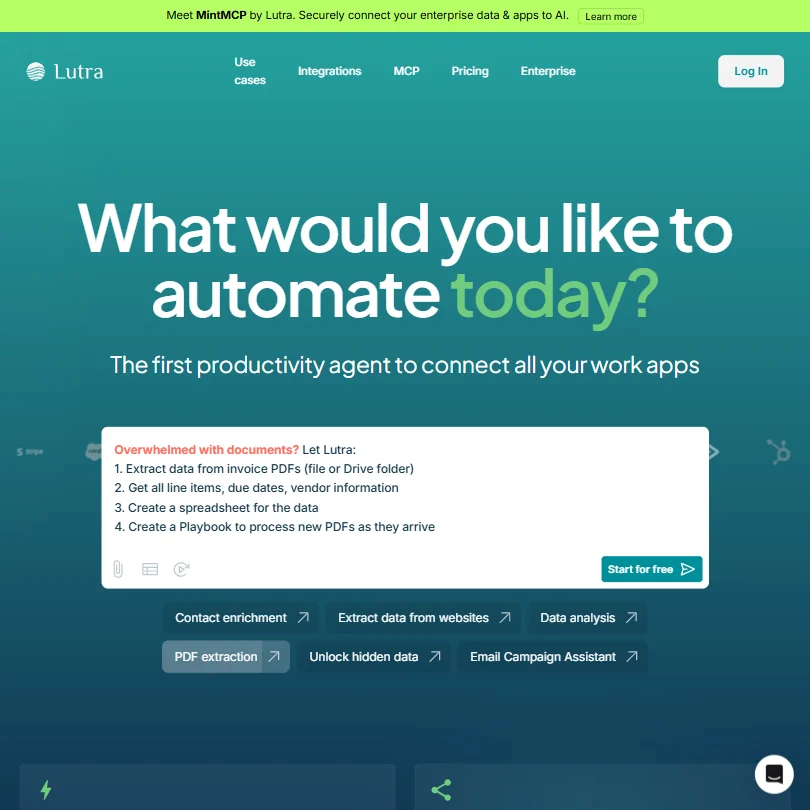
Lutra is a San Francisco-based automation platform founded in 2023. The core idea is that you describe what you want automated in plain English, and an AI agent builds and runs the workflow for you. No drag-and-drop canvas. No node diagrams. Just a conversation.
Finished workflows are called "Playbooks." You can run them once, schedule them, or hand them off to teammates. The agent writes actual code behind the scenes to connect whatever APIs or services you point it at. That's the real differentiator, not the chat interface (plenty of tools have that), but the fact that Lutra generates and executes code on the fly rather than limiting you to a fixed library of pre-built connectors.
Lutra AI Features: Workflows, AI Agents & Automation Capabilities
The feature surface is narrower than a tool like Make, but that's partly the point. No visual builder. No step-by-step flow editor to wrestle with. You talk to the agent, it builds the Playbook, and you decide whether to run it or adjust it first.
Supported triggers are webhook-based, scheduled, or manually kicked off. That covers most use cases. The platform handles conditional logic inside the workflows it generates, which means you don't have to architect branches yourself. Data transformation is there too, covering contact enrichment, deduplication, and pulling structured data from PDFs or websites.
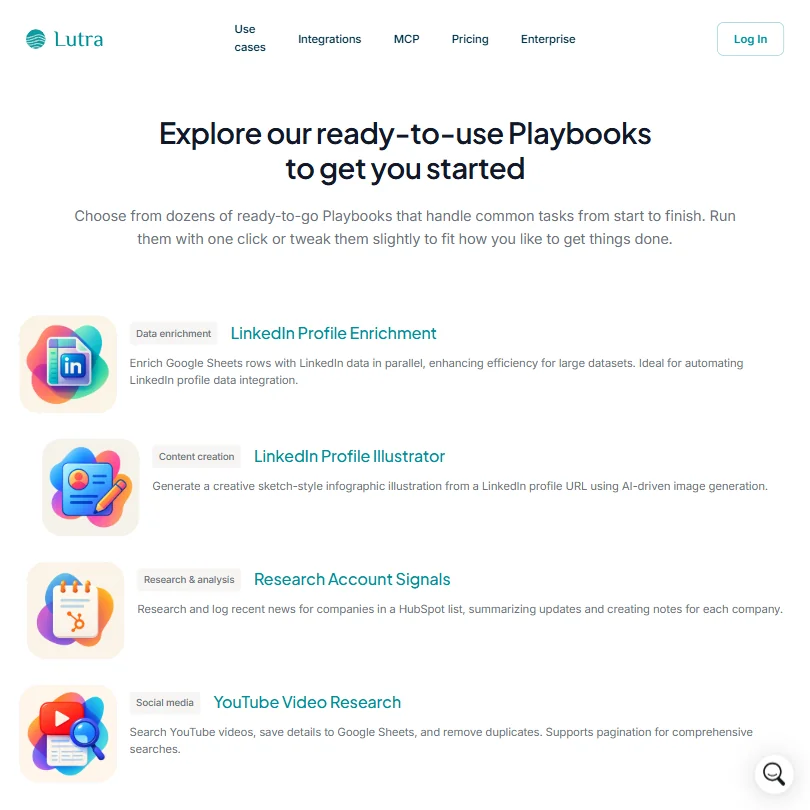
Honestly, the pre-built Playbook library is a nice touch for people who don't want to start from scratch. LinkedIn profile enrichment and company news research piped into a Google Sheet. Practical stuff.
Where the feature list gets thin: error handling isn't documented publicly, and there's no mention of execution logs you can dig into. Those two gaps matter if you're running anything mission-critical on a schedule.
Lutra AI Automation Power: How Complex Can Your Workflows Get?
Most no-code automation tools top out at whatever connectors they've built. Lutra's ceiling is much higher in theory, because it can write custom integrations via REST, OpenAPI, or MCP connectors. If the API exists and is documented, Lutra can theoretically talk to it.
The named integrations include HubSpot and Google Sheets for sales and ops work. Slack and Outlook sit on the communication side. Apollo shows up for prospecting. Beyond those, the platform claims to reach further on request.
We're skeptical of the "connect to virtually any API" framing at this stage. The company is two years old. The hard part of that claim isn't technical capability, it's reliability at scale, edge case handling, and what happens when something breaks mid-run. The lack of publicly documented error handling or execution logs is the clearest signal that Lutra is still building toward production-grade reliability, not already there.
Lutra AI Agent Capabilities: What Can It Actually Do Autonomously?
The AI agent interprets what you type, builds the workflow, and runs it. That loop is the product. You can review a Playbook before it runs on a schedule. Good. That matters.
What the agent does well, based on user reports from Product Hunt and the Slack community, is handle multi-step research tasks. Pull a list, look up news for each company, write summaries, push to a sheet. That workflow is exactly what Lutra's marketing leans on, and the feedback backs it up.
What's less clear is how the agent behaves when something goes wrong partway through. Does it retry? Does it alert you? Does it silently half-complete? We couldn't find clear answers in the docs. That tracks with a 2023 tool still finding its edges.
Is Lutra AI Easy to Set Up Without Code?
Easier than most. Fair. You're not configuring nodes or mapping fields manually. You describe the task, the agent figures out the structure. For non-technical users in sales and marketing, that's a real accessibility win.
The free tier gives you 15 messages per day and 200 credits per month. Enough to experiment. Scheduling only kicks in at the $29/month Essentials plan, which is where the tool actually becomes useful on a recurring basis. The Professional plan bumps credits to 6,000 per month and adds Priority Support for $79/month billed monthly, which is a meaningful jump in both price and capability.
No live chat anywhere on the current plans. The Essentials tier lists no dedicated support option at all, and even Professional only notes "Priority Support" without specifying channel or response time. For a tool positioned at ops and sales professionals who expect fast answers, that's a gap.
Lutra AI pricing: what each plan gives
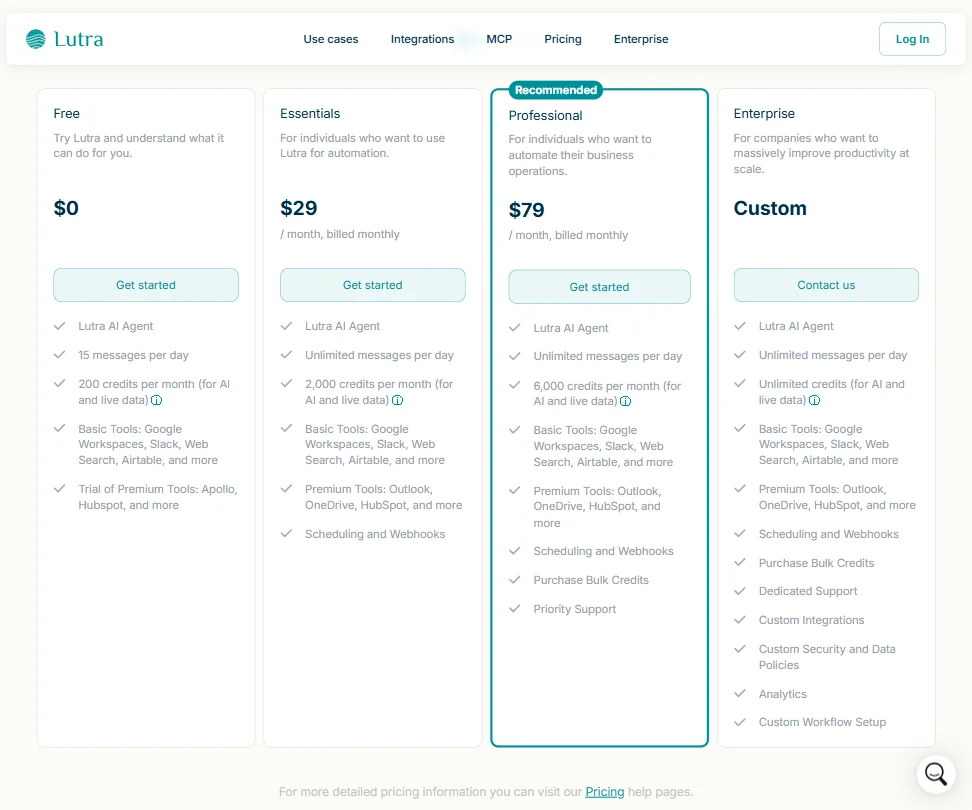
Four tiers. Free, $29/month Essentials, $79/month Professional, and custom Enterprise. The refund policy isn't publicly stated anywhere we could find. Worth knowing before you commit.
The free plan is genuinely usable for evaluation: 15 messages per day, 200 credits, and access to basic tools like Google Workspaces and Slack. But premium tools like Outlook and HubSpot are locked behind Essentials at minimum. The free tier also only offers a trial of tools like Apollo, not full access.
Compared to what you'd pay for a Zapier plan with comparable automation volume, Lutra looks cheaper. But Zapier has years of reliability data, a connector library in the thousands, and documented error handling. The price gap reflects the trust gap. Not an unfair trade if you're experimenting. Harder to justify if you're running production workflows for a team.
Lutra AI vs Zapier: Which Automation Platform Wins?
Zapier wins on depth. Full stop. Connector library, reliability track record, logging, support options. Lutra wins on the interaction model. Describing a workflow in English and having it built for you is genuinely faster for people who struggle with flow builders.
Lutra's custom API generation means you can theoretically automate things Zapier can't touch without a developer. In practice, that's a feature for more technical users, which slightly contradicts the "no coding" pitch. We don't buy that those two things fully reconcile yet.
For pure reliability and breadth, Zapier is the safer call today. Lutra is the more interesting call if you're willing to be an early adopter.
Who Should Use Lutra AI? (And Who Shouldn't)
Sales and marketing ops people doing repetitive research tasks. That's the clearest fit. Contact enrichment, account news summaries, CRM updates pushed to a Google Sheet. Lutra is built for that loop.
Solo operators or small teams who want to automate something specific without learning a visual builder. Also a fair use case. The Playbook library at the Professional tier, with scheduling, webhooks, and 6,000 monthly credits, is probably the right configuration for that crowd.
Technical users who need airtight logging and error visibility. Not the right tool yet. Anyone running financial data or anything where a silent failure costs real money should wait. The Enterprise tier adds dedicated support and custom security policies, but at that scale you'd be doing significant due diligence anyway.
Lutra AI Review Verdict
Two years old. No third-party reviews to audit. The natural language-to-automation model works, the Playbooks are practical, and the pricing sits at a reasonable entry point given what's on offer.
But the platform doesn't document what happens when things fail, and that is not a small gap for a tool you'd run on a schedule. The integration depth is real but still maturing. Enterprise reliability is claimed but not yet proven in the ways that matter, meaning public track records, logging, and support response times you can actually hold someone to.
Worth testing on non-critical workflows. Not ready to displace what's already running your operations.
How Lutra AI compares
Lutra AI scores 5.4 out of 10 among the workflow automation tools we rate. These two do the same job and are the closest to it, compared on what each vendor publishes.
Zapier
Lutra AI reaches 1,000 five-step runs for $29 a month on its entry plan; the same basket costs $133.5 a month on Zapier, which bills every step as a task. Zapier gives you a visual no-code editor with conditional Paths branching; Lutra has neither, working instead through a chat interface with no branching logic. Lutra offers phone support, a channel Zapier does not list, though Zapier adds live chat, which Lutra does not.
Pick Zapier if you need a visual builder with conditional branching.
Pick Lutra AI if you want the cheapest way to hit 1,000 runs a month.
n8n
n8n builds workflows on a node-based visual canvas with branching logic; Lutra AI works only through a chat interface with no branching feature and no visual builder. n8n is also cheaper to reach 1,000 five-step runs a month, $25.92 a month against Lutra's $29 a month, and n8n can be self-hosted while Lutra is cloud-only. Lutra counters with phone support, a channel n8n does not list, where n8n offers only its community forum.
Pick n8n if you want a visual builder with branching and self-hosting.
Pick Lutra AI if you want phone support and a plain chat interface.
Frequently Asked Questions
Does Lutra AI require coding to use?
No, and that's a genuine differentiator, not just marketing copy. You describe what you want in plain English and the agent builds the automation. Technical users can push further with REST and OpenAPI connectors, but the baseline experience doesn't require touching any code.
What are Lutra AI's main integrations?
HubSpot and Apollo cover the CRM and prospecting side. Google Workspaces and Airtable handle data and file work. Slack and Outlook sit on the communication end. Beyond those named connectors, the platform can build custom API integrations for services not on the default list, though reliability there is unverified at scale.
Is Lutra AI available in languages other than English?
Not currently. The product is English-only, which limits its usefulness for non-English-speaking teams regardless of the underlying automation capability. It's a real constraint for international use cases, and we haven't seen any public roadmap item addressing it.







