Jenni AI is an AI writing tool aimed at academic work, drafting and citing long-form text with references handled as you go.

Jenni AI lands in a specific place: a narrow product for a narrow audience, and it mostly delivers on the promise. Mostly.
Founded in 2021, San Francisco.
What is Jenni AI?
The pitch is deliberate in its limits. Jenni AI is a writing workspace for academic and scientific work, not blog posts, not ad copy. Papers. Literature reviews. Dissertations. The core mechanic is that every AI-suggested sentence should point to a real source, either something you've uploaded yourself or a document pulled from a pool of over 200 million indexed academic papers.
That's the separation from a general chatbot. ChatGPT will produce a literature review that sounds authoritative and cites papers that don't exist. Jenni grounds autocomplete suggestions in traceable sources, which is a meaningful distinction for anyone whose career involves not fabricating references.
No brand voice controls. No bulk generation. Zero SEO tooling. Not an oversight.
Jenni AI Features: What You Actually Get
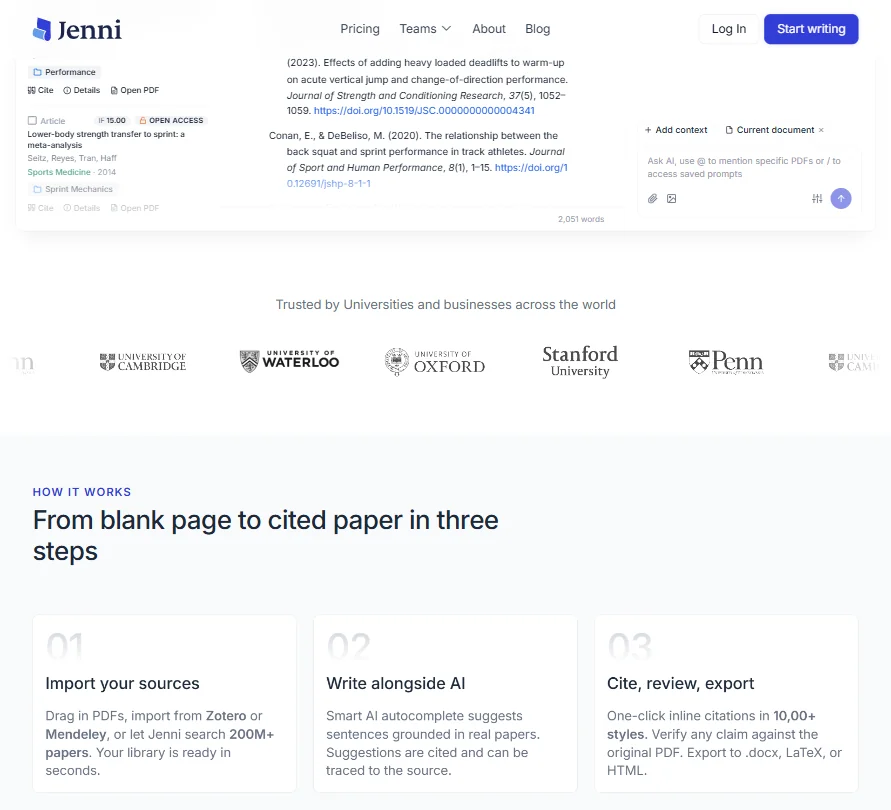
The editor is where most of the work happens. You open a document, build an outline, write. The AI autocomplete surfaces inline as you type, suggesting completions grounded in whatever's in your source library. Accept or reject. Standard behavior, except the source-grounding is what makes it non-standard in practice.
Citations are taken seriously. Over 10,000 citation styles according to the free plan feature list, which covers essentially every journal format a working researcher would encounter. Zotero and Mendeley both connect for your existing library, and PubMed and arXiv are available for direct paper pulls.
The Reviews feature, which operates at the full-paper scale rather than sentence-by-sentence, is capped at 3 per month on the free plan and 10 per month on Plus. Pro gets unlimited. That's a real constraint if you're iterating heavily on a draft. Worth knowing before you hit it mid-revision at 11pm before a deadline.
There's an AI Chat feature too. Not a headline item, but genuinely useful when you're trying to locate a specific argument buried across a dozen uploaded PDFs. Honestly, that alone justifies the tool for anyone managing a large paper collection. The free plan caps AI Chat at 5 messages per day, which you will exhaust fast if you're actually working.
What's absent is worth saying plainly. No plagiarism checker. No grammar tooling approaching Grammarly's depth. No structural templates for users who don't already know how a literature review is supposed to be built.
Jenni AI AI Output Quality: Is It Good Enough?
The underlying model is described as proprietary, drawing on multiple models including GPT-based ones. Architecture details aren't published, so we can't verify that.
citations are generally accurate, prose is sometimes genuinely clunky. Using Jenni as a drafting scaffold and expecting to revise heavily works well. Expecting publication-ready sentences without editing does not. That's a calibration problem, partly a product communication problem.
Ten AI autocompletes per day and 3 AI Edits on the free plan will stop a working researcher mid-draft. That's a product decision, not a bug, but it shapes how new users experience the tool during evaluation.
Is Jenni AI Easy to Use?
The editor isn't complicated. You open a document and start writing. AI features surface inline without requiring window-switching or tool-hopping. For researchers who've spent real time inside clunky reference managers, the experience reads as noticeably cleaner by comparison.
The learning curve exists almost entirely on the source management side. Getting a large existing library imported properly is where friction concentrates, specifically around PDF parsing with bigger collections. That tracks. Any tool parsing PDFs at scale is going to have rough edges somewhere, and this is where Jenni's are.
Chrome extension exists. Mobile has improved recently but this is fundamentally a desktop workflow. No one writes a dissertation chapter on their phone.
Not great for initial onboarding if you're unfamiliar with academic citation workflows generally. The tool assumes you know what you're doing. Newer students sometimes don't.
Jenni AI Pricing: Is It Worth the Cost?
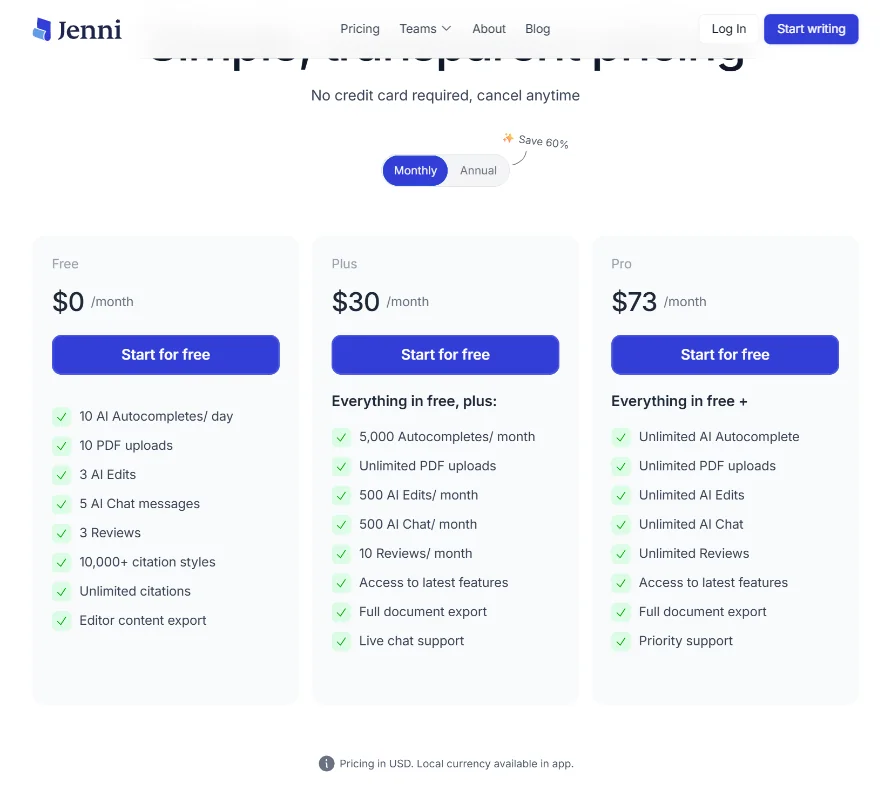
Three tiers. Free at $0, Plus at $30 per month, Pro at $73 per month. The free plan requires no credit card, which is the right call for a product targeting grad students watching every dollar.
The free plan gives you 10 PDF uploads and unlimited citations, which is a real foundation. Plus opens to unlimited PDF uploads and 5,000 autocompletes per month alongside 500 AI Edits, which is where serious drafting actually becomes possible. Pro moves everything to unlimited across autocomplete, edits, chat, and reviews, and adds priority support over the Plus plan's live chat.
At $73 per month, Pro is a real ask for an individual PhD student. The Plus plan at $30 is more defensible as a working research spend. The free tier, in practice, is a long test drive. It will run out faster than new users expect.
If Jenni wants institutional licensing at universities, ask whether an enterprise tier exists. Paperpal is actively pursuing that market.
Refund policy is noted on the site. Check the current terms before subscribing. We didn't have full details in what we reviewed.
Jenni AI vs Elicit: Which Is Better?
Elicit leans into structured research synthesis, pulling data from papers and helping build comparison tables across studies. Jenni leans into the writing layer. Different problems.
Early-stage literature review work. Elicit might actually be more useful there. For a researcher who knows what they want to argue and needs help drafting it with citations attached, Jenni is the better fit, and that's the distinction that matters when choosing between them.
Paperpal belongs in this comparison too. It sits closer to Jenni than Elicit does, with a stronger focus on manuscript preparation for journal submission specifically. If the end goal is a journal-ready paper rather than a dissertation draft, Paperpal is worth a direct look before committing here.
SciSpace comes up in the same breath regularly. The overlap is genuine. The choice often comes down to which editor you find less annoying to write inside. That's a personal call we can't make for you.
Who Should Use Jenni AI? (And Who Shouldn't)
PhD students and academic researchers writing long-form papers. The citation grounding, the Zotero and Mendeley integrations, the tens of thousands of citation styles: none of that architecture exists for any other reason.
Undergraduates writing shorter papers. Useful, but they'll hit the free tier fast and may not need Pro's full feature set.
Content marketers. Wrong tool. No SEO features, no brand controls, no bulk generation. Comparing Jenni to Jasper AI is comparing the wrong categories entirely.
Research institutions looking for department-wide licensing. The missing enterprise tier is a real gap. Worth flagging before you bring this to a department head.
Jenni AI Review Verdict
Keeping AI grounded in real sources while you write is genuinely harder than it sounds, and it's exactly the thing that makes general chatbots inadequate for academic work. Jenni does that part well.
The product reads like it was built by people who have actually been inside an academic writing workflow, not people who read about one. The citation tooling covers more styles than most researchers will ever need. The library integrations are practical. Recent updates show a team still iterating.
The weaknesses are real and worth naming plainly. AI prose requires human revision. The free tier creates friction before it creates value. The distinction between Plus and Pro is buried in documentation rather than surfaced at checkout, which is annoying. No enterprise offering means institutions have to work around the tool rather than with it.
For the Plus plan at $30 per month, this is a reasonable bet for a grad student who has already tried using ChatGPT for citations and watched it invent papers. Not perfect. Notably better than that alternative.
Frequently Asked Questions
Does Jenni AI work for non-English academic writing?
Multiple languages are supported, with the vendor listing support for 30 languages. The underlying paper database skews heavily toward English-language publications. Worth knowing if your research field relies on non-English sources heavily.
Can Jenni AI export to Word or LaTeX?
Yes on both. The tool exports to .docx for Word users and to LaTeX for journal or conference submissions that require it. HTML export is also available. RIS and BIB export formats for bibliography data are also available. That's a practical set of options for most academic workflows, covering the formats that actually matter.
Is Jenni AI's free plan actually usable?
Usable as a trial. You can get a real feel for the autocomplete and citation grounding without entering a credit card, which matters. Ten AI autocompletes per day and 5 AI Chat messages will run out fast if you're actively drafting something substantial. Think of it as a long test drive with a hard daily limit, not a permanent free option.