SAASINSPECTOR
Elai.io logo

Elai.io Review

Elai.io, an AI avatar video tool, turns a script, photo or document into an avatar-led training video with quizzes and branching choices. The free plan lets you try it, and paid plans add screen recording, 1080p exports, 4K and a brand kit on higher tiers.

Visit Elai.ioFrom $29/mo

Research-based review. Features and prices are checked on the vendor's own website, and the score is worked out from those facts. We haven't tested it hands-on yet.

The verdict

Worth it for training teams building interactive avatar lessons on a budget, though real-time conversation isn't offered and full-resolution export needs a higher tier.

Pros

  • Supports voice cloning in 28 languages, with a library of 300+ standard and 100+ premium voices across 450+ accents.
  • SCORM export makes it directly compatible with corporate LMS platforms, a rare feature among AI video tools.
  • PowerPoint-to-video conversion allows L&D teams to repurpose legacy slide decks without re-recording content.
  • AI storyboard tool auto-generates multi-slide video structures from long-form content, accelerating first-draft production.
  • Branching interactive video support enables non-linear learning paths, which most avatar video tools don't offer.
  • Scene-by-scene editor gives users granular control over avatars, backgrounds, scripts, and slide timing.
  • Built-in screen recorder and auto-captions are included without requiring third-party tools.
  • Batch processing supports bulk personalized video production, extending usefulness beyond L&D into marketing workflows.

Cons

  • Voice cloning is a paid add-on unless you're on a Team or Enterprise plan, limiting access for lower-tier subscribers.
  • Customer and language counts (2,000+ companies, 75+ languages) appear to be marketing-rounded figures rather than verified specifics.
  • The product's strong L&D focus means teams outside corporate training may find features misaligned with their use case.
  • Acquisition by Panopto introduces uncertainty about long-term product direction and independent roadmap prioritization.
  • The AI storyboard output requires manual refinement and is more useful as a starting draft than a finished product.
  • Pricing structure may not be cost-effective for teams that don't need the full L&D feature set like SCORM or branching video.
From $29/moFree plan YesFree trial Yes
7.2/10

Spec Score

Elai.io against 7 AI avatar video tools
#5
of 7 AI avatar video tools
-0.4
vs the average
95%
from published facts
Ahead of other AI avatar video tools
Training and interactivity+3.1
Behind other AI avatar video tools
Avatars-3.0
Every criterion
Tap a row for the facts
Avatars5.5
-3.0 vs 8.5 avg16.5 of 30 points
Stock avatars in the library80 avatars2 / 3
Makes a talking avatar from one photoyes2 / 2
An avatar that holds a live conversationno0 / 2
Requires the person's consent for a custom avatarno0 / 1.5
Turns a document or deck into a presenter videoyes1.5 / 1.5
Why these numbers

Stock avatars in the library: Same 80+ figure repeated for all 4 plans in the comparison table ('Custom Avatars ... 80+ 80+ 80+ 80+').

Makes a talking avatar from one photo: 'Photo' is listed as one of the 4 custom avatar types, distinct from the video-based Selfie type.

An avatar that holds a live conversation: Elai's 'Avatar Dialogs' feature is two avatars scripted into a pre-recorded dialogue video, not a real-time conversation with a viewer; no real-time/conversational agent feature found.

Requires the person's consent for a custom avatar: Ethical policy addresses impersonation of public figures/deepfakes generally, but no explicit statement was found requiring consent or identity verification for creating a Selfie/Studio custom avatar of a real person.

Turns a document or deck into a presenter video: Listed as a nav feature; also 'AI Storyboard Generate video scripts automatically from prompts, links, or documents' in the pricing comparison table.

Pricing6.9
+0.0 vs 6.9 avg17.3 of 25 points
Monthly price, cheapest paid plan$29/mo3.5 / 6
Free planyes2 / 2
Free trialdoes not applyn/a
Why these numbers

Monthly price, cheapest paid plan: Plan: Creator. Read: raw page (curl --compressed), billing terms as printed.

Training and interactivity10.0
+3.1 vs 6.9 avg15 of 15 points
Exports to SCORM for an LMSyes3 / 3
Quizzes, branching or clickable choicesyes3 / 3
Records your screenyes2 / 2
Brand kityes2 / 2
Why these numbers

Exports to SCORM for an LMS: Comparison table shows this as Enterprise-only ('- - -' for Free/Creator/Team).

Quizzes, branching or clickable choices: Also 'Multi-Select Answers' quiz feature; gated by plan per the comparison table.

Records your screen: Also a dedicated /screen-recording/ page.

Brand kit: Not on Free/Creator per the comparison table dashes; available from Team plan up.

Languages and output9.0
+0.4 vs 8.6 avg13.5 of 15 points
Languages the AI speaks75 languages3 / 4
Translates a finished videoyes2 / 2
Highest export resolution4k2 / 2
Automatic captionsyes2 / 2
Why these numbers

Languages the AI speaks: Vendor's own copy is inconsistent: the feature-row label says '75+ Languages' but its own description in the same row says 'over 100 languages'; used the headline figure.

Highest export resolution: 4K available from the Team plan ($125/mo) up; Free and Creator are listed with '1080p Full HD Videos' only.

Teams and privacy6.5
-0.4 vs 6.9 avg9.8 of 15 points
Does not train AI on your videosnot published, half points1.5 / 3
Ways to reach supportemail1 / 3
Shared workspaceyes2 / 2
Single sign-onyes2 / 2
Why these numbers

Ways to reach support: A Freshdesk-hosted Knowledge Base (elai.freshdesk.com) also exists but is a self-serve help center, not a listed channel type; no live chat, phone, community forum or Slack found.

Shared workspace: Comparison table shows this as Enterprise-only ('- - -' for Free/Creator/Team); Team plan separately includes '3 Editors & 3 Guests'.

Single sign-on: Comparison table shows SSO available only on Enterprise ('-' for Free/Creator/Team); also listed in the Enterprise feature summary.

yesnonot published average for AI avatar video tools
How the Spec Score works

Scored from what Elai.io publishes on its own site. Not a hands-on test.

Compared with 7 AI avatar video tools. Facts checked 16 Sep 2026.

A fact the vendor does not publish gets half the points, or the typical value for a number, and says so. It never counts as a no. How we score.

Elai.io has carved out a real niche in corporate learning and development, and that focus shapes almost everything about the product, including what gets locked behind the Enterprise tier.

Elai.io homepage screenshot
Elai.io, Homepage

What is Elai.io?

Founded in 2021, headquartered in Pittsburgh. Web-based AI video generation built around talking-head avatar presenters. The basic loop is simple: write a script, pick an avatar, get a narrated video. But the product goes further than most tools in the category by layering on things L&D teams specifically want. SCORM export, PowerPoint-to-video conversion, branching interactive video. Panopto, the enterprise video platform, later acquired them, which tells you something about where the product is heading.

The tool supports 75+ languages and 450+ accents. The multilingual depth appears consistently across their documentation.

Elai.io Features: Video Generation, Editing & AI Capabilities
Elai.io features screenshot
Elai.io, Features

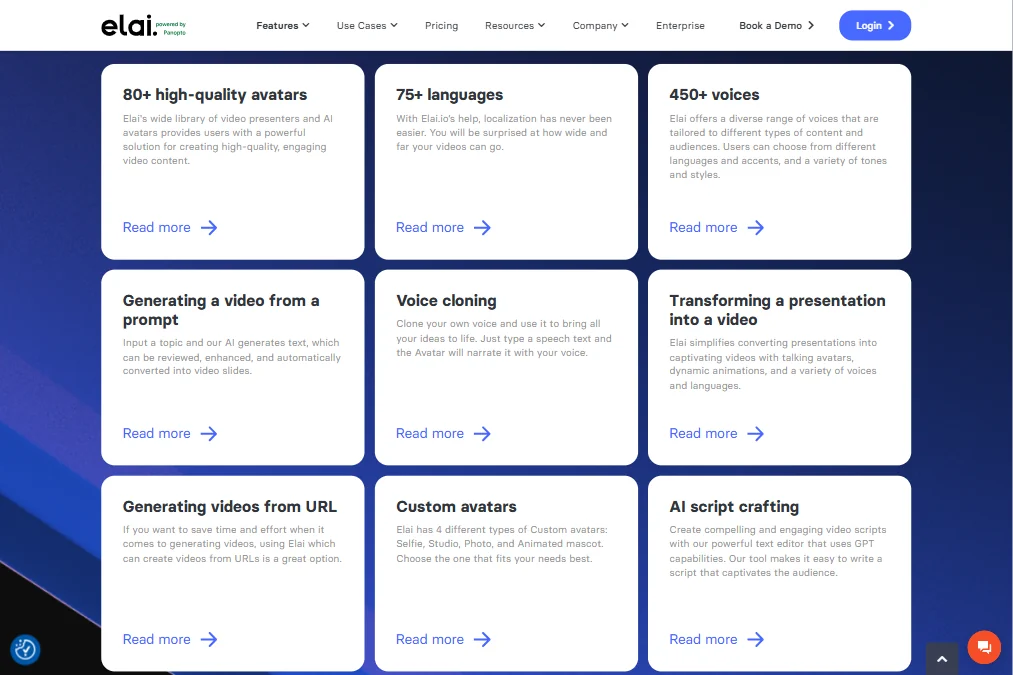
Drop in a URL or paste text and the system generates a narrated avatar video. There's also a PPTX-to-video converter that accepts PowerPoint files and auto-builds slides. Genuinely useful for L&D teams sitting on hundreds of legacy decks with no budget to re-record anything.

The editor is scene-by-scene. You can swap avatars, change backgrounds, edit the script, and adjust timing per slide. The AI storyboard tool auto-structures multi-slide content from long-form input. It's not magic, but it saves real time on first drafts.

Voice cloning runs across 28 languages. It's a paid add-on below the Team tier, which sits at $125 a month. The standard library has 300+ voices and 100+ premium voices. Honestly, that depth surprised us. Most tools at this price point offer far less.

Batch processing supports bulk personalized video production. More relevant for marketing than L&D, but it's there. Screen recording is built in. Auto-captions are included. API access opens at the Creator plan, which is $29 a month.

SCORM export, the feature that makes Elai genuinely useful in enterprise training, is locked to Enterprise. Full stop. That's a real wall, and we'll come back to it.

Elai.io Video Quality: How Good Does the Output Actually Look?

Full HD export at 1080p starts on the Creator plan at $29 a month. 4K is Team and above. Fine for most L&D use cases. Backgrounds are largely template-based, and custom backgrounds exist.

We're skeptical of the 4K claim at the Team tier, purely because avatar video at 4K rarely benefits the viewer. Delivery format matters more than export resolution in most corporate contexts.

Elai.io AI Avatars & Voiceover: How Realistic Are They?

The free plan gives access to 80+ built-in AI avatars. Custom selfie avatars are available by submitting footage. Studio avatars sit behind Enterprise. Worth noting: the avatar dialog feature lets you put two presenters on a single slide, which is genuinely uncommon and useful for scenario-based training content.

Voice cloning across 28 languages is a real differentiator. HeyGen does something similar. That's a narrow audience, but for them it matters.

Is Elai.io Easy to Use?

It functions closer to a presentation tool than a timeline editor.

The free plan includes 1 minute of video output. Barely a preview. Not enough to evaluate avatar quality or voice cloning under real conditions. Fair, given what they're giving away, but don't expect to make a real purchase decision from it.

Web-only. No desktop app, no mobile. For enterprise teams that's usually fine. Solo creators who want flexibility will feel the constraint.

Elai.io Pricing: Is It Worth It for Creators & Teams?
Elai.io pricing screenshot
Elai.io, Pricing

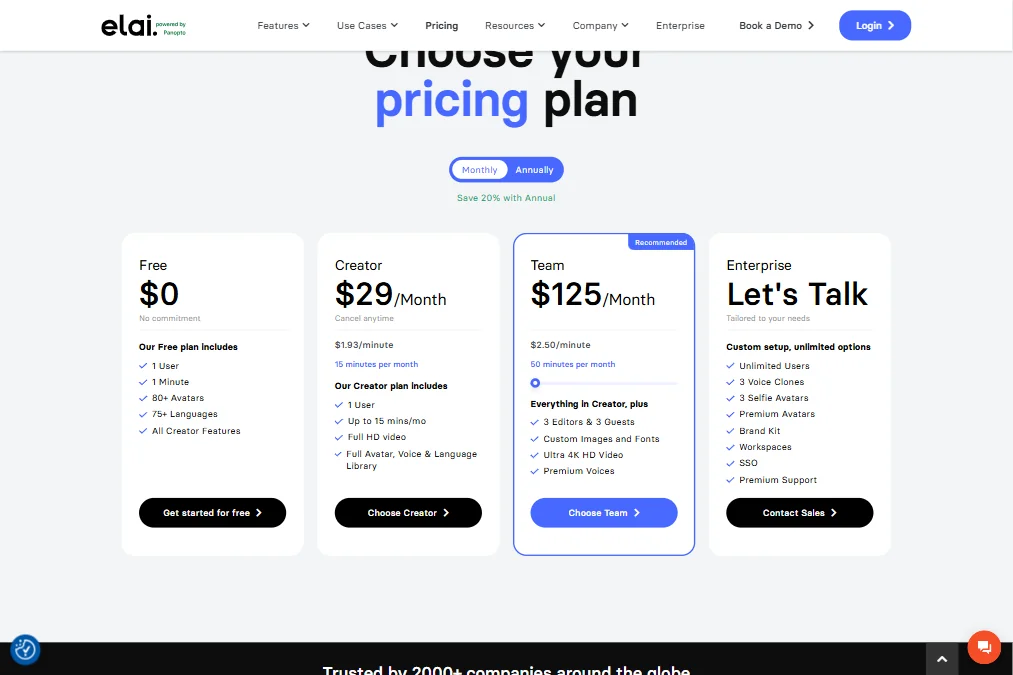
Four tiers, technically. Free at $0, Creator at $29 a month, Team at $125 a month, and Enterprise on custom pricing. The free plan gets you 1 minute of video and access to 80+ avatars and 75+ languages. It's a preview, not a functional tier.

Creator runs at $1.93 per minute, capped at 15 minutes a month. Full HD video is included. Team runs at $2.50 per minute with 50 minutes per month, adds 4K HD video, 3 editors and 3 guests, custom images and fonts, and premium voices. The per-minute rate is actually higher on Team than on Creator, which is a strange pricing choice and one we don't see explained anywhere on the page.

The Team plan at $125 a month is positioned as the recommended tier, and for small corporate training teams producing a steady volume of content, the math is defensible. For a solo creator occasionally needing an explainer video, there are cheaper options, including HeyGen at comparable price points and Synthesia for teams with bigger budgets and simpler feature needs.

SCORM export is Enterprise-only. Voice cloning is bundled from Team upward. API access opens at Creator. That structure is clearly designed to push L&D teams toward Enterprise contracts, with Creator functioning more as an extended trial than a real working tier for production teams.

The refund policy isn't publicly stated anywhere we could find. That's a gap worth flagging before committing to an annual plan.

Elai.io vs Synthesia: Which AI Video Tool Is Better?

The obvious comparison. Synthesia is the dominant name in enterprise AI avatar video, particularly in L&D. Elai is clearly targeting the same buyer.

Synthesia has a larger avatar library and more consistent output polish. It's also more expensive at the enterprise end. Elai's counter-argument is the branching interactive video feature, the PPTX-to-video converter, and the avatar dialog functionality. Synthesia doesn't do avatar dialogs natively. That's a real gap for scenario-based training design.

The real gap is in feature depth for specific use cases. Branching video and PPTX conversion matter a lot to L&D teams and basically not at all to marketers.

HeyGen belongs in this comparison too. It's stronger on the marketing and dubbing side, better positioned for client-facing content and multilingual marketing production. The choice between these three mostly comes down to whether you need SCORM, branching, or deep LMS integration. If you do, Elai is the more focused option. If you don't, HeyGen competes more directly on price and output quality at the mid-tier.

Who Should Use Elai.io? (And Who Shouldn't)

Corporate L&D teams. That's the fit. The SCORM support, branching video, and multilingual voice cloning are purpose-built for that world.

Marketers doing personalized video campaigns at scale. The batch processing and API access support that use case, and the pricing is defensible at volume.

Solo creators and freelancers. Wrong audience. The pricing isn't competitive for low-volume use, the feature set is more than you need, and you'll hit the free-tier ceiling immediately.

Brands looking for polished client-facing avatar video should look elsewhere. Studio avatars, the more polished tier, sit behind Enterprise pricing and aren't included in the base plans.

Elai.io Review Verdict

Elai knows its audience. The L&D feature stack, SCORM export, interactive branching, PPTX-to-video, and 28-language voice cloning in one product, is not something you assemble cheaply elsewhere. The Panopto acquisition adds credibility to the enterprise LMS integration path.

The SCORM lock to Enterprise is the most frustrating decision in the pricing structure. That feature is the primary reason an L&D team chooses Elai over a generic avatar tool. Putting it behind a custom contract creates real friction, and it will lose SMB customers who can't justify an Enterprise commitment before they've validated the workflow.

Solid tool. Specific buyer. Not the most polished avatar generator available, but the most purpose-built one for enterprise training teams. Just make sure you need the full stack before the Enterprise conversation starts.

How Elai.io compares

Elai.io scores 7.2 out of 10 among the AI avatar video tools we rate. These three do the same job and are the closest to it, compared on what each vendor publishes.

7.2Elai.io
vs
8.2Synthesia

Synthesia

Elai.io and Synthesia both open their paid tiers at $29 a month, so features decide this one. Elai builds a talking avatar from a single photo, while Synthesia needs recorded video instead, and Synthesia states a consent requirement for custom avatars, which Elai's policy does not mention. Synthesia also holds a live conversation with an avatar in beta, which Elai lacks, and offers more avatars and languages, 240 against 80 and 160 against 75. Both add SCORM export, quizzes, screen recording and a brand kit.

Pick Synthesia if you want a live conversational avatar and more languages.
Pick Elai.io if you want a photo based avatar at the same price.

Elai.io vs Synthesia →
7.2Elai.io
vs
8.9HeyGen

HeyGen

Elai.io and HeyGen both start at $29 a month, so avatar count and languages decide this one. HeyGen ships with far more stock avatars, 700 against Elai's 80, and speaks more languages, 175 against 75. HeyGen also holds a live conversation with an avatar, which Elai lacks, and states a consent requirement for custom avatars, which Elai's policy does not mention. Both turn a document into a presenter video, export automatic captions and let you build a talking avatar from a single photo.

Pick HeyGen if you want more avatars, more languages and live conversation.
Pick Elai.io if you want the same price and a smaller, simpler avatar library.

Elai.io vs HeyGen →
7.2Elai.io
vs
6.7D-ID

D-ID

D-ID's $5.90 a month undercuts Elai.io's $29, though D-ID has no free plan and Elai does. Elai turns a document or deck into a presenter video and adds automatic captions, both missing from D-ID. D-ID holds a live conversation with its avatar, something Elai cannot do, since Elai's avatar dialogs are pre-recorded rather than real time. Elai also reaches 4K export, D-ID tops out at 1080p, and Elai has a shared workspace where D-ID has none.

Pick D-ID if you want the lowest monthly price and live conversation.
Pick Elai.io if you want document to video, captions and a shared workspace.

Elai.io vs D-ID →

Frequently Asked Questions

Does Elai.io have a free plan?

Yes. It's capped at 1 minute of video output, 1 user, 80+ avatars, and 75+ languages. That's enough to see how the editor works, not enough to properly test avatar quality or voice cloning under real conditions. Treat it as an extended preview rather than a functional free tier.

Is Elai.io good for eLearning content?

It's probably the strongest avatar video tool in this price range specifically for eLearning. The SCORM export and branching interactive video features are purpose-built for learning management systems. The catch is that SCORM export is locked to Enterprise, so smaller teams pay to discover they need a custom contract to use the feature they came for. That's a real problem for SMB L&D buyers.

How does Elai.io compare to HeyGen for business video?

HeyGen has stronger output consistency and is better positioned for marketing video, dubbing, and client-facing content. Elai wins on L&D-specific features, particularly branching video and PPTX conversion. If your primary use case is training content inside an LMS, Elai is the more purpose-built choice. If it's sales enablement or multilingual marketing content, HeyGen is the stronger option at comparable price points.


Elai.io is featured in

Alternatives to Elai.io

Other AI Video Tool options we've reviewed.

HeyGen logo

HeyGen

Solo creators and advanced individuals creating AI videos at scale

8.9
Rank #1 of 7 AI avatar video tools
Best:Avatars10
Weakest:Pricing6.9
Free plan: yesFree trial: noAPI: yes
From $29Free plan
95% from published facts · checked 16 Sep
Riverside logo

Riverside

Podcast and video recording, live streaming, and webinars

8.0
Rank #2 of 5 AI video editors
Best:Recording10
Weakest:Pricing6.9
Records remote guests on separate tracks: yes
From $29No free plan
100% from published facts · checked 16 Sep
Adobe Firefly logo

Adobe Firefly

Creative professionals, marketers, and content creators in the Adobe ecosystem

Not scored yet
Free plan: yesFree trial: yesAPI: yes
From $9.99Free plan

Creatify

Creators and solopreneurs

6.4
Rank #2 of 4 AI ad video tools
Best:Making the ad7.5
Weakest:Assets and teams4.5
Free plan: yesFree trial: yesAPI: yes
From $39Free plan
91% from published facts · checked 16 Sep
Kling AI logo

Kling AI

Filmmakers, content creators, and creative professionals seeking high-quality AI video and image generation with cinematic control

8.9
Rank #1 of 7 AI video generators
Best:What it can generate9.8
Weakest:Privacy and platforms3.2
Does not train AI on your videos: no
From $8.80Free plan
94% from published facts · checked 19 Sep
Krea logo

Krea

Designers who want one of the broadest model menus, plus a node canvas, an AI agent and an API

9.0
Rank #2 of 13 multi-model AI platforms
Best:For video10
Weakest:Pricing6
SOC 2: yesOffers Veo 3.1: yesOffers Nano Banana Pro: yes
From $35Free plan
93% from published facts · checked 19 Sep

User reviews

Review Elai.io

Your rating

Reviews are moderated and appear once approved.






