The review trail on Dashword is thin: no G2 listing worth citing, no Capterra page, no Trustpilot presence. The picture rests on their own docs, a scatter of Reddit threads, and Product Hunt comments from people who tried it around its 2020 launch and again more recently. That's a narrower data set than ideal for a tool at this price point. Keep that in mind as you read this dashword review.

What is Dashword?
Dashword is a web-based SEO content tool. The pitch covers brief creation from competitor research, real-time content scoring as you write, and post-publication page tracking. There's also an AI writer bundled in.
It launched in 2020 and hasn't made much noise since. No funding announcements. No obvious headquarters listed on the site. Small team, by all appearances. That's not a criticism, plenty of solid tools run lean, but it does explain some of what's missing from the ecosystem around it.
The Google Docs add-on is a nice touch. Writers who live in Docs don't have to leave.
Dashword Features: SEO & Content Tools Breakdown
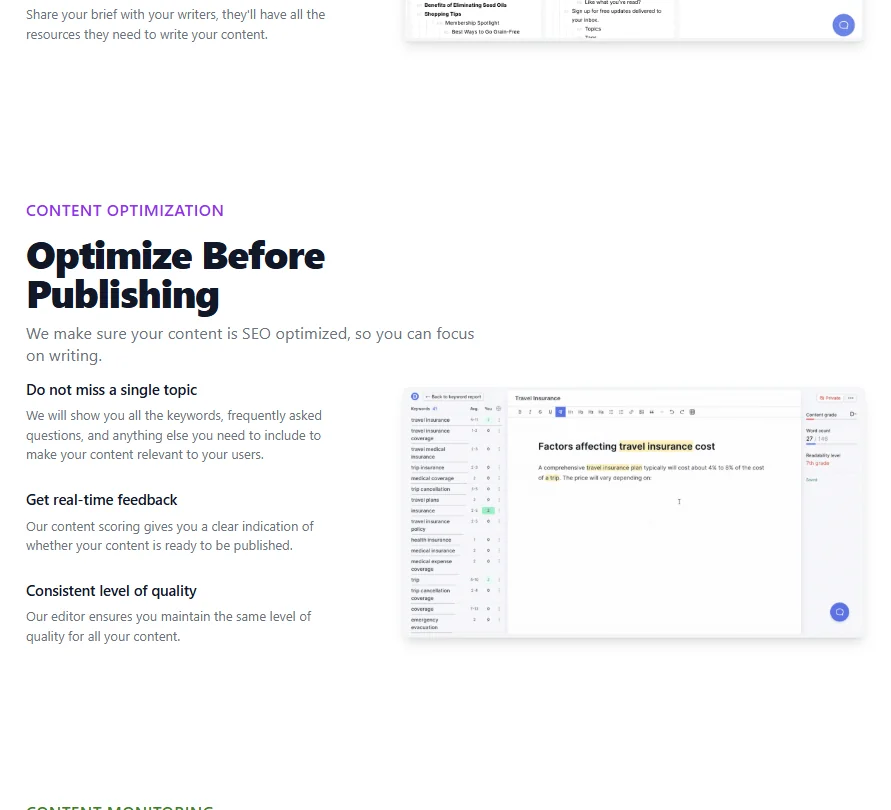
The core loop is straightforward. Drop in a keyword, Dashword crawls competing pages, and it surfaces a brief with competitor outlines, topic ideas, and FAQ suggestions. You write inside the built-in editor, which scores your content against that research in real time. Post-publication tracking is the feature that stands out most from the standard set, generating automated weekly keyword reports so you can see if a page is sliding after it goes live.
Honestly, that surprised us. Most tools at this tier hand you the brief and walk away. Dashword tries to close the loop, which is more than Surfer SEO or Frase typically does at the brief-builder end of the market.
Backlink analysis isn't here. Topic clustering isn't mentioned in their docs. Ask about GSC integration. For some users that's fine. For others, dealbreakers.
Dashword Keyword Research: How Deep Does It Go?
Not very. Honest read.
The keyword research is surface-level: related terms, FAQ pulls, and topics surfacing from competitor content for a given query. It's enough to inform a brief. It's not a replacement for Ahrefs or a dedicated keyword tool, and Reddit threads suggest most users treat Dashword as exactly that, a brief-builder sitting alongside something heavier.
The FAQ surfacing is genuinely useful, especially for writers who need to know what questions people are actually asking around a topic. That part earns its keep. Don't lean on it alone for keyword strategy, though. Search volume data isn't part of it, so you'll want something else for that side of the work.
Dashword Content Creation: AI Writing Quality Tested
The AI Writer is available on both plans. The Startup plan caps generated output at 100,000 words per month, which is a reasonable ceiling for a small team. The Business plan removes that explicit cap based on what the pricing page shows.
We didn't run it ourselves. What Product Hunt comments and occasional Reddit mentions suggest is that the output is competent but not impressive. Nobody was raving. A few people called it useful for generating first-draft structure, and most seemed to edit heavily from there.
That tracks. That's where most AI writing tools sit right now.
The real-time content scoring inside the editor is the more consistently praised feature. It flags topic gaps as you write, keeps you honest about coverage, and comes up more often in user commentary than the AI output does.
Is Dashword Easy to Use?
From what we gathered, yes. The interface is clean. The brief-sharing workflow is simple enough that agencies mention using it with clients directly, and one-click share links for briefs came up more than once as something people actually liked in practice.
The Google Docs add-on reduces friction for teams that already work there, which is a real advantage over tools that force writers into a proprietary editor. Clearscope offers one too. Surfer works in Docs through its Chrome extension rather than an add-on.
The help center is basic, though. Guides, an SEO glossary, some API docs. No community forum. No live chat we could find. Email support is listed but response time expectations aren't set anywhere on the site. For a $99 a month tool, that's a gap worth knowing about before you commit.
Dashword Pricing: Is It Worth It vs Free Alternatives?

Two plans. The Startup plan runs $99 a month, covering 30 content reports, 5 user seats, Content Briefs, and the AI Writer. Business starts from $349 a month and steps up to 100 content reports, 10 user seats, and adds bulk report creation and Single Sign-On. API access now comes with every account.
No free plan. There is a free first report with no credit card required, which is a fair way to sample the brief builder before committing. On refunds: Dashword's published Terms state that subscription payments are generally non-refundable, except where required by law. That's worth reading before you pay, not after.
At $99, the competition is real. NEURONwriter covers similar brief-and-optimize territory at a lower price point and has considerably more public reviews to evaluate. Dashword's post-publish monitoring is a differentiator, but whether that gap justifies the price depends entirely on whether monitoring matters to your workflow.
The Business tier is a steep jump. SSO and bulk reports are what unlock it. If you need those, $349 is your floor. If you don't, stay on Startup.
Dashword vs Surfer SEO: Head-to-Head Comparison
Surfer is the more established product. Larger user base, more integrations, a visible roadmap, and a deeper public review trail across G2 and Capterra. Dashword is smaller and quieter on all of those fronts.
The post-publication piece is where Dashword tries to hold ground. Dashword generates weekly keyword reports for monitored pages. Surfer also offers post-publication monitoring through Content Audit, using Google Search Console data to track position, traffic, impressions, and optimization scores, though the reporting workflows differ. Both tools cover the space. They just approach it differently.
Surfer wins on keyword data depth and integrations. Dashword wins on simplicity and, arguably, price relative to what you actually use day to day. Full platform, Surfer. Focused brief-and-monitor, Dashword is worth a look.
Clearscope keeps appearing in the same conversations, especially for content teams that care most about optimization scoring. More expensive, but the review trail is far deeper and the trust signal is stronger.
Who Should Use Dashword? (And Who Shouldn't)
Freelance content writers and small in-house teams. That's the fit. Simple enough that it doesn't slow you down, and the brief-sharing makes client handoff easy.
Agencies running high content volume with multiple writers and CMS integrations will hit walls fast. The integrations list is short. Ask about WordPress and Zapier before you commit.
SEO strategists needing deep keyword data or backlink analysis. Wrong tool entirely.
Dashword Review Verdict
There's a real gap between what Dashword offers and what the public record can confirm about it. The post-publish tracking is legitimately interesting. The brief builder does what it promises. The combination of a functional editor, real-time scoring, and weekly monitoring in one lightweight package is a reasonable offer at $99 a month, assuming the monitoring piece matters to you.
The concerns are concrete. Subscription fees are non-refundable except where law requires otherwise, so read the Terms first. Support is thin. No integrations worth mentioning beyond Google Docs. The review trail is almost nonexistent, which makes it hard to evaluate user satisfaction with any confidence.
Not a bad tool. An unverified one. Try the free report. If it clicks, the Startup plan is a reasonable bet. If you need more confirmation before spending, the review trail isn't going to give it to you.
How Dashword compares
Dashword scores 3.4 out of 10 among the content optimizers we rate. These three do the same job and are the closest to it, compared on what each vendor publishes.
MarketMuse
MarketMuse offers keyword research with volume and difficulty on every tier, including its free plan; Dashword has no keyword research tool at all. Dashword answers with full article generation, 100k AI Writer words on its $99 a month Startup plan, a feature MarketMuse dropped when it retired full-draft writing. Dashword also gives 5 seats on its cheapest plan against MarketMuse's one seat on Optimize. Neither connects to Google Search Console.
Pick MarketMuse if keyword research with volume and difficulty matters.
Pick Dashword if you want full AI drafts and more seats.
Clearscope
Dashword costs $99 a month against Clearscope's $129 for Essentials, and includes API access, even an MCP server, on every plan; Clearscope has no public API at any price. Clearscope answers with unlimited seats on every plan, while Dashword's cheapest plan gives 5. Clearscope also offers keyword research with search volume, a tool Dashword does not have at all. Both write full articles and score drafts against top-ranking content.
Pick Clearscope if you want API access and a lower price.
Pick Dashword if you need unlimited seats and keyword research.
Frase
Frase starts at $49 a month, half of Dashword's $99, and adds keyword research with difficulty, a technical site audit and keyword clustering, none of which Dashword offers. Dashword answers with 5 seats on its cheapest plan against Frase's one seat on Starter, plus a real Google Docs add-on that Frase lacks. Both write full articles and give API access on every plan. Neither connects a Chrome extension.
Pick Frase if you want keyword research and a technical audit.
Pick Dashword if you want more seats and a Google Docs add-on.
Frequently Asked Questions
Does Dashword offer a free trial?
One free report, no credit card required. That's enough to see the brief builder in action and get a feel for the keyword and topic data it pulls. Fair preview. Won't show you everything.
What's the difference between the Startup and Business plans?
The Startup plan at $99 a month covers 30 content reports, 5 user seats, Content Briefs, and the AI Writer at 100,000 words per month. The Business plan starts from $349 a month and bumps that to 100 reports and 10 seats, then adds bulk report creation and Single Sign-On. API access comes with every account. For most solo users and small teams, the Startup plan is where the real decision lives.
How does Dashword compare to other dashword alternatives like Frase or NeuronWriter?
Dashword is simpler than Frase and lighter on integrations. Frase has a more developed AI writing flow and a stronger review presence across public platforms. NEURONwriter tends to undercut Dashword on price for similar brief-and-optimize functionality. Dashword's post-publish weekly keyword reports are the one feature neither of those tools replicates cleanly. If that's your priority, it has a genuine edge.