What is Surfer?
Web-based content optimization platform. That's the core of it. You drop in a keyword, Surfer analyzes whatever's currently ranking, and it gives you a live score as you write, along with term suggestions, word count targets, and heading guidance. That's been the product since 2017, when a team out of Wrocław, Poland first shipped it as a SERP analysis tool.

The scope has changed considerably since then. Surfer now positions itself as a closed-loop AI Visibility OS, handling keyword research, topical mapping, AI-assisted writing, content auditing, Search Console page tracking, and, most recently, tracking how your brand surfaces inside AI-generated answers from ChatGPT, Perplexity, Google AI, and Gemini. Whether that framing is earned or overstated depends on which features you actually use. The AI Visibility Tracker is the newest push. It's either the most important thing in SEO right now or a feature built ahead of actual demand. We've seen both arguments made seriously.
The documented feature set is genuinely wide. Chrome extension, WordPress plugin, Google Docs integration, a built-in AI assistant called Surfy, and the Content Score as the central feedback mechanism. None of those are vaporware. They're real, they're documented, and reviewers across G2, Capterra, and Reddit are describing real use of them. We cross-referenced the vendor docs against what users report and the match is mostly solid.
Surfer Features: SEO & Content Tools Breakdown
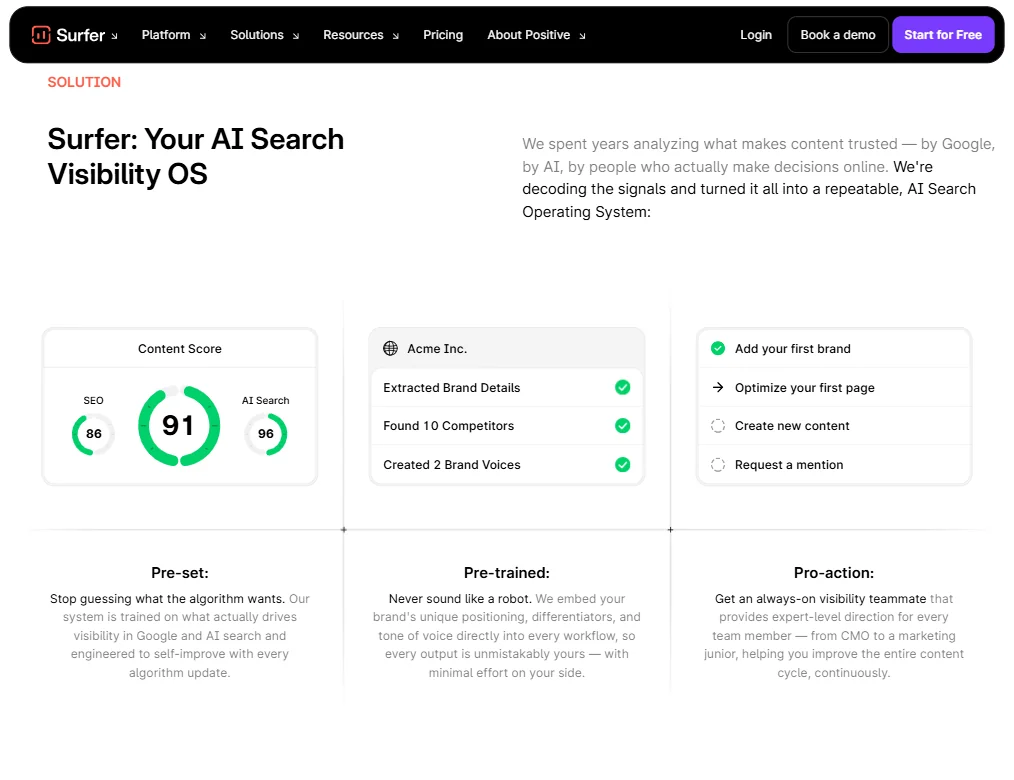
The Content Editor is still the product's spine. Open it, input a keyword, get a set of real-time guidelines drawn from current rankings. Word count, semantic terms, heading structure. Your Content Score moves as you write.
The Content Audit tool is the feature that keeps agencies subscribed. It pulls in your existing pages, identifies where rankings have slipped, and flags probable causes. G2 reviewers in agency roles mention it repeatedly as the feature that justifies the monthly cost on its own. That pattern was consistent enough across reviews that we stopped being surprised by it.
Topical Map is newer and genuinely useful, though not novel. MarketMuse has done topic modeling for years. What Surfer's version does differently is integrate directly into the writing workflow, which makes it less of a planning artifact and more of an actual production tool. Small distinction. Meaningful in practice.
Auto-Optimize and 1-click Internal Linking are among the newer additions. Auto-Optimize received Version History and Version Comparison functionality, along with a new API endpoint for running it in bulk, announced officially on June 19, 2025. Not July. The 1-click Internal Linking feature scans your site and surfaces where internal links should go. Full automation is a stretch here. One-click SEO is a promise that tends to look better in a demo than in a production CMS.
No backlink analysis. Full stop. That's a real gap for anyone expecting consolidated SEO coverage.
Surfer Keyword Research: How Deep Does It Go?
Keyword research ships on all paid plans, but the depth varies by tier. The Topical Map is the main event, not a traditional keyword database. You start with a seed topic and Surfer builds out a content cluster, flagging gaps between what you've published and what's ranking. That's a different kind of research than what Ahrefs or Semrush do.
Honest take: Surfer isn't close to those tools for raw keyword data. Search volume estimates, keyword difficulty, historical trend data. That's not where it competes. Where it does compete is in the handoff from keyword selection to actual writing. That bridge is tighter here than in most alternatives.
Reddit threads from 2024 and 2025 show a consistent split. Users who deploy Surfer as a standalone keyword research replacement end up frustrated. Users who pair it with a dedicated keyword tool end up satisfied. That tracks with what the product is actually built to do.
The Standard plan at $99 per month and the Pro plan at $182 per month, billed yearly, open up progressively more of the coverage gap analysis and SERP detail. Discovery starts lower, at $49 per month billed yearly or $59 monthly. The gap between what's available at Standard versus Pro is meaningful for teams doing serious topical cluster work.
Surfer Content Creation: AI Writing Quality Tested
Surfy lives inside the Content Editor. Full drafts, individual sections, paragraph-level generation. It's calibrated to write toward the Content Score, so the output tends to include the terms Surfer flags as important. That's the feature and the limitation in the same breath.
The writing comes out optimized. It also sometimes reads like it was optimized. G2 reviewers in content roles raise this consistently. One described the output as a "very opinionated rough draft." Fair.
The workflow most teams actually land on is human-edited AI output, where Surfy handles the structural first pass and a writer rewrites for voice and quality. That's how most AI writing tools work in real production environments. Expecting publish-ready copy from any AI writer is a different problem, not a Surfer-specific one.
Content briefs are where the AI output gets more consistent praise. Structured outlines, heading suggestions, key points to cover. Writers report those as more reliable than full prose drafts. Worth separating the two when evaluating this feature.
On voice and style: Surfer publicly documents Custom Voice, which learns a preferred tone from a reference text of at least 200 words. Brand Knowledge, custom templates, and global default voices are also documented features. These exist. Earlier versions of this review missed that. Worth knowing if a distinct style guide is a requirement for your team.
Is Surfer Easy to Use?
The Content Editor, yes. Input keyword, get guidelines, write, watch the score. That loop is clean and the learning curve inside that specific workflow is low.
The rest of the platform is where complexity accumulates. Topical Maps, Content Audit, keyword research, AI Visibility Tracking. All of it under one roof. Onboarding a new user to the full product takes real effort, and Surfer's own Surfer Academy and 20,000-member community read less like a bonus and more like a necessary support system.
Capterra reviewers don't broadly describe the interface as cluttered. That characterization doesn't hold up when you look at the actual review text. What does come up is that learning all the tools takes time. One reviewer noted that specifically. That's a more accurate framing than "cluttered."
The Chrome Extension and WordPress plugin reduce friction for teams already living in those environments. Google Docs integration is consistently well-regarded by writers who don't want to leave Docs. Those integrations are documented across Discovery, Standard, Pro, and Peace of Mind, not gated above a certain tier.
The Content Score confusion is real. New users treat it as a hard target. It isn't. It's directional. Hitting 90 doesn't guarantee ranking. Some reviewers internalize this and adjust. Others spend months optimizing toward a number. Not great.
Surfer Pricing: Is It Worth It vs Free Alternatives?
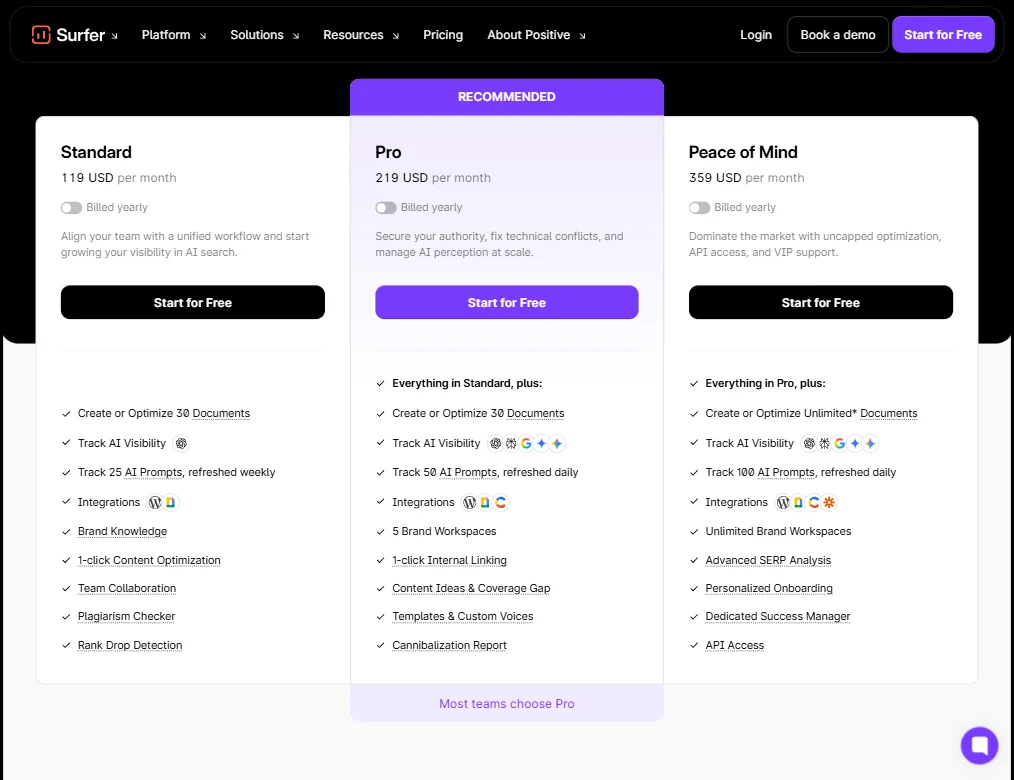
Discovery at $49 per month, Standard at $99 per month, Pro at $182 per month, Peace of Mind at $299 per month, all billed yearly, plus an AI Search Analytics plan at $82 and Enterprise from $999. The plan shown as recommended is Pro.
Feature differences are meaningful across tiers. Standard includes 30 documents, 25 AI prompts refreshed weekly, 1-click Internal Linking, and integrations covering WordPress and a note app. Pro bumps to 50 AI prompts refreshed daily, adds 5 Brand Workspaces, Content Ideas and Coverage Gap, Templates and Custom Voices, and a Cannibalization Report. Peace of Mind adds unlimited documents, 100 daily prompts, Advanced SERP Analysis, a Dedicated Success Manager, and API Access. Unlimited Brand Workspaces also appear at that tier.
No free plan. There's a "Start for Free" entry point on every tier, but that's a trial gateway, not a functional free tier. The refund policy isn't publicly stated. We noticed that. Minor, but worth knowing before you commit.
Compared to alternatives: Clearscope's Essentials plan currently starts at $129 per month, not $189 as some older comparisons state. It includes topic exploration, page tracking, prompt tracking, and onboarding, but far less surrounding functionality than Surfer's Pro tier. Frase runs $49 month-to-month or $39 per month billed yearly at its Starter tier. Cheaper entry, thinner analysis. Neither comparison is straightforward because the feature sets aren't equivalent.
No genuinely free alternative exists that replicates what Surfer does at the Pro level. Free tools exist. They're not the same thing.
Surfer vs Clearscope: Head-to-Head Comparison
This comparison comes up constantly. It's a real one.
Clearscope's content grading is cleaner at the article level. Reviewers who've used both say this consistently. The workflow is tighter because it's narrower. You optimize a piece. That's the product.
Surfer does more. Keyword research, topical mapping, content auditing, Search Console page tracking, internal linking automation, AI writing. Clearscope doesn't do most of that. So the choice comes down to whether you want a tool that does one thing at a high level or a tool that does many things at a solid level. Neither framing is wrong.
For agencies managing large content pipelines, Surfer tends to win. The audit tools and topical map justify the complexity and the price. For in-house content teams focused on optimizing individual articles, Clearscope is the sharper instrument and honestly the honest recommendation there.
On pricing: Clearscope's Essentials at $129 per month sits above Surfer's Standard at $99, which is close enough that the feature comparison matters more than the price difference. If you only need what Clearscope offers, Clearscope is reasonable value. If you're going to use the full Surfer product, the features-per-dollar math shifts toward Surfer. We'd say that's true once you're at Pro and using the audit tools consistently.
Who Should Use Surfer? (And Who Shouldn't)
Content-heavy agencies. That's the clearest fit. The audit tools, topical maps, and bulk workflow features were built for teams producing high content volume who need to track performance systematically.
In-house SEO teams at growth-stage companies. Especially those reporting content ROI to a director or CFO. The tracking and audit features give you something concrete to present.
Solo bloggers on a tight budget. Probably not. The Standard tier at $99 per month is a real commitment, the full product takes time to learn, and cheaper tools can deliver a meaningful percentage of the content scoring value for less money.
Enterprise teams needing deep keyword data should know going in that Surfer isn't replacing Ahrefs, and it isn't trying to. Backlink data, large keyword exports, domain authority analysis. A second tool will be necessary regardless of plan.
Writers who want a clean editor and find SEO dashboards exhausting. Clearscope is the more honest recommendation for that profile.
Surfer Review Verdict
The product works. The team is still shipping. Version History and Version Comparison for Auto-Optimize, plus the new bulk API endpoint, were announced June 19, 2025. That's a recent, meaningful update, not a legacy feature list. The AI Visibility Tracker tracking brand mentions across ChatGPT, Perplexity, Google AI, and Gemini is genuinely differentiated right now. Whether it stays differentiated depends on how fast competitors move.
A few things hold it back from a clean recommendation across the board.
The pricing gap between Standard at $99 and Pro at $182 is real, and several of the features that make the Pro tier worth recommending, including Coverage Gap, Cannibalization Report, and Templates and Custom Voices, sit entirely behind that jump.
The AI writing output needs editing. That's true of every AI writing tool, but expectation-setting matters. Set yours accordingly before pitching this to a team that expects to reduce editorial headcount.
The backlink gap is real for teams expecting one platform to handle everything. The refund policy opacity is minor but annoying. We don't love it.
What Surfer gets right, it gets genuinely right. The Content Editor workflow is mature. The audit functionality catches things human review misses. The brand voice and custom template features are documented and functional, not just marketing copy. For the right team, this is a serious tool at a defensible price. For a team that needs deep keyword data, clean standalone editing, or backlink analysis, the complexity is a cost that doesn't appear on the pricing page.
Frequently Asked Questions
Does Surfer have a free plan?
No. There's a "Start for Free" option shown on every public tier, but it's a limited entry point rather than a functional free tier. Meaningful access to the Content Editor and keyword tools requires a paid plan. Discovery runs $49 per month billed yearly, or $59 monthly, which is the current entry point.
Is Surfer SEO good for beginners?
The Content Editor itself is manageable for beginners. The broader platform is not. Topical Maps, Content Audit, AI Visibility Tracking, and the nuances of interpreting the Content Score as a directional signal rather than a hard target all require real time investment. Surfer runs a Surfer Academy and a 20,000-member community for a reason. Go in expecting a learning curve and budget accordingly.
How does Surfer compare to MarketMuse for topical authority?
MarketMuse has been doing topic modeling longer and its content inventory features are more sophisticated for enterprise-level strategy work. Surfer's Topical Map is more tightly woven into the actual writing workflow, which makes it more useful for teams that need to produce content and not just plan it. MarketMuse tends to win at the strategy layer. Surfer wins when strategy and execution need to happen in the same place.