
Founded in 2020 out of London, Colossyan has been unusually deliberate about who it's building for. Corporate training teams. L&D departments. HR professionals grinding through multilingual onboarding cycles without a film crew. That focus is either precisely what you need, or it tells you to look somewhere else fast.

What is Colossyan Creator?
A web-based platform that converts scripts, PDFs, and slide decks into presenter-led videos via AI avatars. You feed it a document or raw text, it generates a video with an avatar delivering the content. No camera, no talent booking, no studio.
What separates it from generic avatar tools is the training-specific layer sitting on top of that core workflow. SCORM export for LMS integration is the headline capability. Add branching scenarios, quizzes, interactive elements, and bulk translation across 120+ languages, and you start to see the actual pitch. These aren't tacked-on features. They're the reason L&D buyers are in the room at all.
Honestly, plenty of vendors claim to serve enterprise training teams and then bolt on a SCORM checkbox as an afterthought. Colossyan seems to have built toward that use case more seriously than most. We'll see if that holds up under scrutiny.
Colossyan Creator Features: Video Generation, Editing & AI Capabilities
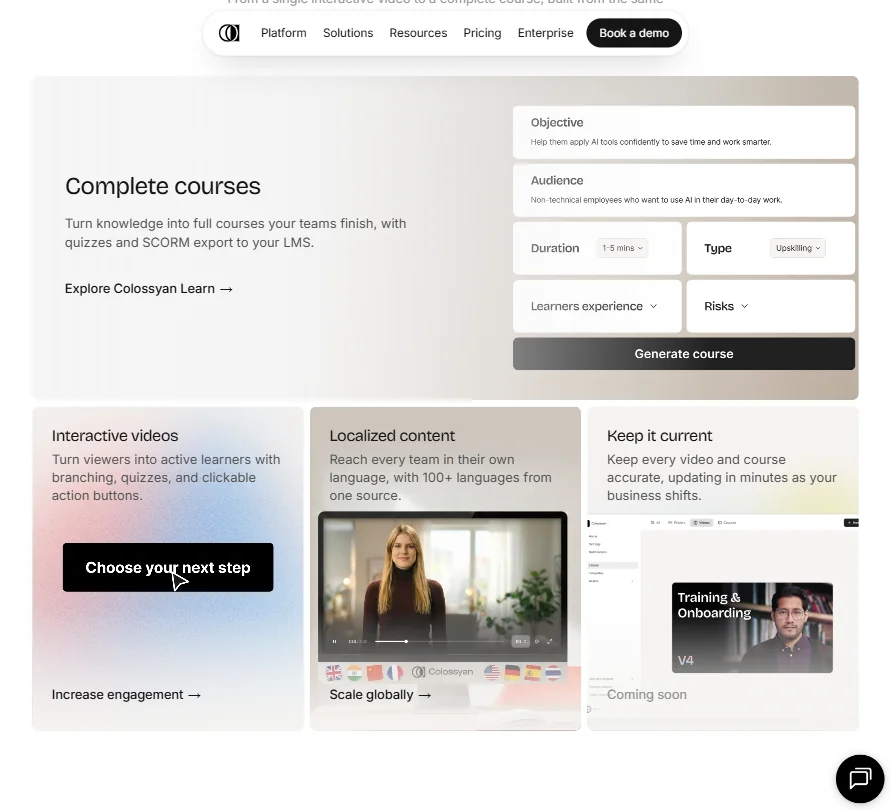
The core loop is straightforward. Bring in a document or write a script, assign an AI avatar to present it, edit scenes, apply brand settings, and export. That's the baseline across plans.
From there, the feature set branches in ways that matter for corporate buyers. There's a built-in screen recorder, which is genuinely useful for software training content. AI image generation is included as a scene asset tool, not a cosmetic extra. Templates exist across plans, though custom templates are gated behind Enterprise.
The bulk localization workflow deserves its own sentence. You push a completed video into translation across multiple languages without rebuilding scenes from scratch. For teams running global onboarding programs, that's not a nice-to-have. It's the entire business case.
Collaboration features sit behind the Professional plan, which the pricing page lists at $89/mo for a single editor, with additional editors at $45/mo each. Shared workspaces and permissions live there. The free Starter tier, which the page shows as free against a crossed-out $27/mo value, is solo-only for practical purposes.
API access appears on Professional, capped at 360 minutes per year on that tier. That's thin for any serious automation work. Not great. Enterprise gets custom limits, but you're in a sales conversation before you find out what those are.
Integration depth outside LMS connectors is limited. No Adobe Premiere connection, no Zapier that we could confirm. The SCORM compatibility list covers Workday and Cornerstone, and a few others. Outside LMS territory, the integration story goes quiet quickly.
Colossyan Creator Video Quality: How Good Does the Output Actually Look?
The Starter and Professional plans top out at 1080p. 4K output is Enterprise-only. For internal training distributed over an LMS, 1080p is fine. For anything hitting a high-resolution display environment or public-facing screen, that limit is worth flagging before you commit to a tier.
Colossyan Creator AI Avatars & Voiceover: How Realistic Are They?
The stock avatar library sits at over 300. Custom avatar creation is available on paid plans. The pricing page references the NEO model tier specifically for video minutes, with NEO appearing as the standard model across Starter and Professional.
The voice stack is deep. 700+ stock voices spanning 120+ languages, with voice cloning available at varying limits depending on plan. For multinational teams trying to maintain a consistent brand voice across markets, that range is a genuine differentiator.
Colossyan's proprietary AI models are named NEO, NEO2, and Cora. The company doesn't say much publicly about what distinguishes those models from each other in practical terms. Mildly frustrating if you're trying to evaluate output quality before committing to a paid tier.
Is Colossyan Creator Easy to Use?
For L&D professionals and HR teams without video production backgrounds, the learning curve reads as manageable.
The more complex features take longer. Branching scenarios and interactive quiz building especially.
No live chat support is confirmed anywhere on Colossyan's site. Email and a help center exist, but no community forum either. For an enterprise-tier tool going up against Synthesia directly, that's a gap that will annoy buyers used to more support infrastructure.
Web-only platform. Fine for most teams. Not fine for anyone expecting a desktop app.
Colossyan Creator Pricing: Is It Worth It for Creators & Teams?

The Starter plan is free, no credit card required. The pricing page shows it carries roughly $27/mo in displaced value, though watermarks stay on free plan exports. You're paying $89/mo on Professional to remove them and unlock the collaboration and API features.
The Professional plan at $89/mo for one editor includes API access, team collaboration, and video minutes under the NEO model tier. Additional editors run $45/mo each. The jump from $89/mo to custom Enterprise pricing is where things go opaque. No published number. You contact sales. Standard practice at the enterprise tier, but you're flying blind until you're actually in that conversation.
Ask about the refund policy before you commit. That's not a minor detail.
For teams already running Articulate 360 or Camtasia for training production, Colossyan looks like an alternative rather than an add-on. Stacking it on top of an existing authoring tool doesn't make obvious budget sense unless avatar video is solving a specific problem your current stack genuinely can't handle.
Colossyan Creator vs Synthesia: Which AI Video Tool Is Better?
This is the comparison that matters most. Synthesia is the market reference point for enterprise AI avatar video, and Colossyan is clearly aware of that positioning.
The distinction worth paying attention to: Colossyan integrates interactive course features directly into the video creation workflow. Synthesia keeps video generation and course-building more separated. For teams wanting both in one place, that's a meaningful difference, not a marketing spin.
Different tools, slightly different versions of the same problem. We don't think either one is a clear knockout winner.
Pricing transparency favors Colossyan slightly. Synthesia's entry tier starts at $19/mo but limits outputs and features significantly. Colossyan's free Starter tier is genuinely functional for evaluation, which matters when you're trying to sell a tool internally before budget approval.
HeyGen also belongs in this conversation, particularly for teams prioritizing video translation and dubbing over SCORM and LMS course-building. If the interactive training workflow isn't your primary need, it's worth a direct comparison.
Who Should Use Colossyan Creator? (And Who Shouldn't)
Corporate L&D teams doing regular training video production. That's the core fit. The SCORM export, bulk translation, and interactive course tools are purpose-built for that workflow, not retrofitted.
HR departments running multilingual onboarding programs. The 120+ language localization with auto-translation is a real operational answer to a real operational problem.
Solo creators or marketers looking for a general-purpose avatar tool. Not this. The feature set leans hard into enterprise training, and the $89/mo Professional pricing makes more sense when you're distributing to a workforce, not producing social content.
Small teams on tight budgets should think carefully. The features that matter most, team collaboration and API access especially, are Professional tier and above. The free plan evaluates the tool. It doesn't run a training program.
Colossyan Creator Review Verdict
Colossyan Creator is one of the more coherent AI video tools in the training space. The product has a clear point of view and mostly delivers on it. SCORM export, bulk localization, interactive scenarios: those capabilities work, and they're not checkbox features bolted on to win an RFP.
The weak spots are real. The integration story outside LMS connectors is genuinely thin. Support infrastructure doesn't match the Enterprise ambition on pricing. Refund policy opacity is a persistent minor annoyance for any buyer doing proper due diligence.
At $89/mo for Professional, it's priced fairly for what it does. The question is whether your team is specifically inside the L&D or HR training workflow. If yes, it earns a serious look and a trial. If you're adjacent to that use case but not fully in it, the fit gets harder to justify against cheaper or more flexible alternatives.
Frequently Asked Questions
Does Colossyan Creator export SCORM files for LMS platforms?
Yes. SCORM 1.2 and SCORM 2004 export is supported. Colossyan publishes compatibility with several major LMS platforms including Workday and Cornerstone. That's the capability that separates it from general-purpose AI video tools, and it's the reason most L&D teams end up evaluating it in the first place rather than defaulting to HeyGen or a simpler avatar tool.
How does Colossyan Creator pricing work for teams?
Three tiers. A free Starter plan with no credit card required. A Professional plan at $89/mo for one editor, with each additional editor running $45/mo. Then custom Enterprise pricing that requires a sales conversation. Team collaboration features, including shared workspaces and permissions, only activate at Professional and above. The free plan is usable for evaluation purposes, but the watermark stays until you upgrade.
Is Colossyan Creator better for AI video for elearning than general-purpose tools?
For dedicated elearning production, yes. The combination of interactive video features, branching scenario support, quiz building, and SCORM export inside a single workflow is hard to replicate by stitching together general-purpose avatar tools. Generic tools can generate the video. They won't handle the LMS integration side. That's the specific gap Colossyan is built to close, and it's the lens through which the pricing and feature tradeoffs make the most sense.











