SAASINSPECTOR
Castmagic logo

Castmagic Review

Content teams, agencies, podcasters, and marketers repurposing audio/video into multi-format content assets

Visit CastmagicFrom $29/mo

Research-based review. We analyzed vendor documentation, customer reviews on G2, Capterra, and Reddit, and live pricing — not hands-on testing yet. We update as our team puts tools through real workflows.

The verdict

Castmagic is a content repurposing platform that transforms audio and video recordings into structured written content like show notes, newsletters, and social copy using AI-driven prompt sets. Founded in 2022 and used by over 100,000 people, it targets content teams, marketing agencies, and regular podcasters rather than solo or one-off creators. It scores well for workflow depth and language support, but is not an audio production tool and lacks voice or music features entirely.

Pros

  • Castmagic converts a single audio or video recording into multiple content formats including show notes, newsletters, LinkedIn copy, and blog posts simultaneously.
  • The platform supports transcription in 60+ languages with timestamps, making it accessible for international content creators.
  • Structured prompt sets called 'Spaces' and a campaign builder allow teams to batch-generate content assets from one recording efficiently.
  • The Claude MCP connector enables integration with Claude-based workflows, which is a genuinely useful feature for AI-forward teams.
  • With over 100,000 users since launching in 2022, the platform has demonstrated real-world traction and product-market fit.
  • The 'content operating system' model is more accurately described than most vendor pitches, with workspace organization that reflects actual team workflows.
  • The feature set is clearly designed for volume production, making it well-suited for content teams and marketing agencies that publish regularly.

Cons

  • Castmagic does not offer text-to-speech, voice cloning, music generation, audio enhancement, or noise removal capabilities.
  • A hands-on review from someone with full platform access would be more definitive, as this review is based on cross-referenced external feedback rather than direct login experience.
  • The tool is primarily built for teams needing high content volume, meaning solo creators may find the feature set more than they need.
  • The feature list is more complex than the simple homepage pitch suggests, which may create a learning curve for new users.
  • It is not a direct competitor to audio-focused tools like ElevenLabs, so users seeking audio production features will be disappointed.
From $29/moFree plan No

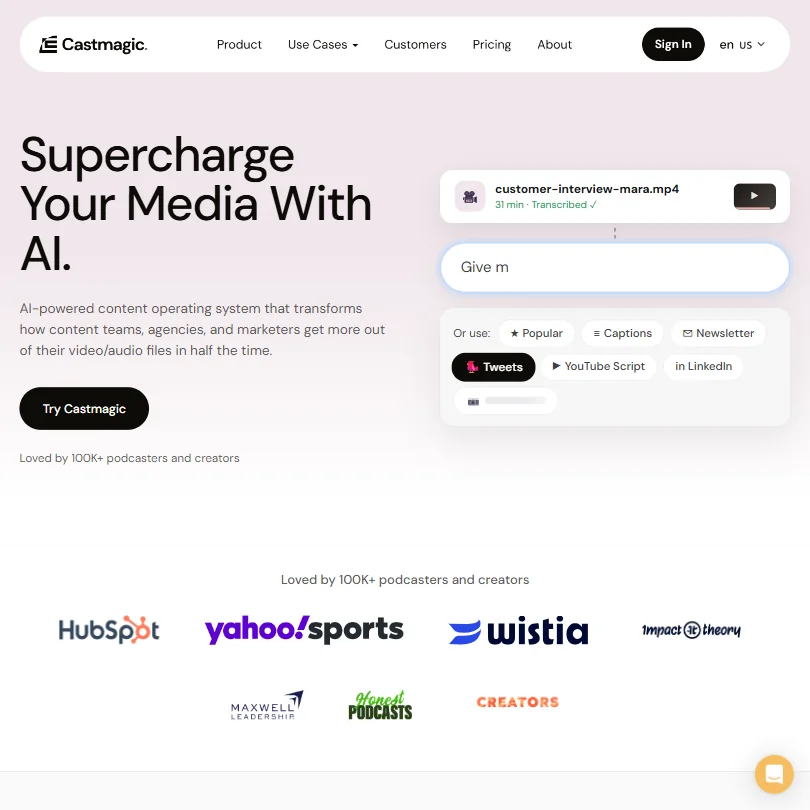
The homepage calls it a content operating system. We've heard that framing before. What we kept seeing across Product Hunt threads, Reddit, and G2 entries was consistent enough to actually mean something here. Castmagic launched in 2022, is based in San Francisco, and has crossed 100,000 users. For a two-year-old AI content tool, that's not nothing.

Castmagic homepage screenshot
Castmagic — Homepage

What is Castmagic?

Drop in a recording. Get a pile of written content back. That's the core premise. Show notes, a newsletter draft, LinkedIn copy, a blog post. One long audio or video file becomes the raw material for a week's worth of assets without anyone rewriting the same ideas five times.

The layer on top is what separates it from a basic transcription tool. It's not just pulling a transcript. It's running structured prompts against that transcript to produce specific formats. They call this a content operating system, and honestly, that framing is more accurate than most vendor descriptions we encounter. The workspace is organized around Spaces, recurring prompt sets, and a campaign builder that batch-generates assets from a single recording. There's also a Claude MCP connector, which is genuinely interesting for teams already running Claude-based workflows.

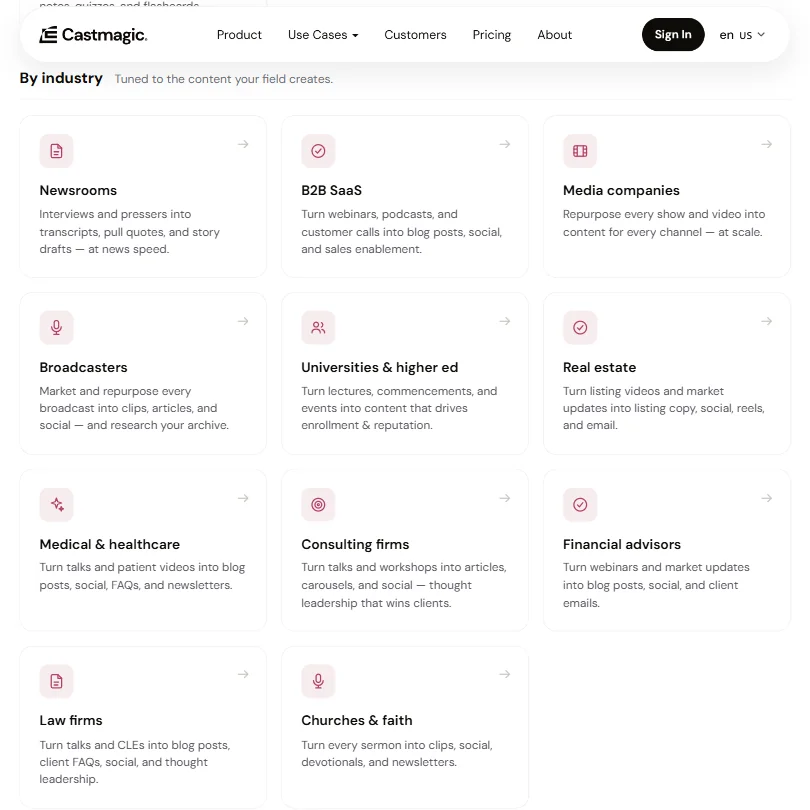
The user base skews toward content teams, marketing agencies, and podcasters publishing regularly. Solo creators show up too. But the feature set is clearly built for teams who need volume, not one-off use.

Castmagic Features: Voice, Music & Audio Capabilities

Castmagic features screenshot
Castmagic — Features

No text-to-speech. No voice cloning, no music generation, no noise removal. Comparing this to ElevenLabs on those dimensions will disappoint fast. Different tools entirely.

What Castmagic does is transcription and content generation. Transcription supports 60+ languages and includes timestamps. From there, Magic Chat and the AI Strategist let you prompt against the transcript to pull quotes, draft posts, generate summaries, or build email sequences. The recurring prompt system is where teams seem to extract real value. You configure a prompt pack once, and every new recording runs through the same set automatically.

Batch processing is supported. The API is available from the Starter plan upward. Integrations include Zoom and YouTube, and a few others. Two that come up most in team workflows: Google Drive sync and the RSS connector for pulling in existing podcast feeds.

The campaign builder gets the most attention. We're cautiously positive on it. Not convinced it works as cleanly as the homepage implies for every use case, but the concept is sound.

Castmagic Audio Quality: How Natural Does It Sound?

The heading is a mismatch for what this tool does. Castmagic doesn't generate audio. It processes it. So audio quality here really means transcription accuracy.

From user reports across G2 and Reddit, transcription accuracy is genuinely good for clean recordings. Podcasters with studio-quality audio report solid results across multiple speakers and technical vocabulary. Where it gets shaky is messy audio, heavy accents in less common languages, or multi-speaker recordings with a lot of crosstalk. Not unusual for AI transcription at this tier. Worth knowing before you throw a poorly recorded conference call at it and expect clean output.

The 60+ language support sounds impressive. In practice, accuracy drops noticeably for non-English content. We've seen worse. But we wouldn't call multilingual support a selling point just yet.

Castmagic Voice Cloning & Customization: How Deep Does It Go?

It doesn't. No voice cloning. Full stop.

The customization that exists is on the content side. Brand voice training is the closest thing to personalization on offer. Feed it examples of your writing style, and it tries to match that tone across generated content. Marketing users on Reddit seem to find this useful once set up correctly. The initial calibration takes some back-and-forth, and results vary depending on how distinctive the target voice actually is.

The recurring prompt system handles custom templates. Build the structure once, apply it to every new recording. For the tool's actual use case, that's probably enough. We're not skeptical of it. Just clear about what it is.

Is Castmagic Easy to Use?

Mostly yes. Some caveats.

Web only. No mobile app, no desktop app. For most content teams that's fine. For someone who records on their phone and wants to process on the go, it's a friction point that won't go away.

The core workflow is approachable. Upload a file or connect a source, wait for transcription, generate content from the prompt library. Most users we read about were running within a session or two. The campaign builder and recurring prompts take longer to configure. That's expected. Onboarding drew real criticism in early Product Hunt comments, specifically around which prompt types to start with. More recent comments suggest the interface has improved since then.

There's a Slack community with over 1,700 members. That's a real resource. Live chat is listed across all plans, which is better than most tools at this price tier. The help center exists but isn't extensive.

Castmagic Pricing: Is It Worth It for Creators & Businesses?

Castmagic pricing screenshot
Castmagic — Pricing

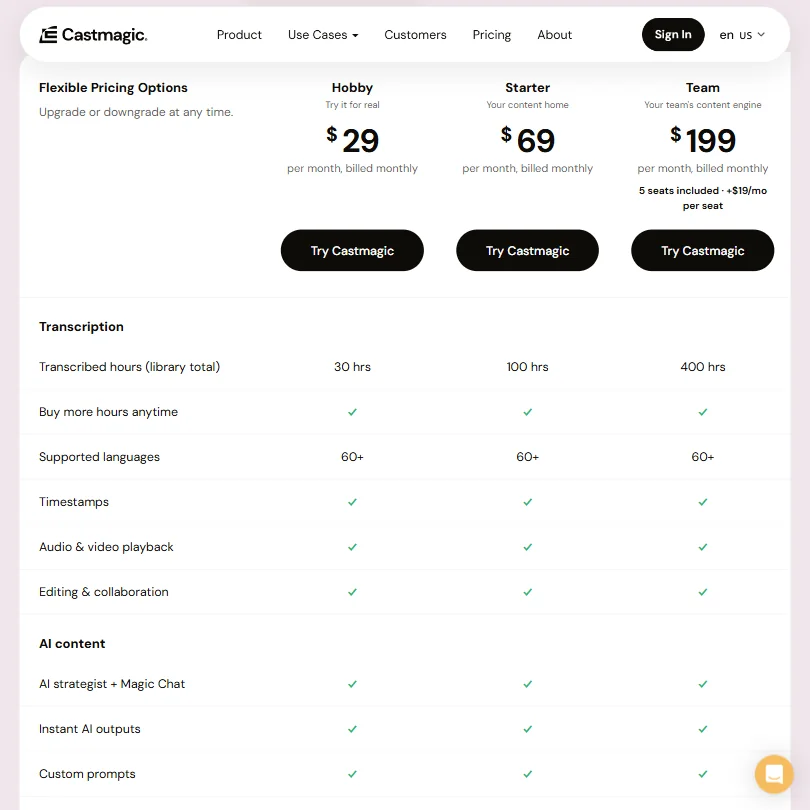
Three public plans. Hobby at $29 a month, Starter at $69, Team at $199. The Team plan includes 5 seats and adds $19 per seat beyond that. No free tier. No publicly stated trial.

The transcription library limits are where the tiers diverge most sharply. Hobby gives you 30 hours total. Starter steps up to 100 hours. Team unlocks 400 hours of transcribed audio in the library, which is where agencies doing serious volume start to breathe easier. All three plans support 60+ languages, timestamps, audio and video playback, editing and collaboration, AI Strategist, Magic Chat, instant AI outputs, and custom prompts. The differentiation is almost entirely in hours and seats, not features.

Honestly, that bothers us a bit. The Hobby plan's 30-hour cap will feel tight fast for anyone using this daily, and you're paying $29 before you've confirmed the tool fits your workflow. You can buy more hours at any tier, which softens that somewhat. But the ask is still real. The category median for AI audio tools sits around $12 per month, and a large chunk of competitors offer a free tier. Castmagic offers neither.

The Team plan at $199 makes sense for agencies. Harder to justify for a solo podcaster watching their expenses.

Castmagic vs Descript: Which AI Audio Tool Wins?

Different tools, different workflow moments. Descript is built around audio and video editing. You cut the waveform by editing the transcript. It's a production tool. Castmagic doesn't touch production. It starts after the recording is done.

If you need to cut, trim, or clean up audio, Descript wins before the comparison gets interesting. If you have a finished recording and need a week of marketing content from it, Castmagic is more focused on that specific job. The two tools aren't really competing for the same moment in the workflow. Some teams use them together: Descript for editing, Castmagic for the written output layer. That tracks.

Otter.ai is a closer competitor on transcription. Opus Clip overlaps on video clip repurposing. Neither does what Castmagic does with the full content generation layer on top.

For teams needing transcription API-first, AssemblyAI is worth a look. Different buyer profile, but the accuracy and developer tooling are strong.

Who Should Use Castmagic? (And Who Shouldn't)

Content agencies. Clearest fit. Teams producing consistent audio or video who need to convert recordings into written deliverables at volume. The campaign builder and recurring prompts are built for exactly that.

Podcast teams publishing weekly. Castmagic was clearly designed with them in mind, and the automation compounds fast above a handful of episodes per month.

Solo creators on tight budgets. Harder to justify with no trial, a starting price above the category median, and a setup curve that takes time to pay off.

Teams who need audio editing or voice generation should look elsewhere. Castmagic does neither. Not a knock on the tool. Just a mismatch worth flagging before someone buys the wrong thing.

Castmagic Review Verdict

Castmagic does one thing and takes it seriously. Turn a recording into a lot of written content, faster than doing it by hand. For teams publishing constantly, that's a real problem worth solving, and the tool solves it better than most alternatives we've looked at in this category.

The gaps are real. No free plan, no trial, and the Hobby tier's 30-hour library cap will feel limiting for anyone using this as their primary content tool. The multilingual transcription has limits the 60+ language claim doesn't fully reflect. The web-only situation won't bother everyone, but it will bother some.

The brand voice training and campaign builder are where the tool earns its price, specifically at Starter and above. Most serious users will land at $69 or $199 pretty quickly. Factor that into the decision before starting with Hobby.

We're positive on what Castmagic is trying to do. The 100K+ user base wasn't built on bad software. But we'd feel better recommending it without hesitation if they'd add even a limited trial. The ask is steep for a category where most competitors let you try before committing.

Frequently Asked Questions

Does Castmagic have a free plan or free trial?

No free plan, and no free trial is publicly listed. Entry point is $29 a month on the Hobby plan. For a tool with a real setup curve and a 30-hour library cap at that tier, not being able to test first is a friction point we'd push them to fix.

What file types and sources does Castmagic support?

Direct audio and video file uploads are supported. It also connects to sources like YouTube and Zoom, plus RSS feeds for pulling in existing podcast content without re-uploading. The integration list includes Loom and a few others, which covers most of where content teams are recording today.

Is Castmagic good for non-English podcasts?

It supports 60+ languages on paper. Accuracy for non-English content is more variable than the spec sheet implies. Clean audio in major European languages tends to fare reasonably well. Rarer languages or heavy accents in any language introduce more errors. Test it on a real sample before you build a workflow around it for non-English content. We wouldn't take the language count at face value.

Castmagic is featured in

Alternatives to Castmagic

See all Castmagic alternatives →

Other AI Audio Tool options we've reviewed.

User reviews

Review Castmagic

Your rating

Reviews are moderated and appear once approved.