Brandmark Logo Maker is an AI logo generator that builds an icon from your business name and keywords, refines it through short chat-style instructions, and sells the finished brand kit as a single one-time payment rather than a subscription. Whether it suits you depends on whether a flat $35 to $195 purchase covers what you need, since there's no ongoing plan to grow into.

What is Brandmark Logo Maker?
Brandmark is Brandmark.io's AI logo maker, headquartered in Canada. The tool runs in the browser; it also works on a mobile browser, though there's no dedicated mobile or desktop app.
What Brandmark Logo Maker gives you
You generate logo options from your business name and keywords, and Brandmark's Generative AI can build a custom icon from those inputs. Editing happens through short, chat-style instructions: you can ask it to place the icon on a hexagonal container, change the text color or remove the tagline, and it applies the change directly.
Every package exports PNG, SVG and PDF files, so print-ready vector formats aren't held back for a higher tier. The Designer and Enterprise packages add a full brand kit: logo source files, a brand guide, business card designs, social media designs and a one-page website, and the Designer package includes unlimited design revisions after purchase.
Working with other people
Brandmark's brand kit, included on the Designer and Enterprise packages, bundles the logo with a brand guide, business card and social designs, and a one-page website. There's no API and no third-party integrations. The tool runs in the browser, including on a mobile browser.
Brandmark Logo Maker pricing: what each plan gives
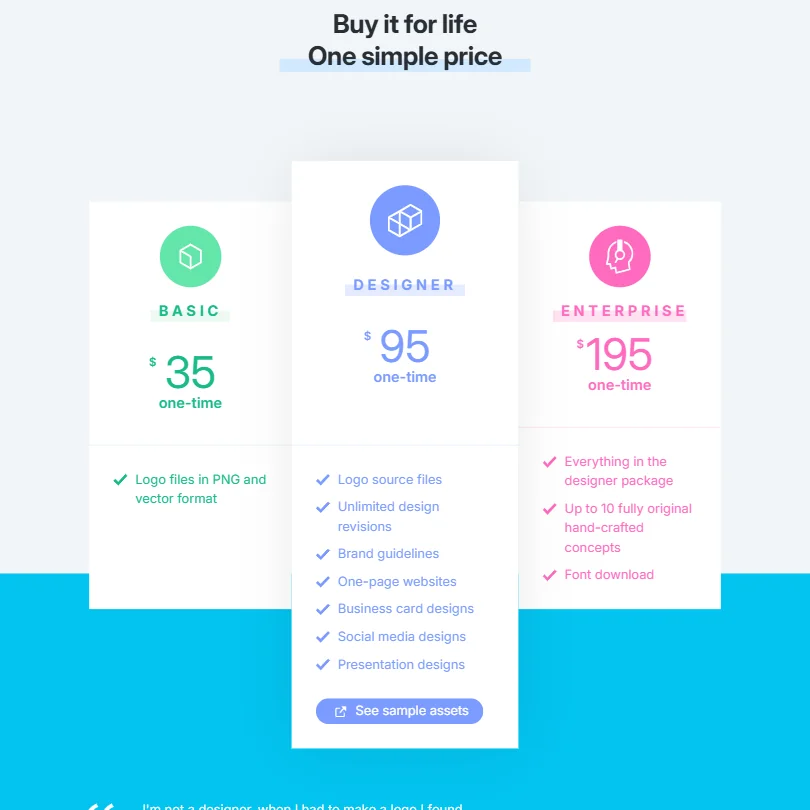
All three plans are one-time purchases with no subscription. Basic costs $35 once and gets you the logo files in PNG, SVG and PDF. Designer costs $95 once and adds the brand kit: a brand guide, business card and social designs, a one-page website and unlimited revisions. Enterprise costs $195 once and covers the same brand kit at its top tier.
There's no free trial, and no free plan that lets you keep a file without paying, though designing and generating logo options costs nothing.
Privacy and support
Brandmark names no SOC 2 or similar security certification and doesn't mention GDPR. There's no single sign-on option. Commercial use of a purchased logo is permitted, with full copyright included. Support is by email only; there's no live chat or help center.
Who Brandmark Logo Maker suits
Brandmark suits someone who wants a single, one-time payment for a logo and brand kit rather than a recurring subscription, and who's comfortable refining the design through short written instructions rather than a full drag-and-drop editor. It also suits anyone who wants vector files included at every price point rather than gated to a higher plan.
It suits less well anyone who might need more support than a single email address if something goes wrong, since there's no live chat or help center. Anyone needing trademark help, an API, or team-based design workflows should look elsewhere too.
Screenshots

How Brandmark Logo Maker compares
Brandmark Logo Maker scores 6.7 out of 10 among the AI logo makers we rate. These three do the same job and are the closest to it, compared on what each vendor publishes.
Looka
Looka builds your logo through a guided picker for name, style, colors and symbol, while Brandmark keeps you editing with a conversational, chat style AI you can keep nudging after the first draft. Both charge $35 for their cheapest one-time package and both hand over 3 export formats. Looka backs its logo with 6 brand assets against Brandmark's 4, and offers 3 support channels to Brandmark's 1. Neither includes AI photo editing, and neither has a free plan.
Pick Looka if you want a wider brand kit and more ways to reach support.
Pick Brandmark Logo Maker if you'd rather type out changes than click through a style picker.
Design.com
Design.com sells its logo as a subscription from $25 a month, with sole ownership a $145 one-time license on top, while Brandmark charges a one-time $35; Design.com delivers 6 export formats against Brandmark's 3. It also adds AI image editing and a free plan, neither of which Brandmark offers. Brandmark bundles a brand kit into its higher package, while Design.com's package does not include one. Both generate a full logo from a written prompt, and both let you keep making changes once you've bought. Design.com states GDPR compliance; Brandmark does not.
Pick Design.com if you want a free plan to start with and built-in AI photo editing.
Pick Brandmark Logo Maker if you want a brand kit bundled in and a lower one-time price.
Turbologo
Turbologo transfers full commercial and copyright rights to your finished logo and throws in free unlimited modification, matching Brandmark's own unlimited changes and outright ownership. Where Brandmark lets you generate a full design from a typed prompt, Turbologo walks you through a name, industry and style questionnaire instead. Turbologo runs its interface in 9 languages and offers 3 support channels against Brandmark's 1. Both include a brand kit and 3 export formats, and neither adds AI photo editing. Turbologo states GDPR compliance; Brandmark does not.
Pick Turbologo if you want more support channels and an interface in several languages.
Pick Brandmark Logo Maker if you'd rather type out changes than answer a style questionnaire.
Frequently Asked Questions
Does Brandmark Logo Maker have a free plan?
No. You can generate unlimited logo options for free with no account, but there's no free tier that lets you keep a downloadable file. Every package, from Basic to Enterprise, is a paid one-time purchase.
What does Brandmark Logo Maker cost?
Basic costs $35 once, Designer costs $95 once and Enterprise costs $195 once. All three are single payments; none is a subscription.
Can you edit the logo with written instructions instead of a full editor?
Yes. Brandmark's Generative AI accepts short, chat-style requests, such as changing a container shape, a text color or removing a tagline, and applies the change directly to the design.
Do you own the logo you buy from Brandmark?
Yes, full copyright is included with every package, covering both commercial and personal use.










