Akiflow is a time-blocking planner that gathers your tasks into one inbox, puts them next to your calendars and adds an AI assistant called Aki to help plan the day. It sells one paid plan after a 7-day trial, with no free tier. What decides whether it suits you is whether you want to plan your day by placing tasks on real calendar time, with an assistant and AI connections included in the price.
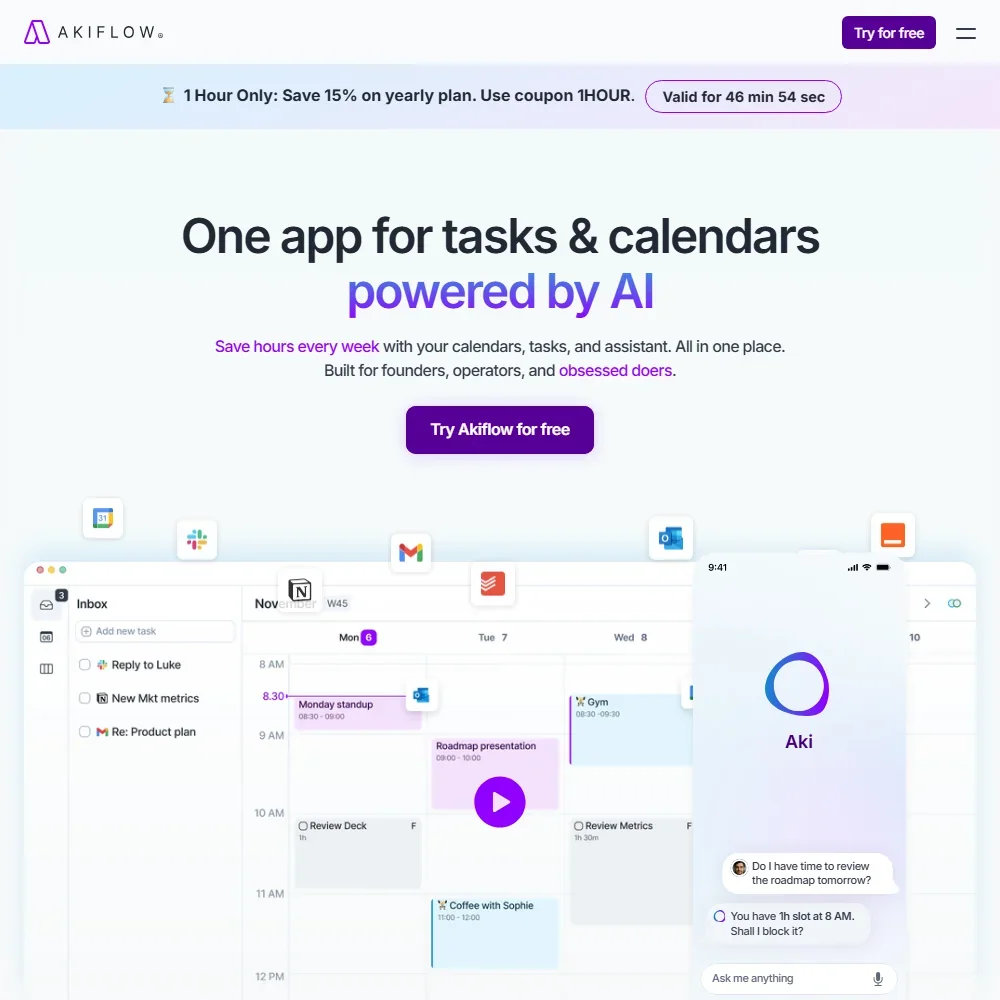
What is Akiflow?
Akiflow is a task inbox, calendar and daily planner in one, made by Akiflow Inc. It runs in the browser, with desktop apps for macOS and Windows, mobile apps for iOS and Android, and an Apple Watch app.
Every version needs an Akiflow account and syncs to Akiflow's cloud, with data hosted on Google Cloud Platform. Your tasks and events sit on Akiflow's servers, and the apps also work offline.
Planning your day with Akiflow
The core of Akiflow is its Universal Inbox, which collects tasks you send in from email and other apps, along with tasks and subtasks you add yourself. From there you time-block the day by placing tasks on your calendar beside your meetings. Akiflow can time-block your day automatically, and Aki can reschedule conflicts when you ask it to.
It connects to Google, Outlook and iCloud calendars. From Gmail and Outlook email, you can turn a message into a task in one click. Akiflow is not a full email client, and it does not sort or summarize your mailbox itself.
Tasks can come in from Notion, Asana, ClickUp, Linear, Jira, GitHub, Trello, Todoist and Microsoft To Do, as well as from Slack, Microsoft Teams and Zoom. Zapier and IFTTT connect further apps.
Aki, the AI assistant, answers questions about your calendar and tasks in chat, such as whether you have time for a piece of work tomorrow. Aki is included in Pro.
A scheduling link lets you share your availability so others can book one-off or recurring meetings with you. Meeting recording is a separate matter: the AI Meeting Assistant records meetings and produces transcripts, summaries and action items, and it is a paid add-on rather than part of Pro. Once it is on, those meeting transcripts are also among the things the MCP connector can reach.
Akiflow also runs a hosted MCP connector, which lets Claude, ChatGPT or any other MCP client work with your tasks, calendar, time slots, schedule and meeting transcripts through 19 actions. The connector is hosted at mcp.akiflow.com/mcp and is included in Pro, so you can ask your own AI assistant to look at or change your plan.
Working with other people
Pro includes team collaboration: you can see teammates' calendars and share availability with them. Pricing for teams is quoted by Akiflow's sales team rather than sold per seat, and Pro itself is a single-user subscription. Slack, Microsoft Teams and Zoom connect to Akiflow, so tasks from team chat and calls can land in the same inbox.
Akiflow pricing: what each plan gives
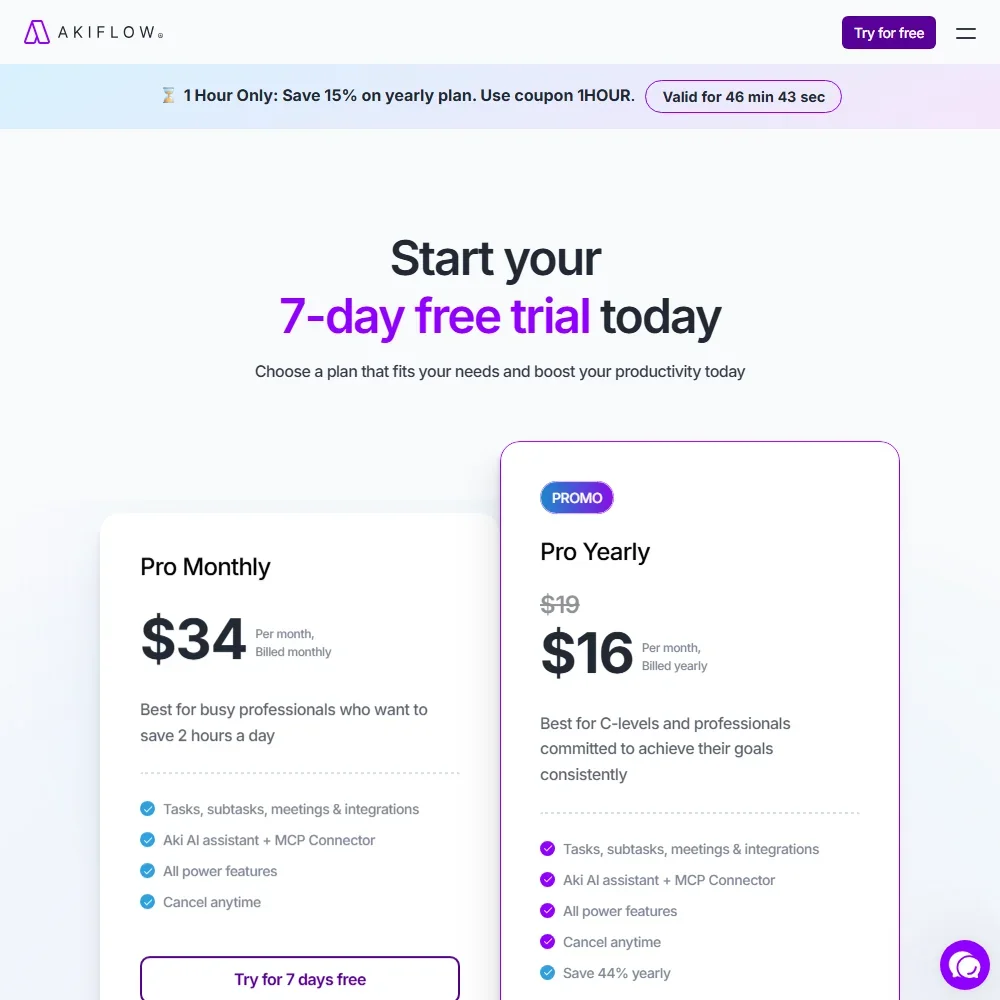
Akiflow has no free plan. New customers get a 7-day trial with full access; a card is required, and the subscription starts when the trial ends unless you cancel.
Pro costs $34 a month, or $19 a month billed yearly ($228 a year). It includes all of Akiflow's features apart from the meeting add-on: tasks, subtasks, meetings and integrations, Aki, the MCP connector, team collaboration and a free one-to-one onboarding call.
The AI Meeting Assistant is an optional add-on at $19 a month on top of Pro. It covers meeting recording, transcripts, summaries and action items. Team plans are priced on request.
Privacy and security
Akiflow does not have SOC 2 or ISO 27001 certification. Your contact details and the tasks and events you create are stored across several databases on different servers in Akiflow's cloud, and a Data Processing Agreement is available.
Support runs through a contact form and email at support@akiflow.com, with replies usually in under four hours.
Who Akiflow suits
Akiflow suits people who want to pull tasks out of email, chat and project tools into one place and then block time for them on the calendar. It fits professionals who juggle several calendars and task apps, who want an assistant that can answer questions about their schedule, and who would like Claude or ChatGPT to reach their plan through the MCP connector without paying extra for it.
It suits less well anyone who wants a free plan to stay on, since the 7-day trial needs a card and there is no free tier. Anyone who wants meetings recorded and summarized should budget for the add-on on top of Pro, and teams with security reviews that require SOC 2 should know Akiflow does not have that certification.
Frequently Asked Questions
How much does Akiflow cost?
Pro costs $34 a month, or $19 a month billed yearly. There is no free plan, but a 7-day trial with full access is available once you add a card. The AI Meeting Assistant costs an extra $19 a month, and team pricing comes from Akiflow's sales team.
What can Aki, Akiflow's AI assistant, do?
Aki answers questions about your calendar and tasks in chat and can reschedule conflicts when you ask. It is included in the Pro plan at no extra cost.
Can I use Akiflow with Claude or ChatGPT?
Yes. Akiflow's hosted MCP connector lets Claude, ChatGPT or any MCP client work with your tasks, calendar, schedule and meeting transcripts, and it is included in Pro.
Is Akiflow SOC 2 certified?
No. Akiflow does not have SOC 2 or ISO 27001 certification. Data is stored on Akiflow's cloud servers, and a Data Processing Agreement is available.











