SAASINSPECTOR

AIVA AI Review

Content creators and composers wanting AI-generated music with monetization rights

Visit AIVA AIFrom Free

Research-based review. We analyzed vendor documentation, customer reviews on G2, Capterra, and Reddit, and live pricing — not hands-on testing yet. We update as our team puts tools through real workflows.

The verdict

AIVA is a Luxembourg-based AI music generation tool founded in 2016, purpose-built for orchestral, cinematic, and instrumental composition used in film, games, and media production. Its standout feature is editable MIDI export, which lets music producers continue refining generated pieces inside their own DAW. With a 2.8 Trustpilot score from just three reviews and no G2 or Capterra listings, third-party validation is nearly absent, making it hard to gauge broader user satisfaction.

Pros

  • MIDI export allows users to pull generated compositions into any DAW like FL Studio or Ableton for further editing and refinement.
  • Built-in MIDI editor separates AIVA from competitors like Mubert or Boomy that only deliver finished audio files.
  • Reference track upload feature lets users steer output using their own audio or MIDI files, offering more control than most tools at this price point.
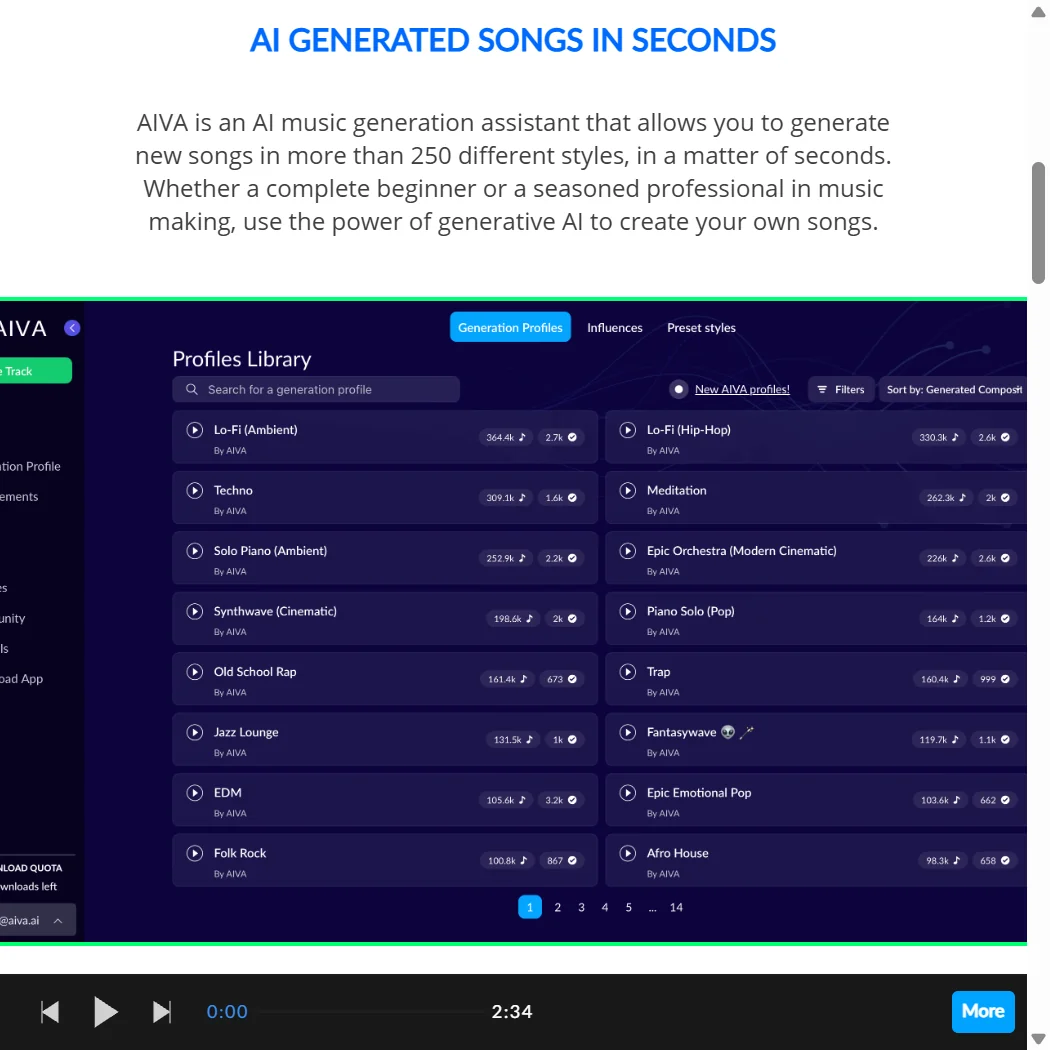
  • Over 250 style models spanning classical, cinematic, ambient, electronic, and jazz provides genuine genre breadth.
  • April 2025 infrastructure update introduced three proprietary models — Lyra, OmniCodec, and ORAQL — representing a meaningful technical upgrade.
  • AIVA has been operating since 2016, giving it nearly a decade of development in AI music generation before most competitors existed.
  • Strong focus on orchestral and cinematic music makes it a purpose-built tool for film, games, and professional media work.

Cons

  • Extremely limited third-party review data — only three Trustpilot reviews with a 2.8 rating, and no presence on G2 or Capterra.
  • No voice generation, vocal tracks, or text-to-speech capabilities, making it unsuitable for projects requiring sung or spoken content.
  • WAV export is locked behind paid plans, restricting higher-quality audio output for free users.
  • The company is quiet about user numbers and overall traction, making it difficult to assess product health or community size.
  • It remains unclear whether the April 2025 model update actually closes the quality gap with newer, better-funded competitors.
  • Niche focus on instrumental and orchestral music means it has limited appeal for users seeking pop, vocal, or hook-driven content.
From Free Free plan YesFree trial No

Our research on AIVA started with the vendor's own documentation and ended somewhere in the Reddit threads, where the picture gets more interesting. Fair warning on the review data: Trustpilot shows three reviews. G2 and Capterra don't list it at all. So we leaned harder on the product itself, the changelog, and what users say in forums.

AIVA has been around since 2016, which is a long time in this space. Luxembourg-based, quiet about user numbers, and historically focused on one thing: orchestral and cinematic music generation for people who need it for film, games, or media work.

What is AIVA, the AI Music Generation Assistant?

Founded eight years before most of its current competitors existed, AIVA carved out a specific niche. Not pop song generators. Not viral hooks. Orchestral scores, cinematic beds, and instrumental composition.

The core workflow is straightforward. You pick a style or upload a reference track, the system generates a piece, and you download it in MP3, WAV, or MIDI. The MIDI part matters. That's what separates AIVA from tools that hand you a finished audio file and walk away. You can pull the MIDI into any DAW you already use, like FL Studio or Ableton, and keep working.

In April 2025, they launched three proprietary models. Lyra handles generation, OmniCodec handles audio encoding, and ORAQL handles quality assessment. That's a meaningful infrastructure update, not just a marketing refresh. Whether it closes the gap with newer competitors is the real question.

AIVA, the AI Music Generation Assistant Features: Voice, Music & Audio Capabilities

No voice generation. No vocal tracks. No text-to-speech. AIVA does one thing.

That thing is instrumental music generation across 250+ style models. Classical, cinematic, ambient, electronic, jazz. The breadth is real. You can upload an audio or MIDI reference to steer the output, which is more control than most tools at this price point offer. Honestly, the reference upload feature is underrated.

The **built-in MIDI editor** is where AIVA separates from tools like Mubert or Boomy. Those hand you a looped audio file. AIVA hands you editable MIDI that you can recompose after generation. For anyone who actually works in music production, that's not a small distinction.

WAV export is gated to paid plans. MP3 and MIDI are available across tiers. Batch processing isn't mentioned in any documentation we found, which is a gap for anyone working at volume.

AIVA, the AI Music Generation Assistant Audio Quality: How Natural Does It Sound?

This is where AIVA has historically been strong, and the April 2025 update appears to push it further. The Lyra model and OmniCodec combination targets higher fidelity output than the previous generation. ORAQL functions as an internal quality filter, flagging poor outputs before they reach the user. Most tools don't surface that kind of quality control at all.

For orchestral and cinematic work, **user reports consistently describe AIVA's output as more polished than Suno or Udio** in that specific genre. Reddit threads from early 2025 show composers using AIVA for game scoring and short film underscore, where those tools produced muddier, less structured results. That tracks with what the product was designed for.

Electronic and pop styles are less consistent, from what we've read. AIVA's DNA is classical composition. When it wanders outside that, the quality edge gets thinner.

AIVA, the AI Music Generation Assistant Voice Cloning & Customization: How Deep Does It Go?

Voice cloning doesn't exist here. This section would normally cover that, but AIVA has no voice features at all.

What it does offer on the customization side is more interesting than the absence of voice suggests. You can build custom style models, which essentially lets you train the generation around a specific sonic direction. Upload references, shape the output over time, iterate. That's a workflow borrowed from professional composition pipelines, not consumer AI tools.

The style control on generation, **adjusting tempo, key, time signature, and instrumentation before output**, gives you levers that tools like Suno don't expose at all. Suno generates, full stop. AIVA generates and then lets you steer.

We're not treating the lack of vocals as a weakness. For the use case AIVA targets, it's not a gap. It's a deliberate boundary.

Is AIVA, the AI Music Generation Assistant Easy to Use?

Web-only. No mobile app. That's a constraint worth naming plainly.

The interface is functional. Not beautiful, but navigable. The generation flow is fast once you're oriented. Where it gets complicated is the MIDI editor. It's a real editor, which means it has a learning curve. Users coming from consumer tools will feel that. Users who already work in DAWs will feel right at home.

What we kept seeing in forums was a split reaction. Casual creators found AIVA's depth slightly overwhelming. Composers found it refreshingly complete. **The tool is built for the second group**, and that's not a criticism, but it's honest.

No API documentation appeared in any public-facing page we reviewed. That's a notable absence for a tool targeting professional workflows.

AIVA, the AI Music Generation Assistant Pricing: Is It Worth It for Creators & Businesses?

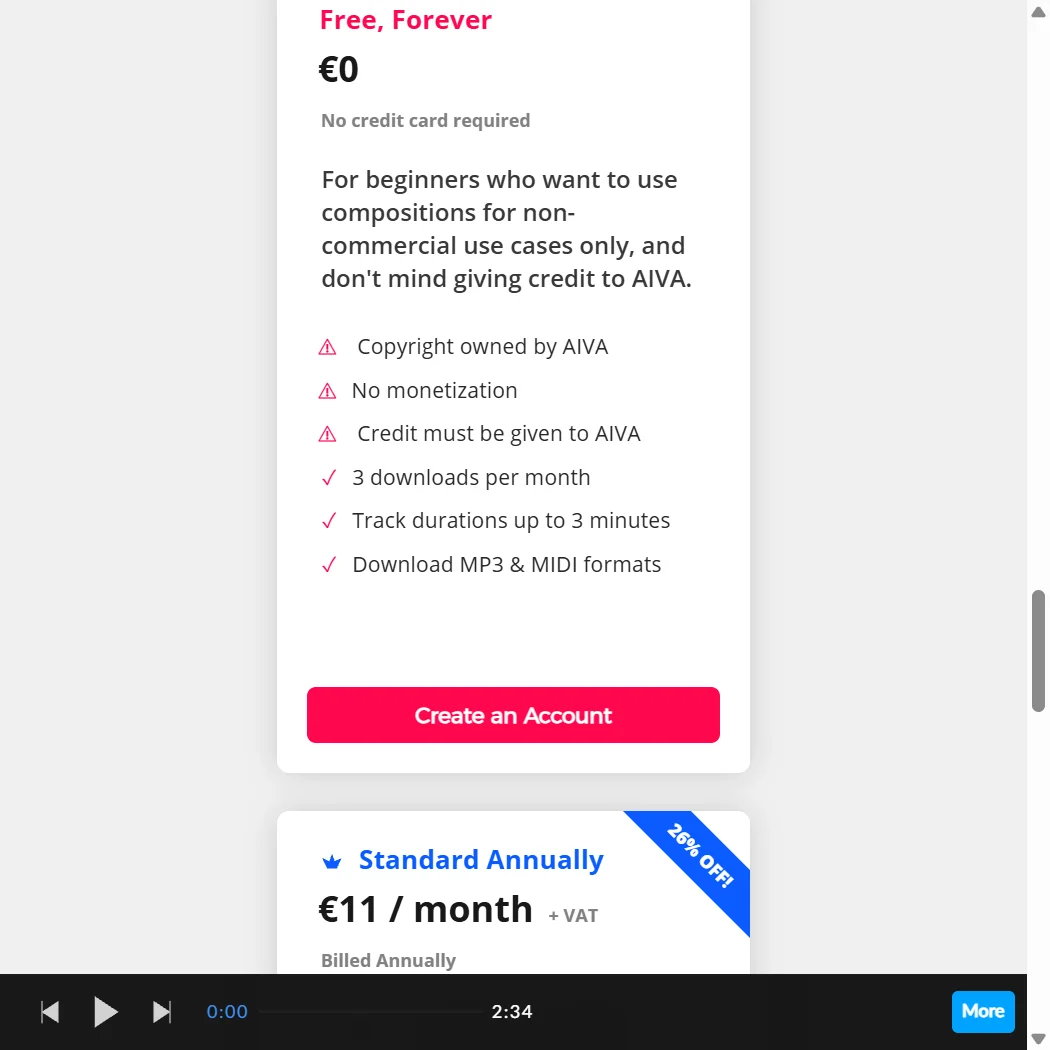
Three tiers. The free plan is permanent, Standard runs €15/month billed monthly, and Pro runs €49/month billed monthly. Those are the monthly figures. Annual billing brings Standard down to €11/month and Pro down to €33/month, which is the version most pricing comparisons quote. Enterprise isn't listed anywhere publicly. You contact them.

The free plan exists but comes with real restrictions. Copyright stays with AIVA, not you. Monetization is blocked entirely. Downloads cap at three per month, and track durations top out at three minutes. Fine for testing the product. Not for real work.

Standard at €15/month opens up fifteen downloads per month and tracks up to five minutes, but **the copyright on Standard still sits with AIVA**, and monetization is described only as "limited," covering YouTube, Twitch, TikTok, and Instagram. That's a narrow window. Pro at €49/month is where copyright transfers to you, monetization becomes unrestricted, and downloads jump to 300 per month. WAV export also only unlocks at Pro. For anyone placing music commercially, that's the tier that actually covers you.

Refund policy isn't publicly posted. Frustrating. Student and school discounts are mentioned but require a live chat inquiry. We'd prefer that information to just exist on the page.

Compare that to Suno's $8/month Creator tier, which includes commercial rights. AIVA's Pro plan costs more. Whether the MIDI editing and orchestral quality justify the gap depends entirely on what you're building.

AIVA, the AI Music Generation Assistant vs Suno: Which AI Audio Tool Wins?

Suno generates vocal tracks. AIVA doesn't. That's the first filter.

Suno is built for song creation with lyrics and melody. AIVA is built for scoring and instrumental composition. They're not really the same product, despite competing in the same broad category. Comparing them head-to-head only makes sense if you actually need both capabilities.

Where the comparison does hold: speed, ease, and output control. Suno is faster to get something shareable. AIVA requires more setup but gives you more to work with after generation. **MIDI export alone puts AIVA ahead for production workflows** that don't end at the AI output stage.

On pricing, Suno edges out. On accessibility, Suno wins again. On professional output control and orchestral quality, AIVA has the better case. The decision comes down to whether you work downstream in a DAW or whether the AI output is the final product.

Who Should Use AIVA, the AI Music Generation Assistant? (And Who Shouldn't)

Film and game composers. That's the obvious fit. The orchestral depth, the MIDI workflow, the style models built around cinematic structures. AIVA was made for this and it shows.

Independent musicians who want to generate backing tracks and then shape them in a DAW will find the workflow natural. The reference upload and custom style modeling are built for that kind of iteration.

Content creators looking for quick background music on a budget? Probably not. The free tier is restricted and the Standard plan's monetization limits are a real friction point. Something like Murf AI serves that simpler use case better, though it's a different product entirely.

Anyone expecting vocal generation or podcast audio tools should stop here. AIVA doesn't do that. It's not going to.

AIVA, the AI Music Generation Assistant Review Verdict

Eight years old, freshly updated in April 2025, and still doing the specific thing it was built to do better than most. Fair.

The weaknesses are real. No mobile app. No public API documentation. Pricing transparency around enterprise and student plans is frustrating. The Trustpilot presence is basically nonexistent, which makes it hard to triangulate on real-world quality at scale. We'd want more data there before recommending it for high-stakes production work without testing.

**The MIDI editor and orchestral output quality are the genuine differentiators.** Most AI music tools generate a file and call it done. AIVA generates a file and then lets you work. For composers who live in DAWs, that's a real argument.

At €33/month for the Pro plan on annual billing, with full copyright and 300 downloads per month, the price is justifiable for working composers. For everyone else, the fit gets shakier fast.

Frequently Asked Questions

Does AIVA give you full copyright ownership?

Only on the Pro plan, at €33/month billed annually or €49/month billed monthly. The free and Standard tiers both list copyright as owned by AIVA, not the user. If you're placing music in a project that generates revenue, the Pro plan is the only tier that covers you cleanly.

Can AIVA generate music with vocals or lyrics?

No. AIVA generates instrumental music only. There are no vocal tracks, no lyric generation, and no text-to-speech features anywhere in the product. If you need AI-generated vocals alongside music, you'd need a separate tool entirely, something like ElevenLabs for voice, paired with AIVA for the underscore.

How does AIVA compare to tools like Suno for background music?

Suno is faster and cheaper for quick audio you'll use as-is. AIVA takes longer to get comfortable with but gives you MIDI output you can edit in a DAW, more style controls before generation, and stronger orchestral and cinematic output quality. Which one wins depends entirely on whether you work with the file after you download it.

AIVA AI is featured in

Alternatives to AIVA AI

See all AIVA AI alternatives →

Other AI Audio Tool options we've reviewed.

User reviews

Review AIVA AI

Your rating

Reviews are moderated and appear once approved.