
Vercel launched v0 in 2023 without much fanfare, and it's a tool that's genuinely good at a narrow thing and oversold on everything adjacent to it. It has no G2 or Capterra listing yet. The tension is consistent: fast, clean React scaffolding on one side, real limits in workflow fit on the other.
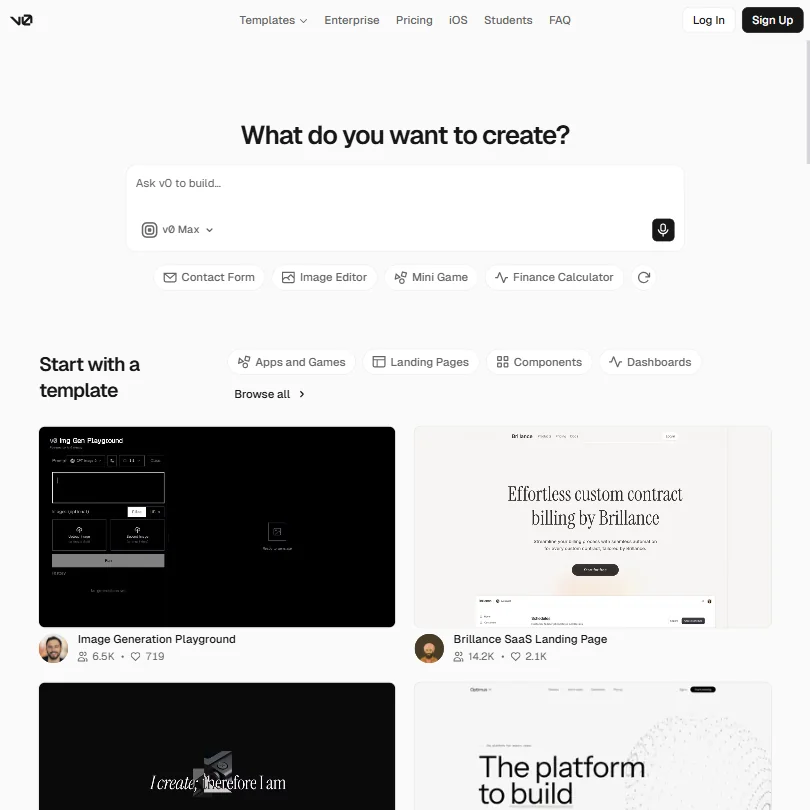
The React-to-deployment speed is hard to argue with. Whether what comes out is production-ready is a separate conversation entirely.
What is v0 by Vercel?
Text prompt in, working web application out. That's the pitch. v0 generates code, almost always React or Next.js, with shadcn/ui components baked in by default. You can push the result to GitHub, deploy to Vercel in one click, or edit visually through a Design Mode layer that sits on top of the live code without forcing you back into a prompt every time you want to adjust spacing.
It runs on Vercel's own model lineup. v0 Mini handles lighter tasks. v0 Max Fast is the ceiling. The naming is a little confusing, but the logic is that you're choosing how much compute to throw at a given prompt. That's different from how Cursor works, which routes through external models like Claude or GPT-4o rather than proprietary ones.
The agentic framing is genuine, not just marketing language. v0 plans, sets up tasks, connects to databases during the build process. That's a real step beyond what UI generators were doing 18 months ago. Whether the agentic behavior holds under pressure is where the user reports get messy, and we'll get there.
San Francisco-based. Launched 2023. No formal review aggregator presence yet, which limits our usual cross-referencing.
v0 by Vercel Features: Code Generation, Review & Developer Workflow
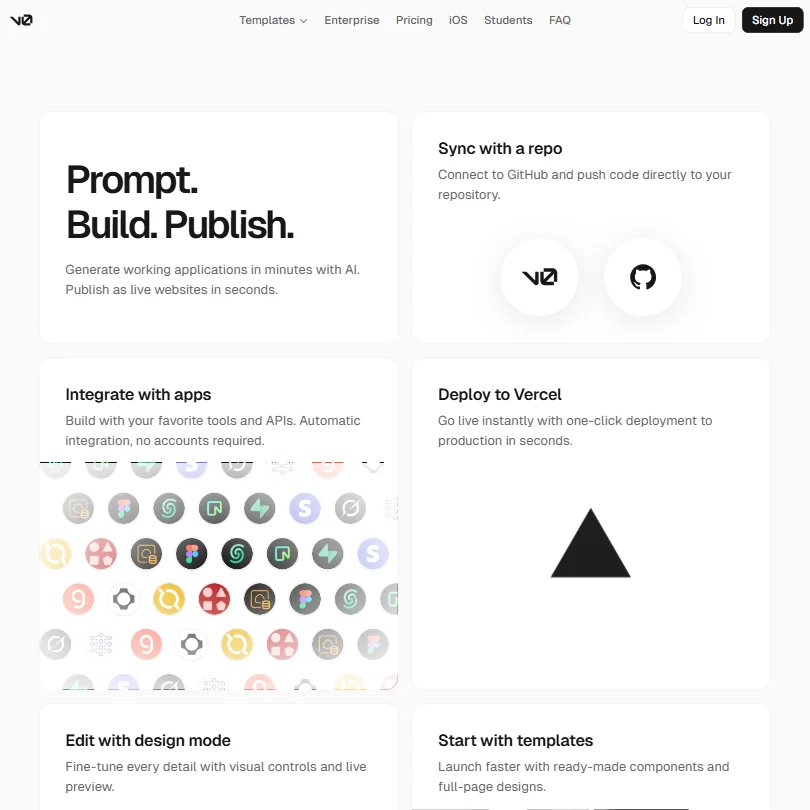
The core loop is prompt, build, deploy. It mostly reflects reality for straightforward projects. What's interesting is everything that happens between those steps.
Design Mode is one of the more thoughtful features. Instead of routing every tweak back through a prompt, it gives you visual controls, something like a lightweight Figma layer sitting on live code. Developers who want to fine-tune typography without writing CSS seem to like it. Non-developers moving fast without touching code seem to like it even more.
GitHub sync is real and functional. You can push directly to a repository, which matters if you're treating v0 as a prototyping layer feeding into a larger codebase. Not every AI app builder handles that gracefully. This one does. Honestly, that's probably the feature that separates v0 from the pure no-code crowd.
On the agentic side, v0 connects to databases and integrates external APIs automatically during the build process. The vendor's own documentation confirms it works, with caveats noted there. Simple integrations go smoothly. Anything complicated tends to require manual cleanup. That tracks with what we see across other agentic builders.
The documentation does explicitly cover test generation. v0's agent can write and run unit tests, execute project test commands, inspect results, and fix failures based on what it finds. That's a publicly documented agentic test loop, not just a feature checkbox, and it's meaningfully different from what most competitors offer in this category.
What's still missing is notable. No VS Code extension, no JetBrains plugin. No security scanning. No pull request analysis or anything resembling a code review layer. The lack of IDE integration means your workflow stays inside v0's browser interface, fine for prototyping, genuinely annoying if you're trying to blend it into an existing engineering process.
v0 by Vercel Code Quality: How Accurate and Reliable Is It?
User feedback in this category tends to split into two camps. One uses v0 as a scaffolding tool, gets 60 or 70 percent of a component built, then finishes by hand. They're happy. The other tries to ship v0 output directly to production. Less happy.
The scaffolding camp has a point. For React components, landing pages, and dashboard layouts, the output is genuinely good. shadcn/ui components render cleanly, the TypeScript is mostly coherent, layout logic holds up. We're not skeptical of those claims.
The production camp has a point too. Users report complex state management getting messy. Multi-page applications with real data dependencies tend to drift from what was prompted. One pattern we kept seeing: v0 generates code that looks right but breaks on edge cases the prompt didn't anticipate. That's not unique to v0, it's a category-wide problem in agentic code generation, but it's worth stating plainly rather than burying it.
The agentic iteration loop helps. Because v0 plans and revises, it catches some of its own errors mid-build. Not all of them. Vague prompts produce vague code that's hard to debug through the interface. Specific prompts narrow the blast radius considerably.
No security scanning anywhere in the documented feature set. For internal tools or quick prototypes, probably fine. For anything touching user data, you'll want another layer somewhere.
v0 by Vercel IDE & Workflow Integration: Where Does It Work?
Browser only. That's the honest summary. v0 is a web application, with an iOS companion app for building on mobile. No VS Code extension, no JetBrains plugin, no publicly documented CLI.
We don't buy the framing that this is fine for professional developers. It's fine for prototypers. It's fine for designers who want to ship something fast. But if your daily workflow lives inside an editor, v0 doesn't meet you there. You copy code out, push to GitHub, pull it into your editor. That's a workflow. It's just more friction than it should be.
The GitHub integration partially saves this. Pushing directly to a repository is a real escape hatch. The flow is two-directional: you can import existing GitHub repositories into v0, and it handles branching, commits, and PR creation automatically.
Team features exist on the Plus plan at $30 per user per month and the Business plan at $100 per user per month. Both include shared chats and centralized billing through Vercel. Shared chats are a reasonable baseline for small teams, not the kind of real-time collaboration you'd get from a purpose-built tool, but we've seen worse implementations. We've seen better ones too.
The iOS app is a genuine differentiator. Narrow audience. Narrow is fine.
Is v0 by Vercel Easy to Set Up and Use?
Genuinely easy. This shows up consistently across user comments and it's one of the clearest strengths. Sign up, type a prompt, something appears. No configuration file, no environment setup, no dependency installation. The frictionlessness is deliberate and it works.
The template library accelerates this further. Hundreds of community-built starting points exist, covering dashboards, landing pages, components, ecommerce, AI projects, and design systems, among others. Usage numbers on individual templates, some showing over 14,000 views, suggest this part of the product is well-used. Real shortcut.
Design Mode adds a layer non-coders can navigate without much instruction. The visual-to-code feedback loop feels tight, at least based on what users describe. You make a change visually, the code updates underneath. That's the expected behavior, and it apparently delivers it.
Where setup gets harder is the edge cases. Connecting real databases, configuring custom domain deployments, and managing authentication in generated apps all require more than the basic interface provides. Users report leaning on community forums, which are active but not officially moderated to any impressive degree.
Support is worth addressing directly. Vercel does provide a support chat through the account dashboard. You start with an AI support agent, which can escalate unresolved problems into a support case. Correspondence happens both in the dashboard and over email. That said, synchronous human live chat isn't generally promised. For a paid product at $30 or $100 per user per month, that's still thin. We flagged it.
v0 by Vercel Pricing: Is It Worth It for Solo Devs and Teams?
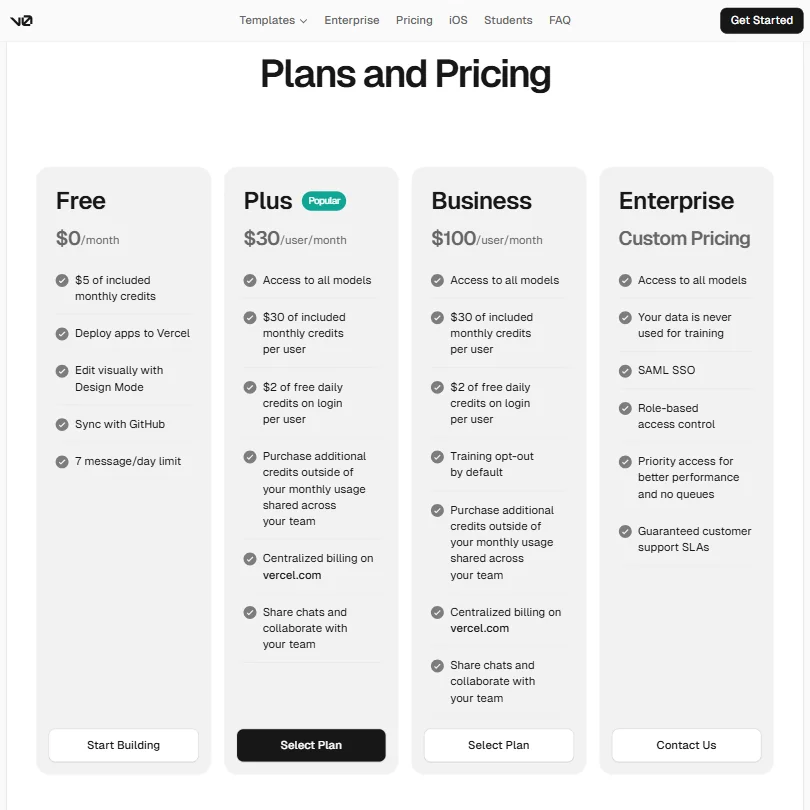
The free plan is $0 per month with $5 in monthly credits and a 7-message daily cap. Real free tier, not a trial. You can evaluate the tool without a credit card.
Plus is $30 per user per month, with $30 in included monthly credits per user and $2 of free daily credits on login. Business is $100 per user per month, same credit structure but with training opt-out by default, which means your data isn't used to train models unless you choose otherwise. Enterprise is custom pricing, adding SAML SSO, role-based access control, priority performance access, and guaranteed support SLAs.
The credit system requires attention. You're buying compute, and different model tiers burn credits at different rates. v0 Max Fast costs more per prompt than v0 Mini. Estimating monthly costs before you're mid-project is harder than it should be. Both Plus and Business allow purchasing additional credits outside the monthly allotment, shared across the team, which helps with overages but doesn't fix the opacity problem.
Among tools in this category, v0's free plan positions it among the cheapest available entry points. The $30 Plus tier isn't aggressive for the category. The Business jump to $100 needs more feature differentiation to justify it. Training opt-out by default is meaningful for some organizations, but it shouldn't be the primary reason to spend an extra $70 per user per month.
No refund policy is publicly stated. Not unusual for SaaS. Not reassuring either.
Compared to GitHub Copilot at $10 per month, v0 looks steep. But they're not doing the same thing. Copilot is a code completion layer inside your editor. v0 is a full app builder. Comparing them on price alone misses the point.
v0 by Vercel vs GitHub Copilot: Which AI Coding Tool Is Better?
Wrong question, honestly. But it's the comparison people reach for, so let's run it.
GitHub Copilot works inside your IDE. It suggests completions as you type, knows your existing codebase, doesn't ask you to leave your editor. For developers with complex ongoing projects, that's a fundamentally different value proposition than what v0 offers.
v0 starts fresh from a prompt. It doesn't know your existing codebase. It builds in the browser and is optimized for launching something new, not extending something existing. Different tools, different problems.
Where v0 wins: speed to a working UI from zero. Where Copilot wins: fitting into an existing development workflow without disrupting it. The overlap in use cases is smaller than the marketing for both products implies.
Bolt.new is actually the closer comparison. Both build full-stack apps from prompts in the browser. Both deploy with minimal friction. v0's Vercel integration is tighter if you're already in that ecosystem. Bolt.new is more framework-agnostic and doesn't default to Next.js. That matters if React isn't your thing.
Lovable is another fair comparison. Similar browser-based build loop, stronger emphasis on non-technical users. v0 skews more developer-facing. Pick accordingly.
Who Should Use v0 by Vercel? (And Who Shouldn't)
Frontend developers who prototype constantly. Clearest fit. The speed from prompt to working React component is hard to beat, and the Vercel deployment path is already their natural home.
Designers who want to ship prototypes without waiting on a developer. v0 lowers that barrier meaningfully and Design Mode exists for exactly this use case.
Solo founders building MVPs. The free tier is real, the speed is real, and getting something in front of users fast matters more than code cleanliness at that stage. Fair.
Enterprise teams with serious security requirements. Not a v0 audience. No security scanning, no self-hosted option, no documented compliance posture, and the Enterprise plan doesn't publicly address any of that beyond SSO and access control.
Developers who live in VS Code or JetBrains. No plugin, no extension. The workflow friction is real and doesn't appear to be a near-term priority given the product's current trajectory.
Anyone not building in React or Next.js. The framework lock-in is genuine. Other stacks are possible in theory. In practice, the opinionated defaults fight you the whole way.
v0 by Vercel Review Verdict
Good tool for a specific job. For that job, it might be the best available option right now. The issue is that the job is narrower than the homepage suggests.
The code generation for React and Next.js is fast and good enough for prototyping. The one-click Vercel deployment is genuinely frictionless. The documented test loop, where the agent writes tests, runs them, and fixes failures, is a real capability that most browser-based builders haven't shipped yet. The combination of those features in one browser-based interface is legitimately valuable, especially for developers already inside the Vercel ecosystem.
But the gaps pile up. No IDE integration means it doesn't fit existing engineering workflows cleanly. No security scanning means it's not ready for production in sensitive contexts. The support structure is thinner than the Business tier pricing implies. And the credit-based pricing model requires careful tracking to avoid surprises mid-project.
Against the tools we've reviewed in this category, v0 lands on the positive side, not toward the top. That's not a failure for a tool launched in 2023 with a clear and narrow focus. It's an accurate read of what v0 currently is: a strong prototyping tool, a reasonable MVP builder, and a work-in-progress as a full production platform.
We recommend it for prototyping. Production engineering teams should wait for IDE support and meaningfully better documentation before making it a primary tool.
How v0 by Vercel compares
v0 by Vercel scores 6.2 out of 10 among the AI app builders we rate. These two do the same job and are the closest to it, compared on what each vendor publishes.
bolt.new
bolt.new publishes native apps to the Apple App Store and Google Play; v0 by Vercel builds only responsive web apps, no native mobile output. v0 offers a full Platform API with chats, messages and webhooks; bolt.new has no public API for its own product. bolt.new's Pro plan costs $25 a month against v0's Plus plan at $30 a month, and both support HIPAA compliance for enterprise customers.
Pick bolt.new if you need to publish native apps to app stores.
Pick v0 by Vercel if you want a full platform API for automation.
Lovable
Lovable has no HIPAA compliance option, while v0 by Vercel supports it for enterprise customers. Lovable's Pro plan is cheaper at $25 a month against v0's Plus plan at $30 a month. Both offer an API and ISO 27001 certification, though Lovable's API is still in open beta and v0's is a full release.
Pick Lovable if you want a cheaper plan without needing HIPAA.
Pick v0 by Vercel if you need HIPAA compliance for enterprise deployments.
Frequently Asked Questions
Is v0 by Vercel free to use?
Yes, there's a real free plan at $0 per month with $5 in monthly credits and a 7-message daily limit. You can evaluate the product without entering a credit card. Once you hit the daily cap or exhaust the credits, you'll need to upgrade to Plus at $30 per user per month to continue.
What kind of code does v0 generate?
Primarily React and Next.js, typically with TypeScript and shadcn/ui components. The framework opinions are baked in and strong. If your stack is Vue, Svelte, or anything outside the React ecosystem, you'll fight the defaults more than you'd like. Not a polyglot tool.
How does v0 compare to Bolt.new or Lovable?
All three build apps from prompts in the browser, but the details differ. v0 has the tightest Vercel deployment path and skews toward developers already in that ecosystem. Bolt.new is more framework-flexible. Lovable is more explicitly aimed at non-technical builders. The decision usually comes down to your stack and how much you care about where your app gets deployed.