
We worked through GitHub's vendor documentation and compared pricing pages across four competitors before writing this. The result isn't a clean verdict. Copilot is mature, credible, and priced in a way that works for most individual developers. The caveats are specific and worth naming.
What is GitHub?
GitHub Copilot launched in 2021, built on Microsoft's infrastructure, trained on a volume of public code that dwarfs what any individual developer produces in a career. It started as a line-completion tool. It's since grown into something that touches your editor, your pull requests, your terminal, and increasingly your CI/CD pipeline.
The feature surface has expanded considerably. Code completion is still the core. But there's a chat interface now, a PR review layer, test generation, security scanning, and an agent mode designed to handle multi-step tasks autonomously. Whether all of that holds up in daily production use is the longer question.
What no competitor can replicate is the platform underneath it. GitHub hosts more code than anywhere else. Copilot wasn't trained on curated samples. It was trained on real-world projects, real-world patterns, real-world mistakes. That context is structural, not a marketing claim.
The subscriber base crossed one million. Real number. Crowded market.
GitHub Features: Code Generation, Review & Developer Workflow
Start typing a function signature, or drop a comment describing what you want, and Copilot fills in what probably comes next. That's still the most-used feature by a wide margin, based on what we kept seeing across G2 reviews. Everything else builds on top of it.
Natural-language code generation is where the more ambitious promises live. Describe what you want in plain English and Copilot writes the code. It works well for common patterns. Users have noted consistent struggles when the architecture is unusual or the codebase has strong conventions of its own. Fair. That tracks with how these models behave.
PR review is worth calling out specifically. Copilot reads a pull request, flags potential issues, describes what a diff actually does, and suggests changes. Reception on G2 is genuinely mixed. Some teams find it useful for routine reviews. Others describe the suggestions as surface-level or generic. We'd call it a time-saver in low-stakes situations, not a replacement for a careful reviewer.
Test generation exists. It produces unit tests from existing functions. Not always the tests you'd write yourself, but a reasonable starting point for coverage you'd otherwise skip.
Security scanning deserves its own sentence. Copilot Autofix sits inside GitHub Advanced Security alongside CodeQL and Dependabot. It proposes code-level fixes, not just warnings. Most AI coding tools stop at flagging the problem. This one tries to close the loop.
Agent mode is the newest addition. Autonomous, multi-step task handling. Honestly, the user reviews on this are thin. Early adopters sound excited. We'd wait for more signal before building a workflow around it.
GitHub Code Quality: How Accurate and Reliable Is It?
Accuracy is simultaneously where Copilot earns its reputation and where the complaints concentrate.
More than 2,300 G2 reviews form a consistent picture. Copilot is excellent at routine work. Standard CRUD patterns, common library calls, familiar idioms in popular languages. Fast and usually correct.
The complaints are specific. Suggestions that look right but aren't is the most common failure mode described across reviews. Code that compiles, passes surface checks, and still has logic errors buried inside. This is a real productivity risk worth naming. You have to read everything it produces. Junior developers who trust output without scrutiny are the ones most likely to ship the bug.
Context handling is the other persistent issue. Copilot indexes your repository, which helps. Complex codebases still produce suggestions that don't account for how specific modules interact. We're not accepting the claim that it understands a codebase the way a senior developer does. It doesn't.
Multi-model access is a real capability here. The free tier offers Haiku 4.5, GPT-5 mini, and a few others. Pro and above unlock premium models including Claude Opus. Switching between models on the same prompt produces meaningfully different output, and having that flexibility inside one tool is genuinely useful. Worth noting, though, that Cursor also supports models from OpenAI, Anthropic, and Google. Multi-model access is not a Copilot-exclusive advantage.
GitHub IDE & Workflow Integration: Where Does It Work?
VS Code gets the most complete implementation. JetBrains IDEs are well-supported. Xcode, Neovim, Eclipse, and a handful of others have official plugins.
The JetBrains experience specifically is worth a closer look. The plugin works. It's not as polished as the VS Code version, and lag has been reported as worth flagging. Not a dealbreaker. Noticeable. Developers deep in IntelliJ or PyCharm might also look at the JetBrains AI Assistant, which is built specifically for that ecosystem.
The git integration isn't a configuration decision. Copilot lives natively inside the same platform that manages your repositories and pull requests, which means setup friction is effectively zero for teams already on GitHub. No separate account. No API key wrangling. Already there.
GitLab users don't have an equivalent path. Copilot is GitHub-only. That's a hard stop for a non-trivial slice of enterprise teams.
CLI support exists through the GitHub CLI. Functional. Rarely mentioned in user reviews, which probably says something about adoption.
Is GitHub Easy to Set Up and Use?
Installing Copilot in VS Code takes a few minutes. Install the extension, sign in with GitHub, done. That part is genuinely low-friction.
The free tier lands at 2,000 completions per month. Enough to evaluate the tool seriously. Not enough for sustained daily professional use. That ceiling is clearly designed to push you toward paid plans, and it works as intended.
Getting the most out of Copilot is the harder part. The tool doesn't improve output automatically. It improves output when you write clear, specific comments and structure code in ways the model can parse. Developers who treat it as an autocomplete on steroids get autocomplete results. Developers who prompt it deliberately get materially better suggestions.
That pattern appeared consistently across G2 reviews from 2024. Senior developers reported strong results. Earlier-career developers reported more frustration, often because they lacked the experience to evaluate what Copilot was producing. Not a tool failure. A calibration issue.
Documentation at docs.github.com is extensive and actually good. Community forums are active. Paid plans include email support. The live support chat is Copilot-powered, which is either clever product integration or circular logic depending on your tolerance for that kind of thing. We lean toward the second reading.
GitHub Pricing: Is It Worth It for Solo Devs and Teams?
The free tier is the most credible free tier we've encountered in AI developer tooling. 2,000 completions a month is real usage, not a teaser. You'll learn whether the tool fits your workflow before you spend anything.
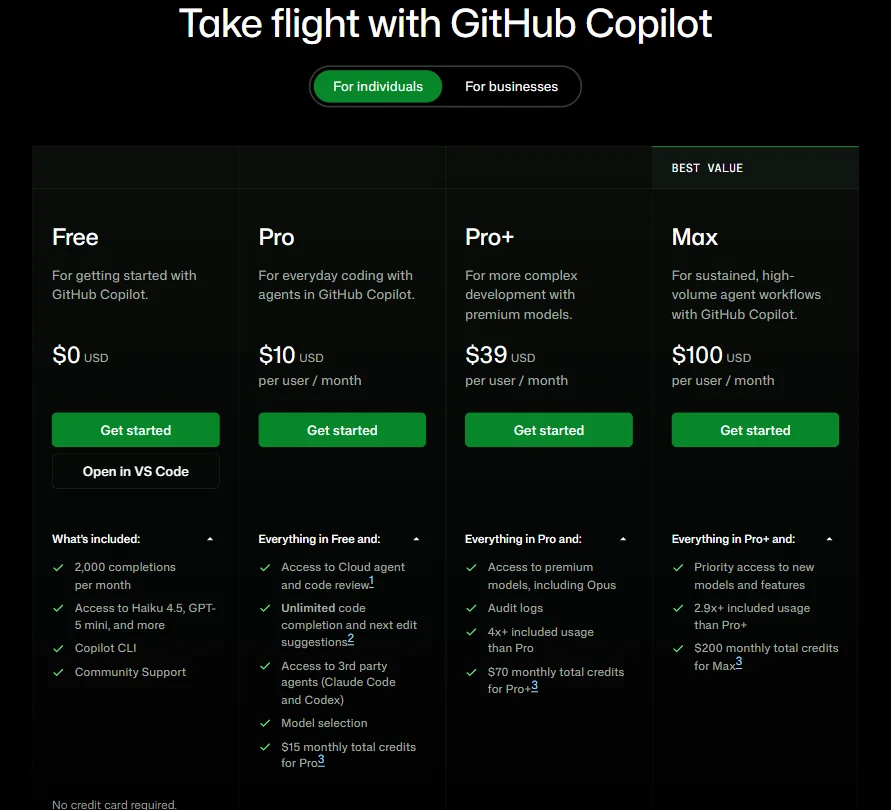
Paid plans are structured across four tiers. Free at $0. Pro at $10 per user per month. Pro+ at $39. Max at $100. Each tier stacks on the previous one. Pro adds unlimited completions, access to third-party agents like Claude Code and Codex, model selection, and $15 in monthly AI credits. Pro+ adds premium models including Opus, audit logs, and $70 in monthly credits. Max, at the top, adds priority access to new models and $200 in monthly credits.
Credit-based billing is replacing the old request-cap system on June 1, 2026. This transition is worth watching, and the concern is fair. Consumption pricing makes monthly budgets harder to predict. We'd want GitHub to publish clearer guidance on what typical developer usage actually costs under the new model before teams sign annual commitments.
Individual Copilot plans don't include all enterprise protections. IP indemnity and certain organizational controls are enterprise-tier features, not defaults. Worth checking the fine print before assuming coverage.
Refund policy isn't stated anywhere we could find. That's a gap.
Compared to Cursor at $20 per month for individuals, Copilot Pro at $10 is cheaper for solo use. Whether it's better is a different question.
GitHub vs Cursor: Which AI Coding Tool Is Better?
No clean answer here.
Cursor is an AI-native editor that forked from VS Code and rebuilt the editing experience around AI from the start. Context handling on large, complex codebases is deeper. Agent mode is more mature. Developers working on substantial projects consistently describe Cursor as better at understanding project structure. That round goes to Cursor.
Copilot's advantages are different in kind. It lives inside GitHub natively. Repositories, pull requests, Actions, team management, all already there. Cursor requires switching editors entirely. For teams with established workflows, that's a meaningful ask, not a minor inconvenience.
Cursor holds SOC 2 Type II compliance, penetration testing documentation, zero-data-retention options, and SSO controls, so framing it as a tool without a security layer is inaccurate. GitHub has different capabilities, including public-code referencing controls and certain protections at the organizational level. Enterprise Copilot includes audit logs, but not self-hosted deployment. They're different security stories, not a one-sided comparison.
Multi-model support is a real feature on both sides. Both tools surface models from OpenAI and Anthropic. That's not a differentiator anymore.
Solo developers who want the sharpest AI editing experience. Cursor is the choice. Teams embedded in GitHub who don't want to change how they work. Copilot is the fit.
Who Should Use GitHub? (And Who Shouldn't)
Teams already inside the GitHub ecosystem. No ramp-up, no infrastructure change, just a line item.
Individual developers who want a credible free tier before committing to a paid plan.
Enterprise teams with security and compliance requirements. The Advanced Security stack covers ground most AI coding tools skip entirely.
GitLab shops. Not the fit.
Developers who want the most aggressive, AI-first editing experience. Cursor is sharper for that specific use case.
Teams anxious about consumption pricing. Watch the June 2026 transition before signing anything with a long term.
GitHub Review Verdict
Copilot is the most mature AI coding assistant in this category right now. That's not hollow praise. Maturity here means better accuracy on common tasks, a broader integration footprint, and a security story that most competitors haven't caught up to at the organizational level.
The weaknesses are real and specific. Context handling in complex codebases remains the most consistent limitation across user reports. The June 2026 shift to credit-based billing introduces genuine budget uncertainty. The JetBrains experience lags the VS Code version in ways that matter to developers in that ecosystem.
What holds across all of that is the platform advantage. No other AI coding tool sits natively inside the repository layer, the PR workflow, and the CI/CD pipeline simultaneously. That's not a feature list item. It's architecture. And it's genuinely hard to replicate.
For most developers and most teams, Copilot is the default choice. Not because everything else is weaker, but because the combination of quality, ecosystem depth, and pricing structure is hard to argue with at scale.
How GitHub compares
GitHub scores 8.5 out of 10 among the AI coding assistants we rate. These three do the same job and are the closest to it, compared on what each vendor publishes.
Cursor
GitHub Copilot Pro costs $10 a month, half of Cursor Pro's $20. Copilot's Enterprise plan adds legal cover for generated code, something Cursor does not offer at any tier. Cursor, on the other hand, lets cloud agents run on your own infrastructure through what it calls Self-Hosted Machines, an option Copilot does not have. Both review pull requests and both suggest code as you type.
Pick Cursor if you want cloud agents that can run on your own infrastructure.
Pick GitHub if you want the cheaper plan and legal cover for generated code.
Tabnine
GitHub Copilot has a free plan and its Pro tier costs $10 a month; Tabnine has no free plan, and its Code Assistant plan costs $39 a month, nearly four times as much. Copilot reviews pull requests, which Tabnine's own assistant does not do. Tabnine can run on your own servers and states your code is never stored, options Copilot does not offer.
Pick Tabnine if you want on-prem hosting and a guarantee your code is never stored.
Pick GitHub if you want a free plan and built-in pull request review.
JetBrains
GitHub Copilot reviews pull requests and, on its Enterprise plan, understands your whole codebase; JetBrains does neither. Both charge $10 a month for their cheapest paid plan. JetBrains commits flatly to not training on your code, while Copilot's Free, Pro and Pro+ plans train on it unless you opt out. Copilot also reaches more editors, including VS Code, Neovim and Xcode, alongside JetBrains and the CLI.
Pick JetBrains if privacy matters most and you want no training by default.
Pick GitHub if you want pull request review and full codebase understanding.
Frequently Asked Questions
Is GitHub Copilot free to use?
There's a genuine free tier at 2,000 completions per month. Enough to evaluate the tool before committing. Paid plans start at $10 per user per month for Pro, stepping up to $39 for Pro+ and $100 for Max. Enterprise pricing starts at $21 per user per month and includes the full security and compliance stack.
Does GitHub Copilot work with JetBrains IDEs?
Yes. Official plugin support covers all major JetBrains IDEs. It works. The JetBrains experience is generally considered slightly behind VS Code in polish and response speed. Worth knowing before you commit to it as your primary environment, especially if you're coming from IntelliJ or PyCharm daily.
How does GitHub Copilot handle private code and security?
Organization-level policy controls let admins block suggestions that match public code. Enterprise plans add audit logs, though Copilot itself is not available for self-hosted GitHub Enterprise Server, which matters for teams with strict data residency requirements. IP indemnity is an enterprise-tier protection, not included on individual Pro plans. We'd recommend verifying current specifics directly with GitHub for regulated industries, since these policies have been updated more than once.