
Topview, founded recently out of Singapore, has moved fast. It's a genuinely ambitious tool, one that refuses to pick one lane and park in it. Whether that breadth holds up in practice is a different question entirely.
What is Topview?
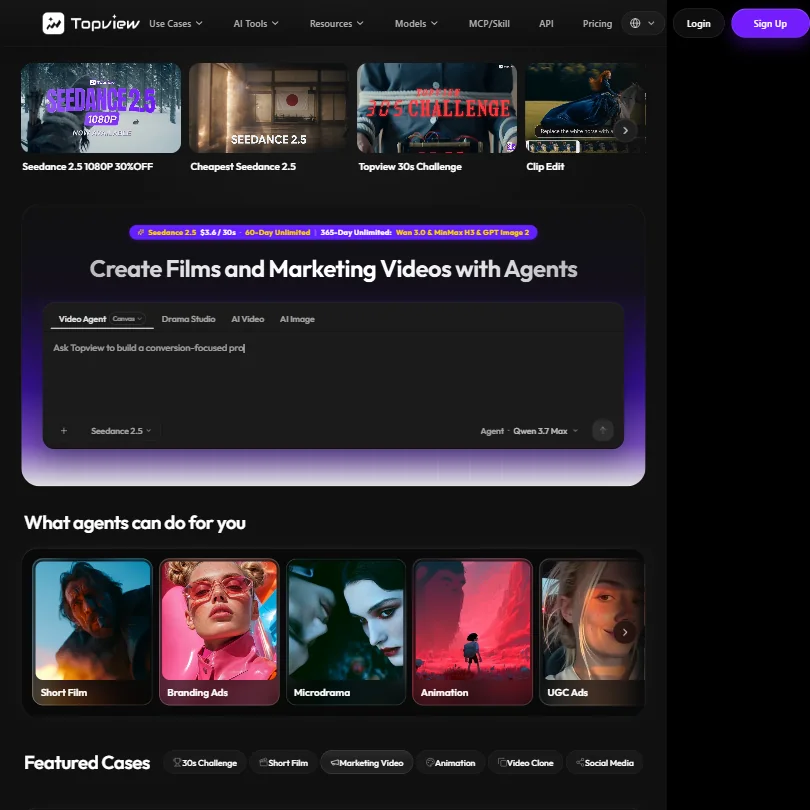
Topview bills itself as a film studio for AI creators. The framing is deliberate. This isn't a prompt-to-clip utility. It's a collection of distinct tools built for people making short films, UGC ads, and marketing content at some scale, running across a multi-model pipeline where you pick the engine based on what you're building.
Web only. No desktop app, no mobile app. Fine for this category, though it does limit where you can actually sit down and work.
A lot has shipped in a short period. A Video Agent, a Canvas composition tool, Drama Studio, and a 3D Shot Composer all landed in roughly two years. For a tool this young, that's a lot of surface area. We're cautiously impressed. More features doesn't always mean better execution, and we'll get to that.
Topview Features: Video Generation, Editing & AI Capabilities
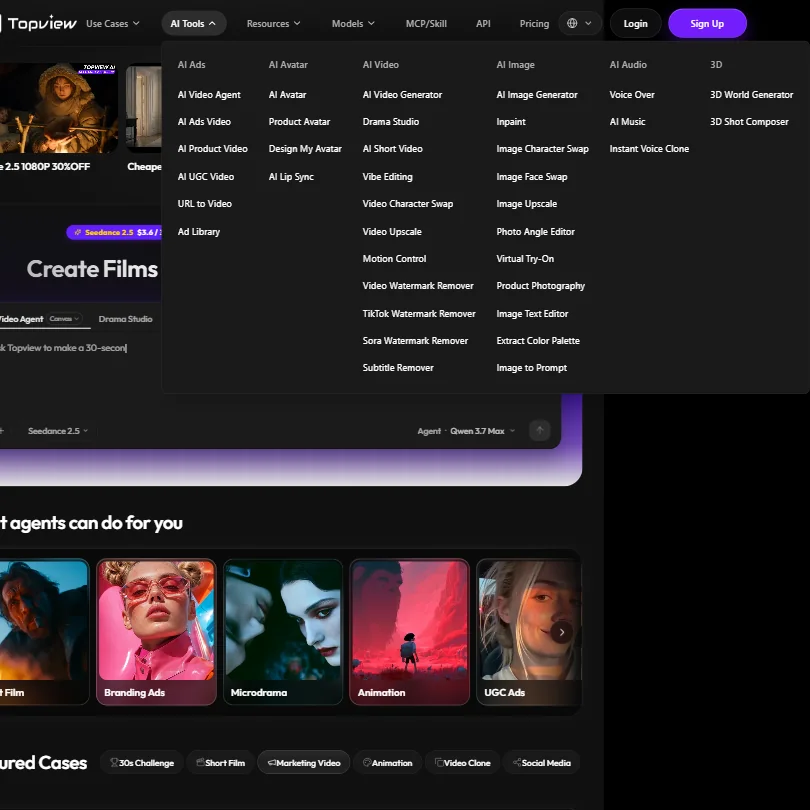
The generation side runs across several named AI models. Seedance 2.5 is their headliner for text-to-video at the budget tier. MiniMax H3 is the 2K cinematic option. Google Veo 3.1 goes up to 4K. You choose based on resolution, style, or cost per second, which is a more flexible setup than most single-engine competitors offer.
Clip Edit flags the bad second in an otherwise usable clip and regenerates just that segment. That's a practical fix for one of the most common frustrations in AI video work.
Canvas handles composition and camera control before generation runs. The 3D Shot Composer extends that into angle and depth decisions. These aren't thin wrappers. They're distinct tools with distinct purposes, which is unusual at this price point. Drama Studio handles narrative-oriented work separately.
Batch creation is there too. Ten UGC ads at once, which is where Topview gets useful fast for marketing teams. The Video Agent, described as handling the full creation flow from prompt to finished video, is the most experimental piece. Honestly, agent-based automation at this stage of AI video is a hard thing to get right.
The URL-to-video feature caught our attention too. Feed it a product URL, it builds a video. Character Swap lets you replace actors in existing clips. These features sound gimmicky until they save you three hours on a deadline.
Topview Video Quality: How Good Does the Output Actually Look?
Model selection determines the output ceiling, and the gap between tiers is real. Veo 3.1 Fast hits 4K. MiniMax H3 lands at 2K. Seedance 2.5 tops out at 720p. So the resolution you get is a direct function of which model you ran and what plan you're paying for.
The showcase videos on their homepage are genuinely polished. Sci-fi films, cinematic action clips, product ads. They're good enough to take the platform seriously. Whether those results come from a cold start with a new prompt, rather than from curated, heavily iterated showcase content, isn't something the homepage says. That gap between demo quality and average output quality is the one that actually matters when you're paying.
Seedance 2.5 is the budget-tier model. At $0.12 per second it's the cheapest generation option on the platform.
Not great on documentation around what the 60-day unlimited access actually caps at in terms of generation volume. That detail matters for budgeting, and it wasn't easy to pin down from what's publicly available.
Topview AI Avatars & Voiceover: How Realistic Are They?
Avatar 4 is the talking-head feature, included across paid plans and running up to 180 seconds per video. Off-peak mode cuts credit costs by 50% by routing jobs through idle server hours, with delivery guaranteed within 24 hours. It's not faster. It's cheaper. That distinction matters if you're scheduling renders in advance.
We'd want to see Avatar 4 compared directly against what HeyGen produces before drawing conclusions. HeyGen has been the category benchmark for realistic AI avatars for a while now, and that's a high bar to clear.
Seed Audio 1.0 handles audio generation from text prompts. Voice cloning isn't mentioned in its public documentation, which is a notable gap given how many competitors are shipping it as a standard feature now.
The audio and avatar functionality here reads like a supporting layer, not a headline feature. Which is probably accurate. Topview is primarily a video generation and film creation platform. The avatar tools exist because users expect them. For marketing teams making product ads, probably fine. For anyone building avatar-heavy explainer content, look harder at the alternatives before committing.
Is Topview Easy to Use?
This is where we'd pump the brakes. The tool does a lot, and that creates a real design challenge. Canvas, Drama Studio, the 3D Shot Composer, the model picker, the Video Agent. That's a significant amount of interface to absorb before you render your first clip.
Their help center documentation reads as basic. Not bad. Just thin. For a platform this feature-dense, the onboarding support feels underdeveloped relative to what's actually there.
The Video Agent is the exception. It's designed to hide complexity by letting you describe what you want while the agent handles workflow decisions. If it works reliably, it's the fastest path for new users. If it doesn't, you're stuck navigating a complicated interface without much documentation to fall back on.
That's our concern. Not a dealbreaker, but a friction point that's real for teams without someone willing to spend a few hours learning the tool properly.
Topview Pricing: Is It Worth It for Creators & Teams?
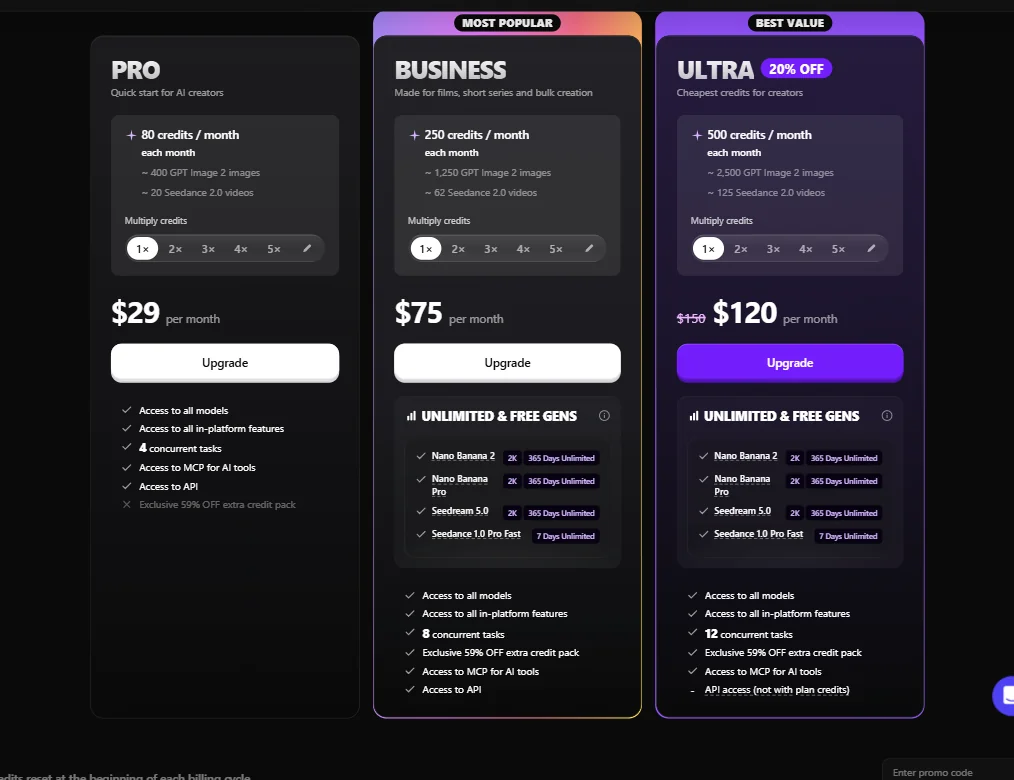
Three paid tiers. PRO at $29 per month, BUSINESS at $75 per month, ULTRA at $120 per month (discounted from $150, reflecting a current 20% off). These are the monthly billing rates as shown on the pricing page. Annual billing brings the PRO entry point down to $16 per month.
PRO gets you 80 credits per month, which the platform translates to roughly 400 GPT Image 2 images or 20 Seedance 2.0 videos. BUSINESS steps up to 250 credits, ULTRA to 500. Both BUSINESS and ULTRA include unlimited free generations on Nano Banana 2, Nano Banana Pro, Seedream 5.0, and Seedance 1.0 Pro Fast, with 365-day access on the first three and 7-day access on the last. Concurrent task limits are 4 on PRO, 8 on BUSINESS, and 12 on ULTRA.
No free plan. No stated free trial. Among the 40-plus AI video tools we've reviewed, the majority offer some kind of free tier. Topview doesn't, which means you're paying before you know whether the output quality works for your actual use case.
The model-based pricing structure means real costs depend heavily on which engine you're actually running, and that's harder to budget for than a flat credit allowance. Seedance 2.5 at $0.12 per second is cheap relative to Runway or Kling. Veo 3.1 is a different conversation.
One inversion we couldn't get a clean explanation for: API access is available on PRO and BUSINESS, but the ULTRA tier notes "API access (not with plan credits)." That's a strange distinction for the highest-priced plan, and it wasn't clarified anywhere on the public pricing page. Understand what you're buying before you pick the wrong plan. No publicly stated refund policy makes that more consequential, not less.
Topview vs Runway: Which AI Video Tool Is Better?
Runway is the established name. It's been setting quality expectations in AI video since before most of the current field existed. Topview is newer, cheaper at entry, and more opinionated about use cases.
The clearest difference is scope. Runway is a general-purpose video generation tool. Topview is built around specific output types: short films, UGC ads, and product videos. If your work fits those categories, Topview's agent-based workflow and multi-model picker might actually serve you better than Runway's more open canvas.
On price at the entry level, Topview wins. Runway's costs climb quickly at volume. Topview's 60-day unlimited access on Seedance 2.5 offers more predictable economics for high-volume creators who can work within that model's 720p ceiling.
Where Runway has the advantage is documentation depth. Years of tutorials exist for Runway. Topview is newer to market and the support layer reflects that. If you need external learning resources to troubleshoot against, Runway is still the safer choice.
Who Should Use Topview? (And Who Shouldn't)
Marketing teams running UGC ad campaigns at volume. Batch creation, the agent workflow, and cheap Seedance generation add up to a practical pipeline for teams that need a lot of clips fast without switching between platforms.
AI filmmakers who want model flexibility. The choice between Seedance for budget work, Veo 3.1 for high-resolution output, and MiniMax H3 for cinematic quality, all inside one platform, is a real convenience that most competitors don't offer at this price.
Solo creators without technical patience are a harder sell. The complexity is manageable, but the documentation isn't there yet to make it smooth. And paying before you know if the tool clicks for you is a real ask given the current support infrastructure.
Teams whose workflow lives inside Adobe Premiere or DaVinci Resolve should look elsewhere. No integrations with either are mentioned in its public documentation. Topview operates as a standalone island. That's fine if you're building a new workflow around it. It's a real friction point if you're trying to bolt it onto an existing one.
Topview Review Verdict
Serious platform. Not a casual one. Running Veo 3.1, MiniMax H3, and Seedance 2.5 with Canvas, Drama Studio, a 3D Shot Composer, and a Video Agent, all at a $29 monthly entry price, Topview has covered a lot of ground fast for a young tool.
The weaknesses are real though. No free trial is a friction point that stings harder because the documentation is thin and the learning curve isn't trivial. No stated refund policy compounds that. Support information across their public materials is vague. For a platform asking you to commit money upfront, the trust infrastructure hasn't caught up to the feature set.
We're not dismissing it. The output ceiling is genuinely high with the right model. The film-focused tooling is unlike what most competitors offer at similar prices. The batch creation and URL-to-video features are practically useful rather than just demonstrable. If the use case fits, the $29 PRO plan is a reasonable test. Just go in knowing you're trading polish and support depth for model flexibility and cheaper generation costs. Fair trade for the right user. Not for everyone.
Frequently Asked Questions
Does Topview have a free plan or free trial?
No free plan exists, and no free trial is publicly stated. This puts Topview in the minority among AI video tools we've reviewed. You're committing to a paid plan from day one, which makes the absence of any stated refund policy more of an issue than it would otherwise be. We're skeptical of that approach for a tool this young.
What AI models does Topview use for video generation?
The primary options are Seedance 2.5 for budget-tier generation at $0.12 per second and Veo 3.1 for 4K output. MiniMax H3 sits in the middle as the cinematic 2K option. The model you choose determines both the cost per second and the resolution ceiling, so the selection matters more here than on platforms running a single fixed engine. A few others round out the roster, but those three are the ones that come up most in community discussion.
How does Topview compare to other AI video tools for UGC ads?
For UGC ad creation specifically, the batch generation capability and Video Agent workflow put Topview ahead of more generalist tools. Creating ten ads at once, with URL-to-video and Character Swap available in the same platform, is a practical stack for marketing teams. Creatify targets a similar use case and is worth comparing directly if your focus is ad creative rather than short film production. The two aren't identical in approach, and which fits better depends on your volume and the level of narrative control you need.