Every score is worked out from the vendor's own pages · How we score →Disclosure
SAASINSPECTOR
ReimagineHome logo

ReimagineHome Review

ReimagineHome is an AI virtual staging and home design app that restyles, stages and edits photos of rooms and exteriors. It is best at reworking a room through a conversational design companion and at filling a design with real, shoppable products.

Visit ReimagineHome →From $19/mo

Research-based review. Features and prices are checked on the vendor's own website, and the score is worked out from those facts. We haven't tested it hands-on yet.

The verdict

Worth paying for at Pro if you stage listings or redesign rooms often, since Essential lacks the design companion, and remember to opt out of training if that matters.

Pros

  • A design companion reworks a room when you tell it what to add, remove or replace, and chatting with it is free.
  • Shoppable designs fill a room with real products you can check out on Amazon or Shopify.
  • All outputs are royalty-free for commercial use, including MLS listings and marketing.
  • New accounts get 5 free designs with no card, at the same quality as paid plans.

Cons

  • Essential uses the older tools only, without the design companion, reference photos, real products or high resolution.
  • Every plan is a single-user account, and team features are still in development.
  • Uploads and outputs may train Styldod's own models unless you opt out.
From $19/moFree plan NoFree trial No
3.8/10

Spec Score

ReimagineHome against 8 AI room and building renderers
#7
of 8 AI room and building renderers
-1.4
vs the average
96%
from published facts
Ahead of other AI room and building renderers
Nothing clearly above the average
Behind other AI room and building renderers
Workflow and teams-2.2Privacy and trust-2.1What you can render-1.8
Every criterion
Tap a row for the facts
What you can render4.5
-1.8 vs 6.3 avg18 of 40 points
What a render can start from2 kinds of input2 / 3.5
Renders video or walkthroughsno0 / 2.5
Edits a render after it is madeyes2 / 2
Plugins for CAD tools0 CAD plugins0 / 1
Template librarynot published, half points0.5 / 1
Why these numbers

What a render can start from: Counted from input_types. Room and exterior photos are the main input; moodboard or inspiration images can guide a design. Sketches, 3D models and text-only generation are not offered.

Renders video or walkthroughs: The pricing page, FAQ and list of 23 solution tools cover still images only; no video or walkthrough output is offered.

Edits a render after it is made: Dedicated tools also cover object removal, sky replacement, day to dusk, wall repainting, image enhancement and upscaling.

Plugins for CAD tools: Counted from cad_plugins. No CAD plugins; the product works from uploaded photos.

Workflow and teams2.0
-2.2 vs 4.2 avg3 of 15 points
Public APIno0 / 4
Apps it connects to2 integrations2 / 3
Comments and approvalno0 / 1.5
Single sign-onno0 / 1.5
Why these numbers

Public API: API support can be discussed case by case for enterprises; the standard offer is a hosted sub-domain or HTML widget.

Apps it connects to: Counted from integrations. Shoppable designs send products to retailer carts. No design-software integrations are listed.

Comments and approval: No commenting or approval feature appears on the pricing page or FAQ; designs are saved in a personal dashboard and shared by link.

Single sign-on: With no team or multi-user accounts, there is no SAML or enterprise SSO.

Pricing3.9
-0.1 vs 4.0 avg11.7 of 30 points
Cheapest paid plan, monthly$193.9 / 6.5
Free planno0 / 3.5
Why these numbers

Cheapest paid plan, monthly: Cheapest paid plan on the monthly term. Only monthly billing is offered. Essential uses the older tools only, with no conversational design, reference photos, real products or high-resolution output; Pro and above include everything. Enterprise pricing is by request.

Free plan: New accounts get 5 free designs with no card; after that a paid plan is needed. There is no ongoing free plan.

Privacy and trust3.5
-2.1 vs 5.6 avg5.3 of 15 points
Does not train AI on what you uploadno0 / 5
GDPRyes2.5 / 2.5
Ways to reach support2 support channels1 / 2.5
Why these numbers

Does not train AI on what you upload: Uploads and outputs may be used to train Styldod's own AI models unless you opt out. They are not used to train public third-party foundation models without permission.

GDPR: The policy sets out EEA and UK legal bases and transfer safeguards. Styldod says it has not yet appointed an EEA or UK representative.

Ways to reach support: Counted from support_channels. A help page sorts requests by topic; support is by email. No live chat or phone is listed.

yesnonot published average for AI room and building renderers
How the Spec Score works

Scored from what ReimagineHome publishes on its own site. Not a hands-on test.

Compared with 8 AI room and building renderers. Facts checked 31 Oct 2026.

A fact the vendor does not publish gets half the points, or the typical value for a number, and says so. It never counts as a no. How we score.

ReimagineHome is an AI home design and virtual staging app that restyles, stages and edits photos of rooms and exteriors, and can fill a design with real products you can buy. Whether it suits you depends on which plan you need, since the conversational designer, reference photos, real products and high-resolution output all start on Pro.
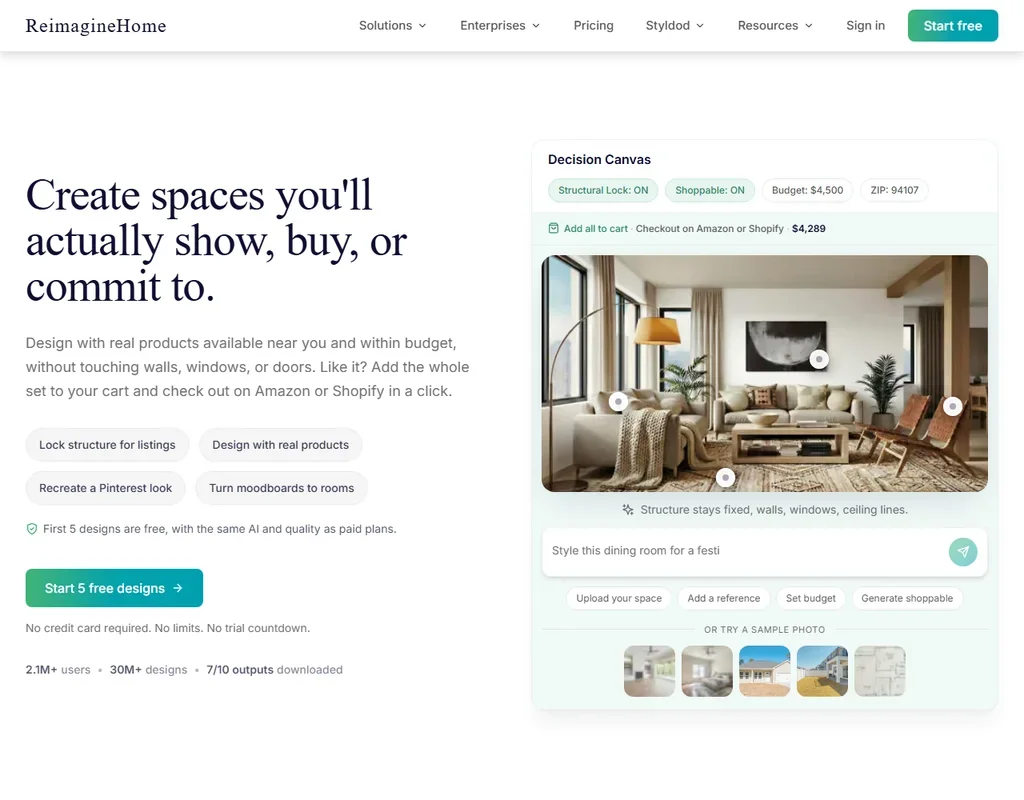
ReimagineHome homepage screenshot
ReimagineHome, Homepage

What is ReimagineHome?

ReimagineHome is made by Styldod, Inc., based in Dover, Delaware, in the United States. It runs as a web app, and designs are saved in a personal dashboard.

At its centre is a design companion you talk to: you describe what to add, remove or replace, and it reworks the design. Chatting with the companion is free; credits are spent only on generations.

Designing a room with ReimagineHome

Room and exterior photos are the main starting point, and a floor plan can also be turned into a photorealistic, furnished room. Sketches, 3D models and text-only generation are not offered. Uploads are processed at 1024px.

From a photo you can stage an empty room, redesign a furnished one, remove or swap furniture, landscape outdoor areas, change textures and render structures such as patios and pergolas. Dedicated tools add object removal, sky replacement, day to dusk, wall repainting, image enhancement and upscaling. An inspiration gallery can be browsed by design theme and space type.

On Pro and above, the conversational design flow gives precise control through specific instructions, and you can upload an inspiration or moodboard image and tell the AI how much to borrow from it. Pro and above also get high-resolution output. Essential covers basic staging and light edits with the older tools only.

Shoppable designs fill a room with real products, and you can add the whole set to your cart and check out on Amazon or Shopify. A design with real products costs two credits instead of one. Output is still images only, with no video or walkthrough.

Working with other people

There are no team plans or multi-user access yet; team features are in development. Designs can be shared by link, but there is no shared workspace, co-editing or commenting. There is no API; enterprises get a hosted sub-domain or an HTML widget, and API support can be discussed case by case.

ReimagineHome pricing: what each plan gives
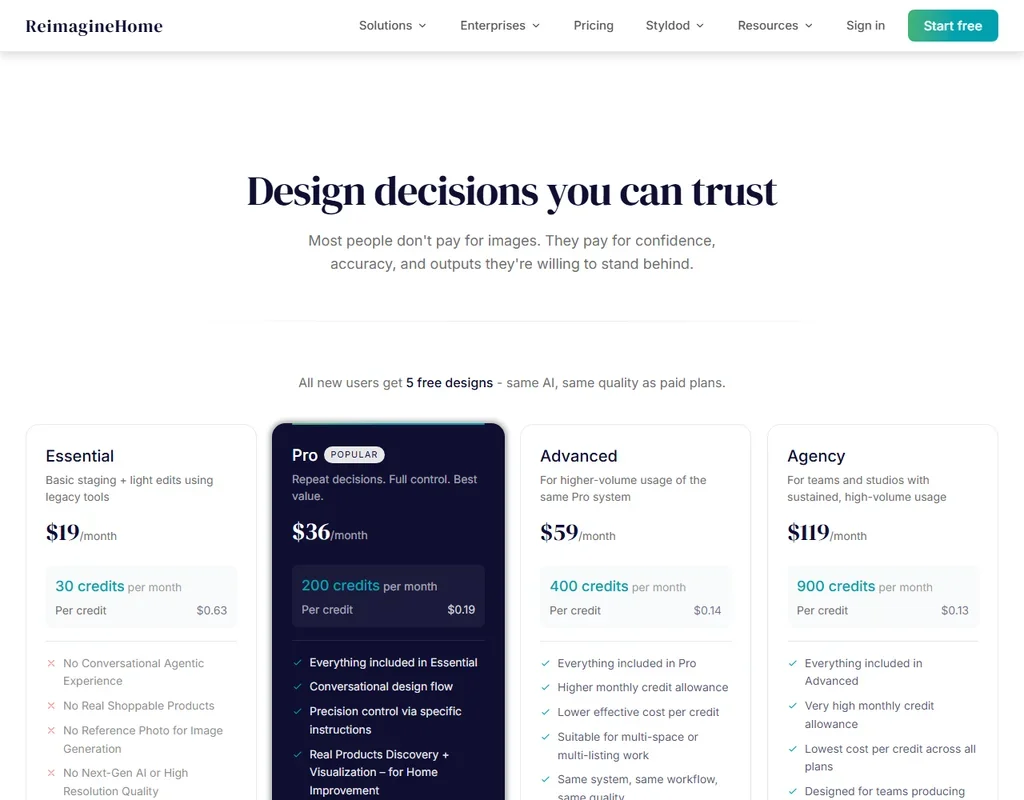
ReimagineHome pricing screenshot
ReimagineHome, Pricing

There is no ongoing free plan. New accounts get 5 free designs with no card, using the same AI and quality as the paid plans. Billing is monthly only, and one generation costs one credit.

Essential is $19 a month for 30 credits, with basic staging and light edits on the older tools. Pro is $36 a month for 200 credits, Advanced $59 a month for 400 credits and Agency $119 a month for 900 credits, and all three include everything, from the design companion to real products and high resolution. Enterprise pricing is by request. Every plan is a single-user account, and all outputs are royalty-free for commercial use, including MLS listings and marketing.

Privacy and security

Your uploads and outputs may be used to train Styldod's own AI models unless you opt out: "You may opt out of the use of your private uploaded images and private generated outputs for model training at any time". They are not used to train public third-party foundation models without permission. ReimagineHome uses third-party AI model and image-processing providers.

The privacy policy sets out legal bases and transfer safeguards for users in the EEA and UK, and Styldod has not yet appointed an EEA or UK representative. There is no SAML or enterprise single sign-on. Support is by email, with a help page that sorts requests by topic.

Who ReimagineHome suits

ReimagineHome suits real estate agents and home sellers who need staged, royalty-free listing photos, and homeowners who want to redesign a room by talking it through and then buy the products in it. Pro is the plan most will want, since it unlocks the design companion, reference images and high resolution.

It suits less well teams, since every plan is a single-user account and team features are still in development. Anyone who wants a flythrough video, or to start from a sketch or 3D model, will not find that here, and anyone who does not want their uploads used for training has to opt out.

Frequently Asked Questions

How much does ReimagineHome cost?

Essential is $19 a month for 30 credits, Pro $36 for 200, Advanced $59 for 400 and Agency $119 for 900, billed monthly. New accounts get 5 free designs with no card.

Can I use ReimagineHome designs in property listings?

Yes. All outputs are royalty-free for commercial use, including MLS listings and marketing.

Can ReimagineHome add or remove specific furniture?

Yes. Tell the design companion what to add, remove or replace. Dedicated tools also handle object removal, wall repainting, sky replacement and day to dusk.

Does ReimagineHome train AI on my photos?

Your uploads and outputs may train Styldod's own models unless you opt out, which you can do at any time. They are not used to train public third-party foundation models without permission.

ReimagineHome is featured in

Alternatives to ReimagineHome

See all ReimagineHome alternatives →

Other AI Design Tool options we've reviewed.

Figma logo

Figma

Product teams wanting one shared workspace for design systems, prototypes and developer handoff

8.1
Rank #2 of 8 AI UI design tools
Best:Teams and platforms10
Weakest:What you can make7
Free plan: yesFree trial: noAPI: yes
Price not publishedFree plan
96% from published facts · checked 19 Sep
→
Canva logo

Canva

Small teams making branded social posts, print and video without hiring a designer

7.8
Rank #3 of 8 AI graphic design tools
Best:Teams and platforms10
Weakest:What you can make7
Free plan: yesFree trial: yesAPI: yes
From $18Free plan
90% from published facts · checked 19 Sep
→
Visme logo

Visme

Brand teams producing polished decks and reports that export to almost any format

6.9
Rank #3 of 5 AI presentation makers
Best:Workflow and output7.2
Weakest:Teams and platforms5.5
Free plan: yesFree trial: noAPI: no
From $29Free plan
85% from published facts · checked 26 Sep
→
Adobe Firefly logo

Adobe Firefly

Creative Cloud users who want generation inside the apps they already use, from a vendor that does not train on their content

8.1
Rank #1 of 7 AI image generators
Best:Rights and privacy9.2
Weakest:Openness and support3
Weights published under a named licence: noDoes not train on what you make: yes
From $9.99Free plan
78% from published facts · checked 8 Oct
→
Krea logo

Krea

Designers who want one of the broadest model menus, plus a node canvas, an AI agent and an API

9.4
Rank #1 of 13 multi-model AI platforms
Best:For video10
Weakest:Privacy and trust7.2
SOC 2: yesOffers Veo 3.1: yesOffers Nano Banana Pro: yes
From $9Free plan
93% from published facts · checked 28 Oct
→
Wix logo

Wix

Small business owners building a site and store themselves, with a phone line for help

8.0
Rank #1 of 7 AI website builders
Best:Teams and platforms9.5
Weakest:Pricing7
Free plan: yesFree trial: noAPI: yes
From $17Free plan
85% from published facts · checked 19 Sep
→

User reviews

Review ReimagineHome

Your rating

Reviews are moderated and appear once approved.