Every score is worked out from the vendor's own pages · How we score →Disclosure
SAASINSPECTOR
Virtual Staging AI logo

Virtual Staging AI Review

Virtual Staging AI is a one-click virtual staging tool that furnishes photos of empty rooms and removes existing furniture for property listings. It is best at quick, repeatable staging in preset styles, with unlimited re-renders of every photo on a plan.

Visit Virtual Staging AI →From $25/mo

Research-based review. Features and prices are checked on the vendor's own website, and the score is worked out from those facts. We haven't tested it hands-on yet.

The verdict

Worth paying for, ideally yearly, if you stage listing photos every month, but edits beyond staging cost extra and the terms claim a broad licence over your uploads.

Pros

  • Staging takes one click: pick a room type and one of more than 50 design styles.
  • Each photo gets unlimited renders and downloads within your plan.
  • Furniture removal is included on every plan, and paid plans carry no watermark.
  • One photo can be staged free with no sign-up and no credit card.

Cons

  • Photo enhancement and day to dusk need a separate Image Editing subscription.
  • There is no written prompt or style upload, only preset styles.
  • The terms give the provider a perpetual licence over your uploads and outputs, with no promise not to train AI on them.
From $25/moFree plan NoFree trial No
3.9/10

Spec Score

Virtual Staging AI against 8 AI room and building renderers
#6
of 8 AI room and building renderers
-1.3
vs the average
96%
from published facts
Ahead of other AI room and building renderers
Nothing clearly above the average
Behind other AI room and building renderers
What you can render-2.3Privacy and trust-1.8
Every criterion
Tap a row for the facts
What you can render4.0
-2.3 vs 6.3 avg16 of 40 points
What a render can start from1 kinds of input1 / 3.5
Renders video or walkthroughsno0 / 2.5
Edits a render after it is madeyes2 / 2
Plugins for CAD tools0 CAD plugins0 / 1
Template libraryyes1 / 1
Why these numbers

What a render can start from: Counted from input_types. Works from room photos only; sketches, 3D models, floor plans and text-only generation are not offered.

Renders video or walkthroughs: The plans, FAQ and homepage cover staged still photos only; no video or walkthrough output is offered.

Edits a render after it is made: Furniture removal is included on every plan; enhancement and day to dusk need the separate Image Editing subscription (a free trial of it is included).

Plugins for CAD tools: Counted from cad_plugins. No CAD plugins; the product works from uploaded photos or the API.

Template library: Preset design styles and room types, rather than a library of design templates.

Workflow and teams4.0
-0.2 vs 4.2 avg6 of 15 points
Public APIyes4 / 4
Apps it connects to0 integrations0 / 3
Comments and approvalno0 / 1.5
Single sign-onno0 / 1.5
Why these numbers

Public API: Enterprise plan only.

Apps it connects to: Counted from integrations. No named software integrations are listed; products connect through the Enterprise API or the whitelabel programme.

Comments and approval: No commenting or approval feature is listed on the pricing page or FAQ.

Single sign-on: No SSO or SAML login is listed on any plan, including Enterprise.

Pricing3.9
-0.1 vs 4.0 avg11.7 of 30 points
Cheapest paid plan, monthly$253.9 / 6.5
Free planno0 / 3.5
Why these numbers

Cheapest paid plan, monthly: Cheapest paid plan on the monthly term. Plans include 6, 20, 60 and 150 photos a month with unlimited renders of each photo. A separate Image Editing subscription (photo enhancement and day to dusk) is added from inside the app; its price is not on the pricing page.

Free plan: All four plans are paid. A first photo can be uploaded free with no sign-up ('Upload image for free No sign up | No credit card'), but there is no ongoing free plan.

Privacy and trust3.8
-1.8 vs 5.6 avg5.7 of 15 points
Does not train AI on what you uploadno0 / 5
GDPRnot published, half points1.3 / 2.5
Ways to reach support3 support channels2.5 / 2.5
Why these numbers

Does not train AI on what you upload: The terms give the provider a perpetual licence to uploads and outputs to improve its products and develop new ones, with no promise not to train AI on them.

Ways to reach support: Counted from support_channels. An FAQ covers common questions, the FAQ points to email support for refunds, and the terms give info@virtualstagingai.app. Enterprise adds a success manager.

yesnonot published average for AI room and building renderers
How the Spec Score works

Scored from what Virtual Staging AI publishes on its own site. Not a hands-on test.

Compared with 8 AI room and building renderers. Facts checked 31 Oct 2026.

A fact the vendor does not publish gets half the points, or the typical value for a number, and says so. It never counts as a no. How we score.

Virtual Staging AI adds furniture to photos of empty rooms and removes existing furniture, for real estate listings. Staging is one click with a preset style, and plans are priced by photos a month, so what decides whether it suits you is how many listing photos you stage and whether you need edits beyond staging.
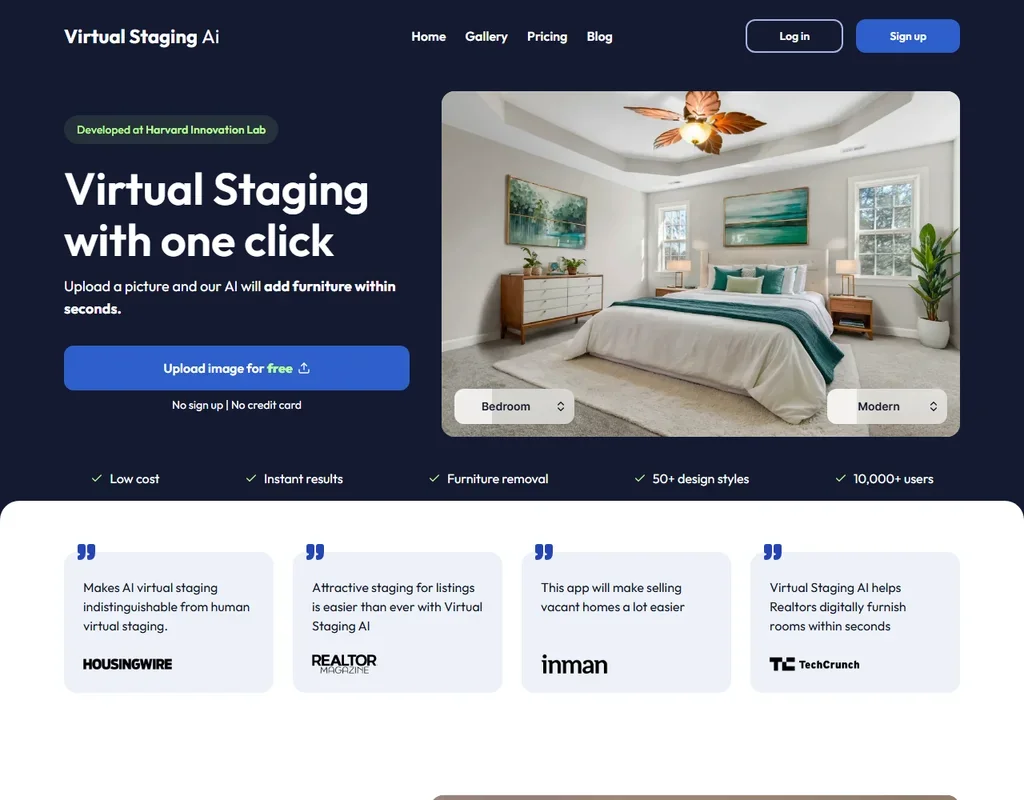
Virtual Staging AI homepage screenshot
Virtual Staging AI, Homepage

What is Virtual Staging AI?

Virtual Staging AI is a browser app for staging room photos. Its terms of service name Zillow, Inc., of Seattle, in the United States, as the provider of the service, while its privacy policy still names Virtual Staging AI Inc.

You can upload a first photo free, with no sign-up and no credit card, to see the result before choosing a plan.

Designing a room with Virtual Staging AI

Every job starts from a room photo. You upload a picture, pick a room type and one of more than 50 design styles, and the AI adds furniture within seconds. There is no written prompt, and sketches, 3D models, floor plans and text-only generation are not offered. You choose a preset style for each photo; uploading your own style reference is not offered.

Each photo on a plan gets unlimited renders and downloads, so you can stage the same room again in another style without using more of your allowance. Furniture removal is included on every plan, and paid plans carry no watermark.

Photo enhancement, which improves contrast and colour, and day to dusk, which turns a daytime photo into a dusk shot, come in a separate Image Editing subscription that you add from inside the app, with a free trial included. Output is staged still photos only, with no video or walkthrough.

Working with other people

There are no shared workspaces, team seats, co-editing or comments; Enterprise is aimed at teams, brokerages and photographers through its larger photo allowance. The API, on Enterprise only, gives automated access to all of the product's features, and a separate whitelabel programme is offered.

Virtual Staging AI pricing: what each plan gives
Virtual Staging AI pricing screenshot
Virtual Staging AI, Pricing

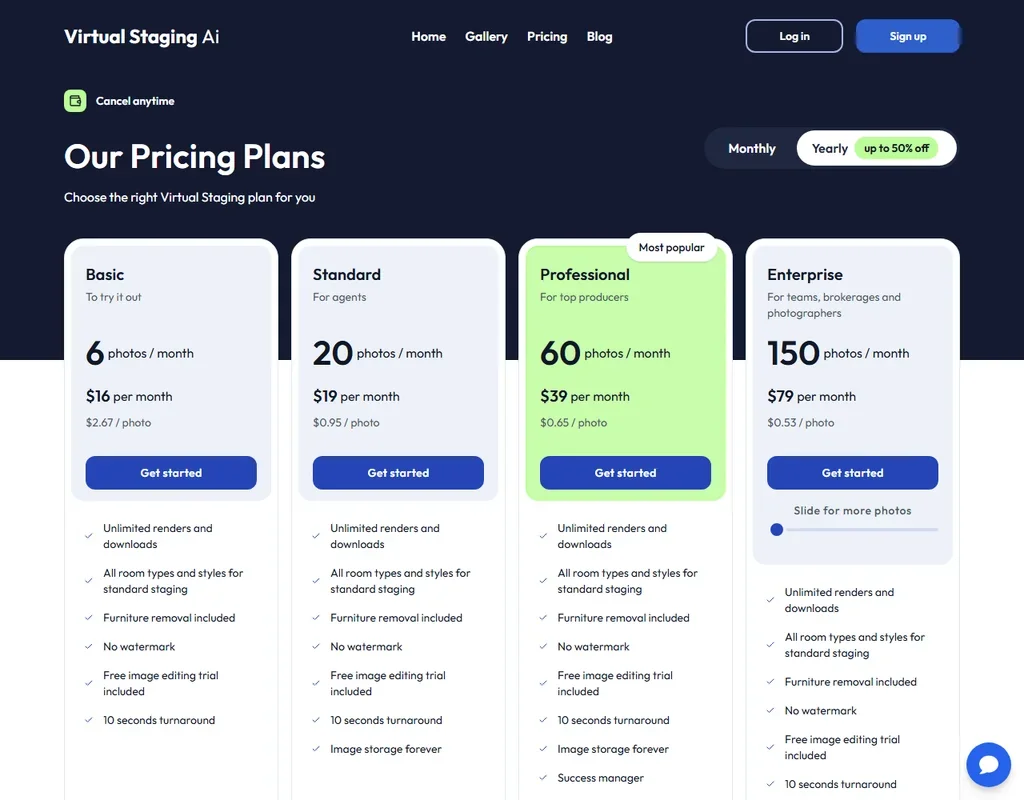
There is no free plan; the free option is one photo upload with no account. Unused photo credits do not roll over.

Basic is $25 a month, or $16 a month billed yearly ($192 a year), for 6 photos a month. Standard is $35 a month, or $19 a month billed yearly ($228 a year), for 20 photos. Professional is $79 a month, or $39 a month billed yearly ($468 a year), for 60 photos. Enterprise is $139 a month, or $79 a month billed yearly ($948 a year), for 150 photos, API access and a success manager. The Image Editing subscription is bought on top, from inside the app.

You own the output and may use it for any lawful purpose, though the terms bar presenting it as made by a person.

Privacy and security

The terms give the provider a perpetual licence to use your uploads and outputs to maintain the service, "to improve our products and the Service and for our other business purposes", with no promise not to train AI on them. There is no single sign-on on any plan, Enterprise included.

Support runs through a chat widget, an FAQ and email at info@virtualstagingai.app, and Enterprise adds a success manager.

Who Virtual Staging AI suits

Virtual Staging AI suits real estate agents, brokerages and listing photographers who need empty rooms furnished quickly in a set of preset styles, and who like unlimited re-renders of each photo. The yearly prices are much lower than the monthly ones, which favours agents who stage listings every month.

It suits less well anyone who wants to describe a design in words, start from a floor plan or sketch, or produce a video tour. Photo enhancement and day to dusk cost extra as a separate subscription, and anyone wary of a broad licence over their uploads should read the terms first.

Frequently Asked Questions

How much does Virtual Staging AI cost?

Basic is $25 a month for 6 photos, Standard $35 for 20, Professional $79 for 60 and Enterprise $139 for 150. Billed yearly, they come to $16, $19, $39 and $79 a month.

Can I try Virtual Staging AI for free?

Yes. You can upload one photo free, with no sign-up and no credit card. There is no ongoing free plan.

Who runs Virtual Staging AI?

Its terms of service name Zillow, Inc., of Seattle, as the provider of the service. The privacy policy still names Virtual Staging AI Inc.

Does Virtual Staging AI remove furniture?

Yes, furniture removal is included on every plan. Photo enhancement and day to dusk need the separate Image Editing subscription.

Virtual Staging AI is featured in

Alternatives to Virtual Staging AI

See all Virtual Staging AI alternatives →

Other AI Design Tool options we've reviewed.

Figma logo

Figma

Product teams wanting one shared workspace for design systems, prototypes and developer handoff

8.1
Rank #2 of 8 AI UI design tools
Best:Teams and platforms10
Weakest:What you can make7
Free plan: yesFree trial: noAPI: yes
Price not publishedFree plan
96% from published facts · checked 19 Sep
→
Canva logo

Canva

Small teams making branded social posts, print and video without hiring a designer

7.8
Rank #3 of 8 AI graphic design tools
Best:Teams and platforms10
Weakest:What you can make7
Free plan: yesFree trial: yesAPI: yes
From $18Free plan
90% from published facts · checked 19 Sep
→
Visme logo

Visme

Brand teams producing polished decks and reports that export to almost any format

6.9
Rank #3 of 5 AI presentation makers
Best:Workflow and output7.2
Weakest:Teams and platforms5.5
Free plan: yesFree trial: noAPI: no
From $29Free plan
85% from published facts · checked 26 Sep
→
Adobe Firefly logo

Adobe Firefly

Creative Cloud users who want generation inside the apps they already use, from a vendor that does not train on their content

8.1
Rank #1 of 7 AI image generators
Best:Rights and privacy9.2
Weakest:Openness and support3
Weights published under a named licence: noDoes not train on what you make: yes
From $9.99Free plan
78% from published facts · checked 8 Oct
→
Krea logo

Krea

Designers who want one of the broadest model menus, plus a node canvas, an AI agent and an API

9.4
Rank #1 of 13 multi-model AI platforms
Best:For video10
Weakest:Privacy and trust7.2
SOC 2: yesOffers Veo 3.1: yesOffers Nano Banana Pro: yes
From $9Free plan
93% from published facts · checked 28 Oct
→
Wix logo

Wix

Small business owners building a site and store themselves, with a phone line for help

8.0
Rank #1 of 7 AI website builders
Best:Teams and platforms9.5
Weakest:Pricing7
Free plan: yesFree trial: noAPI: yes
From $17Free plan
85% from published facts · checked 19 Sep
→

User reviews

Review Virtual Staging AI

Your rating

Reviews are moderated and appear once approved.