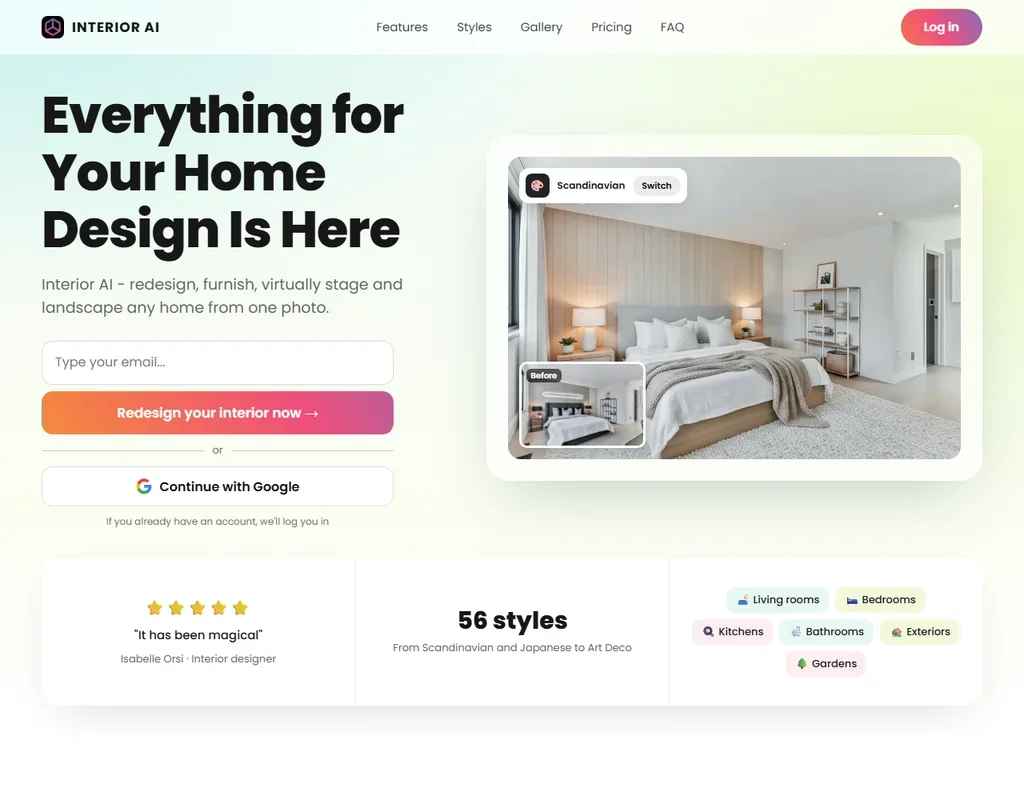
Interior AI is a web app that redesigns, furnishes and restages rooms, exteriors and gardens from a photo, a sketch or a SketchUp screenshot. It has no free plan or trial, so what decides whether it suits you is whether you need the editing, staging and video tools that start on the Premium plan, or only quick redesigns on Pro.
What is Interior AI?
Interior AI is made by Pieter Levels and runs in the browser on a laptop or a phone. You sign in with an email link or a Google account, and each subscription is a personal account.
After sign-up you work in Interior AI's studio, which offers more than 30 room types and more than 50 interior styles. Renders are saved, downloaded or deleted in your own gallery.
Designing a room with Interior AI
The usual start is a photo of your room, which Interior AI can redesign, furnish or reimagine completely. A sketch also works, and SketchUp mode takes a screenshot of a basic SketchUp wireframe or 3D render. Freestyle mode needs no photo: it generates a room from scratch from the style and room type you pick, with an optional prompt. On Pro you can also upload your own room, write your own design prompts and remix any style; the prompt field is marked experimental.
Style comes from the 50+ presets, or from a custom style: upload a photo of an interior you like and Interior AI copies its look. An Empty the space mode removes furniture from a photo.
The editing tools come on Premium and Ultra, not Pro: editing a design, virtual staging, upscaling, painting walls, changing lighting and adding people. Render quality also rises by plan, from low on Pro to medium on Premium and ultra on Ultra.
On Premium and Ultra, any render can be turned into a 3D flythrough video, and you can walk through the room in VR. Interior AI is an official launch partner of Stable Video Diffusion and uses it to turn images into video, and the 3D walk-through uses a World Labs world model. Pro renders with the Flux model, while Premium and Ultra use Interior AI's own Hyper Realism engine.
Working with other people
Interior AI is built for one person per account: each person must have their own account, and there is no shared workspace, team plan, co-editing or commenting. There is no API, and there are no software integrations or CAD plugins; SketchUp work comes in as an uploaded screenshot.
Interior AI pricing: what each plan gives
There is no free plan and no free trial, and Interior AI offers no refunds.
Pro is $49 a month, or $29 a month billed yearly ($349 a year), for 1,000 designs a month with the Flux model and low render quality. Premium is $99 a month, or $49 a month billed yearly ($599 a year), for 5,000 designs a month, medium quality and the editing, staging and video tools. Ultra is $199 a month, or $99 a month billed yearly ($1,199 a year), for 25,000 designs a month at ultra quality. A commercial use licence comes on Pro and above, and you own the images you create.
Privacy and security
Interior AI does not train on your photos: "We only use your photos to create AI interior design renders. We do not train on them like other companies, and your photos and renders are only accessible by you."
Interior AI applies the rights of the GDPR and the California Consumer Privacy Act to all users. There is no SAML or enterprise single sign-on. Billing is managed through the Stripe portal.
Who Interior AI suits
Interior AI suits homeowners, designers, real estate agents and SketchUp users who want many quick redesigns of a room, exterior or garden from a photo, and who can use the volume: even Pro allows 1,000 designs a month. Anyone who needs virtual staging, editing, upscaling or flythrough videos will want Premium or Ultra.
It suits less well anyone who wants to try before paying, since there is no free plan, no trial and no refunds. Studios that need shared workspaces, comments or an API will not find them here.
Frequently Asked Questions
Does Interior AI have a free plan?
No. There is no free plan or free trial, and Interior AI offers no refunds. Plans start with Pro at $49 a month, or $29 a month billed yearly.
Which plan includes virtual staging?
Virtual staging is on Premium and Ultra, together with editing designs, upscaling, painting walls, changing lighting and adding people. Pro does not include these tools.
Can Interior AI work from a SketchUp model?
Yes. Take a screenshot of a SketchUp wireframe or 3D render and select SketchUp mode in the web app. There is no SketchUp plugin.
Does Interior AI train on my photos?
No. Your photos are used only to create your renders, and your photos and renders are accessible only to you.