SAASINSPECTOR
Deepgram logo

Deepgram Review

Developers & Startups (Pay As You Go), Growing Applications (Growth)

Visit DeepgramFrom $0 (Free $200 Credit)

Research-based review. We analyzed vendor documentation, customer reviews on G2, Capterra, and Reddit, and live pricing — not hands-on testing yet. We update as our team puts tools through real workflows.

The verdict

Deepgram is an API-first voice AI platform built for developers and engineering teams, offering speech-to-text, text-to-speech, and a unified Voice Agent API for building real-time voice applications. Its Nova-3 model leads on transcription breadth while the Flux model targets low-latency conversational use. It is powerful infrastructure, but offers nothing for non-technical users looking for a ready-made tool.

Pros

  • Nova-3 flagship transcription model supports 45+ languages with both real-time streaming and batch processing available.
  • The Voice Agent API combines speech-to-text, text-to-speech, and LLM orchestration into a single endpoint, simplifying full voice agent development.
  • Flux model is purpose-built for conversational use cases, offering lower latency for real-time back-and-forth dialogue.
  • Well-documented REST and WebSocket endpoints make integration straightforward for developers.
  • Text-to-speech Aura models emphasize low-latency output, making them suitable for real-time voice applications.
  • Platform serves 100,000+ developers and has proven adoption across medical transcription, customer support, and conversational AI.
  • API-first architecture makes it flexible infrastructure for teams building voice-enabled products at scale.

Cons

  • No consumer-facing interface, mobile app, or desktop editor — entirely unsuitable for non-developer users.
  • The expanding feature set (TTS, Voice Agent API, LLM hooks) adds significant complexity on top of the core transcription product.
  • Flux Multilingual only covers 10 languages, limiting its use for teams needing broad language support in conversational scenarios.
  • Smart Formatting and other add-ons require additional configuration, adding setup overhead for developers.
  • Primarily infrastructure-focused, meaning teams without engineering resources will struggle to extract value from the platform.
From $0 (Free $200 Credit)Free plan NoFree trial Yes

Founded in 2015, Deepgram spent years as a pure speech recognition company before the voice AI wave pushed them somewhere more complicated. What we kept seeing across developer forums, G2 write-ups, and Reddit threads was consistent agreement on one thing: this is infrastructure. Not software you download. Not a dashboard for non-technical users. An API platform, deliberately built for people who are building things with it.

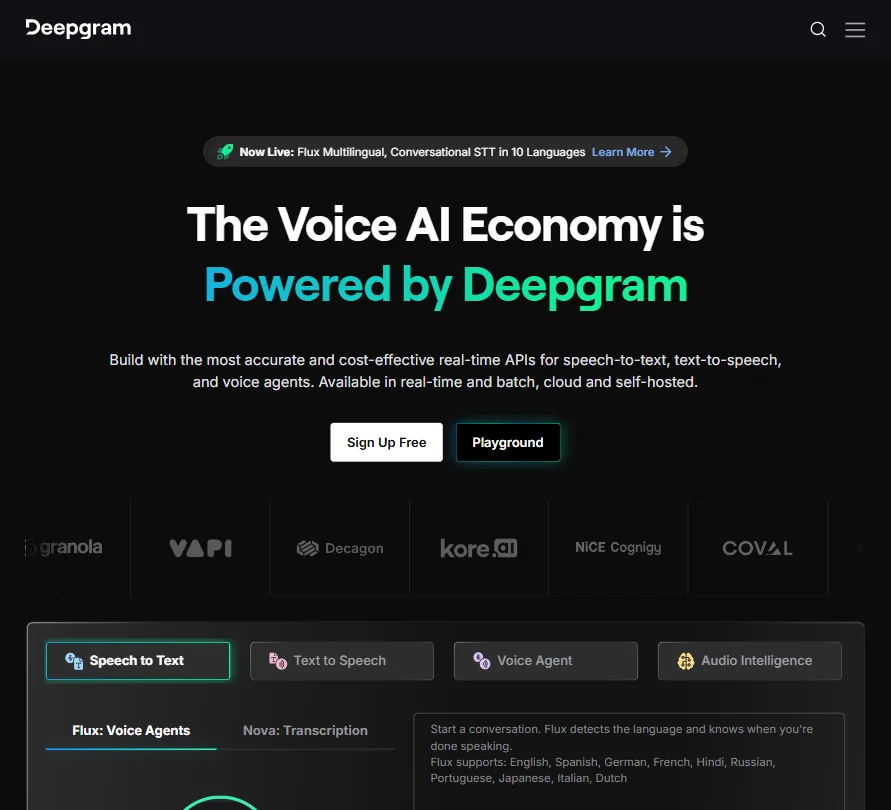
Deepgram homepage screenshot
Deepgram — Homepage

Transcription is still the core. But there's now text-to-speech, a Voice Agent API, and enough LLM orchestration hooks to make this a full pipeline. That's the appeal. It's also where the complexity starts.

What is Deepgram?

An API platform for voice AI. Speech-to-text came first, and the Nova-3 model is their current flagship transcription engine, covering 45+ languages with real-time streaming and batch processing both on the table. The Flux model came later, built specifically for conversational use, meaning lower latency and better handling of back-and-forth dialogue.

Text-to-speech came after that. The Aura-1 and Aura-2 models handle TTS, with an emphasis on low-latency output over voice realism. Then there's the Voice Agent API, which ties speech-to-text, TTS, and an LLM layer into a single endpoint. One call, full voice agent. That's the pitch developers are reacting to.

No mobile app. No desktop editor. No consumer-facing interface worth mentioning. If that sentence puts you off, this product isn't aimed at you.

Their own figures put the developer count at 100,000+. The customer list skews toward teams building voice-enabled products: customer support tooling, medical transcription, conversational AI agents. That's the territory.

Deepgram Features: Voice, Music & Audio Capabilities

Transcription is the obvious starting point. Real-time streaming runs through a WebSocket connection. Pre-recorded audio goes through a REST endpoint. Both are well-documented. Nova-3 handles the broad language coverage. Flux Multilingual covers 10 languages, aimed at one specific situation: low-latency conversational speech recognition where every millisecond is a real cost.

There are add-ons worth naming. Smart Formatting cleans up punctuation and number presentation automatically. Keyterm Prompting lets you bias the model toward specific vocabulary, which matters for domain-heavy transcription. Those features aren't exotic, but the developer commentary we read suggests they're implemented well in production contexts.

TTS via Aura models starts at $0.0150 per 1,000 characters. No voice cloning. No music generation. The TTS feature set is deliberately narrow, positioned for agent builders rather than content creators. Multiple voice styles exist, though Deepgram doesn't publish a full list publicly.

The Voice Agent API is the most recent addition. Priced at $4.50 per hour. You bring your own LLM or use theirs. Same with TTS. The whole thing is designed to cut the engineering overhead of stitching together a voice agent from three separate vendors. Based on developer commentary we aggregated, it mostly delivers on that. Speaker diarization, sentiment analysis, topic detection, and entity detection round out the audio intelligence layer. No noise removal, at least not in any publicly documented form. Not a post-production tool.

Deepgram Audio Quality: How Natural Does It Sound?

On transcription, the quality story holds up across sources. G2 reviewers flag accuracy in noisy environments repeatedly. Speed comes up even more. Developers running real-time applications consistently noted that Nova-3 outperformed Google Speech-to-Text and Amazon Transcribe in their own internal tests. We can't verify those benchmarks independently. But the pattern across enough separate accounts is hard to dismiss entirely.

For TTS, the picture is murkier. Deepgram doesn't publish side-by-side audio demos the way ElevenLabs does, and Aura-specific quality comparisons are sparse across review platforms. The positioning is latency-first, not realism-first, and that's a legitimate call for agent use cases. But developers building consumer-facing voice products who want natural-sounding output are probably not landing here.

Honestly, the product seems to know what it is. That's not nothing.

The Trustpilot score presents a jarring contrast to the G2 picture. Our research found the Trustpilot complaints skew heavily toward billing and account management friction rather than model quality. Those are different problems. Worth separating before drawing conclusions.

Deepgram Voice Cloning & Customization: How Deep Does It Go?

No voice cloning. Full stop. Relevant to some, irrelevant to others.

Custom model training is available for Enterprise customers in specific domains, medical and legal being the obvious candidates. But there's no self-serve path. It's a sales conversation, which means an undisclosed timeline and undisclosed pricing. We're skeptical that this is accessible for mid-market teams at any reasonable speed.

Keyterm Prompting handles some of this at a lighter level. You pass a list of terms, the model biases toward them. Not the same as a fine-tuned model, but enough to move domain-specific accuracy without triggering a custom model engagement.

The BYO model support inside the Voice Agent API is arguably the most interesting customization hook here. You can route your preferred LLM underneath and use a different TTS provider, keeping Deepgram purely for speech recognition and orchestration. Developers who already have strong opinions about their LLM layer will find that flexibility meaningful. The alternative, being locked into a single vendor's full stack, is a real objection in this space.

Is Deepgram Easy to Use?

Relative to what. For developers, the documentation at developers.deepgram.com is genuinely solid. Clear quickstarts, SDK support for Python and JavaScript and a few others, and a WebSocket setup guide that doesn't bury you in boilerplate. The Voice Agent API walkthrough is more involved, but the complexity reflects the actual problem being solved.

Non-developers. Not the fit. There's no visual interface, no drag-and-drop, no dashboard where a non-technical user uploads a file and gets a transcript. Every interaction goes through the API. Design choice, not oversight.

What we kept seeing in G2 reviews from developer accounts was specific: praise for initial integration, then a complaint about model selection. Figuring out when to use Nova-3 versus Flux isn't immediately obvious. You have to read past the quickstart to get there. Small friction, but real.

Support below Enterprise is Discord and documentation. Email and live chat are Enterprise-only. For anyone on the free tier or Pay As You Go plan, that's the reality. The docs are good enough that most developers navigate it. But it's a gap worth knowing about before you commit to a production integration.

Fair. Not great.

Deepgram Pricing: Is It Worth It for Creators & Businesses?

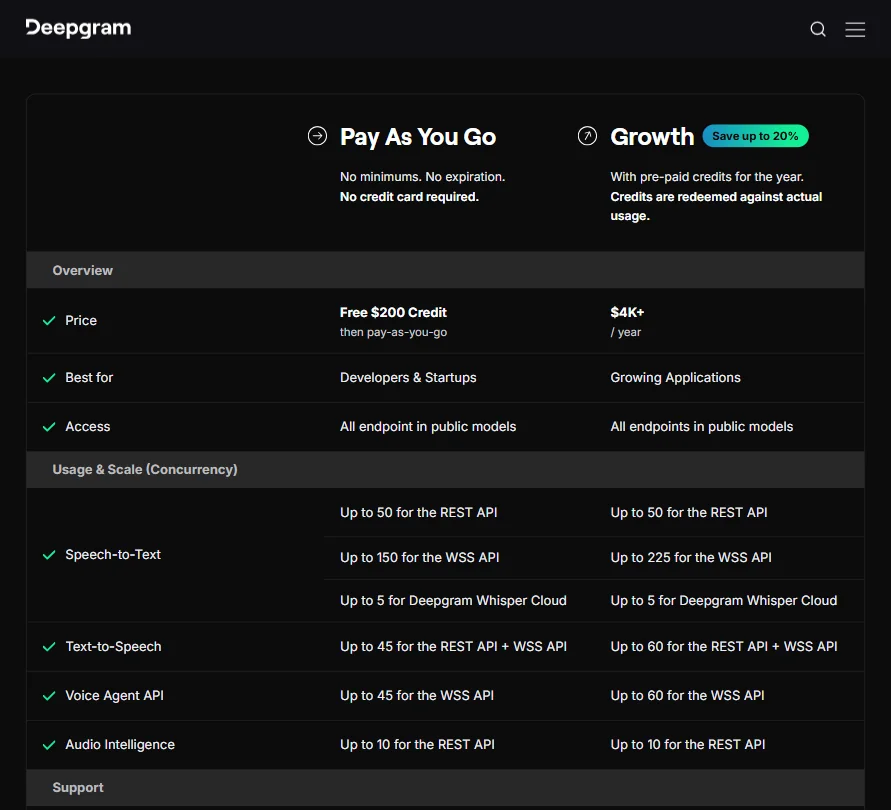
Deepgram pricing screenshot
Deepgram — Pricing

The free tier is genuinely useful. $200 in credit, no credit card required, no expiration. For a developer evaluating whether Nova-3 works for their actual use case, that's enough runway to build something real and test it properly before spending anything.

Pay As You Go streaming speech-to-text starts at $0.0048 per minute. TTS runs $0.0150 per 1,000 characters. The Voice Agent API at $4.50 per hour is where the cost conversation gets serious for anyone running at volume. Whether that number is competitive depends entirely on what you'd otherwise be paying to stitch together separate services for STT, TTS, and LLM orchestration.

The Growth plan starts at $4,000 per year. Pre-paid credits, redeemed against actual usage, with a claimed saving of up to 20% over Pay As You Go rates. Concurrency limits shift: the WSS API for speech-to-text moves from 150 concurrent connections to 225, and TTS plus Voice Agent API both increase from 45 to 60 concurrent connections. Those are real differences at scale. What doesn't shift is transparency: the pricing page doesn't clearly explain everything Growth includes beyond the rate and concurrency bumps.

Enterprise is custom. Contact sales. No floor pricing published anywhere we could find. The refund policy is similarly unpublished, which isn't unusual for API-first products, but worth knowing.

For context, Google Speech-to-Text standard models start at $0.016 per minute. Amazon Transcribe is in the same range. Deepgram's rates are competitive and often cheaper for streaming at volume. The accuracy argument is why developers choose Deepgram over those services, not the per-minute rate alone. That story holds up across what we read.

Deepgram vs AssemblyAI: Which AI Audio Tool Wins?

These two come up in the same conversations constantly. Both API-first, both targeting developers building voice-enabled products, both with strong transcription accuracy. The comparison is real and the answer isn't clean.

AssemblyAI has a stronger out-of-the-box story on audio intelligence, with sentiment analysis, auto chapters, and content moderation all documented for non-enterprise tiers without a sales conversation. Deepgram has some of these, but the depth varies. That's a meaningful difference for teams that need those features quickly.

Deepgram's edge is latency and the Voice Agent API. For real-time streaming in conversational applications, Flux is genuinely differentiated. AssemblyAI's real-time offering is solid. Deepgram's is faster in the scenarios developer accounts described when testing both.

TTS changes the comparison. AssemblyAI doesn't offer it. Deepgram does. If you need speech recognition and voice output from a single vendor, Deepgram has the advantage. The Voice Agent API extends that further.

Self-hosted deployment is available on Deepgram. AssemblyAI has infrastructure for running its voice models on customer infrastructure too, though both treat this as an enterprise conversation rather than a self-serve toggle. For teams with strict data residency requirements, that gap relative to cloud-only alternatives matters considerably.

Neither is obviously dominant. Pick based on your actual latency requirements and which feature gaps you can live with.

Who Should Use Deepgram? (And Who Shouldn't)

Developers building voice agents. The combination of Flux's latency profile, the Voice Agent API, and BYO LLM support is purpose-built for that use case and not much else.

Enterprise teams with data sensitivity constraints. Self-hosted deployment is rare in this category, and Deepgram is one of the few credible options with it.

High-volume real-time transcription teams. Competitive pricing at scale and an accuracy story that holds up across enough independent sources to take seriously.

Creators and non-technical users. Not the fit. No UI, no editor, no way to use this without writing code or hiring someone who can.

Teams primarily needing voice cloning or emotionally realistic synthetic speech. Look at ElevenLabs instead. Aura models are built for low latency, not for realism. Those are different goals, and Deepgram doesn't pretend otherwise.

Small teams on tight budgets who need premium support. Discord and docs is what you get below Enterprise. Not catastrophic, but not hand-holding either.

Deepgram Review Verdict

A well-built product for a specific kind of buyer. The accuracy is real. The latency story for real-time applications is real. The Voice Agent API is the most interesting thing they've shipped recently, and developer engagement with it is genuine based on what we aggregated.

The gaps are real too. TTS quality is a secondary concern for Deepgram but a primary one for anyone building consumer-facing voice products. Support below Enterprise is thin. The Growth plan pricing jump from Pay As You Go lacks public detail on what actually changes. And the billing friction pattern on Trustpilot is something we'd want to track over time, not dismiss.

For developers who know what they need, the API is clean, the documentation holds up, and the free $200 credit gives enough runway to determine whether Nova-3 or Flux is the right fit before spending a dollar. Not a consumer play. Genuinely strong infrastructure. The distinction matters here.

Frequently Asked Questions

Does Deepgram offer a free plan?

Yes. New accounts get $200 in free credit, no credit card required, no expiration on the balance. That's enough headroom to run real tests on streaming transcription, pre-recorded audio, and TTS before committing to anything paid. The Pay As You Go plan picks up after the credit is used, with no minimum spend required.

Does Deepgram support real-time transcription?

Yes, through a WebSocket connection. The Flux model is built specifically for low-latency conversational transcription, while Nova-3 covers the broader language range at 45+ languages. Both are accessible through the same developer portal and documented clearly enough that most developers get a working integration going quickly.

Does Deepgram offer voice cloning?

No. The Aura TTS models come with preset voices and no cloning capability. The focus is on low-latency output for agent applications, not on replicating specific voices. If voice cloning is a hard requirement, that's a different product category, and ElevenLabs is the name that comes up most in those conversations.

Deepgram is featured in

Alternatives to Deepgram

See all Deepgram alternatives →

Other AI Audio Tool options we've reviewed.

User reviews

Review Deepgram

Your rating

Reviews are moderated and appear once approved.