Founded in 2017, out of Wilmington, Delaware, Circleboom runs two distinct products under one brand. A deep Twitter/X account manager on one side. A multi-platform scheduler called Circleboom Publish on the other. Most tools in this category pick a lane. Circleboom didn't, and that choice shapes everything about how it performs.

That ambition is either its best feature or its biggest problem, depending on what you need.
What is Circleboom?
The Twitter tool is the older and arguably stronger half. Circleboom holds official X Enterprise Developer status, which is not a badge they invented. X grants that designation after formal vetting, and it gives Circleboom API access that most third-party schedulers simply don't have. In practice, that translates into deep follower and following analysis, account health metrics, and what they call X Smart Account Search, a competitor research feature that goes well past what the native X interface exposes.
Circleboom Publish is the other side. Post scheduling across multiple platforms, a visual content calendar, AI-assisted captions, hashtag suggestions, RSS feed automation, bulk scheduling on higher tiers. The toolkit you'd expect from a scheduler in this category. Nothing shocking there.
Circleboom Features: Scheduling, AI Content & Analytics

The Circleboom Publish tool covers scheduling basics competently. Content calendar, smart timing recommendations, cross-platform posting from one composer. Bulk scheduling is present but gated behind the Medium plan and above.
Analytics are split across the two products, not unified. The Twitter tool gives you follower demographics, engagement breakdowns, and post-level data.
Honestly, the Twitter analytics are where Circleboom earns its differentiation. Nowhere else at this price point do you get that depth on X-specific account data.
Team features exist but only appear at higher Publish tiers. Support runs through a chat widget and email. The widget is bot-first, which is fine until it isn't.
Circleboom Platform Support: Which Networks Does It Cover?
Circleboom Publish now supports TikTok, YouTube, and Threads, in addition to its other major social networks, including Twitter/X, Instagram, Facebook, LinkedIn, Pinterest, Google Business Profile, and Bluesky.
The Google Business Profile integration is worth flagging as a genuine differentiator. Most tools at this price range skip it. Seeing it included, especially for local businesses, is a small but real distinction.
We're not going to pretend broader coverage solves everything. Compared to something like Buffer, which has had some of these integrations longer, Circleboom is still catching up on network depth. But the direction is right.
Circleboom AI Content Creation: Caption & Copy Quality
Circleboom's AI content layer runs on OpenAI's infrastructure, with Circleboom's own prompting on top. What that means in practice: caption generation in Publish uses GPT-based models, and the outputs are clean and on-topic. Not remarkable. Not bad.
The AI caption quality here is roughly on par with what Buffer and Publer offer now. A checkbox feature done adequately, not a reason to choose Circleboom over alternatives.
Worth noting: 25-plus UI language options are available, which matters for international teams, though English is clearly the primary design language throughout the product.
Is Circleboom Easy to Use?
Their own documentation leans hard on the "no learning curve" framing. They even cite Pareto's principle explicitly in their product philosophy, claiming they only build features that most users actually use. An interesting design commitment, though it needs proving across the full product, not just the Twitter side.
Honestly, "easy to use" is doing a lot of work in their marketing. For the Twitter tool specifically, we'd agree. For Publish across all supported platforms, "functional" is the more accurate word.
Circleboom Pricing: Is It Worth It for Creators & Agencies?
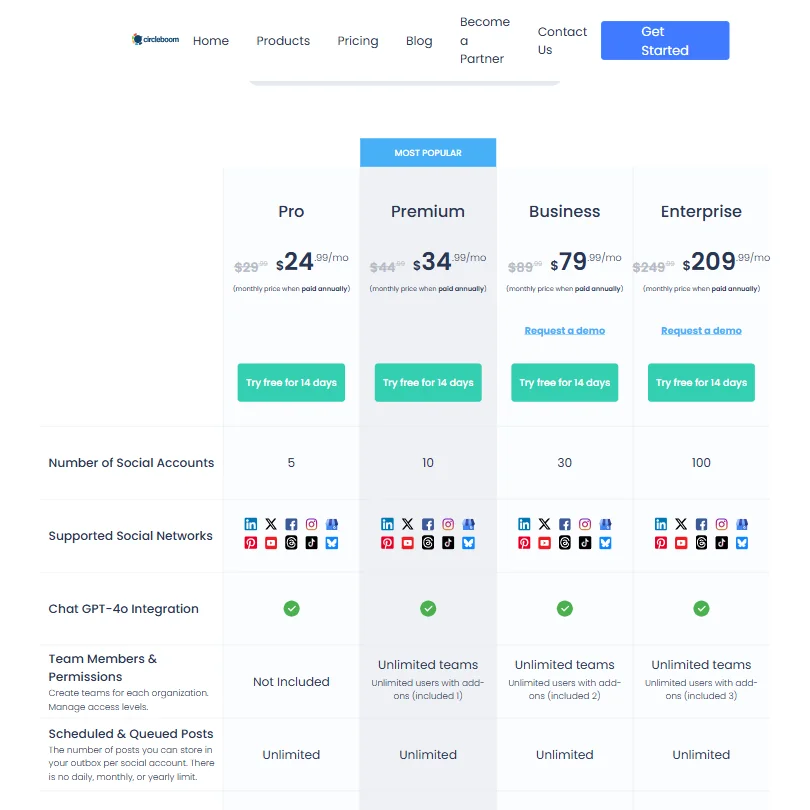
Two separate products, two separate pricing structures. That creates real friction when you're trying to figure out what you're actually paying.
The Twitter-only tool starts at $7.99 a month on the Pro plan. Genuinely low for the depth of X account management you get. Hard to argue with that.
Circleboom Publish is priced separately, with the Pro plan at $24.99 per month billed annually, down from a listed $29.99. Premium, the most popular tier, runs $34.99 per month annually. Business sits at $79.99 per month annually. Enterprise at $209.99 per month annually. Each tier scales the number of supported social accounts, from 5 on Pro up to 100 on Enterprise. All four plans include Chat GPT-4o integration, which at least means the AI content features aren't gated behind a premium tier.
A 14-day free trial exists across all plans. A free tier exists on both the Twitter tool and Publish, though limited. Ask about the refund policy before committing to an annual plan.
For the Twitter tool alone, the value case is strong. For Publish at the Pro tier, you're competing directly with Buffer at similar price points, and Buffer's platform history is longer. The value case gets thinner as you move up the Publish tiers without the X-specific features anchoring it.
Circleboom vs Buffer: Which Social Media Tool Wins?
Buffer covers a broader network list and has had some integrations longer. That's the simple version.
Circleboom wins on one dimension Buffer can't touch. No other tool at this price range has Circleboom's follower analysis and Twitter-specific account management depth. That's not a close comparison. It's a different product category bolted onto a scheduler, and for X-heavy users, that difference is substantial.
For someone who lives on Twitter/X, Circleboom is the obvious call. For someone who treats X as one of five platforms with no interest in deep account management, Buffer is probably the better fit, with cleaner pricing and more familiar agency workflows.
The AI content tools between the two are roughly comparable. Neither one is doing something notably different there.
Who Should Use Circleboom? (And Who Shouldn't)
Power Twitter/X users. That's the core audience, and it's where the clearest argument lives. Creators and small brands managing a serious X presence who want account analytics beyond what X itself provides.
Small businesses with Google Business Profile in their social mix. That integration is genuinely rare at this price tier.
Agencies with large client rosters. Look elsewhere. Team features are limited to higher Publish tiers, the two-product structure adds operational overhead, and something like SocialBee or a tool built explicitly for multi-client management will serve those workflows better.
TikTok-first creators who need deeper video scheduling support. The platform is now listed, but verify current feature depth before committing.
Circleboom Review Verdict
Circleboom is a legitimate tool with a specific and defensible use case. The Twitter/X side is genuinely strong, arguably the best in its price bracket for X account management. The Official Enterprise Developer status isn't marketing fluff. It translates into real data access that competitors at this price point don't have.
The Publish side is where the edges show. The analytics gap between the two products is noticeable. The two-product structure creates real friction for anyone who wants a unified social management experience, and the pricing transparency around combining both tools could be clearer.
We don't think Circleboom is trying to be Hootsuite. Probably wise. What they've built is a focused tool for a specific kind of user, and within that focus, they deliver. Outside it, the product feels patchy in places. The Twitter tool pricing is genuinely competitive. The Publish mid-tier pricing is harder to justify without the X-specific features anchoring the value.
Worth a trial if Twitter/X is central to your strategy. Less obvious if it isn't.
How Circleboom compares
Circleboom scores 3.2 out of 10 among the AI social media management tools we rate. These three do the same job and are the closest to it, compared on what each vendor publishes.
Buffer
Buffer has a free plan and Circleboom does not, though Circleboom's 90 day free trial dwarfs anything Buffer offers before paying. Five profiles cost $30 a month on Buffer against $29.99 on Circleboom, close enough that features decide it: Buffer has a mobile app, a unified inbox and an API, none of which Circleboom has.
Pick Buffer if you want a free plan, a mobile app and an API.
Pick Circleboom if you want evergreen posts re-queued and a 90 day trial.
Hootsuite
Hootsuite charges $99 a month for five profiles, more than triple Circleboom's $29.99, and Hootsuite has no free trial while Circleboom runs a 90 day one. Hootsuite pulls ahead on capability though: a mobile app, bulk scheduling, single sign-on, an API and competitor tracking are all things Circleboom lacks.
Pick Hootsuite if you need bulk scheduling, single sign-on or competitor tracking.
Pick Circleboom if you want a cheaper plan and a long free trial to test it.
Publer
Publer costs $25 a month for five profiles against Circleboom's $29.99, and Publer has a free plan on top of that. Publer also adds a mobile app, bulk scheduling, an API and AI image generation, features Circleboom does not offer. Both re-queue evergreen posts.
Pick Publer if you want a free plan, a mobile app, and AI image generation.
Pick Circleboom if you want a 90 day free trial before paying.
Frequently Asked Questions
Does Circleboom support TikTok?
Yes, as of current documentation. Circleboom Publish now includes TikTok alongside YouTube and Threads, in addition to its established network list covering Twitter/X, Instagram, Facebook, LinkedIn, Pinterest, Google Business Profile, and Bluesky. Earlier versions of this review flagged TikTok as absent, and that's been corrected. If short-form video is a core channel for you, verify the current depth of TikTok scheduling features before committing, since newly added integrations sometimes launch with limited functionality.
Is Circleboom good for Twitter follower management?
Yes, and this is genuinely where the product is strongest. The Circleboom Twitter tool gives you follower and following analytics, account health tracking, and competitor research via X Smart Account Search. That depth is unusual at the $7.99 Pro tier.
Do you need to buy both Circleboom products separately?
Yes. The Twitter management tool and Circleboom Publish are priced as separate products. There's no visible bundle pricing on the public pricing page. If you want both the deep X management features and multi-platform scheduling, you're paying two separate subscription fees. Factor that into your total cost calculation before committing, especially on an annual plan.