
What is Tweet Hunter?
X-only. That's the whole frame. Scheduling, AI writing, a CRM, and Auto-DM automation all built specifically around one platform, and the product makes no apologies for that.

What doesn't get advertised loudly is the ceiling. No multi-platform support. No Canva integration. No public API documentation we could locate. Tweet Hunter is X-only by design, and buyers migrating from something like Publer or Buffer should price that trade-off in before they touch the trial button.
Tweet Hunter Features: Scheduling, AI Content & Analytics

Scheduling works as described. Queue tweets and threads weeks out, bulk-load a month of content in a single session, manage drafts. Nothing exotic.
The pricing page references a library of over 12 million viral tweets. The viral tweet library is searchable by keyword or handle. That's the useful part.
Auto-retweet for evergreen content is available. The CRM lets you build lists from engagement criteria, track who's interacting, and move people toward a follow-up or a sale. Buffer doesn't do that. Hypefury doesn't do that natively either.
The Auto-DM feature can trigger a direct message when someone likes or comments on a specific tweet. X's API restrictions have made this category complicated. Analytics cover impressions, follower growth, clicks, and per-tweet breakdowns. Not deep enough to replace a dedicated reporting tool, but sufficient for a creator who just wants to know what's landing.
Tweet Hunter Platform Support: Which Networks Does It Cover?
One network. X. Full stop.
No Instagram, no LinkedIn, nothing outside the platform. We don't say that to be harsh. We say it because buyers coming from a multi-platform background will immediately need a second tool running alongside this one. That's a real cost, in time and in money.
X-first creators, ghostwriters, and personal brand operators who live on the platform will find the single-platform depth makes sense. Anyone else should look at Buffer first and honestly assess whether a general scheduler covers 80 percent of the need before paying for a specialist.
Tweet Hunter AI Content Creation: Caption & Copy Quality
The AI writing layer includes daily personalized tweet suggestions, a rewriter, thread ideas, and hook generation.
Paste a tweet you like, adjust tone or angle, post something you can stand behind.
Ask how personalized the suggestions are versus recycled structural patterns dressed in different words. There are no public model cards and no sample outputs in the documentation, and transparency matters more as the AI writing category gets more competitive. "Custom trained AI" appears on the Enterprise page at $200 a month, but nothing explains what that means in practice, so ask.
Is Tweet Hunter Easy to Use?
The Chrome extension is the interface most users actually work from. It drops a sidebar directly into X, which keeps the workflow tight. No context-switching to a separate tab to queue something or pull inspiration.
The CRM and Auto-DM features take longer to click. Not a wall, just not intuitive on day one.
Tweet Hunter Pricing: Is It Worth It for Creators & Agencies?
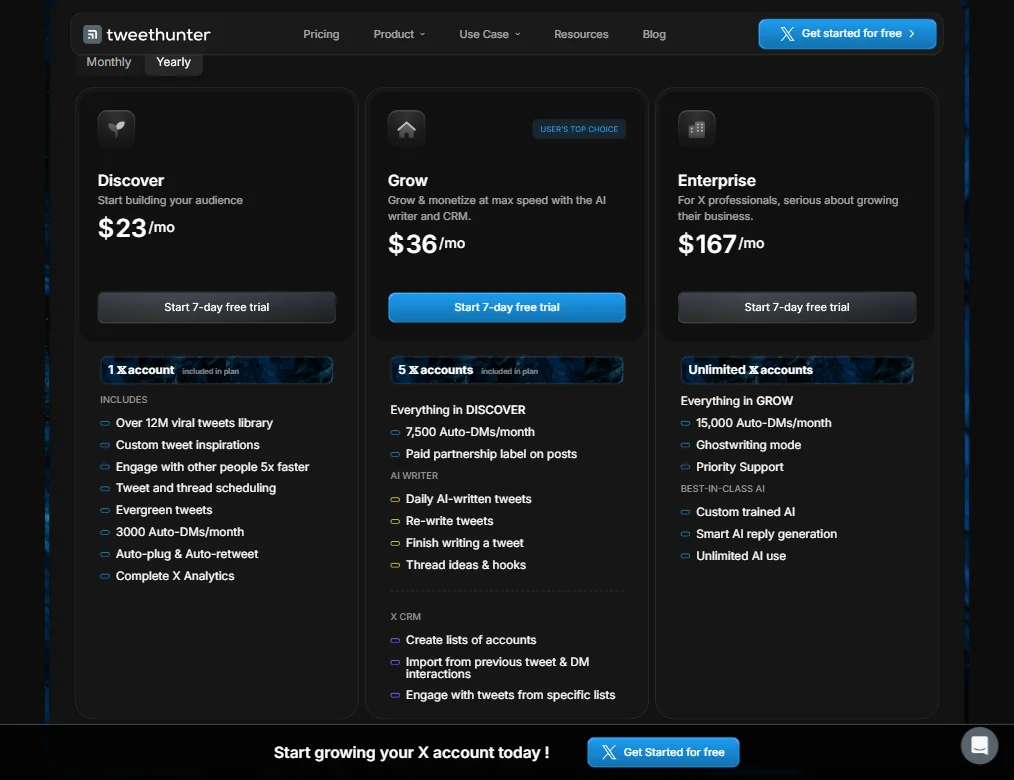
Three tiers, all with a 7-day free trial. No free plan.
The entry-level Discover plan runs $29 a month and includes one X account, 3,000 Auto-DMs per month, and access to the viral tweet library. The Grow plan sits at $49 a month, adds five X accounts and 7,500 Auto-DMs per month, and is where the AI writer features actually live, including daily AI-written tweets and the rewriter. Enterprise is $200 a month, covers unlimited X accounts, bumps Auto-DMs to 15,000 per month, and adds ghostwriting mode plus priority support.
No public refund policy is published. A 7-day trial is tight for a tool with a learning curve on the CRM side, and if someone doesn't hit value in that first week, they're committing $49 with no stated exit path. That missing refund policy is a real friction point for anyone cautious about new tools. Fair warning on that.
Compared to Hypefury at a similar price point, Tweet Hunter has more depth on the CRM and automation side. Compared to Typefully, which is cheaper and cleaner, Tweet Hunter is heavier, and more opinionated about the growth-and-monetization use case specifically.
Tweet Hunter vs Hypefury: Which Social Media Tool Wins?
Both tools target the same lane. X-focused scheduling with AI writing built in. Hypefury has the longer track record. Tweet Hunter pushes harder on the CRM and DM automation side.
For anyone building a sales funnel through X, the Auto-DM setup tilts toward Tweet Hunter. Hypefury's writing assistance is arguably cleaner for users who just want to write and post without configuring automation flows. The viral tweet library is a real differentiator, because Hypefury doesn't match it directly, whatever the actual count turns out to be.
Where Hypefury pulls ahead is community weight. More tutorials, more comparison content, more third-party reviews exist for it. Tweet Hunter's thin public review presence means buying decisions lean on the vendor's own materials more than is ideal. Not a dealbreaker.
No clean winner here. The CRM-and-automation buyer goes Tweet Hunter. The writer who wants the simplest possible interface probably stays on Hypefury.
Who Should Use Tweet Hunter? (And Who Shouldn't)
X-first personal brands. That's the core fit.
Ghostwriters managing multiple clients fit the Enterprise tier at $200 a month. The multi-account setup and ghostwriting mode are built for that workflow, and if you're billing clients, the per-account math can hold up.
Solopreneurs monetizing through X, whether newsletters, courses, or consulting, get genuine utility from the CRM features that most schedulers skip entirely. That's the differentiated piece.
Not great for everyone, though. Anyone managing more than one social platform will find the tool simply won't touch anything outside X. Anyone who needs a stated refund policy before committing money should pause. Agencies needing deep team permissions or white-label options should hold off until Tweet Hunter clarifies what Enterprise actually includes beyond the features listed on the pricing page.
Tweet Hunter Review Verdict
One platform, done with real intent. The product philosophy around X as a sales engine rather than a posting queue is coherent, and most of the features back it up without too much hand-waving.
The limits are real though. No multi-platform support. Thin independent review presence. Ask about the refund policy, since none is published. The 7-day trial is genuinely too short for a tool this layered, and clearer documentation would help before recommending it to someone with no prior experience in X growth tooling. The library figure inconsistency across pages is a small thing, but it suggests the marketing copy isn't being watched closely. That's not a crisis. It's just a tell.
For the right buyer, the tool earns its price. For the wrong one, there's no obvious safety net on the way out.
How Tweet Hunter compares
Tweet Hunter scores 6.0 out of 10 among the X and LinkedIn growth tools we rate. These three do the same job and are the closest to it, compared on what each vendor publishes.
Hypefury
Hypefury's cheapest plan is $6 a month and posts across Bluesky, Threads, LinkedIn, Instagram and TikTok, but it does not support X at all. Tweet Hunter posts only to X, at $29 a month, and keeps a list of the people who engaged, which Hypefury does not offer. Both add a plug once a post takes off and auto-repost your best posts. Hypefury also turns a post on one channel into a post for another.
Pick Hypefury if you post to Bluesky, Threads, Instagram or TikTok cheaply.
Pick Tweet Hunter if you focus on X and want a list of engaged people.
Typefully
Typefully has a free plan and posts to X, LinkedIn, Bluesky, Threads and Mastodon; its paid Creator plan is sold yearly only, unlike Tweet Hunter's $29 a month billing. Tweet Hunter posts only to X but suggests posts and people to reply to and keeps a library of high-performing tweets, neither of which Typefully offers. Typefully lets several people work on one account and has an API; Tweet Hunter has neither. Both add a plug once a post takes off.
Pick Typefully if you want a free plan across five networks, billed yearly.
Pick Tweet Hunter if you want reply suggestions and a curated tweet library.
Taplio
Tweet Hunter costs $29 a month against $39 a month on Taplio, and it adds a plug once a post takes off and auto-reposts your best tweets, neither of which Taplio does. Taplio has an API, lets several people work on one account, and generates images for posts, none of which Tweet Hunter offers. Tweet Hunter posts only to X; Taplio posts only to LinkedIn.
Pick Taplio if you focus on LinkedIn and want an API with team seats.
Pick Tweet Hunter if you focus on X and want a cheaper plan.
Frequently Asked Questions
Does Tweet Hunter work for Twitter (X) scheduling?
Scheduling is the foundation everything else sits on. Individual tweets and full threads, recurring queues, bulk content loading for weeks at a time. The x twitter scheduler functionality is the core of the product. The Chrome extension keeps it integrated directly into the X interface rather than forcing a separate tab.
Is there an Auto-DM feature in Tweet Hunter?
Yes. The auto DM twitter tool fires a direct message automatically when someone likes or comments on a specific tweet. X's API environment has been volatile, so verifying current functionality before committing to a plan that depends on it is reasonable. The Discover plan includes 3,000 Auto-DMs per month. Grow gets you 7,500. Enterprise tops out at 15,000.
How does Tweet Hunter pricing compare to competitors?
Discover starts at $29 a month, Grow sits at $49, Enterprise at $200. Comparable to Hypefury at equivalent feature levels. Typefully undercuts both on price but skips the CRM and automation entirely. Tweet Hunter pricing is publicly listed and reasonably transparent, which is better than several tools in this category. Ask about the refund policy directly before you commit, since none is published.