What is Taplio?
Taplio launched in 2021, part of the lempire ecosystem out of Paris. It does one thing. Not Instagram, not X, not Facebook. LinkedIn. That focus is deliberate and it's the clearest thing the product has going for it.

The framing on the vendor site is "AI coach for LinkedIn growth," which is a bit much. But the product underneath that framing isn't wrong for the job. It bundles post creation, scheduling, carousel building, and profile analytics into a single web app, plus a Chrome extension that sits on top of your regular LinkedIn browsing.
The AI runs on GPT-4 and Claude. Both. That multi-model setup is genuinely unusual at this price tier, and most competitors pick one and move on. Worth knowing.
The target user is specific. LinkedIn creators, solopreneurs building a personal brand, and corporate comms teams running employee advocacy programs. It's not trying to be Buffer. It wants to own the LinkedIn-only lane, and we think that's a defensible position, even if it creates real ceiling problems for anyone managing multiple networks.
Taplio Features: Scheduling, AI Content & Analytics
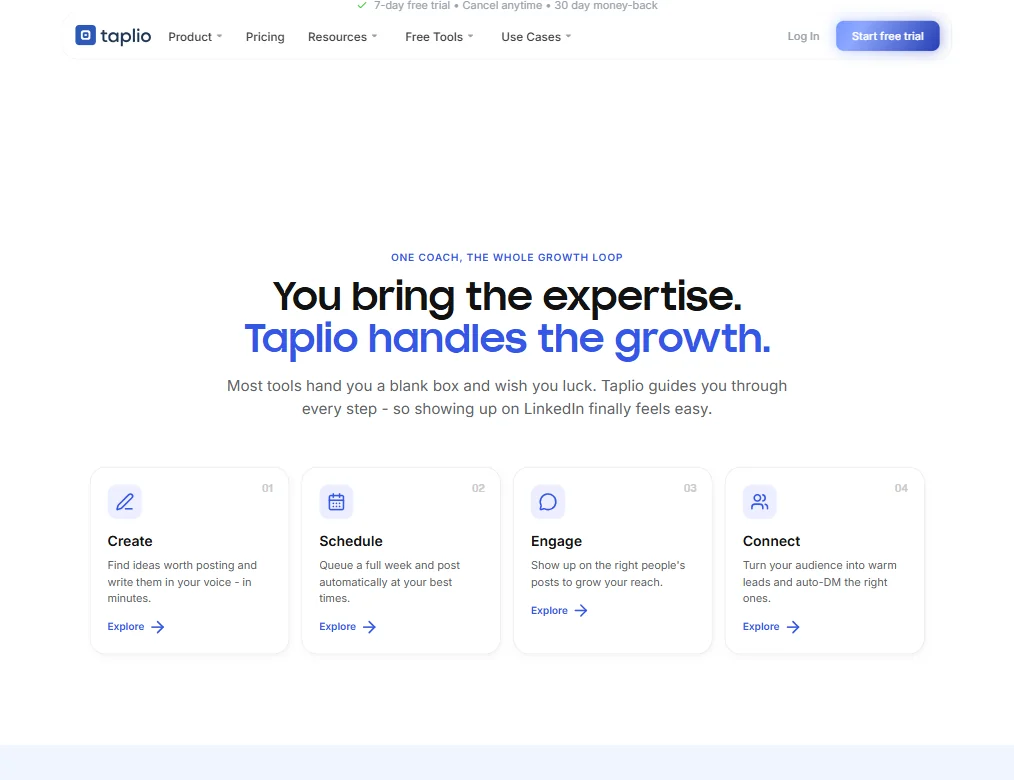
The core loop is straightforward. Write or generate a post in the Create module, schedule it through the built-in calendar, check performance in the Analyse tab. That's the product.
Inside that loop, a few things are worth flagging. The carousel builder turns a post into a slide-format piece without leaving the tool. Useful. The Engage module is built to help you interact with other creators' content, which feeds the LinkedIn algorithm in ways that pure scheduling never could. The Connect feature handles some network growth automation.
The Automate module is where things get interesting. Automation on LinkedIn has always lived in a grey area. Taplio's documentation is careful about it. We'll come back to that.
Analytics are real. Profile-level data, post performance, follower trends. Nothing that would embarrass a mid-tier social tool, and nothing that would replace a dedicated analytics product either. Functional is the right word.
The content inspiration finder pulls trending posts from other LinkedIn creators in your niche. Honestly, that feature alone saves time for anyone who stares at a blank post box every morning.
Taplio Platform Support: Which Networks Does It Cover?
One platform.
LinkedIn. Full stop. No Instagram, no X, no multi-channel calendar. If your strategy runs across networks, Taplio won't cover it. Something like Buffer handles multi-platform scheduling for that situation. Different tool, different job.
The Chrome extension fills a few gaps, letting you engage with LinkedIn content from your browser without switching tabs. Most users find it useful. Some find it redundant once they're in the web app rhythm. Fair.
The single-platform focus is Taplio's clearest trade-off. You get a product built entirely around LinkedIn's quirks and algorithm patterns. You give up everything else. Whether that's reasonable depends entirely on how much of your actual work lives on LinkedIn.
Taplio AI Content Creation: Caption & Copy Quality
The AI writing is where Taplio spends most of its marketing energy. GPT-4 and Claude running behind the same interface is the headline.
The hashtag suggestions are built into the creation flow, not bolted on as an afterthought, which is a small thing that actually matters in daily use.
That platform-specific tuning, respecting LinkedIn's short paragraphs, line breaks, and hook structures, is where the actual value shows up compared to just pasting a prompt into ChatGPT directly.
The viral post inspiration feature is less "write for me," more "show me what's working so I can riff on it."
Is Taplio Easy to Use?
Mixed signals here. Scheduling a post takes a few minutes once you're set up.
The Engage and Automate modules take longer to figure out. Not because the UI is bad, but because there's genuine surface area to explore. Six modules on the main nav, each with its own settings. That's a real onboarding lift for a tool that's supposed to simplify things.
The help center is comprehensive. Good documentation usually signals the product has complexity worth explaining, and Taplio's does. The live chat is a bot, not a person. Email support exists.
Taplio Pricing: Is It Worth It for Creators & Agencies?

Three plans are listed. Starter at $39 per month, Growth at $69 per month, Pro at $199 per month. All three come with a 7-day free trial, and the billing is monthly with a cancel-anytime policy.
The Growth plan is flagged as the top choice and adds AI post writing, team collaboration, and the ability to reply and comment faster through the Engage module. The Pro plan at $199 per month layers in unlimited AI posts and comments, automated lead outreach, and priority support.
A yearly billing option exists and cuts 25% off each plan.
Not great. The 7-day trial window is short for evaluating engagement automation features that need time to show results. And $199 per month for Pro is a real ask for a solo creator without clear evidence the lead outreach automation pays back that cost.
Teams and agencies get a separate pricing path with up to 30% savings, shared analytics across accounts, and admin or client roles. The multi-seat path suggests Taplio has genuinely invested in the agency workflow, not just bolted on a "team" label. The LinkedIn Benchmark feature, which analyzes 60,000-plus LinkedIn posts each month to reverse-engineer algorithm patterns, is included across plans and is the kind of data asset that's genuinely hard for a solo tool to replicate.
For a tool competing against AuthoredUp, which has publicly listed paid plans, a 14-day free trial with no credit card required, and several free standalone tools (though no clearly published permanent free plan), Taplio's 7-day trial with a credit card feels like friction that doesn't need to exist. That approach is hard to defend.
Taplio vs Lempod: Which Social Media Tool Wins?
Lempod focuses almost entirely on engagement pods, getting your posts in front of other users who will like and comment to boost algorithmic reach. Taplio does that too, but it's one module inside a larger product.
Taplio wins on breadth. Scheduling, content creation, analytics, carousels, and engagement automation are all present in a single interface. Lempod doesn't try to be a full creator toolkit, and doesn't pretend to.
Lempod wins if you want a focused engagement tool and don't need the rest. Narrower problem, cheaper entry.
The more useful comparisons are probably AuthoredUp or Postwise on the creation side, and Shield App on analytics. Taplio is trying to beat all of them by bundling everything together. It largely pulls it off. But no single module is definitively best-in-class on its own terms. That's the honest read.
Who Should Use Taplio? (And Who Shouldn't)
LinkedIn-first creators. Someone posting three to five times a week, building a personal brand, and wanting one tool to handle writing help, scheduling, and performance tracking without jumping between apps.
Corporate comms teams running employee advocacy programs. The multi-seat discount, shared analytics, and admin or client roles signal that Taplio has actually built for that workflow rather than just gesturing at it.
Not the right fit. Anyone splitting time meaningfully across LinkedIn and other platforms. The LinkedIn-only constraint is real and permanent. Also, anyone who needs a longer trial window to properly evaluate automation features before committing. Seven days isn't enough for that. We'd say that plainly.
Taplio Review Verdict
Taplio is a focused, capable tool for a specific kind of user. The feature depth is real. Running GPT-4 and Claude together behind one interface is worth something concrete. The carousel builder, the content inspiration finder from 60,000-plus analyzed posts monthly, and the engagement automation all serve the LinkedIn creator workflow in ways general-purpose scheduling tools don't bother with.
The biggest friction point is the trial window. Seven days is genuinely not enough to evaluate the Automate and Engage modules, which are the parts of the product that justify the Growth or Pro price tags. The 30-day refund policy after subscribing is more generous than most tools in this space, but it still asks you to hand over a credit card before you've seen the product work.
Taplio isn't doing anything rogue, but LinkedIn's enforcement is inconsistent and engagement automation always carries some account exposure. That's a category problem, not a Taplio-specific one. Go in clear-eyed.
For heavy LinkedIn operators who want one app to cover most of the workflow, Taplio earns a serious look. For teams managing multiple social platforms, something like SocialBee or a true multi-platform tool makes more sense.
How Taplio compares
Taplio scores 5.9 out of 10 among the X and LinkedIn growth tools we rate. These three do the same job and are the closest to it, compared on what each vendor publishes.
Postwise
Postwise posts to X, LinkedIn and Threads for $37 a month, auto-reposts your best tweets, and adds a plug once a post takes off, none of which Taplio does on its LinkedIn-only, $39 a month plan. Taplio sends DMs automatically and keeps a list of the people who engaged, which Postwise does not offer. Taplio also has an API and states GDPR compliance; Postwise lists neither. Postwise adds live chat support; Taplio offers only email.
Pick Postwise if you post to X and want automatic reposting of top tweets.
Pick Taplio if you focus on LinkedIn and want DMs and a lead list.
Tweet Hunter
Tweet Hunter's cheapest plan is $29 a month against $39 a month on Taplio, and Tweet Hunter adds a plug once a post takes off and auto-reposts your best tweets, neither of which Taplio does. Taplio has an API and lets several people work on one account, both missing from Tweet Hunter. Taplio also generates images for posts; Tweet Hunter only supports manual media uploads. Tweet Hunter posts only to X; Taplio posts only to LinkedIn.
Pick Tweet Hunter if you focus on X and want auto-reposting and a plug feature.
Pick Taplio if you focus on LinkedIn and need an API and team seats.
Re-engage
Re-engage never connects an account: it only writes text for you to copy onto X or LinkedIn yourself, at $15 a month. Taplio publishes straight to LinkedIn, sends DMs automatically, and keeps a list of the people who engaged, starting at $39 a month. Both turn articles and links into posts. Taplio also has an API and states GDPR compliance; Re-engage lists neither.
Pick Re-engage if you just want cheap draft text to paste in yourself.
Pick Taplio if you want direct LinkedIn publishing with DMs and a lead list.
Frequently Asked Questions
Does Taplio work for languages other than English?
The AI runs on GPT-4 and Claude, both of which handle non-English text reasonably well in general use. That said, Taplio's product is primarily built around English-language LinkedIn creators. The interface is in English and the training signal behind the viral post inspiration feature skews heavily English. It works. It works less reliably than it does in English.
Is Taplio safe to use with LinkedIn's terms of service?
Taplio operates in the same grey zone as most LinkedIn automation tools. Their documentation is careful about safe usage limits. They've been running since 2021 without major publicized account issues at scale. The risk isn't unique to Taplio, any tool that automates engagement activity on LinkedIn carries some account exposure, and LinkedIn's enforcement is inconsistent enough that there's no clean answer. Know that going in, especially if the account you're running matters a lot to your business.
What happens after the 7-day free trial?
You pick a paid plan to keep access. Starter at $39 per month, Growth at $69, Pro at $199. Taplio offers a 30-day refund policy after you subscribe, which is more generous than most tools at this price point. The trial itself is short for testing the Automate features properly. Be deliberate about what you prioritize during those seven days rather than exploring the easy parts first.