
Does an AI pronunciation coach actually replace the feedback loop you'd get from a human tutor? For this pronounce ai review, vendor docs, Reddit threads, and Product Hunt comments give an answer somewhere between "mostly yes" and "it depends what you're practicing for." Worth knowing upfront.

What is Pronounce AI?
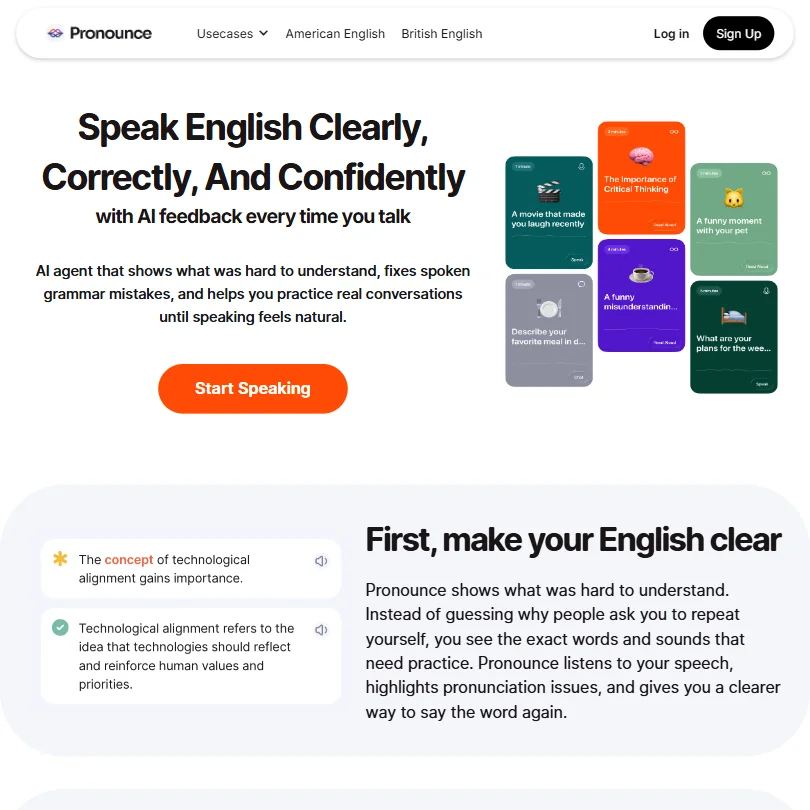
Pronounce AI is a web-based English pronunciation and fluency coach built for non-native speakers. The core idea is straightforward. You speak, the AI listens, and it tells you what's wrong. Then it helps you fix it through drills, live conversation practice, and spoken grammar correction, without a human teacher on the other end.
It runs on a proprietary AI model. No partnerships with OpenAI or Google announced publicly. The platform is available on web and Windows. There's also a Chrome extension, which is the main way users drop it into real calls on Google Meet or Zoom. The 100K+ user base is the clearest signal the tool has real traction. We just don't know when they crossed that line.
Pronounce AI Features: Voice, Music & Audio Capabilities
This is a pronunciation tool, not a general audio tool. That's a distinction worth making early.
There's no voice cloning. No music generation. No podcast editing or noise removal. That's not a knock, it's just scope. The platform does one thing: help you speak English better.
The actual feature set breaks into a few buckets. Real-time pronunciation analysis is the headline. Then there's the interactive AI conversation partner, where you practice speaking in simulated contexts. Spoken grammar correction comes layered on top of both. The Chrome extension is where the tool gets interesting, because it claims to sit live inside Zoom and Meet sessions, giving you feedback during actual calls rather than just practice drills.
Daily tasks and practice drills round things out. The drill structure is worth testing for yourself. The vendor documentation describes them as accent-specific, which sounds reasonable.
Pronounce AI Audio Quality: How Natural Does It Sound?
The AI model voice used for pronunciation demonstrations is how you actually hear correct pronunciations modeled back to you. That's the core audio output here. Not TTS for content production. TTS for learning.
Product Hunt comments and Reddit threads lean positive on the model voice. Users generally find the feedback clear enough to act on. That tracks. The tool isn't competing with ElevenLabs on voice naturalness. It's competing with a human tutor on accuracy and usefulness. Different bar entirely.
American and British accents are both covered. The homepage also mentions Australian and Indian accents, though the research data only confirms American and British in the language support. We'd call that a minor inconsistency worth clarifying before you subscribe.
Pronounce AI Voice Cloning & Customization: How Deep Does It Go?
It doesn't. No voice cloning. No voice styles. No customization layer for the AI voice itself.
That's not a gap for most users here. Someone learning to speak English more clearly isn't shopping for voice customization. We're not chasing that. But it does mean the tool is genuinely narrow in scope, and anyone hoping to use it for content production alongside language learning will need a separate tool for that side.
Is Pronounce AI Easy to Use?
The onboarding path looks accessible. Web-based, plus a Chrome extension and a Windows app. No mobile app, which is a real gap. Most language learners practice on their phones, and Pronounce AI simply doesn't meet them there. That came up in enough user comments that we flagged it.
The Chrome extension integration with live call platforms is probably the smartest UX decision they made. Getting feedback during an actual work call, rather than only during drills, is where the tool's value compounds. Test whether the real-time feedback is fast enough to be useful during a live conversation. Reddit threads from users don't surface major lag complaints, which is a decent sign.
The help center exists but reads as basic. No community forum. No visible live chat. That's a thin support floor for a tool asking users to practice something as personal as how they speak.
Pronounce AI Pricing: Is It Worth It for Creators & Businesses?
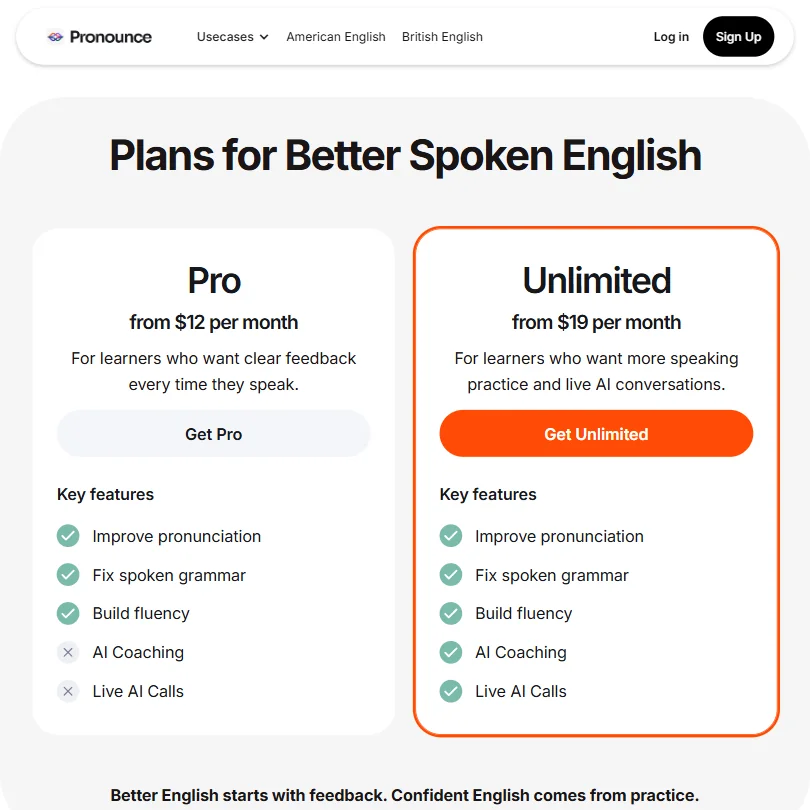
There's a free plan. Good. Limits aren't fully disclosed publicly, which is a pattern we've seen before and don't love.
The Pro plan runs $12 per month. The Unlimited plan is $19 per month. At $19 for unlimited practice, it's considerably cheaper than a weekly italki session, which can easily run $15 to $30 per hour depending on the tutor. The math works in Pronounce AI's favor if you're practicing more than once a week.
Ask about the refund policy before you pay, since none is published. Enterprise pricing isn't listed either, so larger teams will need to ask for a quote.
Pronounce AI vs italki: Which AI Audio Tool Wins?
italki is a human tutor marketplace. Pronounce AI is an AI coach. They're solving similar problems differently.
italki gives you a real person, cultural nuance, and genuine conversation. It also costs significantly more per hour and requires scheduling. Pronounce AI is available whenever you are, costs a flat monthly rate, and doesn't require coordinating with another human's calendar. For high-frequency, low-stakes practice, Pronounce AI wins on accessibility.
What italki beats it on: depth of conversation, native-speaker intuition, and the kind of cultural context no AI currently handles well. Babbel and Duolingo come up in the same conversation as Pronounce AI, but those are primarily reading and listening tools. Speaking practice at Pronounce AI's focus level isn't really what they do. Rosetta Stone and Pimsleur are closer on the audio side but older in their approach.
Who Should Use Pronounce AI? (And Who Shouldn't)
Non-native English speakers who need to practice speaking daily and can't afford regular tutoring. That's the fit.
People who need a live conversation partner for cultural fluency or nuanced feedback will outgrow it. The tool corrects pronunciation and spoken grammar. It doesn't teach you to read a room.
No mobile app means it won't work for people who practice on commutes. And anyone needing API access or integrations beyond Chrome should look elsewhere.
Pronounce AI Review Verdict
Pronounce AI does a specific thing at a fair price. The $19 unlimited plan is genuinely good value compared to human tutoring, and the Chrome extension-plus-live-call angle is a smart move. The missing mobile app is the biggest practical gap, and the sparse support documentation doesn't inspire confidence if something breaks.
We're not worried about the narrow scope. That's a product decision, not a deficiency. We are mildly skeptical of the homepage's claim about Australian and Indian accent support when the core docs only confirm two accents. Small thing, but worth asking before you commit.
The tool won't replace a great human teacher. It probably wasn't trying to.









