What is Ocoya?
Ocoya is an AI-assisted social media management platform aimed at freelancers, small teams, and marketing agencies. The pitch centers on automation. Not just scheduling, which every tool does, but full workflow-based content creation with AI agents handling captions, DMs, and comment replies.

That's a bigger claim than most competitors make. Buffer schedules posts. Ocoya wants to replace the person who writes them. Whether the execution matches the ambition is the real question.
The platform runs on a proprietary GPT-based model and covers over 25 languages. It positions itself somewhere between a scheduler and a lightweight agency replacement. Honestly, that's an interesting category to try to own. Whether Ocoya actually owns it is a different conversation.
Founded in 2021 and headquartered in Vilnius, Lithuania, Ocoya has moved fast enough that the feature set is genuinely interesting. Not fast enough that the rough edges have disappeared.
Ocoya Features: Scheduling, AI Content & Analytics

The content creation side runs on AI caption generation, rephrasing tools, and translation. The scheduling side covers a full content calendar with multi-channel publishing. Then there's the automation layer, which is where Ocoya tries to separate itself from the crowd.
The AI workflow automations are the most distinctive thing here. Ocoya lets you build agents that post automatically, respond to DMs via chatbot, and trigger DM responses based on comment activity. RSS-to-social automation is also baked in, which is useful for anyone running a blog or news feed. That's not nothing.
On the analytics side, things get thinner. Best-time-to-post recommendations and UTM link tracking are present. Deep audience analytics are not, and there's no competitor analysis at all. We've seen tools at this price point do more.
Team features are solid for the price. Multi-level approval flows and client-facing share links both make an appearance, and workspace management is genuinely useful for small agencies. Fair.
Ocoya Platform Support: Which Networks Does It Cover?
Ocoya covers the major networks. Facebook, Instagram, LinkedIn, X (Twitter), Pinterest, and TikTok are all there.
The Canva integration is a real selling point for teams that build visual content there and don't want a separate export step. The Shopify connection matters for ecommerce brands wanting to automate product promotion posts. Those are the two worth digging into first.
Beyond those, the advertised integration total includes several different categories, so buyers should check whether their specific social, ecommerce and automation tools are supported rather than relying on the headline count. Vendor totals like that tend to be optimistic.
Ocoya AI Content Creation: Caption & Copy Quality
This is where the marketing claims get the hardest workout. Ocoya generates captions, rewrites copy, and translates content across 25+ languages. The AI is GPT-based, which tells you the quality ceiling is high. It doesn't tell you how well Ocoya's specific prompting and workflow layers perform on top of that.
No AI caption tool at this price point is producing publish-ready copy consistently, and Ocoya doesn't appear to be an exception.
The hashtag preset system is a practical touch. You build collections and pull them into posts without re-typing. Small thing. Saves real time. We don't buy the idea that Ocoya's AI writing is dramatically better than what ContentStudio or Publer offer. The automation layer around the AI is a more credible differentiator than the AI itself.
Is Ocoya Easy to Use?
The automation builder takes more time and technical comfort than the homepage suggests. That's not unusual for automation tools, but it's worth flagging for solo operators who were hoping to set it up in an afternoon.
The 7-day free trial is short for a tool this feature-dense. Seven days is enough time to schedule some posts. It's not enough time to properly evaluate the workflow automations, the DM chatbot behavior, or the approval flow with a real client. 14 days would be the minimum, and most competitors offer that.
Ocoya Pricing: Is It Worth It for Creators & Agencies?
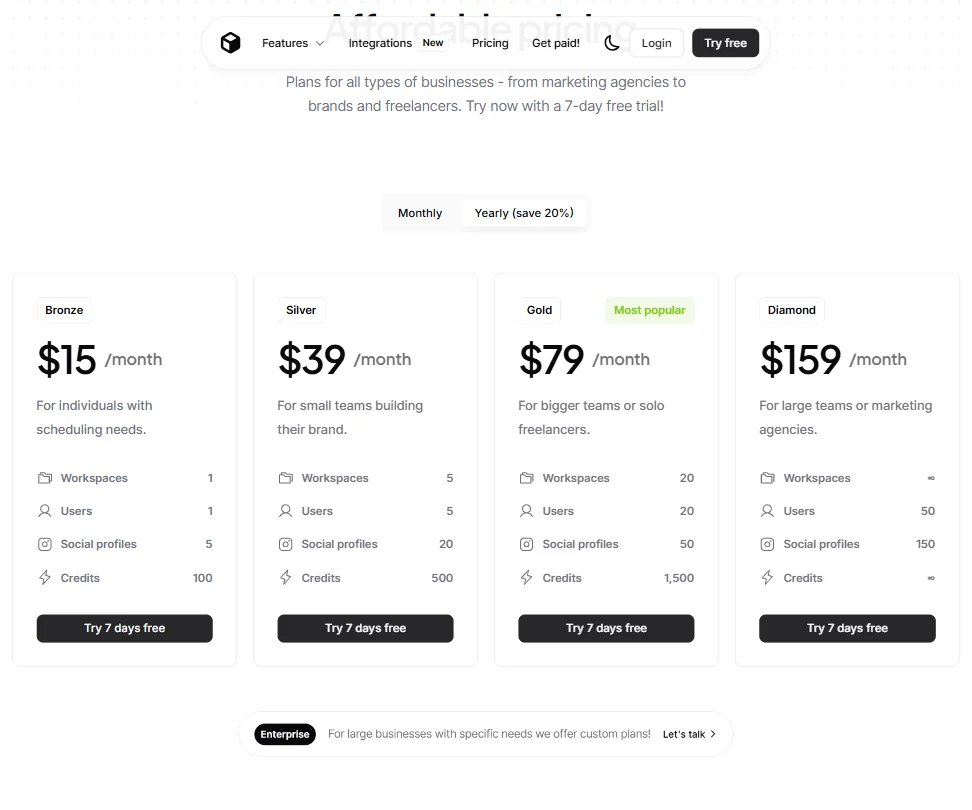
Three plans, based on what's publicly shown. Starter at $29 a month is the entry point, pitched at individuals with scheduling needs, and comes with 1 user and 5 social profiles. Team runs $79 a month for small teams. Agency is $199 a month, targeting larger teams or marketing agencies. A yearly billing option saves 20% across all tiers.
Ask about the refund policy before you pay, since none is published. You're committing to a billing cycle without knowing what happens if it doesn't work out. Competitors like Buffer spell it out.
No free plan exists. The trial is seven days. So you're paying before you've had time to properly evaluate the more advanced features. Annoying. Pricing transparency is where Ocoya loses the most ground to alternatives like Buffer, which puts limits front and center.
Ocoya vs Buffer: Which Social Media Tool Wins?
Buffer is the obvious comparison at the entry level. It's been around longer, has a bigger review base, and is significantly more transparent about pricing and plan limits.
What Ocoya has that Buffer doesn't is the automation layer. DM chatbots, comment-to-DM agents, and AI workflow builders are not Buffer features. If those matter to you, Ocoya is the more interesting choice at the lower price points.
Buffer wins on trust signals. More reviews, clearer pricing, better-documented support. Ocoya wins on automation depth for teams that will actually use those features. The right answer depends on whether you're looking for a reliable scheduler or a tool that can run more of the content operation on autopilot.
For agencies managing multiple clients who want something with more reporting depth, something like Vista Social is worth comparing before committing to Ocoya's Team or Agency plan.
Who Should Use Ocoya? (And Who Shouldn't)
Small agencies and freelancers managing multiple clients on a budget. That's the clearest fit. The approval workflows and workspace management are real features at a price point that makes sense.
Ecommerce operators running Shopify or WooCommerce stores who want automated social content around product updates. The integrations exist. The use case is real.
Solo creators who don't need automation won't get full value here. The basic scheduling features don't justify the price over simpler tools. Power users who need deep analytics should look elsewhere, because the reporting side is too thin.
Anyone uncomfortable with an unclear refund policy and a short trial window should proceed carefully. That's a process concern as much as a product concern.
Ocoya Review Verdict
Ocoya is a more interesting tool than it is a polished one. The automation layer, specifically the AI workflow builder and DM agents, is genuinely differentiated. Not many tools at this price are attempting that.
The limits are real though. Analytics are shallow. Ask about the refund policy. The trial is too short for a fair evaluation. Any tool asking for a billing commitment before you've had time to stress-test the features that cost the most to configure deserves a skeptical look.
The $29 Starter plan is a reasonable entry point for a freelancer who wants to see if the automation features click. The jump to $79 for Team needs more scrutiny before committing. For agencies with a real multi-client workflow, the approval features and AI automations might justify it. For everyone else, the math is less clear.
Not a tool to avoid. Not a tool to adopt without testing carefully. Somewhere in the middle, which for a three-year-old product out of Vilnius is actually a reasonable place to be.
How Ocoya compares
Ocoya scores 5.3 out of 10 among the AI social media management tools we rate. These three do the same job and are the closest to it, compared on what each vendor publishes.
Buffer
Ocoya's AI agent runs inside every workflow, drafting post copy and auto-replying to DMs, and it can be trained on your brand voice; Buffer has no such agent, and its assistant is not trained on your brand voice at all. Buffer covers the basics Ocoya skips: a mobile app, a link-in-bio page, a free plan and first-comment scheduling on its Team plan. Five profiles cost about the same either way: $29 a month on Ocoya against $30 on Buffer.
Pick Buffer if you want a mobile app, link-in-bio page or a free plan.
Pick Ocoya if you want an AI agent that drafts and auto-replies in your brand voice.
Hootsuite
Ocoya costs $29 a month for five profiles against Hootsuite's $99, and only Ocoya turns a new RSS item or article straight into a post through an AI workflow. Hootsuite answers with the agency toolkit Ocoya has none of: paid-ads management, influencer discovery, competitor tracking and mention tracking beyond your own accounts. Hootsuite also holds a SOC 2 report and enterprise single sign-on, both absent from Ocoya, and it has a mobile app where Ocoya has none.
Pick Hootsuite if you need paid-ads management, influencer discovery or a SOC 2 report.
Pick Ocoya if you want cheaper pricing or an AI workflow that turns articles into posts.
Later
Ocoya still publishes to X, Bluesky and Mastodon; Later lists none of the three. Ocoya's AI also generates images, runs an agent inside workflows and turns articles into posts, none of which Later's AI does. Later pulls ahead on the practical side: a mobile app, a link-in-bio page, first-comment scheduling and single sign-on, none of which Ocoya has. It's also cheaper: $25 a month for five profiles against Ocoya's $29.
Pick Later if you want a mobile app, link-in-bio page or single sign-on.
Pick Ocoya if you need X, Bluesky or Mastodon support and AI that drafts posts.