
This mintlify review starts from the homepage claims and looks at what developers say about the product. The review record is thin, and that matters where noted below.

Mintlify launched in 2022 out of San Francisco. Over 20,000 companies are on the platform now, including Anthropic, Coinbase, and HubSpot. That's a real signal. Not hype, an actual data point about where this product sits in the market.
What is Mintlify?
Documentation tooling has been commoditized for a while. GitBook does it. Notion does it, loosely. Docusaurus does it if you can tolerate the setup time. Mintlify's angle is that documentation should update itself when the underlying code changes, and the platform is built around that premise rather than treating it as a nice-to-have feature bolted on later.
The core bet is that AI agents maintain your docs rather than developers doing it by hand after each sprint. They call the flagship automation Autopilot. The platform connects to your Git repositories, watches for changes, and either flags stale content or triggers rewrites. Whether it delivers on that at scale is an open question we address below.
Also worth naming what it isn't. No code completion, no debugging, no test generation. It doesn't live in your IDE. It's a web-based documentation platform, and framing it as anything broader would be inaccurate.
Mintlify Features: Code Generation, Review & Developer Workflow

The feature set breaks into two layers. There's a publishing layer and an AI layer sitting on top of it.
On the publishing side, you get Git sync, MDX support, and OpenAPI spec rendering. An API playground ships on the free Starter plan alongside web editor access, custom domain support, authentication controls, and MCP server support. That last one matters and we'll come back to it. CLI tooling is available for local development. Preview deployments appear at the Pro tier, along with Agent, Assistant, and Automations features. Admin APIs are also Pro-only per what we pulled from the pricing page.
The Writing Agent and Autopilot automation are the core AI differentiators, designed to watch code commits and produce or revise documentation accordingly. Workflow templates cover changelog generation, API sync, SEO auditing, and broken link detection, among a few others. The `skill.md` auto-generation feature for AI agents is clearly a forward bet on the MCP ecosystem.
Honestly, the MCP server support being available on the free tier is surprising in a good way. Most documentation platforms aren't thinking about agent traffic at all yet.
The end-user AI assistant is LLM-powered, though Mintlify doesn't name the provider publicly. That opacity is a pattern worth flagging. Not a dealbreaker, but we'd prefer they named it.
Mintlify Code Quality: How Accurate and Reliable Is It?
The heading needs reframing. There's no code being generated here. The quality question applies to the documentation it writes and the accuracy of what it produces from code changes.
G2 reviewers consistently praised the rendered output and the components library. The platform gets strong marks for how documentation looks and loads. The AI writing quality is harder to judge, because the review trail is thin. Mintlify has eight reviews on G2 with a 4.9 out of 5 rating. Small sample either way.
Developer threads praise Git sync reliability. When that sync breaks or lags, it defeats the entire value proposition. Reddit threads show users noting that automated update quality varies depending on how structured the underlying codebase documentation already is. Garbage in, garbage out. That tracks.
Treat the "self-maintaining docs" pitch as a direction, not an absolute promise. Assisted maintenance is probably the more accurate description of the product.
Mintlify IDE & Workflow Integration: Where Does It Work?
No IDE plugin. No VS Code extension. No JetBrains integration. If that's the primary workflow requirement, Mintlify doesn't fit. Full stop.
The integration story runs through Git entirely. You write docs in MDX, connect your repository, and Mintlify handles publishing and sync. The CLI handles local development and deployment. That's a comfortable workflow for developers who already live in Git. It's a friction point for teams that don't. For teams looking for something that actually lives inside their editor, Cursor solves a completely different part of the stack.
The OAuth, JWT, and SSO support matters at scale. Enterprise adds SCIM provisioning, RBAC, performance SLA, advanced insights, and migration support, per the pricing page. That enterprise security and compliance infrastructure is genuinely there, not a placeholder. Worth knowing before you assume it's a startup-only tool.
Web-only is a reasonable architectural choice for a documentation platform. It is not a reasonable choice for a code assistant. Worth being clear about which one Mintlify actually is.
Is Mintlify Easy to Set Up and Use?
The onboarding story is good. The Starter plan is free with no credit card required. Product Hunt comments from 2023 and 2024 repeatedly mentioned how fast teams got from signup to published documentation, and that sentiment is consistent enough across sources to take seriously.
The flip side is that the platform rewards teams with existing documentation habits. If you're starting from scattered Notion pages and Slack threads, Mintlify is not going to organize that chaos for you. The AI needs structured input to produce structured output.
Collaborative editing, role-based permissions, and preview deployments suggest this was designed for team use from the start, not retrofitted. G2 reviews confirm it, particularly from devrel and platform engineering roles. The admin APIs at Pro tier reinforce that the team workflow was a first-class concern, not an afterthought.
Not great for teams who want zero-setup documentation that requires no existing standards. But few honest tools are.
Mintlify Pricing: Is It Worth It for Solo Devs and Teams?
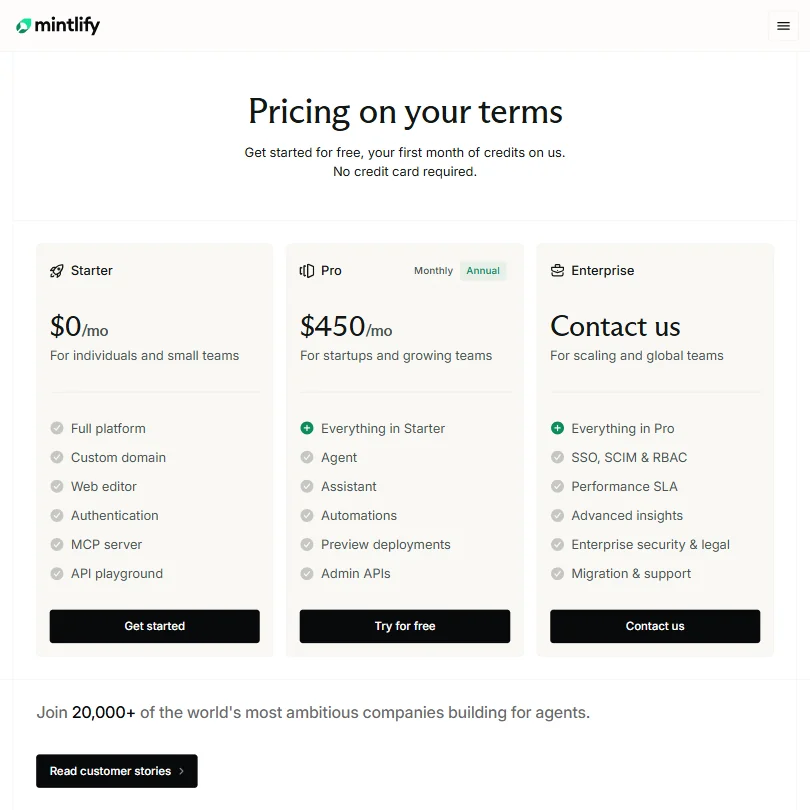
The Starter plan is $0 per month. The Pro plan is $540 per month, billed monthly, per the pricing page. Enterprise is contact-us, custom pricing. Those are the three tiers, and that Pro figure is a real number to anchor budget conversations around.
$540 per month is not cheap. For a startup spending that on documentation tooling, the Autopilot automation and team workflow features had better be doing measurable work. Docusaurus is free and open-source. GitBook publishes lower starting prices. ReadMe has been around longer and has a more established pricing structure. Mintlify is asking for a real budget commitment at Pro.
The refund policy is nowhere on the public site. Not in docs, not in FAQs. We don't buy that's accidental for a company at this stage. Worth raising directly with sales before committing.
For solo developers, the free tier is probably sufficient for a meaningful stretch. The moment you need preview deployments, automations, or Admin APIs, you're looking at $540 a month, and that jump is significant. That gap showed up as a frustration point in our G2 research too.
Mintlify vs ReadMe: Which AI Coding Tool Is Better?
ReadMe is the natural comparison given the API documentation overlap. It's been around longer, has an established enterprise sales motion, and is stronger on the developer experience side for external-facing API references that customers actually read day to day.
Here's the thing, though. ReadMe now offers GitHub AI Writer, which watches pull requests, identifies documentation affected by code changes, and automatically drafts updates on a review branch. That's substantially comparable to Mintlify's code-to-documentation automation workflow. The implementation details differ, but the competitive gap that Mintlify held on AI-assisted updating has narrowed. We'd push both vendors on specifics before assuming either has a clear edge there.
GitBook is another fair comparison. Cleaner pricing, solid collaboration, and a mature enough support ecosystem. Mintlify beats GitBook on the MCP server and agent traffic angle and loses on pricing transparency at the Pro tier.
Docusaurus is free and self-hosted. You save money, take on infrastructure maintenance, and lose the AI layer entirely. Different tradeoff, and a reasonable one for teams with engineering bandwidth to spare.
Who Should Use Mintlify? (And Who Shouldn't)
Developer teams maintaining API documentation or internal technical wikis where docs go stale fast because the product ships fast. That's the core fit.
Startups that need to look credible quickly. The visual quality of Mintlify docs is genuinely good and ships fast. That matters for developer relations at Series A and B companies where the docs are part of the product impression.
Enterprise teams with compliance requirements. The SCIM provisioning, RBAC, performance SLA, and migration support are there at the Enterprise tier. Get the pricing in writing before committing.
Not a fit for solo developers wanting an AI coding assistant. Not a fit for teams needing IDE integration. Not a fit for anyone whose primary need is automated code review. For that last case, CodeRabbit covers automated code review on GitHub and GitLab and doesn't overlap with Mintlify at all.
Mintlify Review Verdict
Mintlify is a real product solving a real problem. Documentation debt is one of the most persistent and boring issues in software teams, and the Autopilot approach is a credible attempt to automate the maintenance burden rather than just the publishing layer.
The publishing layer is strong. The visual output is consistently praised. The AI features are promising, but with only eight G2 reviews, firm conclusions about automation quality at scale are hard to draw.
ReadMe's GitHub AI Writer closing the gap on automated doc updates is worth factoring into any comparison. Neither vendor should be taken at face value on AI automation claims without a trial period.
The $540 per month Pro jump from a free Starter plan is the sharpest practical concern. It's not a quality problem, it's a pricing structure problem. The tool has real traction with serious companies. The numbers don't need to be hidden.
Worth trialing if documentation maintenance is the actual pain point. Go in knowing you'll hit a sales conversation before the Enterprise tier makes sense, and pressure them on what the AI automation actually produces in your specific codebase before committing to Pro.
Frequently Asked Questions
Does Mintlify replace a developer's need to write documentation manually?
Not entirely. Autopilot can flag stale content and generate updates when code changes, but quality depends heavily on how structured the existing documentation already is. Teams still need to review what the AI produces. It reduces the manual burden. "Fully automated documentation" isn't an accurate description of where the product is today, and we'd be skeptical of any vendor claiming otherwise.
Is Mintlify's free plan actually usable for a real project?
For small teams or solo developers, yes. The free Starter plan includes enough to get published documentation live with Git sync, the API playground, authentication controls, and MCP server support. It gets limiting when you need preview deployments, automations, or admin API access. Those features sit behind the $540 per month Pro plan. Worth starting on free and seeing how quickly you hit that ceiling before budgeting for the jump.
How does Mintlify compare to Docusaurus for a technical team?
Docusaurus is free and gives you full control, but you own the infrastructure and there's no AI layer. Mintlify handles hosting, adds AI-powered updating, and produces polished output faster out of the box. The tradeoffs are cost and platform dependency. Teams with strong engineering bandwidth and a preference for open-source often stay on Docusaurus. Teams that want good-looking docs shipped quickly without managing tooling tend to land on Mintlify, at least until the Pro pricing conversation arrives.







