SAASINSPECTOR
Logically logo

Logically Review

Logically is a paper reader that searches a wide index of papers, answers research questions with inline citations, and drafts documents with citations added through its Word add-in. It has a single paid plan.

Visit LogicallyFrom $30/mo

Research-based review. Features and prices are checked on the vendor's own website, and the score is worked out from those facts. We haven't tested it hands-on yet.

The verdict

Worth paying for if you draft papers and want citations added as you write; exporting your reference library to RIS or BibTeX is not supported.

Pros

  • Bundles a document writer, research assistant, reference manager, and PDF annotator into one unified workspace, eliminating the need to switch between multiple tools.
  • Supports three AI models — Claude, Gemini, and ChatGPT — within the same product, which is rare among competitors that typically commit to a single model.
  • Citation generation supports over 10,000 styles with automatic bibliography building, making it genuinely useful for academic and professional writing.
  • Broad file format support including PDF, EPUB, DOCX, PPTX, MDOWN, TXT, and URL or DOI import goes beyond what most competitors offer.
  • AI Research Assistant produces citation-backed answers drawn from your own uploaded sources rather than fabricating references.
  • Zotero integration and DOI import make it easy to bring existing reference libraries into the workflow.
  • Priced at a point that's described as hard to argue with, making it accessible for students and academics on tight budgets.
  • Earned a G2 'Top Voted AI Product of the Year' badge with a verified user base of 100,000+, indicating real-world adoption.

Cons

  • Vendor documentation is vague about how to switch between AI models and when each one is actually used, leaving users without clear guidance.
  • Several bundled mini-tools like the text humanizer and paraphraser feel more like SEO landing pages than substantive features.
  • The 100,000+ user count displayed on the homepage cannot be independently verified, raising questions about transparency.
  • The tool is clearly targeted at students and academics, which may limit its appeal or fit for enterprise or non-research professional use cases.
  • Despite the multi-model setup being a differentiator, the lack of specificity around model selection reduces the practical value of that feature.
From $30/moFree plan YesFree trial No
5.5/10

Spec Score

Logically against 8 paper readers
#3
of 8 paper readers
+0.7
vs the average
100%
from published facts
Ahead of other paper readers
Finding papers+3.0Citing and writing+2.2Reading and analysing papers+1.0
Behind other paper readers
Pricing-2.1Access, teams and privacy-0.7
Every criterion
Tap a row for the facts
Finding papers5.5
+3.0 vs 2.5 avg11 of 20 points
Searches a database of papersyes3 / 3
Answers a research question from the literatureyes2.5 / 2.5
Map of connected papersno0 / 1.5
Alerts for new papersno0 / 1.5
Shows if later papers support or dispute a paperno0 / 1.5
Why these numbers

Searches a database of papers: Also stated on the research-assistant page meta description: 'Discover 200M+ Papers'. You can edit fields of study, publication types, and date ranges searched.

Answers a research question from the literature: Meta description of the Research Assistant product page; answers pull inline citations from the Semantic Scholar-backed 200M-paper database, not only from uploaded files.

Map of connected papers: No visual citation or related-papers graph found anywhere checked (searched citation map, graph of, network).

Alerts for new papers: No alerts/notifications for new papers on a topic, author, or saved search found (searched alert, notify).

Shows if later papers support or dispute a paper: No feature classifying whether later papers support, contradict, or just mention a given paper was found (searched contradict, and the getting-started guide's citation/Semantic Scholar sections).

Reading and analysing papers8.0
+1.0 vs 7.0 avg20 of 25 points
Ask questions of a paperyes2 / 2
Pulls data from many papers into a tableno0 / 2
Summarises papersyes1.5 / 1.5
Answers show the passage they came fromyes1.5 / 1.5
Reads tables and figuresyes1.5 / 1.5
Writes a literature review for youyes1.5 / 1.5
Why these numbers

Ask questions of a paper: You can restrict which connected files/sources the AI refers to when answering a question.

Pulls data from many papers into a table: Users can ad hoc prompt the chat to compare/analyze multiple papers, but there is no dedicated feature that pulls chosen data points from many papers into a structured table or matrix.

Summarises papers: Summarizer supports different tones, formats, and languages; core Research Assistant can also be prompted to summarize individual papers.

Answers show the passage they came from: Inline citations pull from Semantic Scholar or your uploaded sources to support chunks of the answer, so you can check them.

Reads tables and figures: File Annotator page also advertises AI help understanding 'confusing graphs' within a paper.

Writes a literature review for you: Prompt library also includes gap-analysis and bibliography-generation prompts aimed at literature-review work.

Systematic reviews0.0
+0.0 vs 0.0 avg0 of 10 points
Screening with include and exclude decisionsno0 / 3
AI help with screeningno0 / 2
Removes duplicate referencesno0 / 2
PRISMA flow diagramno0 / 1.5
Risk of bias assessmentno0 / 1.5
Why these numbers

Screening with include and exclude decisions: No title/abstract or full-text screening with include/exclude decisions found; this is a writing/reference tool, not a systematic-review tool (searched screen, systematic).

AI help with screening: No screening feature exists to have an AI mode for (see screening_workflow).

Removes duplicate references: No duplicate-reference detection/removal feature found (searched duplicate) in the getting-started guide or reference-manager description.

PRISMA flow diagram: No PRISMA diagram or workflow mentioned anywhere checked.

Risk of bias assessment: No risk-of-bias or study-quality assessment tool found (searched bias).

Pricing5.5
-2.1 vs 7.6 avg11 of 20 points
Monthly price, cheapest paid plan (academic rate if offered)$30/mo5.5 / 10
Yearly price, sold by the year onlydoes not applyn/a
Why these numbers

Monthly price, cheapest paid plan (academic rate if offered): Unlimited, the only paid tier, on monthly billing. The page defaults to Yearly, which shows $12 'per user/month, billed yearly'. The 'Save 60%' badge is exact: $30 -> $12 is 60.0%. That is the largest verified annual discount in the whole category, ahead of Silvi's 52%.

Citing and writing6.2
+2.2 vs 4.0 avg9.3 of 15 points
Works with Zotero, Mendeley, EndNote and othersZoteroMendeleyEndNote3.5 / 3.5
Export formatsnone0 / 2.5
Helps you write and adds citationsyes1.5 / 1.5
Browser extensionno0 / 1.3
Word or Google Docs add-inyes1.3 / 1.3
Why these numbers

Works with Zotero, Mendeley, EndNote and others: One-way import via RIS/BibTeX/CFF file exported from the old manager, not live two-way sync; no Paperpile or RefWorks mentioned.

Export formats: That figure is citation STYLES generated inline in the app (and via the Word add-in), not a stated file export format; no RIS/BibTeX/CSV/DOCX export-of-your-library feature was found (checked getting-started guide, reference-manager page).

Helps you write and adds citations: Document Writer is a dedicated drafting editor, distinct from the Research Assistant chat.

Browser extension: The only extension actually documented is the Logically Cite Extension, which is a Microsoft Word/Office add-in (see word_docs_addin), not a Chrome/Firefox/Edge browser extension; no browser extension found (searched chrome, extension in the getting-started guide and help center home).

Word or Google Docs add-in: Distributed via the Microsoft Add-in Store; supports Word 2019+ on Mac, Word on the web, and Word on Windows/Mac via Microsoft 365. No Google Docs add-in mentioned.

Access, teams and privacy4.0
-0.7 vs 4.7 avg4 of 10 points
University or library licenceno0 / 3
Shared projects with your teamyes2 / 2
APIno0 / 2
Mobile appno0 / 1
Works in languages other than Englishyes1 / 1
Does not train AI on your datayes1 / 1
Why these numbers

University or library licence: No university/library licence, OpenAthens, or LibKey link-resolver access found (searched institution, OpenAthens, library - the only 'library' hits were about your personal reference library).

Shared projects with your team: This is separate from the paid Team plan, whose Team Dashboard the Team Plan Setup Guide explicitly says 'does not provide a shared workspace for collaborative research... solely for team management and billing' - the actual collaboration mechanism is shared libraries plus a public/private share-link toggle on chats, and neither is stated as plan-gated.

API: No published developer API found anywhere checked (searched API in the getting-started guide and help center home).

Mobile app: No iOS/Android app found anywhere checked (searched mobile, ios, android in the getting-started guide and help center home).

Works in languages other than English: Also: the free summarizer states it can 'Summarize your text using different tones, formats, and languages' and citation generation supports selecting a citation locale.

yesnonot published average for paper readers
How the Spec Score works

Scored from what Logically publishes on its own site. Not a hands-on test.

Compared with 8 paper readers. Facts checked 14 Sep 2026.

A fact the vendor does not publish gets half the points, or the typical value for a number, and says so. It never counts as a no. How we score.

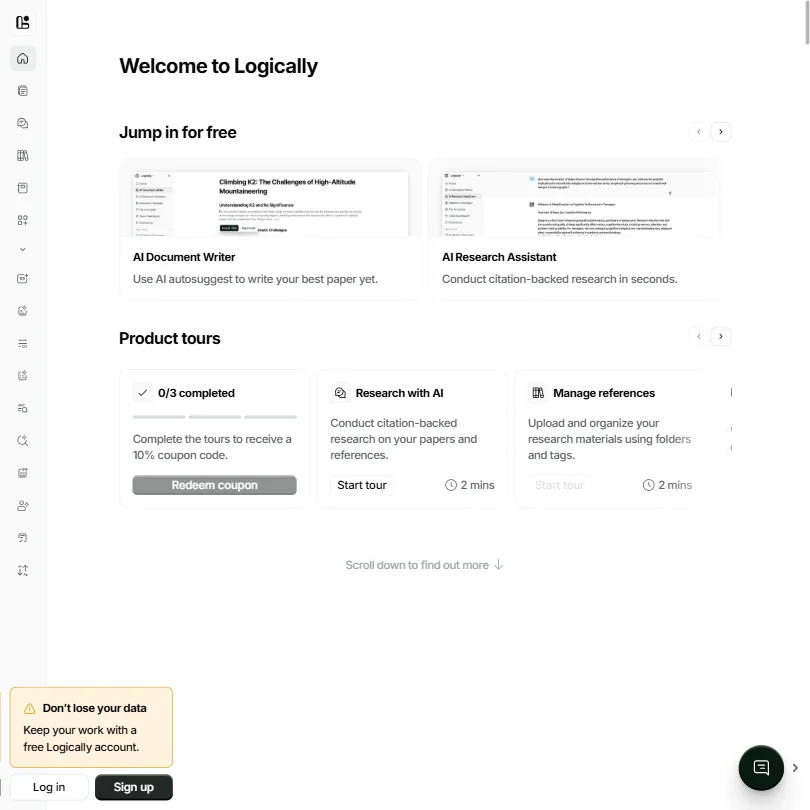
Logically homepage screenshot
Logically, Homepage

The tool has 100,000-plus claimed users, a G2 "Top Voted AI Product of the Year" badge, and a pricing page that actually makes you stop and do the math. We pulled vendor docs, Reddit threads, G2 write-ups, and the pricing screenshot. What we kept seeing was a product doing more than its category label suggests, priced at a point most competitors don't bother competing at, with one gap that keeps surfacing in user reports.

What is Logically?

Four things in one product. A document writer, a research assistant, a reference manager, and a PDF annotator. The target audience is obvious from the design choices: students, academics, anyone who writes papers and has lost count of how many browser tabs they had open at 11pm reformatting citations.

Three AI models sit inside the same workspace, Claude, Gemini, and ChatGPT, which is genuinely unusual. Most competitors pick one and call it a day. Zotero doesn't touch AI writing at all. Jenni.ai doesn't give you model choice. Logically's vendor docs confirm all three are available, though the specifics of how you switch between them, or whether the platform assigns them by task, aren't spelled out clearly. That ambiguity comes up in user feedback too.

The 100,000-plus user count is on their homepage. We can't verify it independently. The G2 badge is real, for whatever that's worth.

Logically Features: Search, Synthesis & Research Capabilities

The core loop is straightforward. You upload references, import from Zotero, or drop in a DOI. The AI Research Assistant runs citation-backed queries across those sources. You write in the Document Writer and handle PDFs in the File Annotator. Upload, research, write, cite.

Bolted on top of that are a collection of mini tools, an AI summarizer, a paraphraser, and a few others. Some feel like real utility. Others feel like SEO landing pages that got promoted to features. Honestly.

Citation generation covers over 10,000 styles with automatic bibliography building. That's a real number worth taking seriously, especially for anyone who has manually rebuilt an APA bibliography the night before a deadline. File support goes beyond the usual PDF and DOCX too. EPUB and PPTX handling is less common at this price point, and DOI or URL import works across all of it.

Logically Research Quality: How Accurate and Trustworthy Is It?

G2 reviews kept flagging the citation-backed approach as the primary reason people stay. When we cross-referenced those reports against vendor claims, the picture was mostly consistent. The AI grounds responses in your uploaded documents rather than generating from nothing, which is the baseline requirement for any academic use case.

We're cautiously positive here. Not enthusiastic. The research assistant synthesizes across what you uploaded, not necessarily from a live external academic database, and that distinction matters more than the marketing copy suggests. Users who brought their own PDFs seemed satisfied. Users who expected the tool to go find new literature for them got something more mixed.

There's a feature described in the docs as academic search, with the ability to discover citations from a research database. How deep that database actually runs, we couldn't confirm. No coverage specifics in the vendor docs. No independent confirmation across the reviews we found. We're skeptical of that.

Logically Source Coverage: What Does It Actually Search?

Unclear. That's the honest answer.

The vendor page references citation-backed research and source verification. The vendor cites a 200 million-paper Semantic Scholar-backed database, though it isn't described in terms of journal coverage, field depth, or update frequency. Tools like Scite are explicit about their corpus. Logically is not.

Reddit threads we found weren't specific about this either. That could mean users aren't pushing the discovery feature hard. Could also mean they've stopped expecting it to work. Users who treated Logically as a way to organize and query their own uploaded literature seemed happiest, and that's a meaningful signal about where the product actually delivers.

On integrations: what's publicly documented includes a Microsoft Word citation add-in and an Obsidian integration. These are software integrations, not browser extensions in the traditional sense. We found no current official Chrome extension listing. The navigation implies more than the documentation delivers.

Is Logically Easy to Use for Researchers and Professionals?

Onboarding is gentle. Three guided product tours on the dashboard, and completing them earns a 10% coupon code. Small touch. Smart one.

G2 reviews in student and academic segments consistently mentioned how quickly people got started. No serious complaints about the learning curve came up in our research. The Zotero import works, which matters because anyone with an existing reference library isn't going to rebuild it from scratch for a new tool.

The free plan is meaningfully limited, though. Five AI autosuggestions per day, five chat messages per day, five commands per day, and 100MB of reference and file storage. Not great. That daily cap will stop a real research session before it gets going. Enough to evaluate the product. Not enough to actually work in it.

Logically Pricing: Is It Worth It vs Free Alternatives?

Logically pricing screenshot
Logically, Pricing

One paid tier. The Unlimited plan costs $12 per user per month billed annually, which works out to $144 per user per year. Not $12 for the year. That distinction matters and the pricing page doesn't make it prominent. Month-to-month is $30 per user. The gap between those two numbers is real and worth planning around before you commit.

Students get an extra 50% discount on top, which the pricing page confirms. That brings annual Unlimited down to something closer to $6 per user per month, and at that price the value case becomes fairly obvious for the target audience.

The free plan exports add a PDF watermark. That watermark is a meaningful enough annoyance to push most users toward paying. The Unlimited plan comes with a 30-day money-back guarantee, and no card is required for the free tier at all.

Zotero is free and excellent at reference management. It doesn't write. Jenni.ai charges more and doesn't give you model choice. SciSpace has a free tier but gates useful features faster. At $12 per month annually, Logically's value case holds for regular users. Casual researchers might survive on the free plan, frustrations aside.

Logically vs Zotero: Which AI Research Tool Is Better?

Zotero is free, open source, and very good at organizing references. It is not an AI writing tool. It doesn't synthesize across documents or draft paragraphs with inline citations.

Logically does both of those things. For a researcher already running Zotero, Logically isn't a replacement. You'd import the Zotero library into Logically and use both. That import path exists and apparently works cleanly.

Zotero wins on reference management depth and plugin ecosystem. That's not close. Logically wins on the AI writing layer, and if you need both in the same workspace without context-switching, Logically has a real argument. Teams get a small additional advantage too: Logically offers a centralized admin portal for teams and discount pricing for multiple seats. Zotero's free plan caps group library storage quickly.

Fair.

Who Should Use Logically? (And Who Shouldn't)

Graduate students writing papers regularly. That's the clearest fit. The workflow maps directly onto that use case, the student discount brings the price down further, and there's no strong reason to look elsewhere at that combination.

Academics with existing Zotero or Mendeley libraries who want an AI writing layer on top. The import path keeps the friction low.

Professionals writing citation-heavy reports who aren't trying to run systematic literature searches from scratch.

Researchers expecting deep literature discovery from an independent academic database. They'll be disappointed. Elicit is built specifically for systematic literature reviews and is considerably more transparent about what it actually searches. Logically is not the right tool there.

No mobile app. If you're not at a desk, that's a real problem.

Logically Review Verdict

The product is genuinely useful. Not overbuilt, not trying to be everything, and at $12 per user per month annually it doesn't need to be.

What we'd change: more transparency on the academic database, clearer documentation on what the Word add-in and Obsidian integration actually cover, and a harder look at the mini tools section. A text humanizer and a title case converter don't belong in the same product suite as a serious research assistant. That section reads like feature padding.

The AI writing layer with real citation grounding is the actual reason to use this. That part works, based on what we found across G2 and user reports. Reference management is solid if not best-in-class. The $12 monthly price annually, the 30-day money-back guarantee, and the no-card-required free tier make it easy enough to try without much risk.

The source coverage question is the one thing we'd want them to answer clearly. Until they do, serious researchers have a legitimate reason to keep one foot out the door.

Frequently Asked Questions

Does Logically work with existing Zotero libraries?

Yes. Logically supports importing from Zotero and Mendeley. You don't rebuild your reference library from scratch, which is one of the more practical decisions they made. It won't replace Zotero for reference management depth. It doesn't try to.

Is the free plan actually usable?

For evaluation, yes. For daily research work, no. Five AI chat messages per day, five autosuggestions, five commands, and 100MB of storage will run out fast in a real session. Most people doing serious work will need the Unlimited plan. The 30-day money-back guarantee on that plan means the risk is low. Students should also check the 50% discount before paying full price.

Which AI model does Logically use?

Claude, Gemini, and ChatGPT are all confirmed available inside the platform. What's less clear is whether users can freely choose between them or whether the platform assigns models to specific tasks. The vendor docs don't spell that out. Worth testing during your own trial before committing to a full year at $144 per user.

Logically is featured in

Alternatives to Logically

See all Logically alternatives →

Other AI Research Tool options we've reviewed.

Anara logo

Anara

Researchers, PhD candidates, biopharma teams, clinical practitioners, and R&D engineers who need accurate, cited AI answers across large document libraries

7.3
Rank #1 of 8 paper readers
Best:Reading and analysing papers10
Weakest:Systematic reviews0
Institution licence: noPaper search: yesScreening: noResearch answers: yes
From $12Free plan
100% from published facts · checked 14 Sep
Scite logo

Scite

Individual researchers, labs, and small teams doing deep research

5.8
Rank #7 of 11 literature search tools
Best:Finding papers8.5
Weakest:Systematic reviews0
Institution licence: yesPaper search: yesScreening: noResearch answers: yes
From $20Free plan
100% from published facts · checked 14 Sep
Claude logo

Claude

Individuals, developers, teams, and enterprises needing advanced AI assistance for writing, coding, research, and complex reasoning

Not scored yet
Free plan: yesFree trial: noAPI: yes
From $0Free plan
Google NotebookLM logo

Google NotebookLM

Research, analysis, and learning from uploaded sources

4.8
Rank #4 of 8 paper readers
Best:Reading and analysing papers10
Weakest:Systematic reviews0
Institution licence: noPaper search: noScreening: noResearch answers: no
Price not publishedFree plan
80% from published facts · checked 14 Sep
Elicit logo

Elicit

Systematic literature reviews and academic research

7.8
Rank #1 of 11 literature search tools
Best:Reading and analysing papers10
Weakest:Citing and writing5.8
Institution licence: yesPaper search: yesScreening: yesResearch answers: yes
From $19Free plan
99% from published facts · checked 14 Sep
Gemini logo

Gemini

Everyday productivity, creative work, and AI assistance at work, school, or home

Not scored yet
Free plan: yesFree trial: noAPI: yes
From $4.99Free plan

User reviews

Review Logically

Your rating

Reviews are moderated and appear once approved.