SAASINSPECTOR
HyperWrite logo

HyperWrite Review

Writers, students, professionals, and knowledge workers seeking AI-assisted writing, research, and email drafting

Visit HyperWriteFrom $16/mo (Premium, billed annually)

Research-based review. We analyzed vendor documentation, customer reviews on G2, Capterra, and Reddit, and live pricing — not hands-on testing yet. We update as our team puts tools through real workflows.

The verdict

HyperWrite is an AI writing assistant and research tool built for individuals who want AI help embedded directly in their browser workflow rather than a standalone editor. It stands out for its Scholar AI citation feature and Chrome extension that works across Gmail, Google Docs, and other web interfaces, making it particularly appealing to students, researchers, and frequent writers. Despite a surprisingly broad feature set, it scores lower consideration due to missing SEO tools, no plagiarism checker, and limited integrations.

Pros

  • The Chrome extension integrates natively into Gmail, Google Docs, and virtually any web interface, eliminating the need to switch tabs while writing.
  • Scholar AI connects to millions of peer-reviewed articles in real time and provides citations alongside generated content, a feature most competitors lack entirely.
  • TypeAhead autocomplete predicts and finishes sentences as you type, offering a genuinely seamless writing experience.
  • Access to hundreds of specialized AI tools covering email responses, speech writing, content rewriting, and paraphrasing.
  • Personal AI feature allows users to build up to 10 Custom Personas based on their own writing patterns, supporting consistency across large volumes of content.
  • Runs on GPT-4 with a proprietary OthersideAI layer on top, giving it a strong underlying model with added customization.
  • Real-time web research with citations is built in, making it more useful for students and researchers than standard writing assistants.

Cons

  • No plagiarism checker is included, which is a notable gap for academic and professional users.
  • No image generation capability, limiting its usefulness for content creators who need visual assets.
  • Bulk content generation does not appear to be available, restricting efficiency for high-volume writing workflows.
  • SEO optimization features are absent from the product, making it less suitable for marketers focused on search performance.
  • Integration options are thin beyond the Chrome extension, reducing flexibility for teams using diverse tech stacks.
  • HyperWrite has a low public profile with limited G2 coverage, making it harder to evaluate through third-party reviews.
From $16/mo (Premium, billed annually)Free plan YesFree trial Yes

We spent time pulling apart the vendor docs, digging through what little G2 coverage exists, and reading Reddit threads where actual users talk about HyperWrite without a marketing filter. That research shapes this hyperwrite review. The short version: HyperWrite is a more interesting product than its low profile suggests, but it comes with real gaps that the homepage doesn't advertise.

HyperWrite homepage screenshot
HyperWrite — Homepage

What is HyperWrite?

Founded in 2020 by OthersideAI and headquartered in San Francisco, HyperWrite started as a predictive writing tool and has grown into something harder to categorize. It's part writing assistant, part research tool, part Chrome extension that follows you around the web. The core idea is that AI writing help shouldn't live in one tab. It should be wherever you're already working.

The product runs on GPT-4 with an OthersideAI proprietary layer on top. What that means in practice: you get access to hundreds of specialized AI tools, a document editor, real-time web research with citations, and a **TypeAhead autocomplete** feature that predicts and finishes your sentences as you type. Forbes called it one of five AI productivity tools worth trying in 2025. Make of that what you will.

HyperWrite Features: What You Actually Get

HyperWrite features screenshot
HyperWrite — Features

The Chrome extension is the real product, in a way. Install it and HyperWrite shows up inside Gmail, Google Docs, and basically any web interface you write in. That browser-native approach is what separates it from most writing tools that demand you come to them.

On the research side, **Scholar AI** is genuinely interesting. It connects to millions of peer-reviewed articles in real time and spits out citations alongside whatever it generates. Students and researchers keep mentioning this in reviews. It's not perfect, but it exists. Most competitors don't have it at all.

The AI tools library runs into the hundreds. Email responders, speech writers, content rewriters, and a paraphrasing tool called Rewrite Content. You get a long-form document editor too. The Personal AI feature lets you build up to 10 Custom Personas based on your own writing patterns, which is genuinely useful if you write a lot and care about consistency.

Honestly, that's a lot of surface area for a tool this size.

What's missing is worth naming. No plagiarism checker. No image generation. No bulk generation as far as we could find. SEO optimization isn't mentioned anywhere in the vendor docs. The integrations picture is thin too: Chrome extension, web editor, and that's mostly it. No confirmed Zapier connection, no WordPress plugin, no API access that they publicize.

HyperWrite AI Output Quality: Is It Good Enough?

GPT-4 under the hood means the ceiling is high. The quality of raw AI output in our research came up positively, though with caveats. Reviewers consistently said the TypeAhead suggestions feel natural when they're on. When they're off, they're distracting. It's the kind of feature that wins you over or annoys you within the first week.

The Scholar AI output is where we got more cautious. Real-time citation pulling sounds great. **The actual accuracy of those citations is something several academic users flagged as inconsistent.** Paraphrasing and returning plausible-looking but wrong sources is a known problem in AI research tools generally, and nothing in HyperWrite's documentation suggests they've fully solved it. We're skeptical of any "real-time scholar search" claim until it proves itself at depth.

The Custom Personas feature gets warmer feedback. Users who spent time training it on their own writing said the style matching held up better than they expected.

Is HyperWrite Easy to Use?

The web editor is approachable. The Chrome extension installs in seconds. Most of the AI tools are self-explanatory, which matters when you're staring at a library of hundreds of them.

The friction shows up a different way. Too many tools can feel like too few. When there are hundreds of options, users tend to default to a handful and ignore the rest. Several Reddit threads mentioned feeling overwhelmed by the interface before settling into a routine. That tracks.

**The onboarding doesn't do much to guide new users toward the features that would actually help them.** That's a real miss. A tool this wide needs better signposting, not just a help center with basic articles and an email address to write to.

HyperWrite Pricing: Is It Worth the Cost?
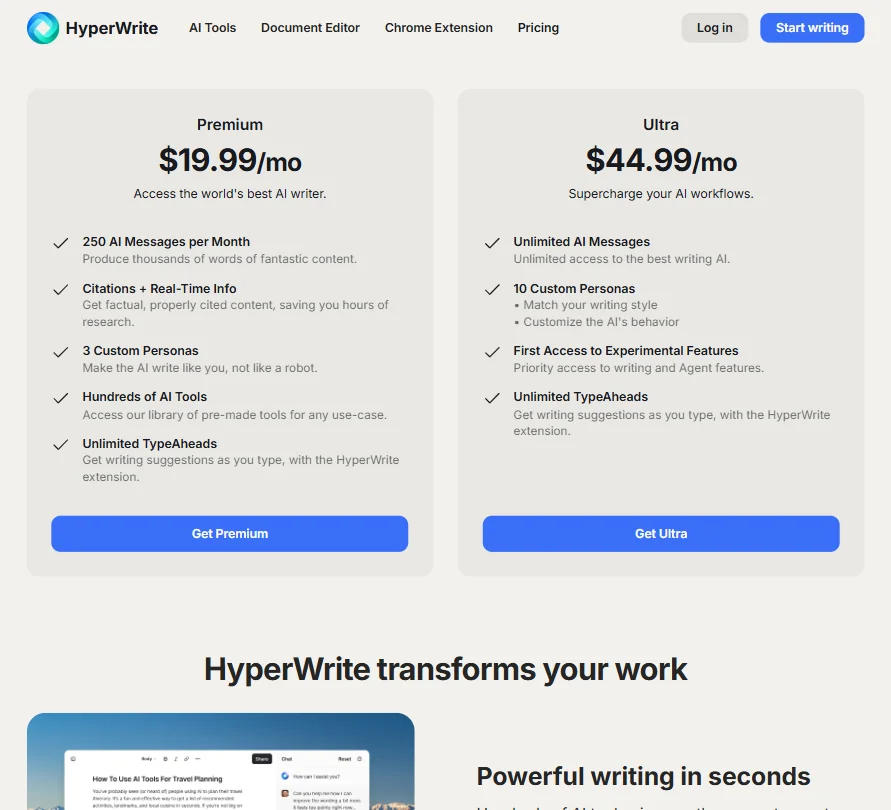
HyperWrite pricing screenshot
HyperWrite — Pricing

There's a free tier with limited monthly credits. Paid plans start at $16 per month on the Premium plan, billed annually. The Ultra plan runs $29 per month. No enterprise tier is listed publicly.

We dug through the pricing page and found no refund policy stated anywhere. That's a concern. Not a dealbreaker, but a concern. Spending $29 a month on a writing tool you can't return if it doesn't fit your workflow is a real ask, especially when the free tier is limited enough that you can't properly evaluate everything before committing.

At $16, **the Premium plan is reasonable compared to Jasper's entry price**, which runs higher and targets a different buyer entirely. At $29, the Ultra plan has to compete with a lot. Notion AI is bundled into a tool people already pay for. Grammarly covers grammar and style at a comparable price point with a much bigger integration footprint. The value case for HyperWrite Ultra depends almost entirely on whether you actually use Scholar AI and the Custom Personas.

HyperWrite vs Jasper: Which Is Better?

Different tools for different budgets and different intentions. Jasper AI is built for marketing teams with money to spend and a need for brand-consistent, scalable content. HyperWrite is built for individuals who write a lot across different contexts and want help that follows them around.

Jasper wins on integrations. It connects to more places and has a larger ecosystem around it. HyperWrite wins on price and on the research angle. Scholar AI has no direct Jasper equivalent.

The honest answer is that most solo writers and students don't need Jasper. It's priced and positioned for teams. HyperWrite at $16 a month is a more realistic entry point. Not sure that holds up once you need to share documents or connect to other tools in a workflow.

Who Should Use HyperWrite? (And Who Shouldn't)

Students doing research-heavy writing. That's the strongest fit. The Scholar AI feature and citation pulling solve a real problem, imperfect as it is.

Solo knowledge workers who live in the browser. The Chrome extension approach makes HyperWrite genuinely useful if you draft emails, write in Google Docs, and don't want to context-switch into a separate app all day.

Who shouldn't bother? Marketing teams who need real integrations and brand governance. HyperWrite doesn't have the infrastructure for that. Enterprise buyers won't even find a pricing tier. Teams that need bulk content generation at scale should look elsewhere too. The tool is personal by design.

HyperWrite Review Verdict

HyperWrite is a credible product with a clear point of view. The TypeAhead feature is genuinely different. Scholar AI fills a gap nobody else has fully filled. The Custom Personas are more useful than they sound. And $16 a month is a fair price for what the Premium plan offers.

The gaps are real though. **The integration story is the biggest weakness by a distance.** Chrome extension plus a web editor is not enough for anyone who works inside a stack of other tools. The support infrastructure is thin. Six G2 reviews is not enough to draw strong conclusions from, and the absence of a Capterra listing or Trustpilot presence makes that review trail even shorter.

The refund policy situation is a bad look for a company asking you to commit annually.

For individual writers and students, there's a version of HyperWrite that earns its price. For teams or anyone who needs reliability over cleverness, the gaps are going to bite.

Frequently Asked Questions

Does HyperWrite have a free plan?

Yes, there's a free tier. It comes with limited monthly credits, so you can get a sense of the TypeAhead and the basic AI tools, but you'll hit the ceiling before you can properly evaluate Scholar AI or the Custom Personas. Treat it as a short trial, not a permanent option.

What is HyperWrite Scholar AI?

Scholar AI is HyperWrite's real-time research feature. It pulls from millions of peer-reviewed articles and generates citations alongside the content it produces. The idea is solid. Accuracy of the citations is something we'd verify carefully before trusting for anything that gets submitted or published, based on what academic users have reported.

Is HyperWrite good for students?

It's probably the user group with the most to gain. The Scholar AI feature, the paraphrasing tool, and the document editor cover the main things students actually need. The $16 per month price point is manageable. Just go in knowing the citation accuracy isn't guaranteed, and don't submit anything without checking the sources yourself.

HyperWrite is featured in

Alternatives to HyperWrite

See all HyperWrite alternatives →

Other AI Writing Tool options we've reviewed.

User reviews

Review HyperWrite

Your rating

Reviews are moderated and appear once approved.