
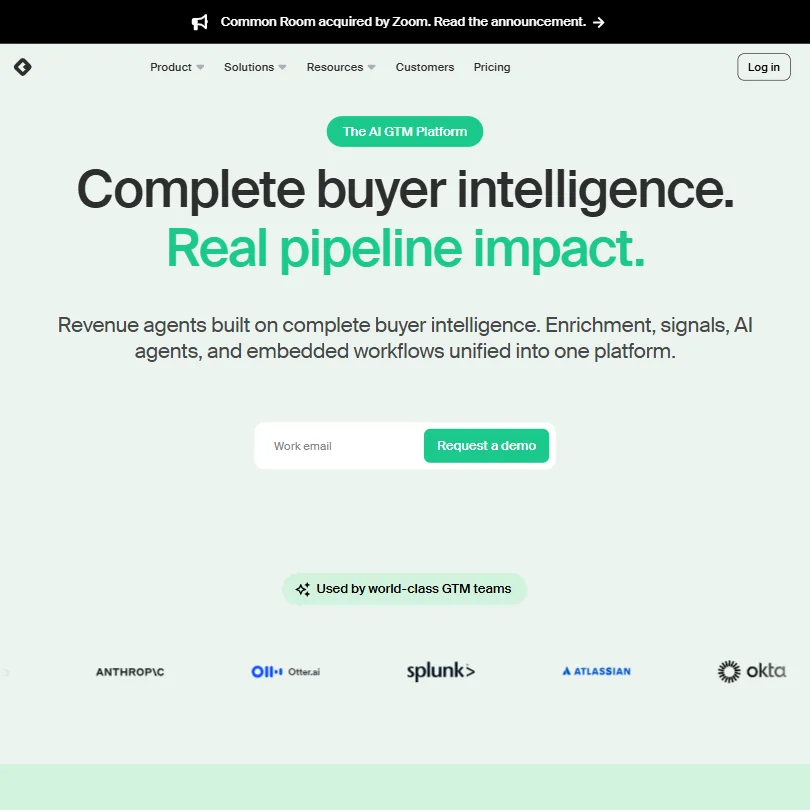
Common Room has been on plenty of GTM team wishlists since its 2020 founding, and it's now part of Zoom. It has real depth in buyer intelligence and genuine AI agent capability, sitting behind a price tag that makes it a hard sell for most teams.
What is Common Room?
Founded in Seattle in 2020, Common Room started as a community intelligence platform and gradually rebuilt itself into something closer to a full GTM data layer. Today the pitch is that it replaces eight to ten point solutions by pulling first-party CRM data, product signals, website visits, job change data, and social or community engagement into a single identity-resolved profile layer they call Context360.
RoomieAI is what sits on top of that. It's their proprietary AI layer. It handles account research, contact research, and generating personalized outreach. There's also something called Spark Briefs, which are AI-generated summaries that surface to reps before they act. The idea is that reps get context without having to do the research themselves.
Common Room was acquired by Zoom. The announcement is on the homepage. Ask what that means for roadmap, pricing, and independence.
Common Room Features: Workflows, AI Agents & Automation Capabilities
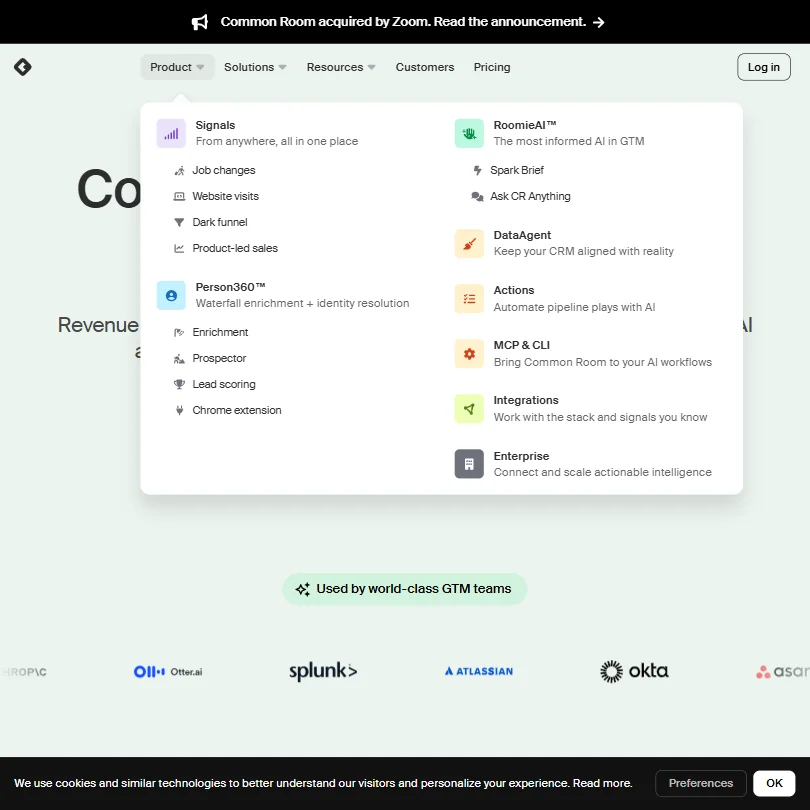
The feature set is wide. Honestly, wider than we expected for a company this age.
The Person360 layer does waterfall enrichment and identity resolution. That means if someone visits the site anonymously, or if a contact has changed jobs since your CRM was last touched, Common Room tries to resolve who they actually are and update the record. A DataAgent runs continuously in the background flagging duplicates and stale records. That's a function most teams currently handle manually or don't handle at all.
On the workflow side, there's a no-code play builder. Triggers include job changes, website visits, product signals, and dark funnel activity. You can set conditional logic for account and contact scoring. Scheduled runs, webhook support, and API access are all there. For teams that want to go deeper, there's an MCP server and a CLI for building custom agentic flows.
The Chrome extension, Salesforce connector, and Slack integration are native across plans. Bombora intent data is listed as a key integration too. Public documentation references a complete Signal and Integrations List, and the vendor claims 50-plus channels across social, community, product, code collaboration, CRM, and a few others. Ask to see the full integration library before you buy.
Common Room Automation Power: How Complex Can Your Workflows Get?
Pretty complex, if you're on the right plan. The no-code workflow builder handles the standard use cases. But the CLI and MCP server access is where it gets interesting for teams that want to build their own agentic flows rather than using pre-built plays.
Signal-based triggers are the strongest part of the automation stack. Job changes, product usage events, dark funnel signals. These are harder to action in tools like Clay because Clay requires you to bring your own data sources and wire them together. Common Room's value proposition here is that the data is already in the platform, already resolved, already current.
We cross-referenced their docs with what users described in RevOps communities. The recurring pattern was that setup time is real. The more sophisticated the workflow, the more configuration is involved upfront. Not unusual for a platform at this complexity level, but worth going in with eyes open.
Common Room AI Agent Capabilities: What Can It Actually Do Autonomously?
The RoomieAI agents handle four distinct functions. Account research, contact research, message personalization, and automated prospecting. That's the standard set you'd expect. What's different is that the agents are running against the Context360 data layer, not against a stale static database.
Spark Briefs are worth calling out specifically. They're AI-generated summaries of a buying signal or account situation that surface to a rep before outreach. That's an automated design, with no human approval step. Fair. Most sales leaders we've seen quoted don't want fully autonomous AI sending emails on their behalf either.
The "Ask CR Anything" feature is a natural language interface for querying the platform's data. Think of it as a conversational layer over your GTM data warehouse. We're cautiously optimistic about that use case. It's only useful if the underlying data is good, and Common Room's whole argument is that their data is better.
No public G2 or Capterra rating exists for Common Room. That's unusual for a four-year-old company. We don't have a clean way to validate AI quality claims from user reviews because the review trail is thin.
Is Common Room Easy to Set Up Without Code?
The no-code play builder is real and looks genuinely usable. RevOps teams in community threads describe standing up basic plays without engineering help. That's the intended motion.
The complexity ramps quickly once you move past the standard plays. Custom enrichment logic, custom product entities, and advanced agentic workflows all require either the CLI or engineering involvement. The MCP server integration is powerful but not a no-code story.
Common Room markets this toward RevOps architects and GTM operators, not beginners. That framing is honest. The Academy, Playbooks, and Signal Guides in the documentation suggest the company knows users need help ramping. Documentation quality looks solid.
Not a tool you hand to a new SDR and expect them to self-serve on day one.
Common Room Pricing: Is It Worth It at $2,500 per Month?
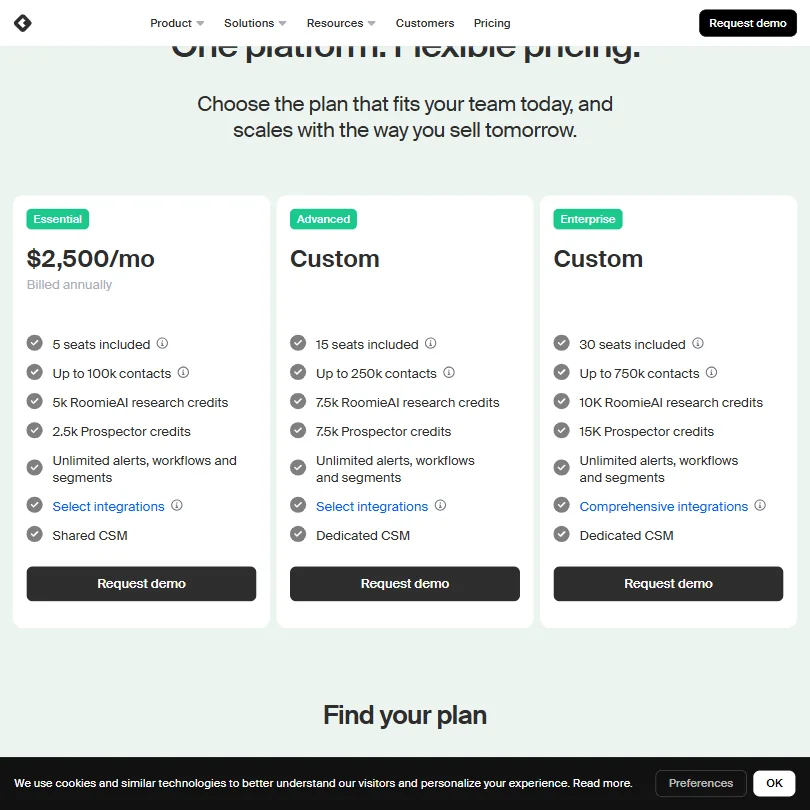
The Essential plan starts at $2,500 per month, billed annually. That's not a typo. It includes 5 seats, up to 100k contacts, 5k RoomieAI research credits, and 2.5k Prospector credits. Unlimited alerts, workflows, and segments are included at that tier, along with a shared CSM and a select set of integrations.
Advanced and Enterprise are both custom pricing. The Advanced plan steps up to 15 seats, 250k contacts, 7.5k RoomieAI credits, and 7.5k Prospector credits, with a dedicated CSM instead of shared. Enterprise goes to 30 seats, 750k contacts, 10k RoomieAI credits, and 15k Prospector credits, and swaps "select integrations" for what they call comprehensive integrations. No public numbers on either. You need a demo call to find out what those tiers cost.
There's no free plan and no free trial. That's a hard combination at $2,500. In our database of reviewed tools in this category, that price point ranks among the three most expensive, against a category median around $29 per month. Clay, which competes for overlap in the enrichment and signal layer, has a free tier and per-credit pricing that lets smaller teams start cheap. Zapier and similar workflow tools offer entry-level access for almost nothing. Common Room is explicitly not playing that game.
Ask about the refund policy before you pay, since none is published.
We don't buy that $2,500 is the right entry price for every team this tool targets. A mid-market RevOps team with five reps is priced out before the conversation starts. The pricing model makes most sense for teams already spending on ZoomInfo, 6sense, and a separate enrichment tool, and looking to consolidate.
Common Room vs Clay: Which Automation Platform Wins?
Clay is the most direct comparison. Both do enrichment. Both have AI agents for research and personalization. Both integrate with Salesforce and sales engagement tools.
The difference is model. Clay is a build-your-own enrichment waterfall. You wire together data sources, set up your logic, and the platform executes. It's flexible and relatively cheap to start. Common Room's argument is that it ships the data layer already assembled, already resolved, always current, and that the GTM team shouldn't be the ones maintaining a data pipeline.
That argument holds for larger teams. For a 10-person startup, Clay wins on price and control. Common Room wins when the problem is scale, signal volume, and CRM alignment across a large rep team.
ZoomInfo and 6sense sit in adjacent territory. ZoomInfo is a data vendor with intent signals bolted on. 6sense leans into account-level prediction. Common Room's person-level identity resolution is a different angle. Whether it's a better one depends on how much you value individual-level vs account-level signals.
We'd also note: teams that just need workflow automation across their existing stack, not GTM intelligence, should look at a proper AI workflow builder before committing here. Common Room is not general-purpose workflow software.
Who Should Use Common Room? (And Who Shouldn't)
Enterprise RevOps teams. That's the real fit. Teams running 50-plus reps, already paying for multiple data subscriptions, and looking to consolidate signals into one place where AI can act on them.
Demand Gen teams running account-based programs at scale also make sense. The signal layer and personalization capabilities are genuinely designed for ABM motion.
SDR teams at mid-market companies with tight budgets. Wrong tool. The price stops the conversation. Clay or Make with a cheaper enrichment source will serve them better.
Teams in early-stage companies evaluating their first GTM stack should look elsewhere. This is a consolidation and scale tool, not a foundation-layer tool.
There's no trial, so anyone who needs to evaluate before committing is going in on demo-driven information only.
Common Room Review Verdict
Common Room is a serious product. The data layer is differentiated. The AI agent capability is real. The automation flexibility, especially the signal-based trigger library, is better than most competitors in this lane.
But $2,500 per month as the entry price cuts the addressable market down sharply. No trial, no free tier, and an unclear refund policy means you're committing real budget on the strength of a demo. The Zoom acquisition adds another variable nobody can fully price in yet.
The team this was built for is large, already sophisticated, and already frustrated by maintaining too many data tools. For that team, Common Room might genuinely earn its price. For everyone else, the math doesn't close easily.
Public review volume would make this easier to recommend. There are no G2 or Capterra ratings for a company operating at this price point, which is odd and a good reason to ask hard questions before signing.
Frequently Asked Questions
Does Common Room have a free trial?
No. Not a free trial, not a free plan. Access requires a demo request, and pricing starts at $2,500 per month for the Essential tier, billed annually. For a platform at this price, the lack of any trial option is a meaningful commitment to ask buyers to make blind.
What is RoomieAI and what does it actually do?
RoomieAI is Common Room's proprietary AI layer. It runs agents for account research, contact research, and outreach personalization. It also generates Spark Briefs, which are context summaries that surface to reps before they contact a prospect. The agents run against Common Room's own enriched data layer rather than querying external databases at runtime, which is supposed to make them faster and more accurate. That's plausible given the architecture.
How does Common Room compare to Clay for enrichment and prospecting?
Clay gives you a flexible build-your-own enrichment workflow at a much lower entry cost. Common Room ships the enrichment infrastructure pre-assembled, with identity resolution and real-time signal monitoring included. Clay wins on price and flexibility for smaller or more technical teams. Common Room's argument makes more sense when you're dealing with scale, rep volume, and a need to keep CRM data continuously current without engineering involvement.







