
Cline's GitHub repository sits at 66k stars as of mid-2025. That number gets attention. It has no G2 listing and no Capterra page, so this cline review draws on community signals, docs, and Product Hunt comments rather than structured review platforms.
What is Cline?
Founded in 2024 and based in San Francisco, Cline describes itself as an open coding agent runtime. The open-source core is free. It runs as a VS Code extension, a CLI you can install globally via npm, and an SDK developers can embed in their own products. That SDK piece is unusual. Most tools in this category want you to stay inside their ecosystem. Cline hands you the plumbing and lets you go build something with it.
The model layer is agnostic. Purchase and Model Inference at Cost or BYOK is how the pricing page phrases it, which is a real differentiator from tools that lock you into one provider. ClinePass adds managed access to open-weights models for people who don't want to manage their own API keys and infrastructure. Eight million developers are reportedly using it. That claim comes from the homepage, so we'd take it as directional rather than audited.
Honestly, the positioning is sharper than most tools we cover. It's not trying to be the best autocomplete. It's trying to be the agent layer you wire into everything else.
Cline Features: Code Generation, Review & Developer Workflow
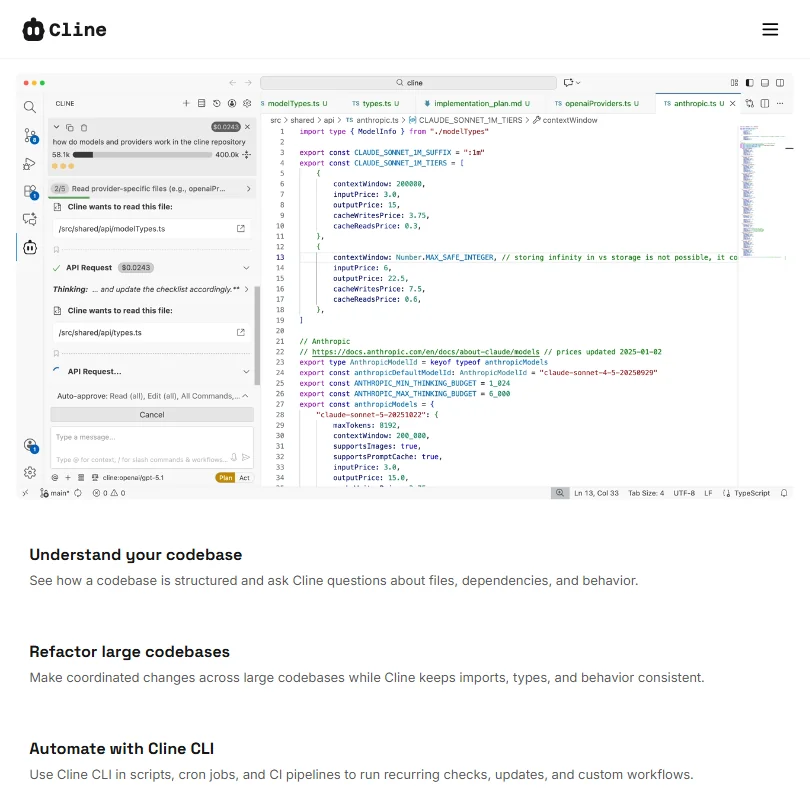
The core workflow is agentic. You give it a prompt, it works through a task from start to something close to production-ready output. That covers code generation, refactoring, and debugging. Not just tab-complete.
The CLI One command, globally installed via npm, and you're running an AI coding agent from your terminal. Cross-platform reach matters more than it sounds because a lot of teams mix environments. The MCP Marketplace is listed as a feature too, which signals an intent to build an ecosystem around the core runtime rather than keep it as a single monolithic tool.
Codebase indexing is in there. Cline navigates existing code rather than treating every session as a blank slate. That's where the refactoring and debugging value actually comes from. Several Product Hunt commenters flagged this specifically, saying it handled mid-size codebases better than they expected. Multi-Root Workspaces are supported as well, which matters for monorepo setups.
What's missing is notable. Security scanning isn't mentioned anywhere in the docs. The JetBrains Extension appears only on the Enterprise plan, not the open-source tier. We're not writing those off as minor. For teams considering this at any scale, those gaps matter.
Cline Code Quality: How Accurate and Reliable Is It?
No formal benchmarks are published in any final, comprehensive form. Cline has released a public real-world benchmark framework built from production user sessions, although comprehensive published comparison results remain limited. Frustrating. Not unusual for a tool this young, but frustrating.
Complex multi-file refactors, test scaffolding, and bug tracing came up as specific wins. When someone ran it on a cheaper or less capable model, the results got spottier fast. That tracks.
The open-weights path via ClinePass is where things get interesting, and also where the most uncertainty sits. Ask for benchmark comparisons between ClinePass-accessed models and direct API access to frontier models before recommending it to a team with serious quality requirements.
The quality ceiling isn't the worry. The floor is.
Cline IDE & Workflow Integration: Where Does It Work?
VS Code is the primary home for the open-source tier. The extension is the primary home for the open-source tier. Git and GitHub workflows are supported natively, as you'd expect from anything serious in this space.
The VS Code Extension experience appears well-regarded. Comments on Product Hunt and in Discord threads consistently describe it as less disruptive than Cursor's full IDE replacement approach. You keep VS Code. You add Cline on top. That matters to people with existing tooling setups they've spent years configuring.
Fair.
The JetBrains Extension exists, but it's gated behind the Enterprise plan with custom pricing. That's a hard stop for a substantial part of the professional developer market on the open-source tier. Developers on IntelliJ or WebStorm don't have a free path in. JetBrains AI is the more obvious choice for that group.
Is Cline Easy to Set Up and Use?
The CLI install is one command. Genuinely simple. The VS Code extension installs like any other extension from the marketplace.
Where it gets complicated is model configuration. You need to bring your own API keys unless you're on ClinePass. That's a real setup step for someone who's never managed API credentials. Not a dealbreaker for most developers, but it is a step. Non-technical users would stop here.
Community Support is listed as the free tier's support channel. That means Discord is the real support layer. A large active community helps, but it does mean that when you hit a problem, you're probably posting a question rather than finding a pre-written answer. We've seen worse. We've also seen better.
Cline Pricing: Is It Worth It for Solo Devs and Teams?
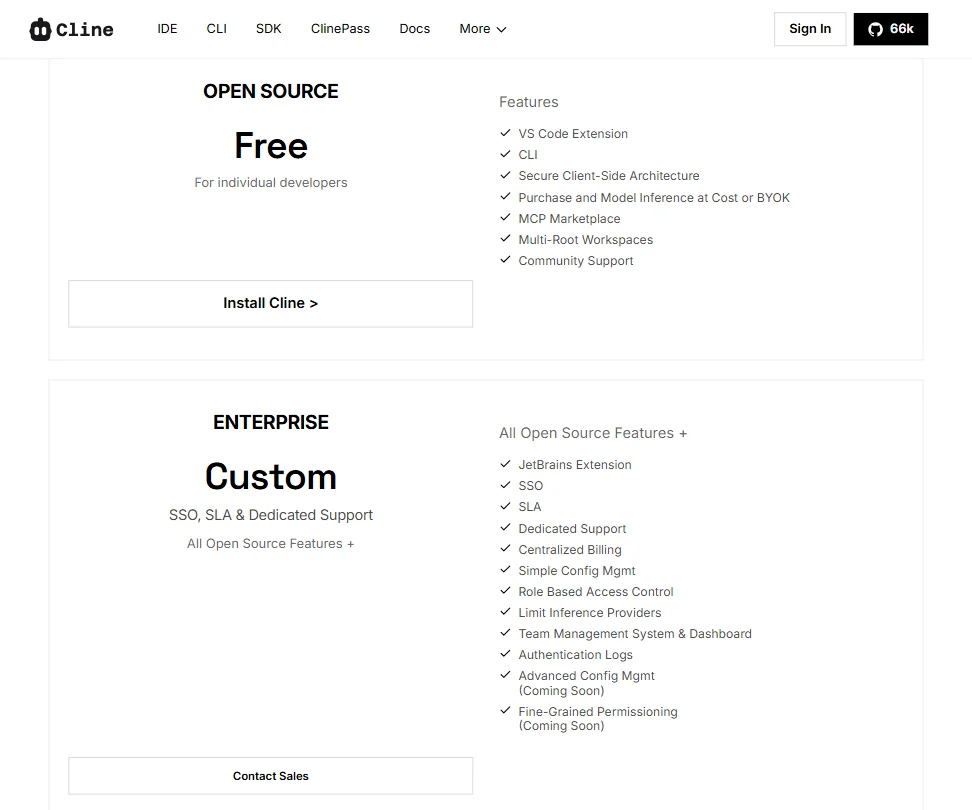
The open-source core is free. Full stop. That's a real free plan, not a 7-day trial with a credit card attached.
ClinePass sits at $9.99 per month, which is actually published in the documentation alongside the included models and their reference token rates. The public-facing pricing page is a different story, listing Enterprise as "Custom" with no figures attached. That gap between what's in the docs and what's on the pricing page is an odd communication choice. Twenty-six of the thirty tools we've covered in this category offer a free plan, so the free core doesn't differentiate as much as it once would have. Worth knowing.
For solo developers, "free and bring your own API keys" is a genuinely compelling offer. Your costs are whatever you spend on Claude or OpenAI API calls, which you control. For teams, the Enterprise custom pricing makes budgeting a guessing game. Dedicated Support, Centralized Billing, and Role Based Access Control are all gated there. Those aren't optional features for most organizations of any size.
Cline vs GitHub Copilot: Which AI Coding Tool Is Better?
Different tools for different things, but the comparison is fair because they're competing for the same developer attention.
GitHub Copilot is polish and integration. It sits inside your existing IDE with minimal setup, has enterprise features and team seats, and offers published pricing. The model choice is Microsoft's to make, not yours.
Cline wins on model flexibility and open-source transparency. You can audit the code. You can swap models. You can run it on self-hosted infrastructure if that's your requirement. Copilot can't do any of that. The SDK path is also genuinely unusual, letting you embed the agent runtime in your own products in a way that Copilot simply isn't designed for.
Where Copilot wins is predictability. Pricing you can plan around. Support you can actually contact. IDE coverage that includes JetBrains on the base plan. For teams buying this at a company level, those things matter in ways that open-source transparency doesn't fully offset.
For a developer who wants to control the full stack, Cline is the more interesting option. Aider is worth a look too if the terminal-first workflow appeals and you want to compare approaches before committing.
Who Should Use Cline? (And Who Shouldn't)
Solo developers who want an agentic coding workflow without being locked into one model. That's the core fit. The free tier plus bring-your-own-API-key model makes costs controllable in a way that subscription-gated tools don't.
Developer teams building their own AI-powered products. The SDK is the unusual piece. Embedding an agent runtime is genuinely harder to do with Copilot or Cursor than it is with Cline.
Teams on JetBrains at the free tier. Not the fit.
Anyone who needs published pricing before they can even start an evaluation conversation. The Enterprise custom pricing will kill that process before it starts.
Enterprise teams with security requirements. Security scanning isn't listed on either plan. That gap is real.
Cline Review Verdict
Cline is a genuinely interesting piece of infrastructure. Not just a coding assistant. The open-source runtime approach, the SDK, the model-agnostic layer, these are design decisions that reflect a different theory of what this category should look like.
The code quality ceiling is competitive when you're running a capable model. The community is active. The CLI is fast to set up. The $9.99 ClinePass entry point is reasonable once you find it. These aren't small things.
The JetBrains gating and the Enterprise pricing opacity are the two friction points most likely to stall real adoption. A tool with 66k GitHub stars and 8 million claimed users probably has the commercial momentum to fix those things. Whether it moves fast enough to stay ahead of Cursor and Copilot is the open question.
For the developer who values control and transparency in their toolchain, Cline is worth serious evaluation. For everyone else, there are better-documented options at comparable cost.
How Cline compares
Cline scores 7.2 out of 10 among the AI coding assistants we rate. These two do the same job and are the closest to it, compared on what each vendor publishes.
GitHub Copilot
Cline is open source and free to use beyond the API key you bring; GitHub Copilot is closed source, with a free plan and a Pro plan at $10 a month. Cline reviews pull requests through its CLI and a GitHub Actions workflow, a capability Copilot also has built in from its Pro plan up. Copilot suggests code as you type as you write it; Cline does not, working instead through chat and agent instructions.
Pick GitHub Copilot if you want inline code suggestions as you type.
Pick Cline if you want an open source tool with no vendor lock-in.
Cursor
Cursor Premium costs $30 a month and can run cloud agents that open pull requests on their own; Cline is open source and runs only on infrastructure you control, with no such cloud agent feature. Cursor also suggests code as you type, something Cline does not do. Cline lets you run models on your own machine via Ollama or LM Studio, which Cursor does not support.
Pick Cursor if you want cloud agents that open pull requests for you.
Pick Cline if you want to run local models and keep everything open source.







