
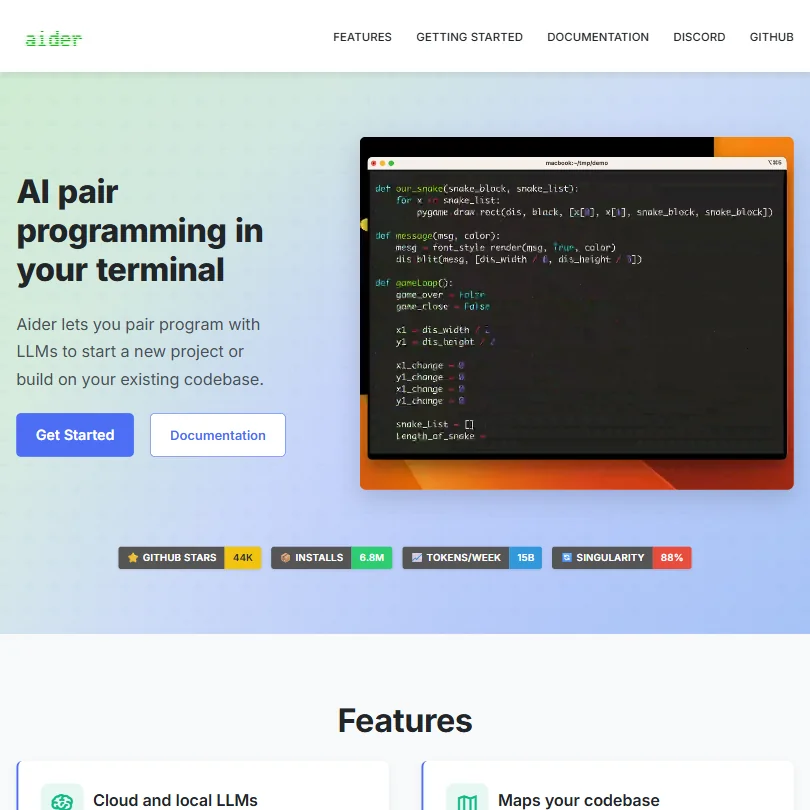
Aider is a tool that defies easy categorization, not because it's trying to be mysterious, but because it genuinely occupies a different space than most things in this category.
What is Aider?
Terminal. Chat. Edit. Commit. That's the entire loop.
Aider sits in your command line and lets you describe code changes in plain language. It edits the files, writes a git commit message, and moves on. No browser tab open somewhere. No subscription dashboard to log into. No IDE you have to switch to.
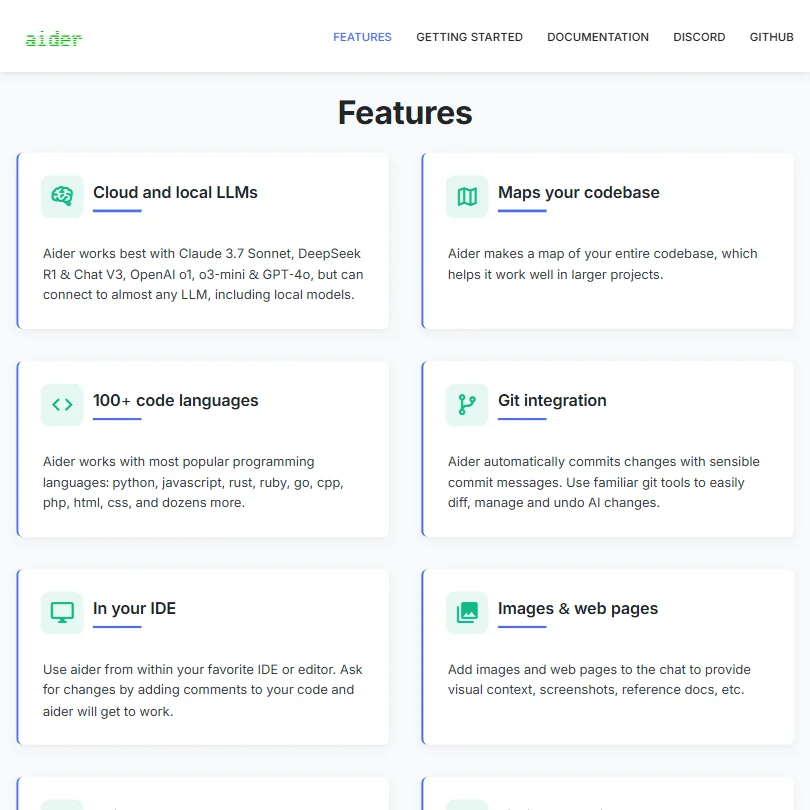
Model flexibility is real and worth understanding upfront. Aider connects to Claude 3.7 Sonnet, OpenAI o1, and DeepSeek R1, and a few others, but you bring your own API keys. Aider provides the interface. You pay the provider directly. That's the whole pricing model.
What actually separates it from most tools in this category is the repo map, Aider's term for its codebase indexing approach. Before you type a prompt, it reads your project structure and builds a working picture of how things connect. Most competitors work on whatever file you have open. Aider tries to hold the whole project in context. For anything beyond a single-file change, that distinction matters more than it sounds.
Aider Features: Code Generation, Review & Developer Workflow
No inline autocomplete. Full stop. Half the developers who look at Aider are expecting something like GitHub Copilot's tab-complete behavior, and that expectation will mislead you. Different tool, different moment in the workflow.
What it does instead: you describe a change, and Aider writes it across however many files need touching. New features, test generation, refactoring across modules. All through the chat interface. Git integration is the feature that comes up most consistently in community threads, and it earns the attention. Every change gets committed automatically with a sensible message. You diff, revert, or undo through normal git tooling. No proprietary history format. No lock-in to Aider's own undo system.
The linting and auto-testing loop is genuinely useful. Aider can run your test suite after each change and try to fix failures before surfacing the result to you. Fewer back-and-forth prompts to get to working code.
Voice input is listed as a feature. Honestly, we'd call that a curiosity rather than a workflow centerpiece. The more serious capability is image and URL context, where you can drop a screenshot or a web page reference into the chat. Useful when you're building toward a design or referencing external documentation.
Aider Code Quality: How Accurate and Reliable Is It?
The repo map is where Aider wins or loses on output quality. When it reads the project structure correctly and selects the right files to edit, the code it produces is clean and coherent across the change. When the map misses context, you get plausible-looking output that quietly breaks something three files away.
Community feedback from 2024 and 2025 shows a consistent pattern. Developers on well-structured Python and JavaScript projects report genuinely good results. Developers on messier legacy codebases report more misses, particularly around implicit dependencies the repo map doesn't surface. That's not a knock specific to Aider. Every tool in this category struggles with spaghetti code. But the map isn't magic, and it's worth knowing that before you point it at a fifteen-year-old Rails monolith.
The model you pick matters more here than with most tools, because Aider exposes that choice directly. Claude 3.7 Sonnet gets the best mentions for edit quality across community threads. GPT-4o users report solid results but higher API costs per session. No single model works best across all project types. The right one depends on what you're building and how your codebase is organized.
Aider IDE & Workflow Integration: Where Does It Work?
The primary home is the terminal. If that sentence made you uncomfortable, Aider will feel like work rather than a tool.
IDE integration exists, but it operates differently than a conventional plugin. The workflow runs through comments in your code. You add a comment describing what you want, Aider picks it up, implements the change. VS Code users report this working reasonably well. JetBrains users report a rougher experience, and the documentation doesn't confirm a formal JetBrains plugin. Community threads from 2025 suggest it's still unsettled territory there.
The comparison to Cursor comes up constantly, and it's instructive. Cursor wraps similar AI-editing capability into a full IDE with a polished UI and built-in model access. Aider keeps the experience raw and gives you more control over the stack. Different tradeoffs, not a clear winner. Developers who want the IDE experience should look at Cursor. Developers who want to stay in the terminal and own every configuration decision should look at Aider.
No team features. No shared context, no collaborative sessions. Worth stating plainly.
Is Aider Easy to Set Up and Use?
Installation is a pip command and an API key. Genuinely that quick.
The documentation is solid, covering installation, configuration, and common troubleshooting without a lot of padding. We've seen commercial tools at $30 a month with worse docs. Fair.
The learning curve after setup is real, though. Aider rewards developers who already think in terms of clear, scoped prompts. Vague requests produce vague edits, and the developers who get the most out of it tend to be specific: name the function, describe the expected behavior, reference the failing test. That's a different skill than just typing questions into an AI chat box.
Community support lives on Discord and GitHub. Both are active. No email support, no live chat, no ticketing system. For an open-source tool at this price, that's the expected deal.
Aider Pricing: Is It Worth It for Solo Devs and Teams?
Free to install. No subscription, no seat fees, no enterprise tier to navigate.
That's a genuinely unusual position in this category. Of the roughly 30 AI developer tools we track, most offer a free tier but layer paid plans on top. Aider has no tiers. The cost is purely API usage, billed directly by whichever provider you've connected.
Running Claude 3.7 Sonnet through an active coding session will add up. Developers in community threads report anywhere from a few dollars to over $20 per day depending on session length and codebase size. Not great if you're running heavy sessions against expensive models without watching the meter. DeepSeek brings that cost down considerably, which explains why it appears so often in Aider's own documentation and community recommendations.
For solo developers with moderate usage, this model is almost certainly cheaper than a $19 per month GitHub Copilot subscription. For heavy daily use on large projects with an expensive model, do the math before assuming it's the budget option.
Aider vs GitHub Copilot: Which AI Coding Tool Is Better?
These two tools don't compete in the same moment in the workflow. Copilot is inline autocomplete living inside your IDE. Aider is a conversational agent that rewrites files and commits to git. Comparing them directly is a bit like comparing a spell-checker to a copy editor.
Where Copilot wins: the IDE experience is frictionless. It fits into existing habits without ceremony. Most developers don't have to change how they work to use it.
Where Aider wins: multi-file edits with full project context. Copilot writes in the file you have open. Aider touches whatever files the task actually requires. For refactoring work or feature additions that cut across modules, that difference is meaningful. Not theoretical. Meaningful.
The honest observation from community threads is that a lot of developers use both. Copilot for moment-to-moment suggestions, Aider for bigger structured changes. That's not a knock on either. It reflects what each tool is built for.
Developers looking for a team-facing code review layer rather than an individual coding assistant should look at CodeRabbit separately.
Who Should Use Aider? (And Who Shouldn't)
Terminal-comfortable developers working alone. That's the core fit.
The bring-your-own-key design and open-source model make Aider particularly good for developers with privacy concerns about cloud-hosted tools, or who want to run local models through something like Ollama. Full control over the stack, no data leaving your environment if you set it up that way.
Developers who want a polished GUI or inline autocomplete should look elsewhere. Not because Aider is bad. Because it's not built for those things and doesn't pretend otherwise. Enterprise teams should know upfront that there are no admin controls, no SSO, and no procurement-friendly packaging here. This isn't that conversation.
Aider Review Verdict
Aider is one of the more capable open-source developer tools we've researched in this category. The repo map concept is genuinely smart. The git-native workflow is cleaner than most commercial alternatives manage to be. The model flexibility means you're not locked into one provider's pricing or quality decisions, which matters more as model quality shifts around.
The gaps are real. No team features. No autocomplete. IDE integration that works cleanly in some editors and poorly in others. API costs that need active management if you're running heavy sessions against expensive models. These aren't small things depending on your context.
Not because it's the most polished tool in the category. Because it fits the way careful, deliberate developers already tend to work. Scoped changes. Clean commits. Full visibility into what the AI actually touched.
That's not nothing.
How Aider compares
Aider scores 6.4 out of 10 among the AI coding assistants we rate. These three do the same job and are the closest to it, compared on what each vendor publishes.
GitHub Copilot
Aider costs nothing beyond the LLM API calls you bring, since it is free and open source; GitHub Copilot's cheapest paid plan, Pro, is $10 a month. Copilot reviews pull requests and can run cloud agents that open PRs on their own, things Aider does not do. Aider runs only in the CLI, while Copilot also works in VS Code, JetBrains, Visual Studio, Neovim and Xcode.
Pick GitHub Copilot if you want pull requests reviewed and cloud agents that open them.
Pick Aider if you want to bring your own model and pay only for api use.
Cursor
Aider is free and open source, so the only cost is the LLM API usage you bring; Cursor's paid plans start at $8 a month, but Bugbot, cloud agents and Claude, GPT and Gemini start at $30 for Premium. Cursor reviews pull requests through Bugbot and can spawn cloud agents that run remotely, neither of which Aider offers. Aider connects to more model families, including DeepSeek, while Cursor sticks to Claude, GPT, Gemini, Grok and its own models.
Pick Cursor if you want pull request review and a dedicated code editor built in.
Pick Aider if you want more model choice and no monthly subscription.
Amazon Q Developer
Aider lets you bring your own API key and choose from Claude, GPT, Gemini, Grok or DeepSeek, and the tool itself is free, only the LLM usage costs money. Amazon Q Developer Pro costs $19 a month, works only with Claude, and has no bring-your-own-key option. Q Developer reviews pull requests and runs cloud agents that open them on their own, capabilities Aider does not have.
Pick Amazon Q Developer if you want a managed service that reviews and opens pull requests.
Pick Aider if you want model choice and to bring your own api key.







