This yuma ai review looks at the homepage claims alongside G2 reviews, Reddit threads, and what e-commerce operators say publicly. Founded in 2022 and headquartered in San Francisco, Yuma is young. Very young. Two years old when most of its competitors had already burned through their Series A money and pivoted twice. It's more interesting than you might expect.

What is Yuma AI?
Yuma positions itself as a specialized AI layer for e-commerce support. Not a generic helpdesk. Not a chatbot bolted onto Shopify. The pitch is that every stage of the customer journey gets its own dedicated AI agent, one covering pre-purchase questions, one managing the transaction moment itself, one cleaning up post-purchase chaos like returns and address changes. That's what the vendor says, at least.
It doesn't replace your helpdesk. It plugs into it. Gorgias users and Zendesk users keep their existing setup. Yuma sits on top, handles what it can, and escalates the rest with full context attached. Basic loop.
The self-improvement layer, which Yuma calls Ask Yuma, is the part that caught our attention. The claim is that it reads every ticket handled by human agents, finds recurring breakdowns, and ships fixes automatically. No engineering ticket required, no week of prompt tweaking. Honestly, that surprised us. Most tools in this category make you do that maintenance work yourself, manually, indefinitely.
Yuma AI Features: Chatbot, Helpdesk & Support Automation Breakdown

The 75+ pre-built automations are the core of what Yuma sells. These cover the most common e-commerce support requests: WISMO queries, refunds, cancellations, and address edits. Real actions, not template replies. That distinction matters when you're running 150,000 tickets a month.
On the email side, Yuma handles automated replies in the brand's own voice. G2 reviewers specifically called this out, the tone-matching, which is not a given. A lot of AI-generated replies read like they were written by someone who has never encountered your brand before. Brand-voice and guardrail controls are listed as a named feature on the Starter plan, so this isn't just a marketing claim, it's a documented configuration layer.
Human handover is configurable. You set a confidence threshold, and below it the ticket goes to a human with context already attached. We've seen worse. Some tools drop a cold ticket on an agent's desk with zero history and call that a handover.
Multilingual support covers 15+ languages according to G2 reviewers. The vendor doesn't emphasize this on the homepage, which is odd, because it's a real differentiator for international Shopify brands. Integration depth leans heavily on the Shopify ecosystem. Recharge and Loop Returns are the ones that matter most for subscription and returns workflows, and a few others cover the rest of a typical high-volume stack.
Yuma AI Bot Quality: How Well Does It Handle Real Customer Queries?
G2 automation rate figures are all over the place. One reviewer reported roughly 30% of tickets fully handled. Another reported nearly 40% full automation, with AI touching about 75% of tickets overall. A third reported more than 50%. Yuma's own case studies, not its G2 reviewers, are where the bigger numbers live: figures like 62%, 70%, 79%, and 89% appear in vendor-published materials. We cross-referenced those carefully. The gap between case study claims and reviewer-reported outcomes is wide enough that we'd treat the case study figures as ceiling, not floor.
That said, even the lower end of what reviewers reported is genuinely useful at scale. Fair.
What we kept seeing in reviews was praise for how Yuma handles complex, multi-step requests. Not just "where's my order" but things like subscription swaps mid-billing cycle or partial refunds on bundles. Most AI support tools fall apart on anything with two conditions. Yuma apparently does better there.
On accuracy, the picture is less clean than the marketing suggests. G2's review summary notes that some users report occasional inaccurate responses requiring human oversight. Yuma publicly documents confidence monitoring, escalation rules, and error-rate tracking, but it doesn't publish a general hallucination-rate statistic. We don't buy the framing that accuracy complaints are absent from the record. They're not.
Yuma AI Channel Coverage: Which Platforms Does It Support?
Email and helpdesk tickets are the core surface. Beyond that, Yuma handles social DMs through what they call Social AI, covering real-time support inquiries from social channels. That's increasingly where customer frustration lands first, and not many tools in this category have built a dedicated agent for it specifically.
Live chat is also covered. The distinction Yuma draws is that these aren't the same agent deployed across different surfaces. Each channel gets a specialized setup. Whether that produces meaningfully better resolution quality versus a unified bot is worth testing. The architecture at least makes more sense than a one-size-fits-all deployment.
Mobile app access isn't mentioned anywhere in the documentation or review record. For a tool managing high ticket volumes, that's a gap worth flagging if your team monitors queues on the go. Web access only, as far as we can tell.
Is Yuma AI Easy to Set Up and Manage?
Setup gets mixed signals. G2 reviewers in e-commerce operations roles mentioned a learning curve during initial configuration. The 75+ automations are a strength and a configuration burden at the same time. Someone has to map those to your specific workflows. That takes real time, not a weekend.
The Ask Yuma layer handles ongoing improvement automatically once you're live, which does reduce the maintenance burden. More work upfront, less firefighting later. Whether your team has the bandwidth for the initial lift is a legitimate question before you sign anything.
A 30-day free trial is available. Separately, Yuma offers a free CX audit before you commit, connecting to your helpdesk and producing a report on your actual automation gaps. That's a smart offer. Real data about your own support operation, not just a vendor pitch. We'd take that audit before any sales call.
Yuma AI Pricing: Is It Worth It for Support Teams?
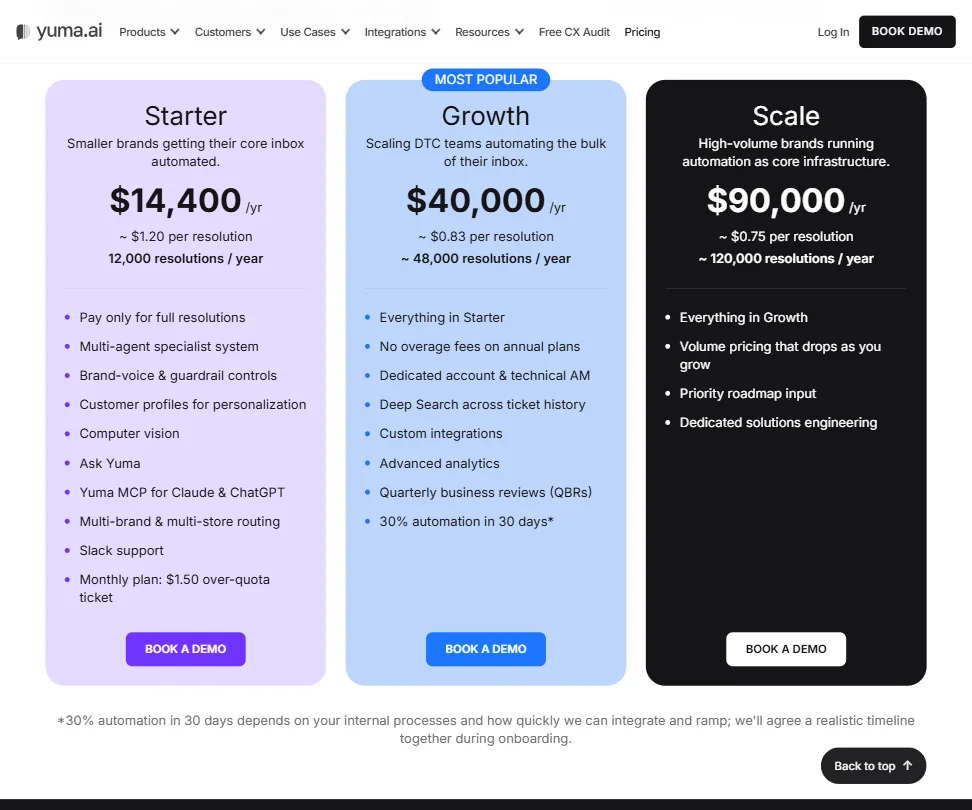
Three plans are visible from what we could pull together. Starter runs $14,400 per year, covering roughly 12,000 resolutions at approximately $1.20 per resolution. Growth runs $40,000 per year, covering roughly 48,000 resolutions at approximately $0.83 each. Scale runs $90,000 per year, covering roughly 120,000 resolutions at approximately $0.75 each, with volume pricing that continues to drop from there.
Growth adds a dedicated account manager, Deep Search across ticket history, custom integrations, and quarterly business reviews. Starter covers the core feature set including computer vision, multi-brand routing, and Slack support. Not great that Starter customers also face a $1.50 over-quota charge per ticket once they exceed 12,000 resolutions, while Growth removes overage fees entirely on annual plans. Worth knowing before you pick a tier.
The refund policy is unstated. For a product at these price points, that's an uncomfortable gap. We don't know what happens if you spend three weeks integrating and decide it's not the right fit. That's not a product problem, it's a go-to-market problem. Fixable. Currently annoying.
Yuma AI vs Tidio: Which Customer Service AI Wins?
Tidio is a very different product. It's broader, it works across e-commerce and non-e-commerce contexts, and it has a free plan. Yuma has neither of those things. But Yuma also doesn't try to be a general-purpose tool, so the comparison only goes so far.
For a high-volume Shopify brand running thousands of tickets a month, Yuma's depth wins. The pre-built automations for returns and subscription management cover more ground than Tidio's AI does out of the box. Tidio is better for smaller operations, or teams where live chat is the primary interface rather than helpdesk ticket resolution.
Gorgias is a closer comparison, especially since Yuma integrates with it. Yuma isn't trying to replace Gorgias, it's designed to layer above it. If you already run Gorgias and you're hitting the ceiling on manual ticket handling, Yuma is probably the layer you add. Not the thing you swap in. That's a different buying decision than most people expect going in.
Who Should Use Yuma AI? (And Who Shouldn't)
High-volume e-commerce brands on Shopify. That's the fit. Specifically brands with enough tickets per month to justify the configuration investment and the annual cost at any of the three plan tiers.
Brands managing a few hundred tickets a month. Overkill. The tooling is built for teams drowning in WISMO queries at 3am, not for operations where a part-time agent could handle the load. The complexity-to-value equation only works past a certain volume threshold.
Brands not on Shopify can still use Yuma. The documentation mentions support for other e-commerce platforms. But the deepest integrations clearly favor the Shopify ecosystem. Headless commerce setups or brands running custom stacks should ask specific questions before committing to a trial.
Teams that want a simple, low-configuration chatbot should look elsewhere. Something like Fin handles multi-channel automation with a lighter setup burden. Yuma rewards teams willing to do serious configuration work upfront. Not everyone is. Not every team should be.
Yuma AI Review Verdict
Genuinely capable tool for a specific problem. E-commerce support at volume. Bot quality is above average for this category. Integration depth with the Shopify ecosystem is real and documented. The Ask Yuma self-improvement layer is the most interesting architectural choice we've seen from a tool this young.
The accuracy picture is less clean than the vendor implies. Some G2 reviewers flagged inaccurate responses requiring oversight. The automation rate figures in Yuma's own case studies run significantly higher than what most G2 reviewers actually reported. We'd treat that gap seriously during a trial, not after.
Post-purchase automation is where the tool earns its reputation, and reviewers back that up consistently. The pre-purchase Sales AI and Social AI layers are newer and less validated in the public review record. Worth testing in trial, not assuming from the marketing materials.
The Scale plan at $90,000 per year includes dedicated solutions engineering and priority roadmap input. For a brand running 120,000 resolutions annually, that per-resolution cost of $0.75 can make the math work. Take the free CX audit. Go into the demo with specific volume numbers. Then ask directly what plan fits your ticket count before the conversation drifts anywhere else.
Frequently Asked Questions
Does Yuma AI work with helpdesks other than Gorgias?
Yes. Yuma integrates with Zendesk, Kustomer, Gladly, Re:amaze, and Front, among others. It's designed to sit on top of your existing helpdesk rather than replace it, so most major platforms in the e-commerce space are covered. Check their integrations page for the current list before assuming your stack is supported.
Is there a free plan for Yuma AI?
No free plan. There's a 30-day free trial, and separately a free CX audit where Yuma analyzes your existing ticket history before you commit. The audit is worth doing. It surfaces real data about your support operation, not just a pitch about Yuma's feature set.
How does Yuma AI handle tickets it can't resolve?
Unresolved tickets escalate to a human agent with full conversation context already attached. The confidence threshold for when that handover triggers is configurable, so your team controls how cautious or aggressive the AI should be before it asks for help. That configurability is a meaningful piece of control, and reviewers generally say the handover quality is cleaner than what they saw with previous tools. Not a universal view, but a common one.