Shakker is genuinely ambitious, and almost nobody outside of Stable Diffusion circles has heard of it. This shakker AI review draws on community threads, vendor docs, and the little review data that exists.

Launched in 2023, Shakker sits in a crowded corner of the AI image generation market. It's not chasing Midjourney's aesthetic crown. It's doing something more specific.
What is Shakker?
Think of it as a browser-based creative studio for people who already know what LoRA models are. The platform runs multiple image generation models, with FLUX.1 and Stable Diffusion XL as the headline options. SD 1.5 support sits underneath those for anyone still working with older fine-tunes.
What makes Shakker different from a basic image generator is the stack it ships around those models. There's an online A1111 WebUI and an online ComfyUI, both browser-based, no installation needed. That's a real convenience for people who've tried running those locally and watched their GPU overheat. It also has an online training pipeline for building your own LoRAs.
Community is baked in, too. There's a gallery and model-sharing infrastructure that reads more like Civitai than like a pure SaaS product. Whether that community has real momentum is worth checking.
Shakker Image Quality: How Good Are the Results?
The model selection does a lot of the heavy lifting here. FLUX.1 is genuinely strong for photorealism and detail. SDXL handles a broader aesthetic range. The quality ceiling is as high as those underlying models allow, which is fairly high.
Consistency at scale is hard to pin down, since there's no substantial G2 review pool for Shakker. In community discussions, the recurring angle is that output quality depends heavily on which model you pick and how well you know prompt construction. Not surprising for a platform aimed at people who already have opinions about CFG scale.
The honest read: Shakker's quality ceiling is good. The floor depends on the user. That tracks for a power-user platform.
Shakker Features: Text-to-Image, Video & Editing Tools
The feature list is long. Long enough to be suspicious until you start reading what each thing actually is.
Text-to-image generation is the core. The platform also covers image-to-image work, inpainting, outpainting with an infinite canvas, style transfer, and what they call entity control and spatial control. Those last two suggest ControlNet integration, which lines up with the A1111 and ComfyUI support. The LoRA library spans FLUX.1, SDXL, and SD 1.5, with Shakker claiming over 50,000 Stable Diffusion models in the ecosystem.
Honestly, that's a lot. More than most tools in this category ship with.
Video is not on the table. No text-to-video, no image animation. Face swap is listed on the homepage. Ask about API access, batch generation, private generations, watermark behavior, and export formats.
Worth noting: the shakker comfyui online angle is genuinely useful for teams that want ComfyUI workflows without the setup overhead. That's a real differentiator.
Is Shakker Easy to Use?
That depends entirely on who's asking. For someone who's never touched Stable Diffusion, the A1111 WebUI and ComfyUI interfaces will feel overwhelming. Those tools were not designed for casual users. Shakker putting them in a browser doesn't change the learning curve.
For the intended audience, people who already run these workflows locally, the browser-based access probably feels like a relief. No local setup, no driver conflicts. Just open and go.
Shakker isn't trying to be beginner-friendly, and that's a choice, not an oversight. The problem is the homepage doesn't make that choice obvious. A new user landing there might think it's an accessible creative tool. It isn't, really. Not until you know what you're doing.
Shakker Pricing: Free Plan vs Paid, Is It Worth It?
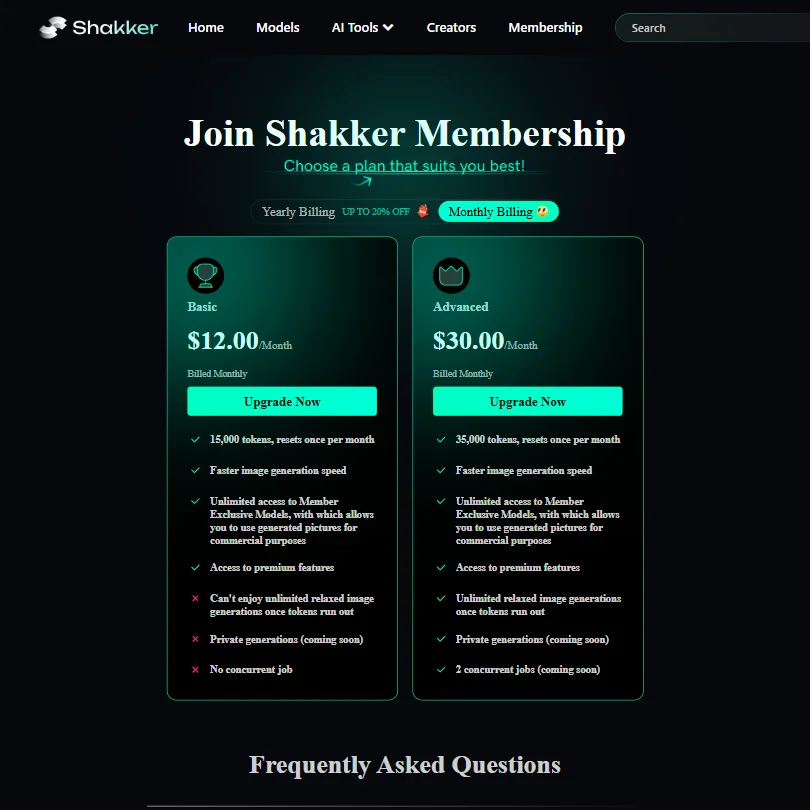
Shakker’s pricing is not opaque in the current plan view. The Basic plan costs $12/month and includes 15,000 tokens per month, faster image generation, access to premium features, and access to Member Exclusive Models that can be used to generate images for commercial purposes. The Advanced plan costs $30/month and includes 35,000 tokens per month, the same commercial-use access to Member Exclusive Models, premium features, unlimited relaxed image generations after tokens run out, and two concurrent jobs listed as coming soon. Private generations are also marked as coming soon.
That's a problem. We're not chasing it. Opacity around pricing is usually a sign that the pricing is either experimental or unfavorable compared to alternatives. It could also mean they're still figuring it out, given the 2023 founding date.
Refund policy: not stated. Free trial terms: not stated. This section of the review is short because Shakker hasn't given us much to work with.
Shakker vs Civitai: Which AI Image Generator Wins?
Civitai is the natural comparison. Both are community-driven platforms built around shared models and fine-tunes. Both lean into Stable Diffusion's ecosystem. The difference is Civitai is more of a model-sharing hub with generation attached. Shakker is more of a generation tool with community attached.
Shakker's edge, if it has one, is the browser-based A1111 and ComfyUI access. Civitai doesn't offer that in the same way. If you want to run complex ComfyUI workflows without touching your local machine, Shakker has an argument.
Midjourney is a different animal entirely. It's not trying to be a power-user toolkit. It's chasing aesthetic quality with a simpler interface. The audiences barely overlap.
For creative professionals already deep in the Adobe stack, Adobe Firefly is probably a better fit than either. Commercial rights clarity alone makes that an easy call for agency work.
Who Should Use Shakker? (And Who Shouldn't)
The fit is specific. AI artists who already run Stable Diffusion workflows and want a cloud-based option. Designers who need FLUX.1 LoRAs and don't want to pay for local compute. Community-minded creators who want to share and discover models, not just generate images.
That's a real audience. It's just a narrow one.
Casual users looking for a simple text-to-image tool. Not the fit. The interface depth and the missing onboarding will frustrate them fast. Marketing teams needing commercial rights clarity should look elsewhere until Shakker publishes that information.
Shakker Review Verdict
Shakker is a capable, technically deep platform that's clearly built for a specific kind of user. The feature stack is real. FLUX.1 and SDXL support, online ComfyUI and A1111 access, a large shakker lora models library, LoRA training in the browser. That combination is genuinely uncommon.
Shakker’s pricing is not opaque in the current plan view. The Basic plan costs $12/month and includes 15,000 tokens per month, faster image generation, access to premium features, and access to Member Exclusive Models that can be used to generate images for commercial purposes. The Advanced plan costs $30/month and includes 35,000 tokens per month, the same commercial-use access to Member Exclusive Models, premium features, unlimited relaxed image generations after tokens run out, and two concurrent jobs listed as coming soon. Private generations are also marked as coming soon.











