
What is Re-engage?
Web-based. One input, one output loop. You paste a YouTube URL or drop in article text, the tool reads it and writes either a LinkedIn post or a Twitter thread. That's the full product description and it genuinely doesn't need to be longer than that.
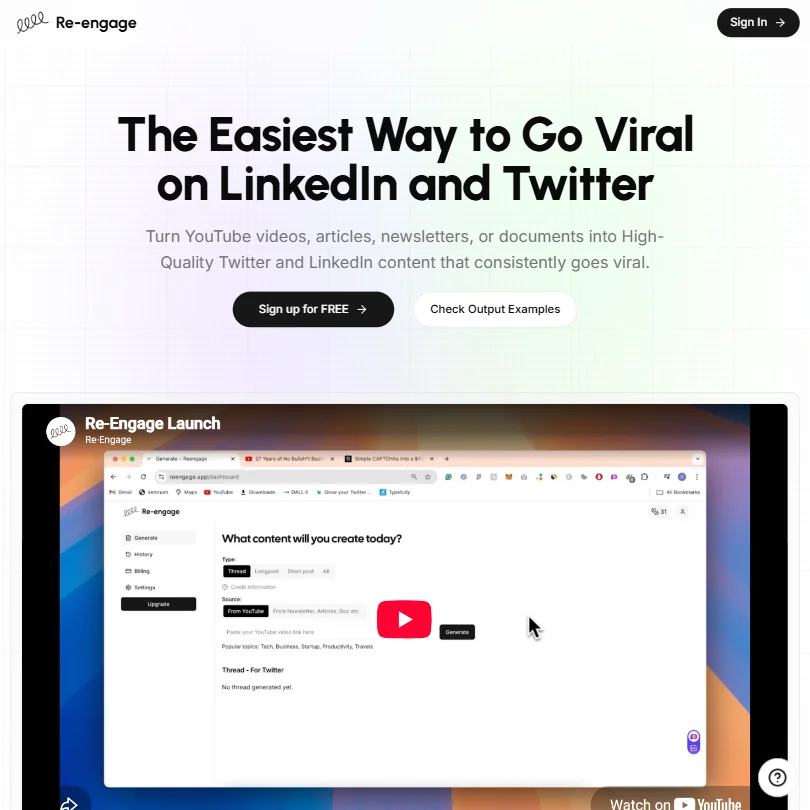
The founding story is that the people behind Re-engage built it on strategies that earned them over 100 million views on their own content. We can't verify that. What we can say is that the product reflects a real point of view about how repurposing should work, which is fast and opinionated, not configurable into infinity. Whether their personal content performance translates into better outputs for you is a different question entirely. We don't buy the implied guarantee.
No scheduling. No analytics. No calendar. Copy generation, full stop.
Re-engage Features: Scheduling, AI Content & Analytics
The content repurposing engine is not one feature among many. It is every feature. Threads, long-form posts, short posts, across LinkedIn and Twitter. That's the complete output list and we're not summarizing for brevity.
Honestly, we went looking for a features page that might list something we missed. Nothing. There's no post scheduling, no content calendar, no analytics layer, no team access controls, no API, no bulk generation queue. The tool writes the copy and then you go somewhere else to use it. If you want to actually publish what Re-engage generates, something like Buffer handles that half of the workflow and integrates easily enough with a generation-only tool.
Both the Standard and Premium plans cap transcript input at 40,000 characters. That's workable for most YouTube videos and newsletters. A very long document might hit the wall.
Worth flagging: that character cap is the same across both tiers, so the only meaningful difference between plans is credit volume.
Re-engage Platform Support: Which Networks Does It Cover?
LinkedIn and Twitter. Full stop. No Instagram, no TikTok, no Threads, no Facebook.
The YouTube side works through URL input, meaning the tool fetches the transcript directly from a link. No manual export, no copy-pasting a transcript file. That part is genuinely clean. Everything else, articles, newsletters, any other source text, requires manual input.
Fair. Re-engage doesn't claim broader platform coverage, so there's no bait-and-switch. But Typefully, which started as a Twitter-native writing tool, now covers X, LinkedIn, Bluesky, Threads, and even cross-posts to Mastodon. The platform breadth gap between Re-engage and even its narrower competitors is real and widening.
Re-engage AI Content Creation: Caption & Copy Quality
The output examples on the homepage look competent. Thread structures are readable. The LinkedIn samples don't have the tell-tale cadence of unedited AI copy, at least in the samples the vendor chose to display. The "Wall of Love" testimonials on the homepage are vendor-curated.
A tool generating clean output from a well-structured YouTube video is not impressive. The real test is a rambling 45-minute podcast, and the homepage examples don't show that.
We're skeptical of the 100M-views framing as a quality signal. The copy might be great.
Is Re-engage Easy to Use?
Three steps. That's the workflow depth and there's genuinely not much more to say about complexity.
The interface reads as minimal from what's publicly visible. Pick a source, pick a format, generate. No configuration rabbit holes, no settings panels to navigate before you see output. For a first-time user, that's a fast ramp.
What's thin is everything around that core loop. No help center with any real depth, no community forum, no in-app documentation we could find. Support is email only, at support@reengage.app, and that's the entire support structure. For a tool this simple, email might cover most situations. For a paying user whose credits aren't behaving correctly on a Friday afternoon, probably not.
Re-engage Pricing: Is It Worth It for Creators & Agencies?
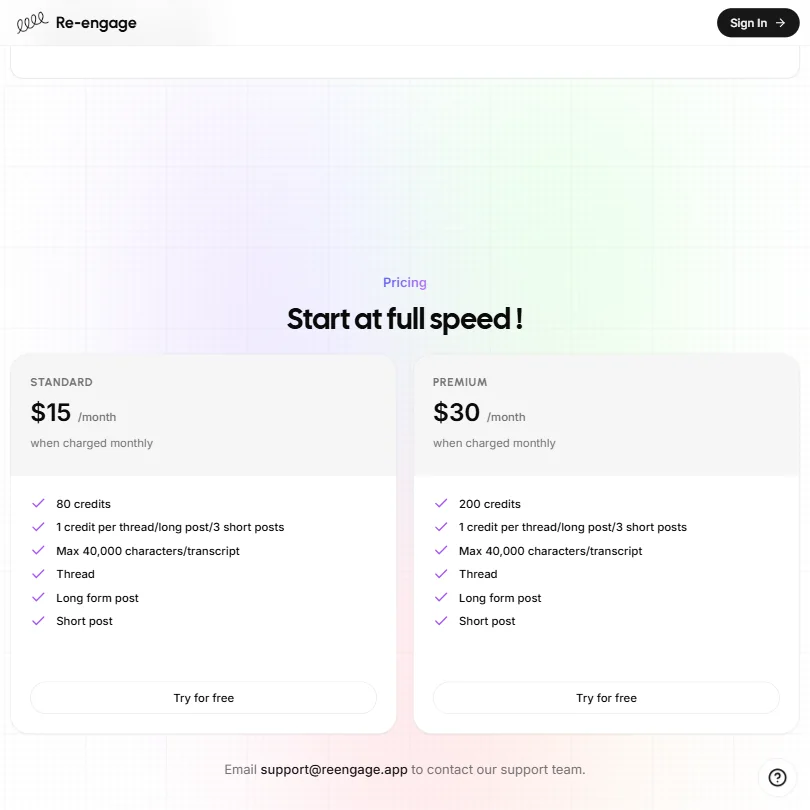
Standard is $15 a month for 80 credits. Premium is $30 a month for 200 credits. One credit covers a thread or a long-form post. Three short posts burn one credit. No annual discount is listed anywhere on the pricing page, no enterprise tier, no team pricing.
Against the category, that's cheap. Taplio currently starts at $39 per month, compared with Re-engage's $15 Standard plan. Even Typefully's paid tiers run higher for what they include. On price alone, Re-engage wins.
The problem is what that price buys. Fifteen dollars for a generation-only tool with no scheduling and no analytics is a different value proposition than $39 for something that handles the full content management loop. The low price reflects the narrow scope, not just generosity.
Eighty credits sounds comfortable until a heavy LinkedIn publisher burns through 20 in a week. Not great. The free trial exists, but the duration isn't stated publicly on the pricing page. No refund policy is posted either.
Re-engage vs Taplio: Which Social Media Tool Wins?
Taplio is the natural LinkedIn-side comparison. AI-assisted writing, but also scheduling, analytics, a content library, and relationship-tracking features. Taplio starts at $39 a month. You're paying more and getting substantially more product.
Re-engage's counter-argument is simplicity and price. That lands for a solo creator who wants a YouTube link turned into a post with minimal friction. It doesn't land for anyone who needs to manage a posting calendar or understand what's performing.
Repurpose.io covers the YouTube-to-social workflow too, with considerably more platform breadth. Typefully is worth a look if Twitter threads are the primary output, though it now extends well beyond Twitter. Re-engage sits below both on features.
That's not automatically disqualifying. Narrow tools have their place.
Who Should Use Re-engage? (And Who Shouldn't)
Solo creators publishing on LinkedIn and Twitter, sourcing content from YouTube. That's the fit and the product was clearly built for exactly that person.
Agencies and teams. Not a fit. There are no collaboration features, no client management, no shared workspaces. SocialBee handles that use case far better and has the review coverage to back it up.
Anyone who needs scheduling or performance reporting inside the same tool should stop here and look elsewhere.
Re-engage Review Verdict
Low price, narrow focus. That's the summary and it's genuinely hard to push past it.
The repurposing workflow is simple and fast. The Standard plan at $15 a month is cheap enough that the trial-to-paid risk is low. Those are real points in its favor.
The problem is that Re-engage becomes a tab in a larger stack almost immediately. You still need a scheduler. You still need somewhere to track what's working. The tool generates copy and then leaves you to manage everything else manually. For some creators that's fine, a specialist tool for one job. For most, it's one more subscription to justify.
Take the free trial seriously. Don't skip it.
At $15 a month, the floor is low. The ceiling is too.
How Re-engage compares
Re-engage scores 2.2 out of 10 among the X and LinkedIn growth tools we rate. These three do the same job and are the closest to it, compared on what each vendor publishes.
Taplio
Re-engage only drafts posts for you to copy onto X or LinkedIn yourself, it never connects an account or publishes anything, and its cheapest plan is $15 a month. Taplio connects straight to LinkedIn, sends DMs automatically, keeps a list of people who engaged, and starts at $39 a month. Both turn articles and links into posts. Re-engage is the cheaper drafting tool; Taplio is the fuller LinkedIn growth tool.
Pick Taplio if you want it to publish straight to LinkedIn and message people automatically.
Pick Re-engage if you just want cheap drafts to paste in yourself.
Typefully
Typefully posts to X, LinkedIn, Bluesky, Threads and Mastodon, automatically re-posts your best content, and adds a plug once a post takes off, with a free plan to start. Re-engage never connects an account: it only writes text for you to paste onto X or LinkedIn yourself, and its cheapest plan is $15 a month with no free tier. Typefully's paid Creator plan is sold yearly only, not month to month. Re-engage does turn articles and links into posts, which Typefully does not list.
Pick Typefully if you want built-in posting to five networks and a free plan.
Pick Re-engage if you only need drafts to paste in yourself each month.
Postwise
Postwise reposts your best tweets automatically, adds a plug once a post takes off, and keeps a library of high-performing tweets to draw on, starting at $37 a month. Re-engage has none of that: it only writes text for you to paste onto X or LinkedIn yourself, with no account connection, and its cheapest plan is $15 a month. Postwise also posts to X, LinkedIn and Threads directly; Re-engage posts nowhere on its own.
Pick Postwise if you want automatic reposting and a tweet library built in.
Pick Re-engage if you just want cheap draft text to post yourself.
Frequently Asked Questions
Does Re-engage support scheduling posts to LinkedIn or Twitter?
No. The tool generates copy and stops there. Posting is manual or requires a separate scheduler entirely. That's a deliberate product decision rather than a missing feature on a roadmap, but it does mean Re-engage is one piece of a workflow, not a complete one.
Is there a free plan for Re-engage?
No permanent free tier. A free trial is available through the "Try for free" button on the site, Standard and Premium both show it, but the trial duration isn't stated publicly. Paid plans start at $15 a month. No refund policy is posted anywhere on the site, so use the trial before spending money.
Can Re-engage repurpose content for platforms beyond LinkedIn and Twitter?
No. Instagram, TikTok, Threads, and Facebook are not supported. If multi-platform output matters to your workflow, tools with broader coverage are the practical choice.