
Most AI video tools in this category are chasing the same thing: pull a clip, add captions, post to LinkedIn. Parmonic isn't doing that. Founded in 2019, headquartered in Atlanta, built specifically for the 60-minute webinar that nobody ever does anything useful with afterward. That's the product.
What is Parmonic?
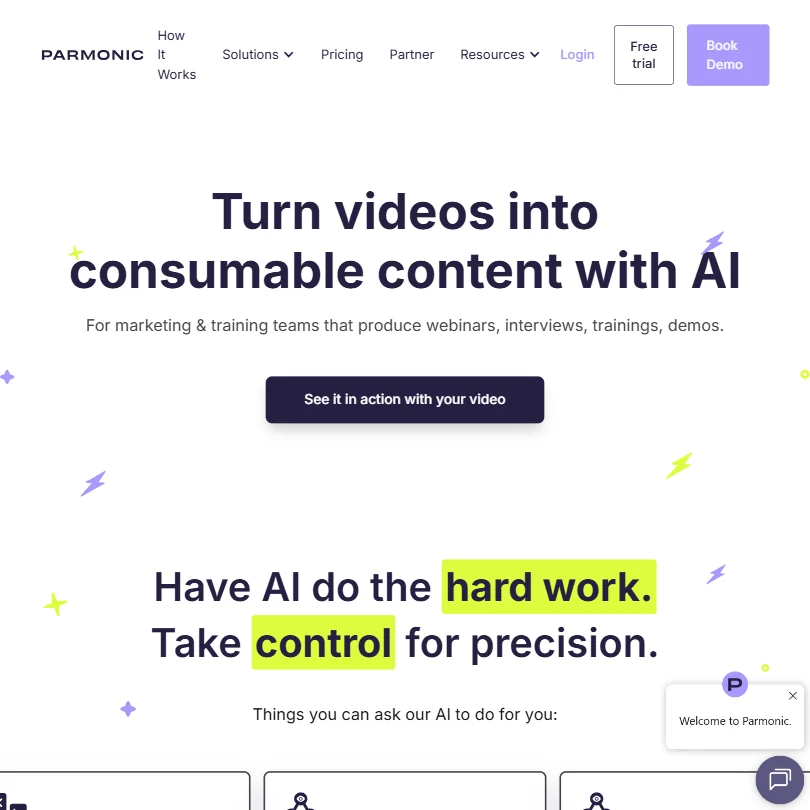
Web-based, aimed squarely at marketing and training teams. The core workflow is repurposing long recordings into something distributable: shorter clips, subtitled highlights, blog-ready text, branded galleries. You bring the recording, Parmonic breaks it apart.
The AI doing that work is called Moments AI, and Parmonic holds multiple USPTO patents on it. That's not marketing copy. Most competitors in this space, Vidyo.ai, Opus Clip, and a few others, are wrapping commodity transcription in a nicer UI. A real patent trail suggests actual proprietary work on identifying meaningful segments inside dense professional video. The IP position is at minimum a real differentiator on paper.
The homepage calls out tech companies, financial services, and healthcare as core verticals. That tracks. These are exactly the environments where someone records a 90-minute compliance webinar and it immediately disappears into a shared drive forever. Fair.
Parmonic Features: Video Generation, Editing & AI Capabilities
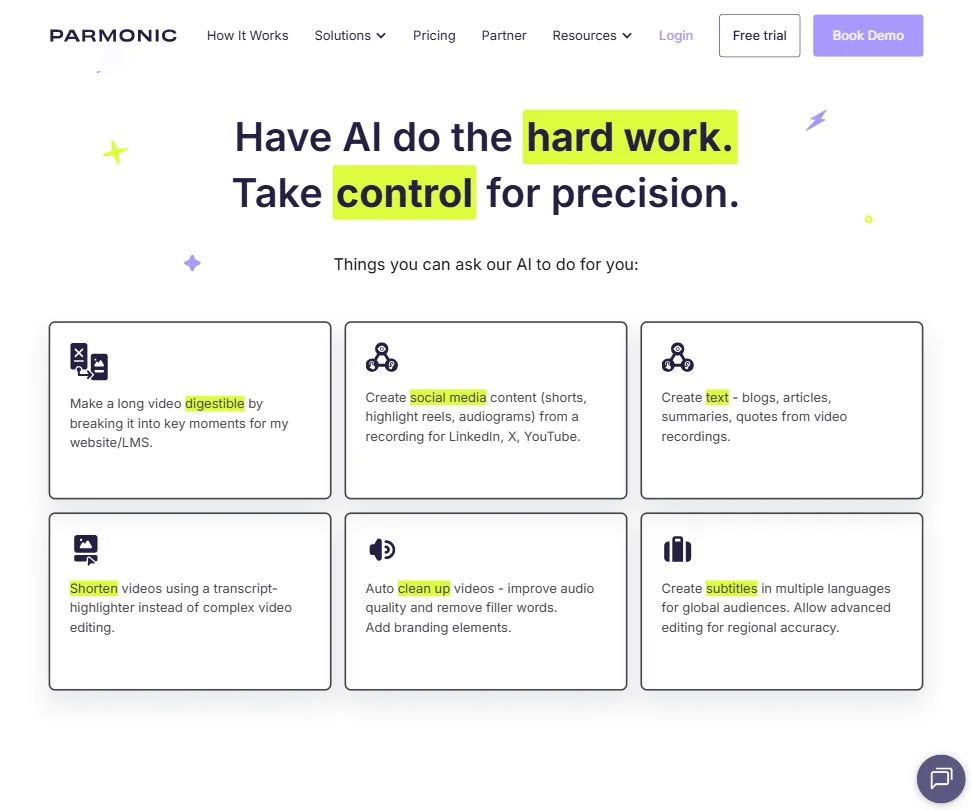
The editing model is transcript-based. You highlight what you want, the video follows. Filler word removal is included, so is basic audio enhancement and video resizing. None of that is unusual at this point, but the execution here is purpose-built around professional long-form content rather than bolted onto a general editor.
On the output side, the platform generates blog posts and article text from recordings. It builds audiograms with customizable branding. It produces what they call content galleries, which are essentially hosted landing pages for your repurposed material. Multi-language subtitles are supported, with regional accuracy editing that goes beyond auto-generated captions.
The pricing screenshot confirms unlimited outputs on paid plans with no caps. That's genuinely useful for teams running high-volume webinar programs. Batch processing at unlimited output volume is a real enterprise-grade capability, not a checkbox feature. The Advanced tier supports up to 25 users with Teams functionality, and Enterprise goes to 25-plus with platform customizations and advanced compliance on top.
What it doesn't do: no avatars, no voice cloning, no text-to-video. No screen recording either. Descript covers more editing ground if you need a broader toolkit. Synthesia handles the synthetic presenter use case. Parmonic doesn't try to compete in either of those lanes.
Parmonic Video Quality: How Good Does the Output Actually Look?
Parmonic isn't generating video from scratch, so output quality is downstream of your source material. What the platform adds is structure, branding, and formatting. The real question is whether the AI picks the right moments and whether the result looks polished enough to use without extra cleanup.
Export resolution isn't publicly documented anywhere on the site or in the docs. That's a real gap for a tool priced at $399 a month minimum, and we're not going to pretend otherwise.
Parmonic AI Avatars & Voiceover: How Realistic Are They?
There aren't any. No avatars, no voice cloning, no text-to-speech. Full stop.
This is a deliberate product decision. Parmonic works with real recorded video, not synthetic presenters. If you came here looking for avatar-based video generation, this is the wrong category entirely. Not even close to that use case.
Is Parmonic Easy to Use?
The transcript-highlighter approach is genuinely simpler than timeline-based editing. You read, you highlight, you cut. Non-technical users can work that way without training.
Integrations include Zoom and GoTo for direct recording import. On the marketing stack side, HubSpot, Marketo, and Salesloft are all present. The webinar platform connections matter practically: pulling recordings in without a manual upload step is a small thing that compounds fast when you're doing this every week. API access is documented for custom setups beyond the named integrations.
Parmonic Pricing: Is It Worth It for Creators & Teams?
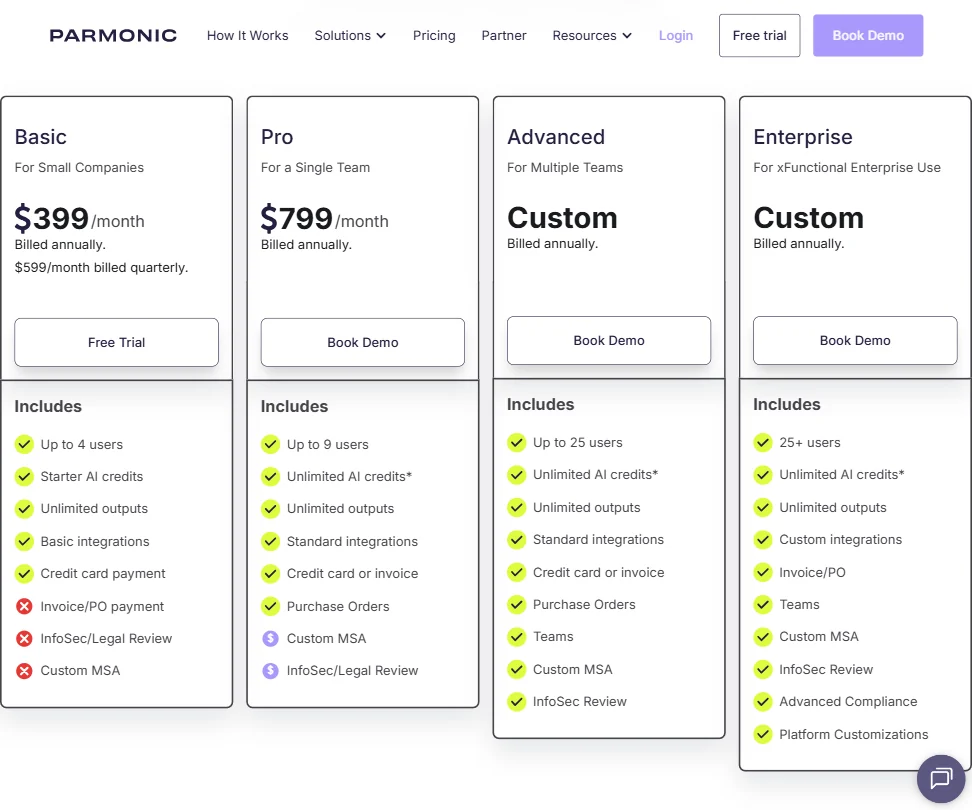
Basic plan: $399 per month billed annually, $599 billed quarterly. Pro: $799 per month billed annually. Advanced and Enterprise are both custom, both billed annually. A free trial exists but no permanent free tier.
In our database of reviewed AI video tools, $399 as an entry price sits at the very top end of the category. The median is closer to $20 a month. Roughly twenty tools in this space offer a permanent free tier with no expiration. That gap is real and large.
The comparison isn't entirely fair, though. Most $20 tools are not processing 60-minute enterprise webinars with Marketo integrations, Purchase Order support, InfoSec reviews, and multi-user workspace management. The Pro plan includes Custom MSA access, noted in the pricing screenshot as an add-on feature. Basic explicitly excludes Invoice/PO payment and InfoSec/Legal review. These are procurement-cycle features, not creator features. The product is priced for a business buying process.
We still don't love that the free trial duration isn't disclosed anywhere. That signals friction in the evaluation process, and friction at that stage usually means a longer sales cycle than necessary. Not great.
Parmonic vs Vidyo.ai: Which AI Video Tool Is Better?
Vidyo.ai starts around $25 a month and targets social clip creation from long-form video. Faster to start, fraction of the cost, genuinely good for pulling short LinkedIn clips from a podcast. If that's the use case, Vidyo.ai wins on price and simplicity without much contest.
Parmonic goes deeper on the back end. The marketing automation integrations, HubSpot, Marketo, and Salesloft specifically, don't exist in Vidyo.ai. Neither does the content gallery infrastructure or the multi-language subtitle editing at this level. The Advanced plan adds Teams functionality and Custom MSA, which are procurement features Vidyo.ai doesn't address at all.
Different problems. That's the cleanest way to put it. Vidyo.ai is a content creation tool. Parmonic is closer to a content operations tool. Comparing them on price alone misses the point.
Who Should Use Parmonic? (And Who Shouldn't)
B2B marketing teams running regular webinar programs with real distribution volume. That's the fit. Specifically teams with enough recording throughput to absorb $399 a month and enough stack complexity to use the integrations.
Corporate L&D teams with long recorded training sessions. The multi-language subtitle editing and structured output both point that direction, and the Advanced plan's 25-user Teams support makes the collaboration layer functional at that scale.
Individual creators. Not the fit. The price alone rules it out, and the feature set isn't designed for solo use cases anyway. Solo podcasters should look at Repurpose.io or Opus Clip instead.
Small marketing teams without a recurring webinar or recording program. Also a mismatch. You'd be paying for infrastructure you won't use consistently enough to justify the cost.
Parmonic Review Verdict
The Moments AI patent work suggests real product investment, not a thin API wrapper. The marketing stack integrations are genuine. The workflow is built for professionals with volume. This isn't a tool faking enterprise positioning.
But $399 a month is a hard ask.
The fit is specific: B2B teams with recording volume and a real need to build content programs around those recordings. Outside that situation, the price is hard to justify. We'd want the free trial duration disclosed and export resolution documented publicly before recommending this without caveats. The product looks solid. The surrounding evidence is still catching up.
Frequently Asked Questions
Does Parmonic have a free plan?
No permanent free tier. A free trial exists, but the duration isn't stated on the pricing page or in the documentation we reviewed. Ask the sales team directly before committing time to an evaluation. Worth confirming upfront rather than discovering mid-process.
What kinds of video does Parmonic work with?
Long, dense professional recordings: webinars, training sessions, interviews, and demos primarily. It connects directly to Zoom and GoTo for recording import, which removes the manual upload step if you're already running webinars on those platforms. It's not designed for short-form content or synthetic video.
How does Parmonic compare to generic AI video repurposing tools?
Most repurposing tools target social clips and price accordingly, often under $30 a month. Parmonic's differentiation is the depth of its marketing stack integrations and its focus on enterprise content programs built around professional recordings. That focus carries a significant cost premium. Whether the premium is justified depends almost entirely on your recording volume and your existing tech stack.










