Pulling together an honest picture of Adobe requires wading through a lot of noise. We've spent time cross-referencing vendor documentation, Reddit threads, Product Hunt discussions, and review signals across design communities. What comes back is pretty clear: this is one of the few tools in the AI design category where the reputation is mostly earned. That said, this isn't going to be a love letter. Adobe has real friction points. The pricing structure alone deserves its own paragraph, and we'll get there.
What is Adobe?
Founded in 1982, still headquartered in San Jose. Adobe has spent decades becoming the default answer to almost every creative brief. Photoshop, Illustrator, Premiere Pro. Those names aren't products at this point, they're verbs. What changed recently is the addition of Adobe Firefly, their proprietary generative AI model, baked into tools the industry already runs on.
The pitch isn't "here's a new AI design tool you've never heard of." It's closer to "we added AI to the software your team already uses." For a lot of studios and agencies, that framing works. You don't have to change your workflow. The AI comes to where you already are.
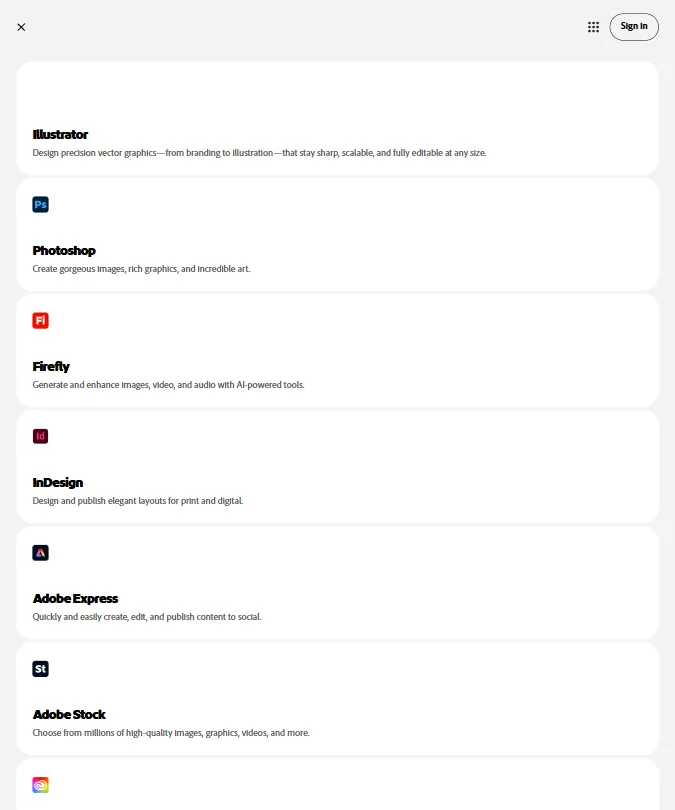
Adobe Express sits at the lighter end, and it's the one most non-designers encounter first. Firefly handles image generation across the ecosystem. Adobe XD covers the UI and wireframing side, making this one of the few platforms that can credibly claim to touch logo work, presentation design, and UX prototyping without switching tools. We were skeptical that depth would hold up across all three. Mostly it does.
Adobe Features: Logo, Graphics, UI & Brand Design Capabilities
The feature surface here is wide. Genuinely wide.
On the branding side, Adobe Express ships a Brand Kit that stores logos and color palettes in one place, then pulls them through templates automatically. That's not unusual at this price point, but the execution is cleaner than most. The Firefly AI logo maker generates vector-ready options from text prompts, and output goes straight to SVG or .AI format. That means it's actually usable in a print workflow, not just for social posts.
Templates cover the usual social platform formats. Thousands of them. Adobe's own documentation puts the volume high, and users tend to agree it's there. Quality is a separate question and we get into that below.
The AI UI design side lives in Adobe XD. Wireframing, prototyping, interactive states. It's not as far along as Figma for pure product design workflows, and Reddit threads from 2024 make that pretty clear. For teams already inside the Adobe ecosystem who need basic prototyping, XD does the job without much ceremony.
Background removal is one-click in both Photoshop and Express. Animation support runs through After Effects at the high end, with Express handling simpler motion for social formats. API access is documented at developer.adobe.com for teams that want to build on top of any of this. That's a lot of surface area. Not all of it is polished to the same degree.
Adobe Design Quality: How Good Are the AI-Generated Results?
Firefly is the center of this question. The answer: better than we expected, not better than everything.
Adobe's big positioning move with Firefly was training it on licensed content. No scraping from artists who didn't consent. That matters to some buyers a lot and to others not at all, but it does affect the output range. Firefly tends to produce cleaner, more commercially safe images. The results skew professional rather than experimental. If you want boundary-pushing AI image output, something like Krea operates in a different register entirely. If you need images a client can actually approve and publish, Firefly holds up.
What we kept seeing in design community forums was praise for Firefly's integration into Photoshop specifically. Generative Fill gets mentioned constantly. Users described filling in backgrounds, extending canvas areas, replacing objects without rebuilding the whole composition. That's a real workflow improvement, not a gimmick.
Print-ready output is a legitimate strength. CMYK support, bleed settings, crop marks. Most AI design tools either skip print entirely or fake it. Adobe doesn't.
Honestly, the quality ceiling here is higher than any other tool in our database for this category. Whether you need that ceiling depends on what you're actually making.
Adobe Templates & Assets: How Deep Is the Library?
Thousands of social media templates across platforms. That's what the documentation says, and users generally confirmed the depth in our research. Quality inside the library is inconsistent, though. The premium templates tend to look better. The filler templates look like filler.
The Adobe Stock integration sits behind a separate subscription. That's a sore point that came up repeatedly. You get some free assets bundled into Express, and anything beyond the basics is a separate line item. For a platform at this price point, that stings a little.
Font access through Adobe Fonts is genuinely good. Thousands of fonts, all licensed for commercial use, available across the ecosystem. Most design teams already have opinions about fonts, and Adobe's library mostly has what they need. That's one area where the structural advantage over tools that license fonts piecemeal is real and measurable.
On the vector asset side, Illustrator's library and native format support remains best in class. No debate there. This is forty years of tool-building showing up in the details.
We don't buy the idea that the template library is uniformly excellent. It's large. Large and excellent are different things.
Is Adobe Easy to Use for Non-Designers?
Depends entirely on which Adobe product you're actually talking about.
Adobe Express is accessible. That's deliberate. It was rebuilt to compete with Canva, and it shows. The interface is cleaner than what Adobe shipped five years ago, and non-designers can get functional social graphics out of Express in under ten minutes. That's a reasonable bar, and Express clears it.
Photoshop is not for non-designers. Never has been. The learning curve on Photoshop remains steep, and no amount of AI tooling changes that. The menus are still dense. The panel system still takes time to learn. Reddit threads from people new to the platform consistently describe feeling overwhelmed in the first few weeks. That tracks.
Ease of use signals in our category research put Adobe at the lower end compared to tools like Canva. Expected. You're not buying Adobe because it's easy. You're buying it because it does things nothing else does. The tension between "professional capability" and "anyone can use this" is real, and Adobe hasn't fully resolved it.
Non-designers who mainly need social graphics and simple brand files will find Express workable. Anyone trying to use Photoshop or Illustrator without a design background should expect friction, and plenty of it.
Adobe Pricing: Is It Worth It vs Hiring a Designer?
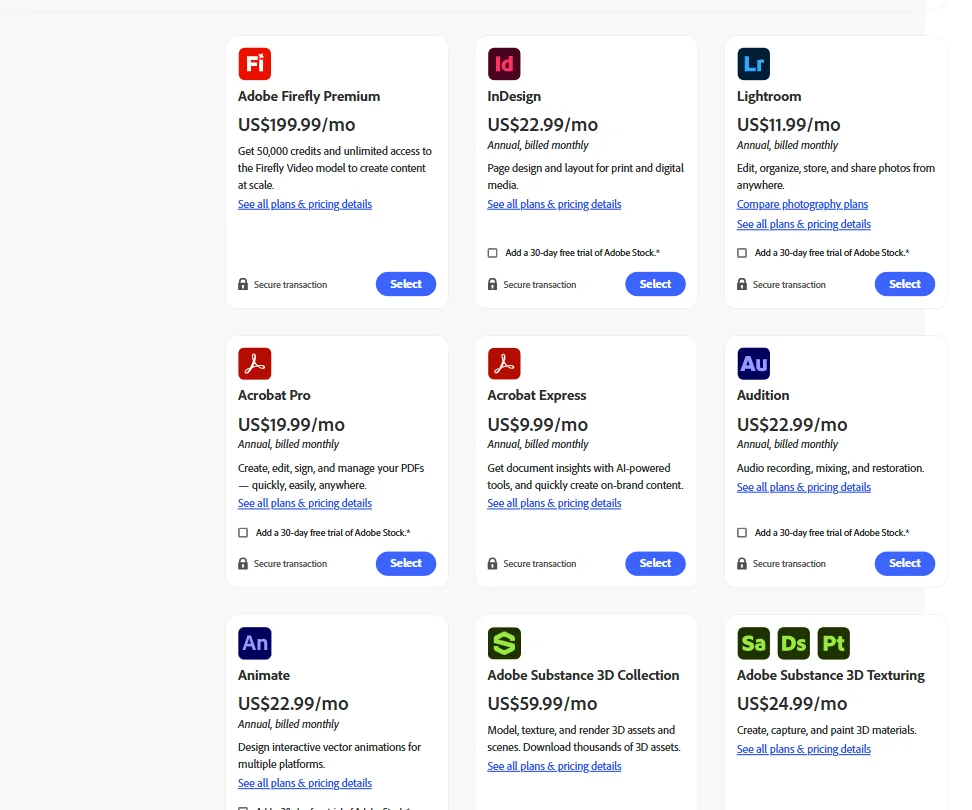
Here's where it gets complicated.
The accessible entry point is Adobe Express Premium at $9.99 a month, billed annually. There's also a genuine free plan for Express, with limited features and capped Firefly credits. The number that matters more for full creative work is $54.99 a month for Creative Cloud All Apps, which is the subscription that actually unlocks Photoshop, Illustrator, Premiere Pro, and the rest of the platform together.
From the screenshot Adobe publishes publicly: Acrobat Pro runs $19.99 a month, Acrobat Express is $9.99 a month, InDesign and Audition are both $22.99 a month, and Lightroom comes in at $11.99 a month. Adobe Firefly Premium, the credit-heavy plan that includes 50,000 generative credits and unlimited access to the Firefly Video model, sits at $199.99 a month. Adobe Substance 3D Collection is $59.99 a month. These aren't bundled. Each is a separate line item.
That pricing architecture is the source of a lot of the frustration we saw in forums. It adds up fast.
Enterprise pricing is custom, no number on the page. Standard practice, still annoying when you're trying to budget. The 7-day free trial is on the shorter side for the creative suite. Firefly credits are capped on free accounts, which pushes creative workflows toward paid tiers faster than you'd want.
The refund window is 14 days on annual plans, and Adobe's billing history with involuntary renewals comes up enough in community threads that it's worth double-checking your billing settings before you commit. Not a minor footnote.
Versus hiring a designer? Professional design services easily run $500 to $2,000 for a single project. At $54.99 a month for a team that uses it consistently, Creative Cloud makes the math work. For a solo user who needs one logo, not necessarily.
Adobe vs Canva: Which AI Design Tool Wins?
Depends entirely on what you're doing. That's not a dodge.
Canva wins on simplicity. It's faster to get to a passable result with zero design background, and non-designers consistently prefer it. The templates are generally more polished at the consumer level.
Adobe wins on capability. Firefly's output in Photoshop runs deeper than Canva's AI features. Print-ready workflows, CMYK output, vector precision. Canva doesn't have an equivalent to Illustrator, and that gap matters for professional work.
The honest version of this comparison: Canva is where marketing teams go to make content. Adobe is where design teams go to make things that get produced at scale or in print. These are different jobs. The overlap exists, but it's smaller than either company's marketing implies.
We kept seeing the same split in Reddit discussions. Marketing coordinators on Canva, senior designers on Adobe. Both groups mostly correct, for their context.
Price-to-output is closer than it looks. Canva Pro runs $15 a month. Adobe Express has a free plan, or $9.99 a month for Premium, but getting the full creative suite pushes you to $54.99 a month. That gap between Canva Pro and Creative Cloud All Apps is real. Worth it for a professional. Not necessarily for a small business making Instagram posts.
Who Should Use Adobe? (And Who Shouldn't)
Professional designers and creative agencies. That's the core fit. Always has been.
Marketing teams with design staff who need AI tools built into software they already use. That's a real case for Firefly specifically, and a credible one.
Studios producing print work. Adobe's print pipeline is still the industry standard, and nothing in our research suggested otherwise.
Enterprises needing brand consistency across teams will find the Brand Kit and shared library features functional at scale, if not the most technically sophisticated collaboration setup available.
Who shouldn't? Non-designers who need quick social content without a learning curve will find Canva faster. Startups looking for a cheap AI graphic design tool that gets out of the way will find Adobe has too much overhead for that use case. Freelancers who only need one tool and want to stay light will find the All Apps subscription is overkill.
Solo creators who mainly need AI image generation. There are purpose-built tools that cost less and produce comparable output for that specific job, and Adobe isn't really competing for that segment.
Adobe Review Verdict
Forty years of creative tool-building shows. That's the short version.
The Firefly integration into Photoshop is genuinely useful, not bolted on. Print-ready output, professional vector workflows, and brand management across a large team are harder to find elsewhere at any price. The gap between Adobe and the next tier of tools in this category is meaningful, and our research consistently bore that out.
The friction is real too. The pricing structure is the biggest genuine complaint, and we saw it surface consistently across forums. $54.99 a month for All Apps is a real commitment. The free trial on the creative suite is only 7 days. Renewal billing has generated enough complaints online to treat it as a known risk worth managing actively.
Ease of use sits lower than competitors. That's a feature for some users, not a flaw. Professional tools aren't supposed to be frictionless. They're supposed to be powerful. Adobe is powerful.
For creative teams who produce design work as a core function, this is the recommendation without much hesitation. For everyone else, the fit depends on how much capability you actually need.
Frequently Asked Questions
Does Adobe have a free plan?
Yes. Adobe Express has a free tier that includes templates, basic assets, and limited Firefly credits for AI image generation. The free plan is real and usable, but the caps on AI credits push active users toward paid plans quickly. Adobe Express Premium runs $9.99 a month if you want the full Express experience. If you need the broader creative suite including Photoshop and Illustrator, there's no free path to those. The 7-day trial is the only way to access them without paying.
Is Adobe Firefly better than other AI image generators?
Firefly's biggest differentiator is that it was trained on licensed content, which makes output safer to use commercially without worrying about copyright exposure. The quality is strong for professional use cases, especially inside Photoshop through Generative Fill. It's not the most experimental generator out there, and it doesn't try to be. For creative exploration without commercial constraints, other tools may produce more surprising results. For work that needs to survive a client approval process, Firefly holds up well. Fair.
How does Adobe Creative Cloud compare to Figma for UI design?
Adobe XD handles wireframing and basic prototyping, but Figma has pulled significantly ahead for product and UX design workflows. Real-time collaboration in Figma is better. The component and design system features in Figma are deeper. Most product teams discussed in the forums we tracked have moved to Figma for UI work. Adobe XD still makes sense for teams that live inside the Adobe ecosystem and need light prototyping without switching platforms, but it's not the stronger choice for dedicated product design teams.