SAASINSPECTOR

Podsuite Review

Podcast creators, regular publishers, and agencies managing multiple shows

Visit PodsuiteFrom $15.99/mo

Research-based review. We analyzed vendor documentation, customer reviews on G2, Capterra, and Reddit, and live pricing — not hands-on testing yet. We update as our team puts tools through real workflows.

The verdict

Podsuite is a podcast repurposing tool that converts uploaded episodes into transcripts, show notes, chapter markers, blog drafts, and social copy. It's built for podcasters who want to automate content generation around their recordings rather than edit audio. At up to $99.99 per month and with no presence on major review platforms, it's a hard sell without more independent validation.

Pros

  • Narrow, purpose-built focus on podcast repurposing means it does one thing without unnecessary bloat.
  • Transcription includes speaker diarization, making multi-host podcast content easier to process.
  • Outputs chapter markers formatted specifically for Spotify and YouTube, saving manual formatting time.
  • SRT export for video captions is included, adding value for podcasters who also publish to video platforms.
  • Show notes are described as publish-ready, reducing editing effort after generation.
  • Social post output is written in the speaker's voice for LinkedIn and X, attempting brand consistency.
  • Blog post draft is generated automatically from the episode, giving podcasters a content marketing starting point.

Cons

  • No third-party reviews on G2, Capterra, or Trustpilot despite charging up to $99.99 per month, making trust assessment difficult.
  • No audio editing, noise removal, or cleanup capabilities despite being categorized as an AI Audio Tool.
  • Highlight clips feature only surfaces timestamps and quotes rather than cutting actual video or audio clips.
  • Social post support is limited to only two platforms — LinkedIn and X — with no mention of others.
  • No API access, Zapier integration, or native workflow integrations, requiring manual copy-paste for every output.
  • Claims of first-person, on-brand blog post output are unverified due to lack of independent user data.
  • The 'AI Audio Tool' category label is misleading since the tool does not touch audio files at all.
From $15.99/moFree plan NoFree trial No

Our research into Podsuite started with a straightforward question: does this tool actually do what it says, and is anyone using it? Finding the answer took longer than it should have. No G2 listing. No Capterra page. No Trustpilot presence. For a tool asking up to $99.99 a month, that's a notable gap. This podsuite review pulls from vendor docs, the pricing page, Product Hunt comments, and what little community discussion we could surface. Here's what we found.

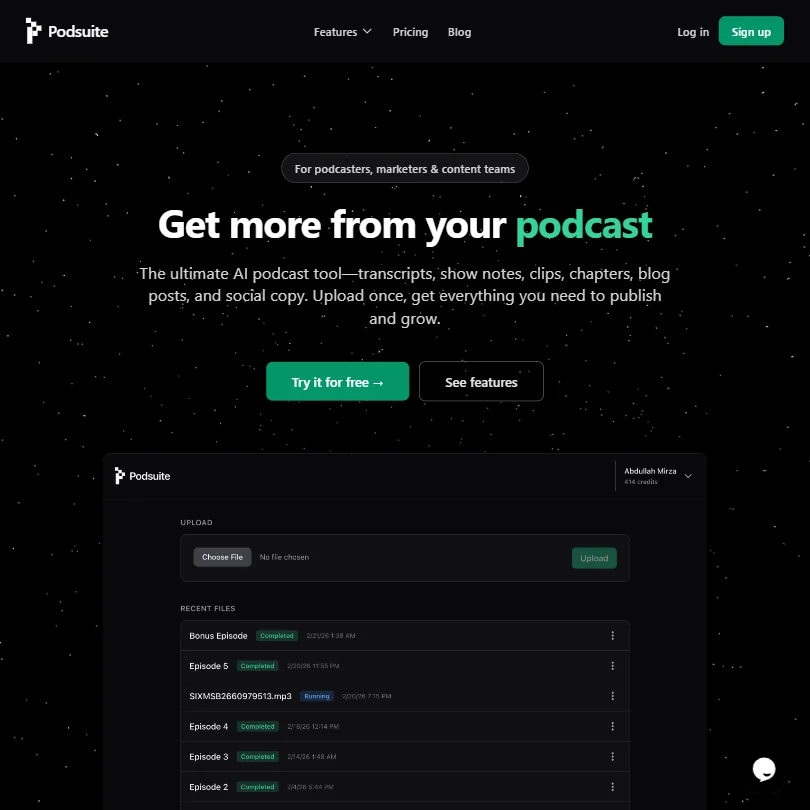
Podsuite homepage screenshot
Podsuite — Homepage

What is Podsuite?

Upload a podcast episode. Get a transcript, show notes, chapter markers, a blog post draft, and some social copy out the other side. That's the whole idea. Podsuite is built specifically around podcast repurposing, not general AI writing or audio production. It's not trying to be Descript. Not trying to be an audio editor at all.

The focus is narrow on purpose. You record your episode somewhere else, then drop it into Podsuite and let it generate the surrounding content. The transcript includes speaker diarization. The podcast show notes generator outputs something described as publish-ready by the vendor. Chapter timestamps get formatted for Spotify and YouTube specifically.

Podsuite doesn't do audio cleanup, noise removal, or anything that touches the actual sound file. If you need that, Auphonic handles automated audio post-production and is worth a look before you buy.

Podsuite Features: Voice, Music & Audio Capabilities

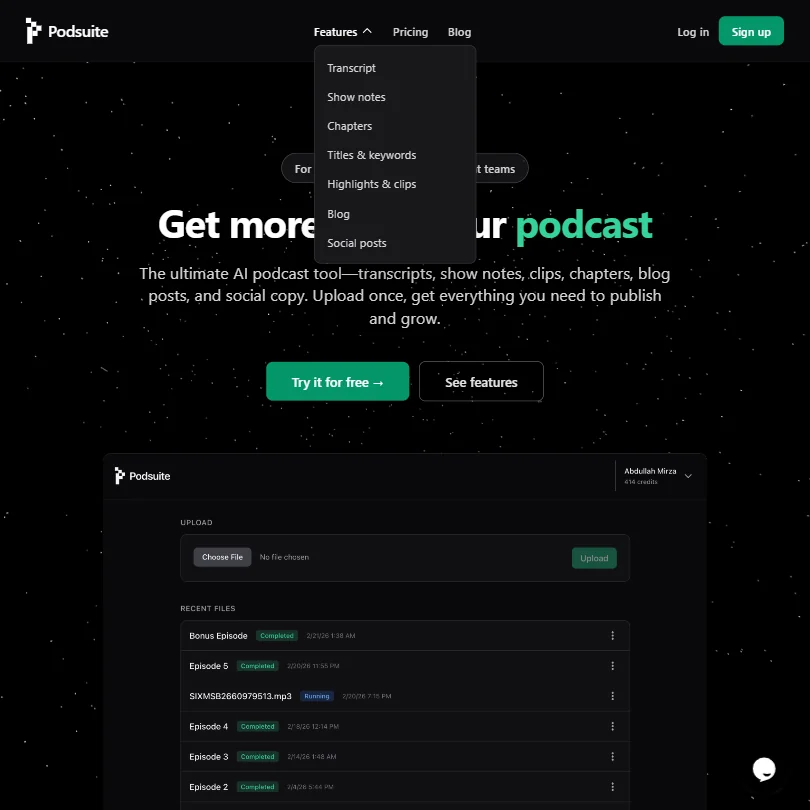
Podsuite features screenshot
Podsuite — Features

No text-to-speech here. No voice cloning. No music. Honestly, that's fine given what the tool is actually for, but the category label "AI Audio Tool" is doing some heavy lifting.

What Podsuite does offer is transcription with speaker diarization and SRT export for video captions, plus a set of content outputs built around that transcript. The highlight clips feature doesn't cut video. It surfaces timestamps and quote hooks you can take elsewhere for editing. The blog post output is described as first-person and on-brand, which we're mildly skeptical of without more user data to back that up.

Social posts come formatted for LinkedIn and X specifically, written in the speaker's voice according to the vendor. Two platforms. That's the scope.

No API access. No Zapier. No native integrations beyond copy-paste and export files. That matters if you're hoping to slot this into a production workflow without manual steps in between.

Podsuite Audio Quality: How Natural Does It Sound?

Podsuite doesn't generate audio. So this question doesn't quite apply. Transcription accuracy is what matters here, and the vendor claims high accuracy with speaker diarization for podcast-style recordings.

We couldn't find enough independent user reviews to stress-test that claim. The absence of G2 and Capterra listings means there's no public dataset of user experiences to pull from. We don't buy the "accurate" claim without more evidence, but we also can't disprove it. That's the problem with a tool that has no public review trail.

Not great.

Podsuite Voice Cloning & Customization: How Deep Does It Go?

It doesn't. No voice cloning. No voice styles. No customization of audio output at all. This section is essentially a non-answer, and that's worth saying plainly rather than padding it out.

If voice cloning or AI voiceover generation is what you need, Podsuite isn't the right category. Something like ElevenLabs is built for that use case specifically.

Is Podsuite Easy to Use?

The workflow is intentionally simple. Upload once, get a set of files back. No timeline editor, no complex settings, no multi-step process described in the docs. For a solo podcaster who just wants to stop spending three hours writing show notes after each episode, that simplicity is the whole value proposition.

Support is more accessible than some sources suggest. Email is publicly listed at support@podsuite.io, and Podsuite's privacy policy also references in-app chat and support widgets as a contact channel. The level and hours of any live-agent support aren't publicly detailed, so we won't overstate it. For a product at $28.99 or $99.99 a month, the transparency around support availability is still thin. We've seen worse, but not often at Agency pricing tier.

No mobile app. Web only.

Podsuite Pricing: Is It Worth It for Creators & Businesses?

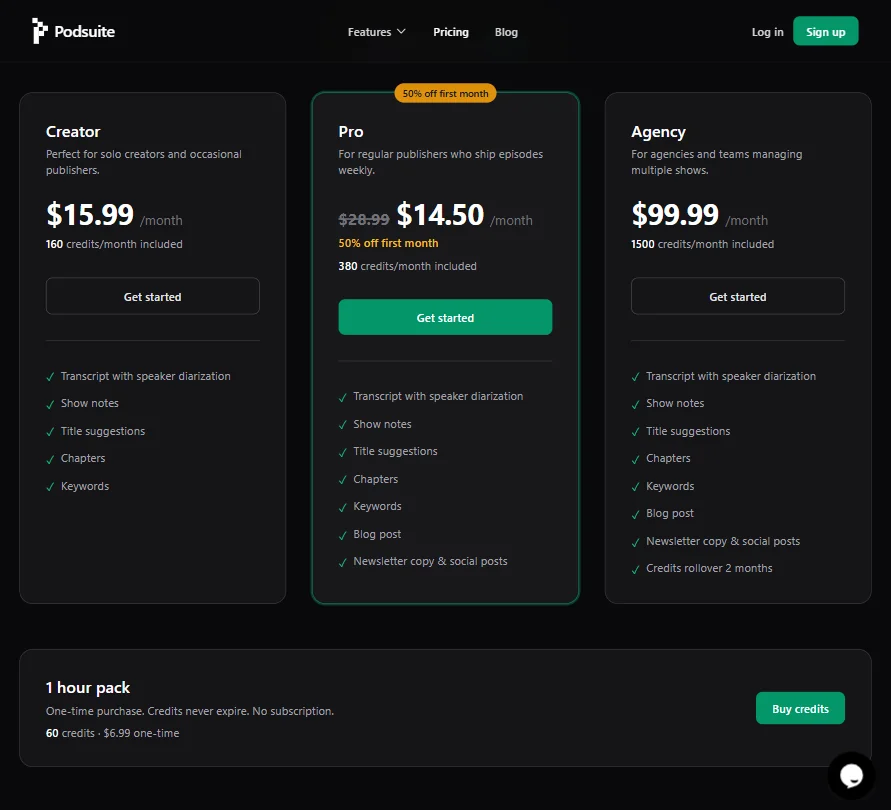
Podsuite pricing screenshot
Podsuite — Pricing

Three tiers. Creator at $15.99 a month with 160 credits included, Pro at $28.99 with 380 credits (currently discounted to $14.50 for the first month), Agency at $99.99 with 1,500 credits. No free plan, though a free trial is available without a credit card. Duration of the trial isn't stated publicly. That's an odd omission.

The Agency plan adds two things the lower tiers don't have: blog post output and newsletter copy with social posts, plus a two-month credits rollover. The Creator plan stops at keywords and chapters. Fair, as a feature ladder. But the jump from $15.99 to $99.99 is steep for what's added.

The $15.99 starting price sounds reasonable until you look at the category. Our database of 29 reviewed AI audio tools puts the category median around $11 a month. Podsuite ranks 18th out of 25 when sorted by starting price. Not the most expensive tool in the category, but not cheap relative to what's on offer. 18 of the 29 tools we cover in this category include a free plan. Podsuite doesn't.

On refunds: Podsuite's Terms say partial periods and unused credits are typically non-refundable, subject to applicable law and exceptions. That policy isn't prominently surfaced on the pricing page. At $99.99 a month for the Agency tier, buyers should know what they're committing to before they commit.

A one-time credit pack also exists. 60 credits for $6.99, no subscription, credits never expire. That's the cleanest entry point if you want to test output quality before picking a plan.

Podsuite vs Castmagic: Which AI Audio Tool Wins?

Castmagic is the obvious comparison. Both tools take a podcast episode and generate written content from it. Castmagic has been around longer, has public reviews on G2, and has a documented user base. That's a real advantage right now.

Podsuite's pitch is that it's built more tightly around how podcast episodes actually work, with chapter formatting for Spotify specifically and clip timestamp extraction tuned for short-form video platforms. Whether that specificity translates to better output quality, we genuinely can't say yet. No review data to compare against Castmagic's public record.

For teams already using Castmagic and satisfied with it, there's no obvious reason to switch based on what's publicly available about Podsuite. That tracks.

Who Should Use Podsuite? (And Who Shouldn't)

Solo podcasters grinding through post-production admin. That's the clearest fit. If your bottleneck is writing the surrounding content after you've already recorded, this tool is designed for exactly that workflow.

Marketing teams or agencies expecting API access or workflow integrations. Don't bother. The export options are text files and SRT. That's it, and agencies on the $99.99 plan are going to hit that limitation fast.

Anyone who needs audio editing, noise removal, or voice generation is in the wrong tool entirely.

Podsuite Review Verdict

Podsuite does one thing: turns a podcast file into a stack of written content. The scope is honest and the use case is real. Plenty of podcasters spend more time on the surrounding content than on the episode itself.

The concern isn't the concept. It's the unknowns. No public reviews anywhere. A refund policy that defaults to non-refundable and isn't prominently disclosed. A free trial with no published duration. A starting price above the category median with fewer features than most competitors at that price point. That's a lot to overlook for a tool with no track record we can verify.

If the transcription and content quality hold up, there's a version of Podsuite we'd recommend to solo creators. We'd want to see some independent user data first. The $6.99 one-time credit pack is probably the right way to find out without committing to a monthly plan.

Frequently Asked Questions

Does Podsuite offer a free plan?

No free plan exists. There's a free trial available without requiring a credit card, but the trial duration isn't stated on the pricing page. Worth clarifying with support at support@podsuite.io before you sign up.

What does the ai podcast transcription produce?

The transcript includes speaker diarization, meaning it labels who said what. You can export as plain text or as an SRT file for video captions. The vendor claims high accuracy for podcast-style recordings, though we found no independent reviews to confirm that at scale.

How does Podsuite compare to podcast content repurposing tools like Castmagic?

Castmagic has an established review presence and a documented user base. Podsuite is newer with no public reviews on major platforms. Podsuite appears to offer tighter formatting for platform-specific outputs like Spotify chapters, but whether the underlying content quality is better is something we can't determine yet from available data alone.

Podsuite is featured in

Alternatives to Podsuite

See all Podsuite alternatives →

Other AI Audio Tool options we've reviewed.

User reviews

Review Podsuite

Your rating

Reviews are moderated and appear once approved.