
PodGen.io turns an uploaded document, website, YouTube video or block of text into a two-host podcast conversation. It suits people who want a ready-made conversational podcast built from source material rather than writing and recording one themselves; how it bills by the week is worth checking before you commit.
What is PodGen.io?
PodGen.io runs its own Podgen Podcast AI Model 2.0 to generate the conversation and voices. It is a browser-based app with no desktop or mobile client.
Making voiceovers with PodGen.io
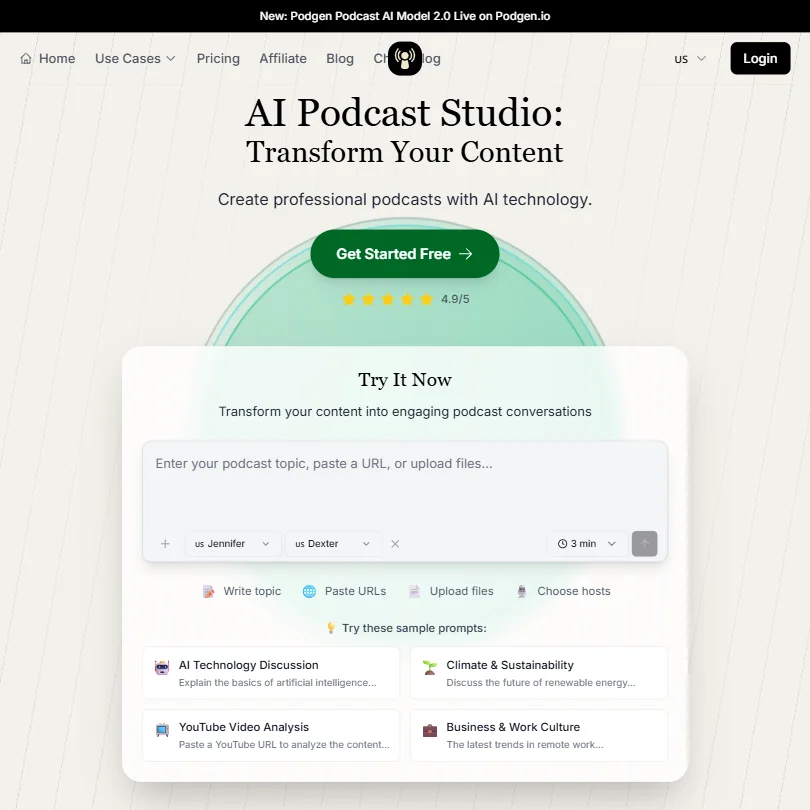
PodGen.io generates a two-host podcast conversation: you pick a source, such as a document, website, YouTube video or pasted text, and choose hosts, such as the Jennifer and Dexter voices shown in its own demo, to read it as a back-and-forth conversation. It supports 25+ languages.
PodGen.io does not translate an existing recording into another language, does not change the voice in a recording you supply, and has no pronunciation or phonetic control. Scripts are capped at 10,000 characters in one box, with no chapters or long-form audiobook editor, so longer source material needs to be split into separate runs.
Working with other people
An API is offered only as part of a custom Enterprise plan arranged by contacting sales, along with unspecified custom workflow integrations; none of Starter, Plus or Professional include an API or named integrations. Team collaboration is not part of any current plan.
PodGen.io pricing: what each plan gives
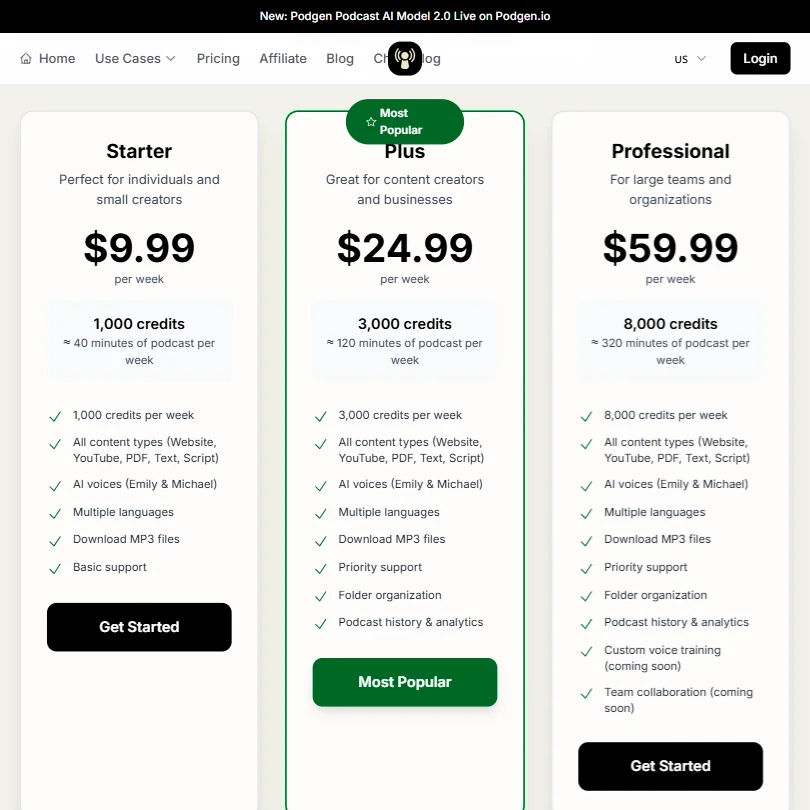
PodGen.io has no free plan: new accounts get a batch of free credits to start with and no card is required, but there is no ongoing no-cost tier. Every subscription plan bills weekly or, at a discount, yearly; there is no monthly billing term.
Starter costs $9.99 a week, or $260 billed yearly (about $21.67 a month), for roughly 52,000 credits a year, about 2,080 minutes of podcast audio, delivered as about 1,000 credits (roughly 40 minutes) a week on the weekly term. Plus costs $24.99 a week, or $650 billed yearly (about $54.17 a month). Professional costs $59.99 a week, or $1,560 billed yearly (about $130 a month). A one-time pack of 1,000 credits costs $10.99 and is a separate top-up rather than a subscription. Every plan exports audio as MP3 only. An Enterprise plan with API access and custom integrations is sold by contacting sales.
Privacy and support
Support is reached through a Contact Support link, with Basic or Priority support tiers named on the plans; no specific channel such as chat or phone is stated.
Who PodGen.io suits
PodGen.io suits anyone who wants a ready-made two-host podcast conversation generated from a document, website, YouTube video or block of text, without writing a script or recording it themselves. The weekly-billed plans and one-time credit pack make it straightforward to try in short runs.
It suits less well anyone who needs a single episode built from more than 10,000 characters of source script, wants control over pronunciation, or needs to translate or dub an existing recording: none of those are part of PodGen.io's toolset.
How PodGen.io compares
PodGen.io scores 3.1 out of 10 among the AI voice generators we rate. These three do the same job and are the closest to it, compared on what each vendor publishes.
ElevenLabs
ElevenLabs starts at $6 a month with a free plan, while PodGen.io has no free tier and costs $21.67 a month. Both generate conversations between several voices, but ElevenLabs also dubs speech into another language and offers an editor for audiobooks and long projects, neither of which PodGen.io has.
Pick ElevenLabs if you want a free plan and audiobook editing.
Pick PodGen.io if you only need multi voice conversations.
WellSaid
WellSaid costs $19 a month with a free plan, while PodGen.io has no free tier and starts at $21.67 a month. PodGen.io generates conversations between several voices, a feature WellSaid does not offer, and speaks more languages at 25 against WellSaid's 17. WellSaid answers with an editor for audiobooks and long projects and six export formats against PodGen.io's one.
Pick WellSaid if you want a free plan and audiobook editing.
Pick PodGen.io if you need multi voice conversations and more languages.
Notevibes
Notevibes costs $9 a month with a free plan, well below PodGen.io's $21.67 with no free tier. Notevibes also speaks far more languages, 72 against PodGen.io's 25, dubs speech into another language, and offers an editor for audiobooks and long projects, none of which PodGen.io has. Both generate conversations between several voices.
Pick Notevibes if you want a free plan, dubbing and more languages.
Pick PodGen.io if multi voice conversations are all you need.
Frequently Asked Questions
What does PodGen.io cost?
Starter costs $9.99 a week, or about $21.67 a month if billed yearly at $260. Plus costs $24.99 a week, or about $54.17 a month billed yearly. Professional costs $59.99 a week, or about $130 a month billed yearly. A one-time pack of 1,000 credits costs $10.99.
What languages does PodGen.io support?
PodGen.io supports 25+ languages.
Can PodGen.io turn a YouTube video into a podcast?
Yes. PodGen.io can generate a two-host podcast conversation from a document, website, YouTube video or pasted text as the source.
Does PodGen.io translate or dub an existing recording?
No. It generates a new AI hosted conversation from your source material rather than translating or dubbing speech that already exists.









