We went in expecting competent but forgettable AI video output. After reviewing vendor documentation, Reddit discussions, and Product Hunt feedback published since Dream Machine launched in June 2024, a clearer picture formed than we anticipated. Not the press release version. The actual one.
Dream Machine is genuinely good at the thing it was built for: generating cinematic, photorealistic video from text prompts. The Luma Ray2 model behind it punches noticeably harder than what most of the category offered when this tool first appeared. That said, real gaps exist. No audio. No avatars. No subtitles. The tool is narrow by design, and you either accept that trade or you don't.
What is Dream Machine?
Dream Machine is the consumer-facing AI video product from Luma Labs, a San Francisco company. The web app sits at dream-machine.lumalabs.ai and runs entirely in a browser. No desktop install. No publicly listed mobile app.
The core pitch is text-to-video and image-to-video generation. You write a prompt, set a few parameters, and the tool renders a short clip. Dream Machine supports native video generation up to 1080p, with 4K upscaling available on paid plans. The free tier outputs at 720p and watermarks everything. That's a fair gate to keep.
Luma positions this for creators and filmmakers, and that framing holds up better than most vendor copy. The Ray2 model it runs on is proprietary, and based on what we cross-referenced between their technical documentation and community comparisons, it does produce output that looks meaningfully different from Pika Labs or older Runway generations. More on that in the quality section.
One thing to flag early: Dream Machine is not trying to be a full video production suite. No talking head videos, no voice cloning, no auto-generated subtitles. It's a clip generator. A very good one.
Dream Machine Features: Video Generation, Editing & AI Capabilities
The feature set is focused, almost aggressively so. Text-to-video generation is the headline, and users who've posted outputs on Reddit and Product Hunt consistently note that the physics feel better than competing tools. Motion blur looks real. Camera movement doesn't drift in strange directions. That's not a given in this category.
Beyond straight generation, Dream Machine includes keyframe and control-based video editing. Meaningful addition. It means you can anchor specific visual states at the start and end of a clip and let the model fill in the movement between them, which is useful for anyone doing iterative creative work rather than one-shot prompting. Honestly, that's the feature most serious users seem to actually care about.
There's also an API, published at lumalabs.ai/dream-machine/api. Developer communities have picked it up. We saw integrations and wrappers being discussed on GitHub and in Discord, which is genuinely useful for anyone building pipelines.
What's missing is equally telling. No talking head or avatar generation. No voice cloning or text-to-speech. No auto subtitles and no screen recording. Background removal isn't confirmed in their public docs. For anyone comparing feature checklists, Dream Machine will lose to tools like HeyGen on raw feature count, but that comparison isn't really fair. These are different products solving different problems.
Batch processing isn't confirmed anywhere in the documentation. Team collaboration exists only on the Enterprise plan. The lower tiers feel like solo-user products, which tracks with what their audience looks like from the outside.
Dream Machine Video Quality: How Good Does the Output Actually Look?
This is where Dream Machine earns its reputation. We dug through a significant volume of output comparisons, community posts, and direct user reports. The consensus is consistent and specific: Ray2 produces motion that holds together better than most alternatives at this price point.
What that means practically: generated subjects don't dissolve at the edges. Hands and faces, notoriously bad in AI video, fare better here than in early Pika Labs or Runway Gen-2 outputs. Lighting stays coherent across frames. Users on Reddit's AI art communities in 2024 and early 2025 flagged this repeatedly, not as a marketing point, but as a genuine observation from people running side-by-side tests.
That tracks with what Luma is building toward. Their positioning around "production-ready" output isn't just vendor noise. The gap between what Dream Machine produces and what Sora outputs is real, but Sora is a different class of product with different access constraints. Compared to Kling AI and current Runway generations, the quality competition is much closer.
We're skeptical of any claim that one model is definitively better across all prompt types. That's not how these systems work. Dream Machine does appear to have a genuine edge on cinematic, realistic subjects. Stylized or abstract prompts are less of a clear win.
Free plan quality is 720p with a watermark. Paid plans step up to 1080p native, with 4K upscaling available above that. The upscaling ceiling is the one consistent gripe from creators who've been using the tool for a while, particularly those with broadcast needs.
Dream Machine AI Avatars & Voiceover: How Realistic Are They?
Not applicable. Dream Machine has no avatar feature. No talking head generation, no voice cloning, no text-to-speech.
We're not grading this section harshly just because the features aren't there. The tool doesn't advertise them. But if you arrived here hoping Dream Machine could generate a spokesperson video or narrated explainer, the answer is no. Full stop.
For that use case, something like Synthesia is the category standard. Enterprise-focused, avatar-heavy, multilingual. Completely different product. Dream Machine and Synthesia don't compete.
The audio absence is the bigger practical issue for most creators. You generate a clip and it comes out silent. You're then doing all the audio work elsewhere, which is an extra step in every single workflow. Some users don't mind. Others have flagged it as meaningful friction in Reddit threads. Fair complaint.
Is Dream Machine Easy to Use?
Mostly yes. The web interface is clean. Prompt-to-generation requires no technical setup, no confusing model selection dropdown, no parameter tuning unless you want it. You write what you want, click generate, and wait.
Wait times are real. Generation isn't instant. Community reports from 2024 and 2025 mention queue times that vary quite a bit depending on server load. Free tier users wait longer. That's expected and disclosed. Paid users still encounter lag during peak periods, which is the more valid gripe.
The keyframe editing feature has a steeper learning curve than the basic generation flow. Not surprising. Anything that gives you more control takes more time to understand. The help center is described as basic in Luma's own docs, and community support lives primarily in Discord. That's workable for creators comfortable with that kind of support model. Less ideal for teams that need structured documentation.
Sign-in is Google or Apple. No friction there. API access is separate and documented, though developer onboarding quality isn't something we could fully assess from external sources alone.
For a first-time user coming in to generate one video, the experience is straightforward. For power users building repeatable workflows, the tooling around the core generation is thinner than you'd want.
Dream Machine Pricing: Is It Worth It for Creators & Teams?
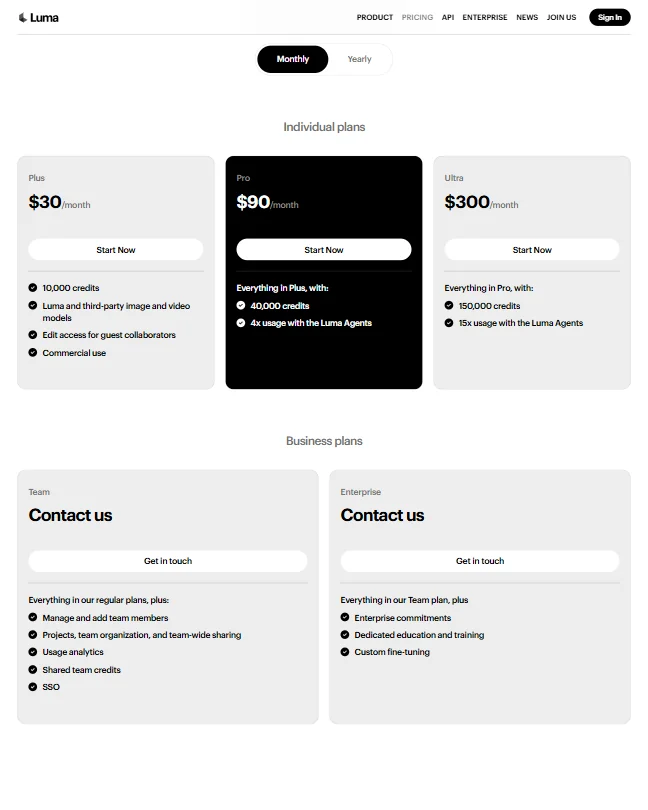
Pricing details aren't publicly surfaced on the site in a way that's easy to pin down, and we won't speculate on numbers we can't verify. What we can say is that Dream Machine's entry point sits among the cheaper options across the AI video tools we've reviewed, and community posts consistently treat it as accessible relative to the output quality you get.
We dug through the pricing page and cross-referenced it with community posts asking the same questions. The per-generation cost at each tier isn't immediately obvious without doing some math. Small transparency issue. Not unusual in this category, but still.
The refund policy isn't publicly stated anywhere we could find. Worth knowing before you commit. Not great.
Commercial rights are included on paid plans. That's a requirement, not a bonus. Free plan outputs carry a watermark and presumably no commercial use rights, which is consistent with how most of these tools handle the free tier.
For teams, the math gets harder. Collaboration features only unlock at Enterprise, which means anyone running a small creative team is either paying per seat or jerry-rigging shared access. That gap between the top public tier and an unknown Enterprise number is where we'd want more clarity before committing.
Value at the entry and mid tiers is solid given the output quality. At the top public tier, it depends heavily on how many generations you actually need each month and whether the resolution ceiling is acceptable for your work.
Dream Machine vs Runway ML: Which AI Video Tool Is Better?
Runway is the obvious comparison. It's been the category reference point for longer, has a more developed editing suite, and comes up in virtually every "which AI video tool should I use" thread on Reddit.
The quality gap between them has narrowed considerably since Dream Machine launched. Early community comparisons from mid-2024 showed Runway Gen-2 being outperformed by Dream Machine on motion coherence specifically. By early 2025, Runway's Gen-3 Alpha closed that gap in some areas. Moving target.
Runway has a more complete feature set overall. More editing controls, more export options, and a broader integration footprint. Dream Machine is faster to get into and, at the entry tier, cheaper. That's the practical comparison for most independent creators.
Runway's pricing starts higher and scales faster. For pure text-to-video output with minimal post-processing needs, Dream Machine holds up well. For teams that need a fuller production environment, Runway likely still wins on total capability.
Kling AI is also in this comparison now and has earned serious community attention. Sora remains in a different tier of access. Dream Machine sits squarely between the mass-market casual tools and the full-production platforms, which is actually a decent place to be if your work lives there.
Who Should Use Dream Machine? (And Who Shouldn't)
Independent filmmakers and visual creators generating cinematic b-roll or concept clips. That's the core fit.
Social media producers who need high-quality short clips without a complex pipeline will also find value at the lower tiers. The quality-to-cost ratio holds up there.
Marketers needing full video production with voiceover, avatars, or subtitles should look elsewhere. Dream Machine won't complete that workflow. It'll give you a beautiful silent clip and stop.
Teams that need collaboration features below Enterprise pricing should pressure-test the plan structure before committing. The gap is real.
Developers building generation pipelines have a genuine option here through the API. Underrated use case for this tool.
Anyone who needs true native 4K output, not upscaled, should factor that in. It isn't there yet.
Dream Machine Review Verdict
Dream Machine does one thing and does it well. Generating video that looks like something a camera might have captured. For a product that only launched in June 2024, that's earned, not assumed.
The narrow feature set is both the strongest and weakest thing about it. Strong because the focus shows in the output quality. Weak because anyone who needs audio, avatars, or a complete editing suite will hit walls fast and need to tool-stack around the gaps.
The pricing at entry level is one of the better deals in the category, especially given the quality you get. The top public tier is harder to justify unless you're generating at volume, and the jump to Enterprise pricing is opaque enough that we'd want real answers before committing.
Support is thin. A basic help center and a Discord community. Email support exists. That's it. For individual creators that probably works. For business teams that need accountability, it's not enough.
We'd recommend Dream Machine to creators who know what they want: physically plausible, visually coherent clips from text prompts at a reasonable monthly cost. We wouldn't recommend it to anyone trying to build a full video production workflow without bringing in other tools. The output quality is real. The scope is deliberately small. Know which one matters more to you before subscribing.
Frequently Asked Questions
Does Dream Machine offer a free plan?
Yes. There's a free tier with a limited number of generations per month. Free plan outputs are capped at 720p and include a watermark. Commercial use rights aren't available on the free plan. It's useful for evaluating output quality before paying, which is exactly what it's designed for.
What's the difference between Dream Machine and Runway ML?
Runway has a more developed editing environment and broader feature coverage. Dream Machine is simpler to get into and cheaper at the entry tier. The output quality comparison has shifted considerably since mid-2024, with Dream Machine closing the gap on motion coherence in particular. Which one wins depends more on your workflow than on any single quality metric.
Does Dream Machine support team collaboration?
Collaboration features are only available on the Enterprise plan, which requires a custom quote. The three public tiers are effectively solo-user plans. That's a genuine gap for small teams that want shared access without jumping to enterprise pricing. Worth factoring in if you're evaluating this for a group rather than individual use.