What is Flick?
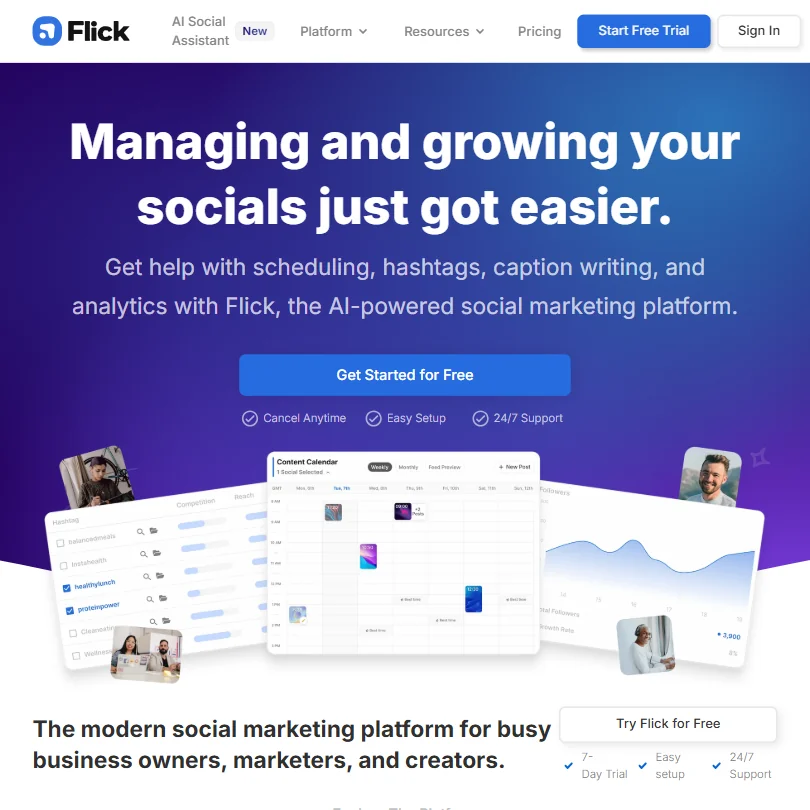
London-based, founded in 2018, built from the start around a single conviction: that Instagram hashtag research was being done badly by everyone else. That's still the core of what Flick is. The hashtag intelligence layer is what you're actually paying for, and the scheduler, the AI assistant, and the analytics came later, arranged around it.
Iris, the AI assistant, is described in Flick's own documentation as proprietary, not a GPT-4 wrapper. Treat that framing with caution until independent benchmarking exists.
Flick Features: Scheduling, AI Content & Analytics
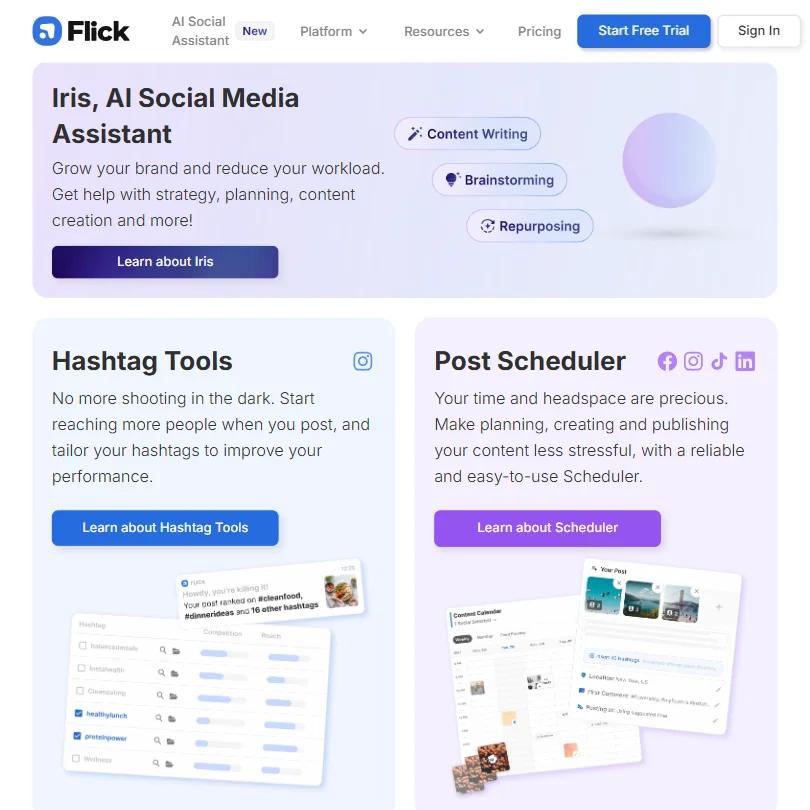
Four real pillars. Hashtag research is the oldest and most developed. Then Iris and the Caption Generator, then scheduling, then analytics.
The hashtag tooling is where the product earns its keep. The Advanced Hashtag Search includes performance filters, banned hashtag detection, a randomizer, Collections for saving sets, and CSV export. That CSV export matters specifically for agencies. The Hashtag Tracker lets you monitor hashtag performance over time, a rarity at comparable price points.
Scheduling works. The Solo plan caps you at 30 posts per month per social profile, which gets thin fast once you run the numbers across four platforms. Pro and Agency lift that to unlimited posts and add bulk scheduling. The drag-and-drop content calendar is genuinely visual, not just a list view dressed up. That's a real usability difference.
Analytics are Instagram-heavy. You get account-level data, feed and Reels stats, Stories reporting, and hashtag performance tracking at the post level. That last part is the differentiator. Tying hashtag research directly to post-level performance data in the same interface is something very few tools do. The cross-platform reporting feels thinner. TikTok and LinkedIn analytics depth isn't documented clearly.
No competitor analysis anywhere in their docs. Agencies will feel that.
Flick Platform Support: Which Networks Does It Cover?
Instagram is the strongest coverage by a wide margin. Built on the official Meta API, so Posts, Reels, and Stories all schedule properly. Facebook is included too.
TikTok and LinkedIn are there but feel secondary. The hashtag research depth is Instagram-native and doesn't carry over evenly.
No Pinterest, YouTube, or X support exists. If your client mix includes those, Flick won't cover it alone. That's scope, not a failure. A tool like Metricool covers a broader network list if platform breadth is the priority.
Flick AI Content Creation: Caption & Copy Quality
Iris is positioned as a social media strategy assistant, not just a caption writer. Flick's documentation says it handles planning, ideation, and content repurposing. That's a broader brief than most AI tools in this category claim. We're cautiously interested, not convinced.
The AI Caption Generator is the simpler, more concrete tool. That's consistent with every AI caption tool we've looked at. Nobody's output is post-ready out of the box.
The "proprietary" framing for Iris is impossible to verify from public sources.
Hashtag suggestions are integrated directly into the writing flow. No tab-switching. That's a real workflow gain, not a marketing point.
Is Flick Easy to Use?
Mostly yes. The drag-and-drop calendar and visual-first scheduling feel lighter than Hootsuite, which tends to bury new users in interface density on day one.
The Flick Academy and Help Center are documented as substantial resources, and there's a private Facebook community that adds a peer support layer. Underrated for solo users who hit questions at odd hours.
The 24/7 support claim is vague. Their site advertises it. It does not specify the channel. Live chat, a bot, email with an SLA? That's annoying.
Flick Pricing: Is It Worth It for Creators & Agencies?
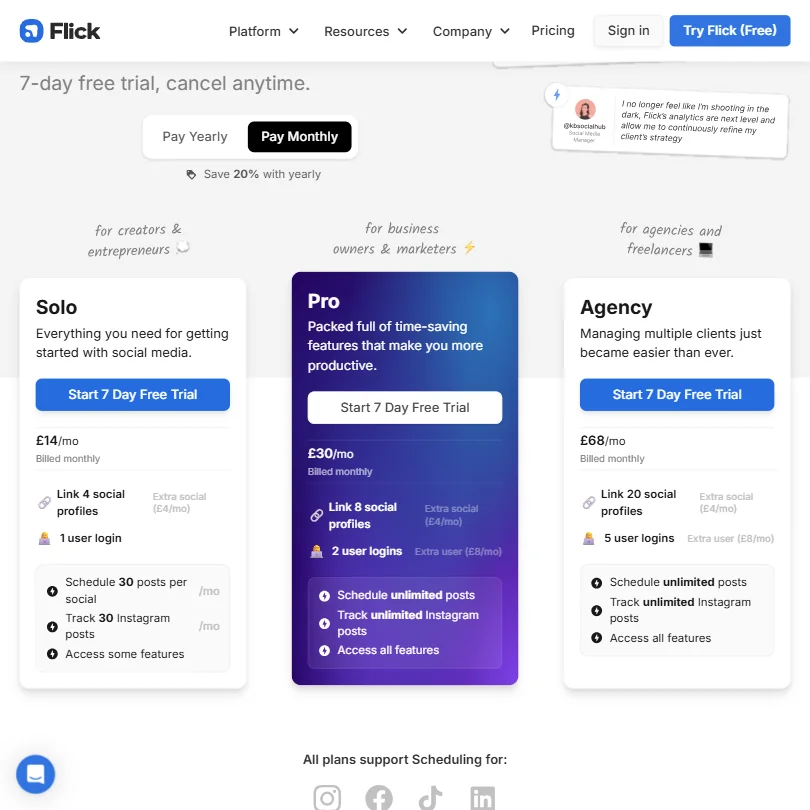
Three plans, all in British pounds. Solo at £14 a month (£11 billed yearly). Pro at £30 (£24). Agency at £68 (£55). The pound-denominated pricing matters if you're billing clients in dollars and the exchange rate shifts.
Solo links 4 social profiles and supports 1 user login. The 30-posts-per-month cap per social profile on Solo sounds generous until you run it across four platforms and account for Stories and Reels separately. It gets tight. Pro lifts that to unlimited posts, covers 8 social profiles, and includes 2 user logins. Agency handles 20 social profiles and 5 user logins.
Additional user seats cost £8 per month on Pro and Agency. Extra users are unavailable on Solo. Extra social profiles beyond each plan's limit cost £4 per month across all three plans. Those add-on costs are real and add up for agencies.
No free plan. Seven-day trial only. That's enough to poke around the hashtag tools. It's not enough to evaluate analytics over time. We don't buy the seven-day window as sufficient for serious evaluation of a tool that's partly selling on long-term performance tracking. Fourteen days would be more honest.
Cancel-anytime during the trial. That's clean, at least.
Flick vs Later: Which Social Media Tool Wins?
Later is the natural comparison. Both are Instagram-first tools that expanded outward. Both have schedulers, analytics, and AI features layered on over time.
Flick wins on hashtag research. Not close. Later has hashtag suggestions, but nothing matching the filtering depth, the performance tracking, the banned hashtag checker, or the CSV export. If hashtag strategy is how your clients grow on Instagram, Later doesn't compete at equivalent pricing.
Later competes better on platform breadth. Flick's hashtag analytics are the stronger differentiator.
For agencies needing white-label reporting or deeper client management, neither is ideal. That's where something like Sendible makes more sense.
Who Should Use Flick? (And Who Shouldn't)
Instagram-first creators. That's the core fit. Hashtag intelligence at this price point is genuinely differentiated. Nothing comparable exists in Buffer or Later at equivalent plans.
Small business owners managing their own social. Solo is affordable, setup is relatively painless, and the AI handles some of the repeatable work. Good fit.
Agencies with larger teams or multi-platform clients need to think carefully. Five users on Agency is low. No white-label reporting confirmed. No competitor analysis. The analytics thin out fast once you move past Instagram. Those are real constraints, not minor ones.
TikTok-first brands. Not the right tool. The scheduling works technically, but the intelligence layer doesn't follow.
Flick Review Verdict
The hashtag tooling is the reason to buy it. Full stop. Everything else, the AI captions, the scheduler, the analytics calendar, is good enough but not obviously better than what Later or Buffer offer at similar prices.
What keeps this from being a stronger recommendation is some unanswered operational questions. The 24/7 support claim is unsubstantiated in terms of channel, the AI model's proprietary framing is unverified, and the agency-tier add-on pricing requires a conversation rather than a clear public answer.
If Instagram hashtag performance is central to how you or your clients grow organically, Flick earns the subscription. For everything else, the case gets narrower quickly.
How Flick compares
Flick scores 3.8 out of 10 among the AI social media management tools we rate. These three do the same job and are the closest to it, compared on what each vendor publishes.
Later
Later publishes to eight networks including YouTube and Pinterest, where Flick covers just four: Facebook, Instagram, TikTok and LinkedIn. Five profiles cost less on Flick than the $25 a month they cost on Later, and Flick's Iris AI agent plans content calendars and branded graphics on its own, something Later's on-request AI tools do not do.
Pick Later if you post to YouTube or Pinterest and want a mobile app.
Pick Flick if you want an AI agent that plans your content calendar for you.
Hootsuite
Hootsuite costs $99 a month for five profiles, far more than on Flick, and Hootsuite publishes to eleven networks against Flick's four. Flick's Iris AI agent still plans content calendars and generates branded graphics on its own, a step further than Hootsuite's Wisdom, which drafts but will not publish for you.
Pick Hootsuite if you need Bluesky, Threads or Google Business Profile publishing.
Pick Flick if you want an AI agent that plans content and generates graphics itself.
Buffer
Buffer has a free plan and publishes to eleven networks against Flick's four, plus a unified inbox and an API that Flick does not offer. Flick's edge is its Iris AI agent, which plans content calendars and produces branded graphics from a stored Brand Hub on its own, where Buffer's AI Assistant only helps with text on request.
Pick Buffer if you want more networks, a free plan and a unified inbox.
Pick Flick if you want an AI agent that plans and designs graphics for you.
Frequently Asked Questions
Does Flick have a free plan?
No free plan. Flick offers a 7-day trial across all plans, no charge if you cancel in that window. That's enough time to test the hashtag research tools and get a feel for the scheduler. It's not enough to evaluate analytics performance in any real way, which is a fair criticism for a tool partly selling on long-term tracking data.
What platforms does Flick support for scheduling?
Flick supports scheduling across Instagram, Facebook, TikTok, and LinkedIn. Instagram has the deepest coverage, including Posts, Reels, and Stories. The other three platforms work for scheduling but don't get the same depth of hashtag intelligence or analytics detail. Not great for TikTok-first workflows.
Is Flick's AI assistant any good for caption writing?
Iris produces usable captions that need editing before posting. Consistent with the rest of the market. Where Flick's setup actually stands out is the integration between caption writing and hashtag suggestions in the same flow, no tab-switching required, which saves real time compared to running those steps in separate tools.