
What is Creati.ai?
Creati.ai indexes over 27,000 AI tools and presents them as a discovery hub. Think Futurepedia or There's An AI For That, not Synthesia or CapCut. The AI tools discovery platform angle is the actual product. Video generation gets top billing on the homepage, but what that means in practice is that Creati.ai surfaces other people's video tools, curated and categorized, rather than running its own generation engine.
That's a meaningful distinction.
There's a BGRemover tool featured on the platform. AI video editing tools get indexed. Text-to-video capabilities exist, in the sense that the platform points you toward tools that do it. But if you land here expecting to type a prompt and get a video back, confusion is the likely outcome.
Creati.ai Features: Video Generation, Editing & AI Capabilities
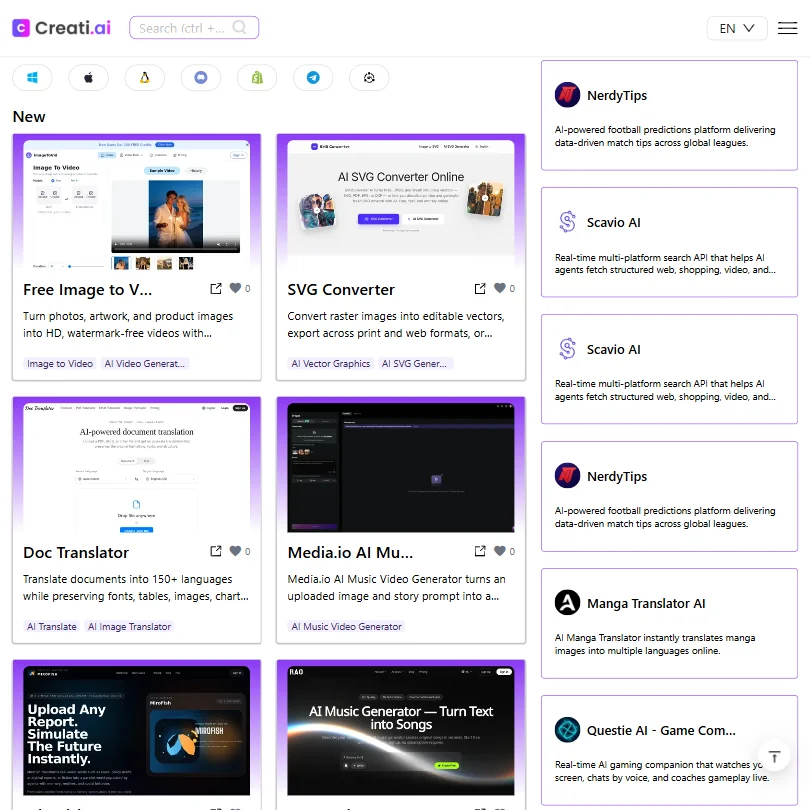
The vendor docs mention text-to-video and AI video editing, but those are categories of indexed tools, not native outputs. Creati.ai is a front end for discovery, not a production studio.
BGRemover is the clearest example of a usable tool surfaced through the platform. Beyond that, any specs on avatar support, voice cloning, auto subtitles, or screen recording are simply absent from public documentation. Not paywalled. Absent.
Honestly, that's a problem if you're evaluating this as a creation suite that doubles as a directory. It reads more like one than the other.
No API access is documented. No integrations with Adobe Premiere or DaVinci Resolve appear anywhere. Descript, by comparison, sits inside an editing workflow rather than pointing you toward tools that might.
Creati.ai Video Quality: How Good Does the Output Actually Look?
Here's the issue. Creati.ai isn't generating the video itself in most cases. Rating output quality gets complicated.
The quality of what you produce depends entirely on which tool in the index you end up using. That's not a knock on the curation. The breadth of what Creati.ai aggregates is genuinely wide. But we can't evaluate a rendering pipeline that doesn't belong to the platform.
We're skeptical of any "AI video platform" framing that delegates the actual generation. That's the whole job.
Creati.ai AI Avatars & Voiceover: How Realistic Are They?
Not publicly stated. That covers most of it.
Talking-head support, avatar quality, voice cloning, and TTS voices are all undocumented in anything we could find. Creati.ai doesn't claim these as native capabilities in its public-facing materials. The platform indexes tools that do these things. That's the mechanism, not a feature.
Avatar-driven video as an actual requirement points elsewhere. HeyGen ships its own avatar engine with documented quality benchmarks and a known pricing structure. That's a more direct path and a more honest one.
Is Creati.ai Easy to Use?
A discovery hub has a different usability bar than a production tool. For browsing and finding AI tools, the platform looks clean enough from the outside. Navigating 27,000-plus indexed tools is a real design challenge, and Creati.ai appears to handle it through categories and featured collections.
Ease of use for actually making something is harder to assess, because the creation happens elsewhere. You find the tool on Creati.ai, then go use it on a different platform. That two-step adds friction no UX polish on the Creati.ai side can fully fix.
Fair.
No documented help center and no community forum. Email support exists at support@creati.ai, and that's the complete list. For a platform indexing tens of thousands of tools, the support infrastructure is thin.
Creati.ai Pricing: Is It Worth It for Creators & Teams?
No pricing is publicly stated. No starting price, no free plan confirmation, no trial terms appear anywhere on the site. The pricing page has nothing reportable. The information isn't there.
Twenty-one of the thirty-four AI video tools we've reviewed in this category offer a documented free plan. Creati.ai doesn't confirm one either way. That's a transparency problem that affects whether anyone can make a real comparison before committing.
We don't buy the idea that pricing opacity is a strategy. It's friction. Futurepedia and Toolify.ai both make their access model obvious upfront. The silence here stands out.
Creati.ai vs Futurepedia: Which AI Video Tool Is Better?
Futurepedia is the more established comparison. It's been around longer and has a recognizable brand in the AI tools discovery space. Creati.ai's 27,000-plus tool index is a legitimately large number.
Who Should Use Creati.ai? (And Who Shouldn't)
Researchers and tool-hunters. That's the actual fit. People who want a large, browsable index and don't need a creation platform underneath it.
Not the fit: anyone who needs to produce video directly, with a documented pipeline, known export formats, and a support team behind it. The specs aren't there. The production infrastructure isn't documented, because it isn't really the product.
Teams with real video output requirements should look elsewhere. The category has well-documented options that tell you what they do before you sign up.
Creati.ai Review Verdict
Creati.ai is a directory that got categorized as a video tool. That framing mismatch causes almost every friction point in this review. Pricing is invisible. Native capabilities are undocumented. Support infrastructure is minimal. Third-party review coverage is sparse and, where it exists, appears to reflect a different product entirely.
The 27,000-plus tool index is real, and for pure discovery that might be enough. But if the goal is making video, this isn't where that happens. The tools that do it are in the index. Go find them, then go use them somewhere else.
Frequently Asked Questions
Does Creati.ai have a free plan?
No free plan is publicly confirmed on the site. Trial terms are equally absent. That makes it hard to recommend trying before any kind of commitment, which is a real problem in a category where most competitors are upfront about free access from the start.
Is Creati.ai actually an AI video generator?
Not in any direct sense. It's primarily an AI tools discovery platform that indexes video generation tools made by others. The video capabilities surfaced through the platform come from curating and categorizing other products, not from a native generation engine Creati.ai runs itself.
How does Creati.ai compare to other AI tools directories?
The index size is notable. Over 27,000 tools puts it in the upper range of what we've seen in this space. But established directories like Futurepedia have more visible pricing information available.










