
BLACKBOX AI is an AI coding assistant that dispatches competing agents across models and evaluates their output, with end-to-end encrypted inference.

What is BLACKBOX AI?
A multi-agent coding assistant built on top of more than two dozen underlying models. Claude, Codex, and their own native model are the names that show up most in their docs. The core idea is that when you make a request, a system they call the Chairman LLM dispatches competing agents in parallel, evaluates what comes back on things like correctness and risk, and ships the winner. You don't pick the model. The system does. Honestly, that's a more interesting bet than "pick your model from a dropdown," which is what most competitors offer. They support 50+ programming languages and plug into 35+ IDEs. VS Code is the obvious one. Their own Blackbox IDE also exists. The product runs on web, CLI, and API, and the API is compatible with OpenAI endpoints, which matters for teams already built around that format.BLACKBOX AI Features: Code Generation, Review & Developer Workflow

BLACKBOX AI Code Quality: How Accurate and Reliable Is It?
Speed and latency claims. That's where things get interesting. An independent benchmark from Artificial Analysis compared seven providers total, testing one shared model, Nemotron 3 Ultra 550B, across all of them. BLACKBOX AI ranked first for output speed, time to first token, and blended price. Not first among seven others. First among seven providers including themselves. That distinction matters when you're reading a benchmark claim. That's actually credible, as far as third-party benchmarks go. Artificial Analysis isn't BLACKBOX AI's own testing. We'll take it more seriously than vendor-produced numbers. G2 reviewers land somewhere between 4.4 and 4.5, which is a small sample but consistent. Capterra is higher, though that sample is even smaller. Trustpilot diverges significantly, and that gap took us the longest to reconcile. Trustpilot skews toward frustrated users writing after a bad experience, so some divergence is expected. A two-point spread is still wide. The pattern we kept seeing in G2 reviews: developers who used BLACKBOX for targeted, specific tasks found it accurate enough. People who expected it to hold long context across a complex codebase found it unreliable. That tracks with most multi-agent tools at this price range, honestly.BLACKBOX AI IDE & Workflow Integration: Where Does It Work?
The VS Code extension is native and well-documented. Their own Blackbox IDE exists if you want a fully integrated environment. Beyond those two, the "35+ IDEs" claim is on the homepage but not spelled out in the public docs. That's the kind of thing that shows up as a complaint in user reviews, and it did. The CLI is interesting. Not an afterthought. Dispatching competing agents from a terminal is a workflow that actually fits how a lot of senior developers operate, and having that as a first-class surface is a real differentiator. Automatic PR creation through the CLI is genuinely useful if you trust the output enough to ship it. Codebase indexing is there, but depth seems to vary. Reviews point to it working well on smaller repos and losing context on larger ones.Is BLACKBOX AI Easy to Set Up and Use?
Their docs live at blackbox.ai/docs and are functional. Basic. Not the kind of docs that answer edge-case questions, but enough to get started. The free plan exists and is described as unlimited, which is a low barrier to try the thing before committing. Reddit threads from 2024 and early 2025 surface a recurring complaint about onboarding friction once you move past the free tier. Some users couldn't tell which model was actually used for a given response. That's a product design issue, not a docs issue. If the Chairman LLM selects models dynamically, some transparency about what ran would help developers trust the output. Setup through VS Code is reportedly fast. The CLI takes longer if you're not already comfortable in a terminal environment. Fair.BLACKBOX AI Pricing: Is It Worth It for Solo Devs and Teams?
BLACKBOX AI vs GitHub Copilot: Which AI Coding Tool Is Better?
GitHub Copilot runs on a single underlying model architecture at any given time. BLACKBOX AI's pitch is parallel agent dispatch with automatic winner selection. That's architecturally different, and for certain tasks it might genuinely produce better output. GitHub Copilot's ecosystem advantages are significant though. Deep VS Code integration, JetBrains support that's actually documented, and years of training data from actual repositories. BLACKBOX AI is newer and the docs are thinner. Developers already deep in the GitHub ecosystem will feel the difference. If the ecosystem question is your main concern, our Cursor review is also worth a look, since it competes on the agentic workflow side without the multi-vendor complexity. BLACKBOX AI likely wins on price at the entry tier. GitHub Copilot Individual runs $10 a month too, but BLACKBOX's free tier is more accessible. The Artificial Analysis speed benchmark favors BLACKBOX, and that one holds more weight than their own internal numbers would.Who Should Use BLACKBOX AI? (And Who Shouldn't)
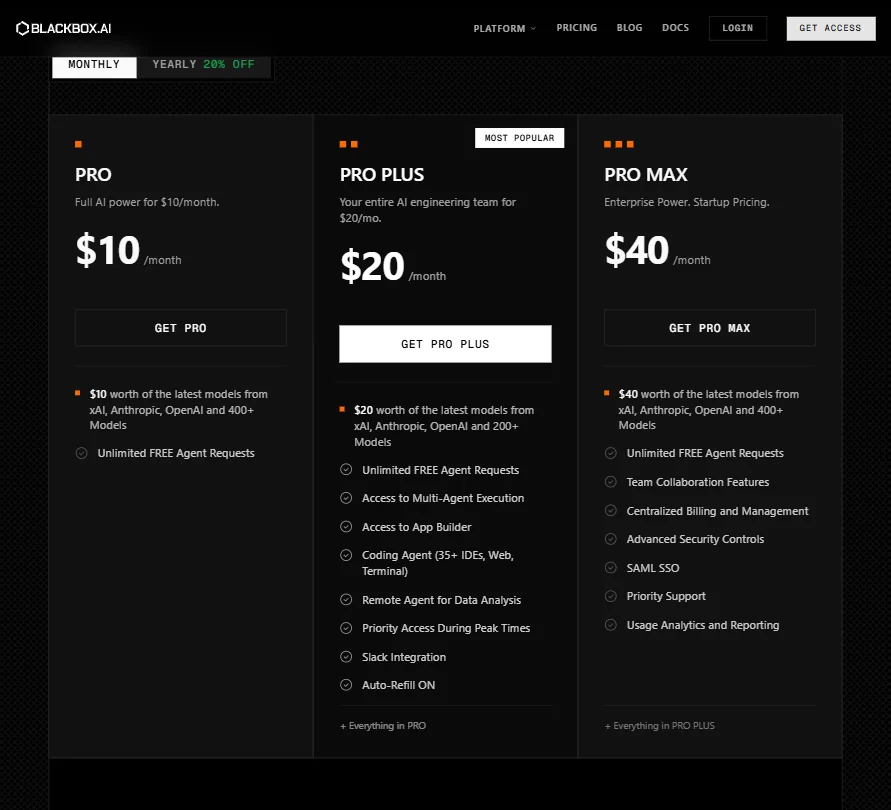
Solo developers who want multi-model access without paying $20 or more a month. That's the clearest fit. The $10 tier covers the core workflow, and the free plan lets you test before you spend anything. Engineering teams with compliance needs should wait. SAML SSO appears only at Pro Max, and the refund policy silence is a procurement problem. Not great. Developers deeply embedded in JetBrains tooling should go in with low expectations. The JetBrains plugin isn't confirmed in the public docs, which is a real gap given what competitors like Codeium and Tabnine offer there. Enterprise teams wanting formal SLAs, auditable output, and serious support documentation are probably looking at the wrong tool.BLACKBOX AI Review Verdict
BLACKBOX AI is doing something architecturally interesting. The Chairman LLM evaluation layer, parallel agent dispatch, named agents for specific tasks like security scanning and test generation. Real ideas, not feature-list padding. The 30 million user count suggests the free tier is working as an acquisition engine. The support documentation is thin. The Trustpilot divergence is a flag. Ask about the refund policy. The multi-agent inference approach, validated by at least one independent benchmark, is the most credible differentiator in this price range. More independent verification would help before you bet a production workflow on it. For the price, there's enough here to justify a trial. The free plan costs nothing. That's the right place to start.Frequently Asked Questions
Is BLACKBOX AI free to use?
Yes, there's a free plan described as unlimited in their docs. That said, "unlimited" in this context deserves a careful read before you depend on it professionally. Paid plans start at $10 a month for Pro, which adds $10 in model credits from xAI, Anthropic, OpenAI and a few others on top of the free agent requests.
What models does BLACKBOX AI use?
Their system runs across Claude, Codex from OpenAI, and their own native Blackbox model, among others. The Chairman LLM evaluates which agent's output wins for a given request. You don't manually select a model in the standard workflow, which is either a feature or a frustration depending on how much control you want. Worth knowing before you sign up.
How does BLACKBOX AI compare to GitHub Copilot?
BLACKBOX AI's multi-agent dispatch model is architecturally different from Copilot's single-model approach. On price, they're comparable at the entry tier, both at $10 a month. Where Copilot wins is depth of ecosystem integration, especially for teams already inside GitHub's native tooling. BLACKBOX AI wins on model variety and on speed, at least according to the Artificial Analysis benchmark, which is independent and compares seven providers on a shared model.







