
What is Augment Code?
Augment Code launched in 2022 out of Palo Alto, and the product is not trying to be another autocomplete wrapper. The pitch is a full agentic development platform: take a ticket, write the code, open a pull request, flag the risks, close the loop. That's the whole sequence they're selling as a single coordinated thing.

The centerpiece is their Context Engine, which maps a codebase by structure rather than running keyword searches across open files. They claim it handles codebases with 400,000+ files. What calls what, what's active, what's been abandoned. That's the part that separates Augment from most things in this category. Most competitors treat your codebase as a text corpus. Augment treats it as a graph. Honestly, that's a meaningful architectural difference, not just positioning language.
The Cosmos platform sits on top and coordinates agents at organizational scale. Shared memory across a team, a registry of specialized AI experts, workflows that span from incident detection all the way to merge.
Augment Code Features: Code Generation, Review & Developer Workflow

Wide feature surface. Start with the PR Author agent, which drives tasks from first commit through merge. Not just code generation. The full handoff process, built into one workflow. Then there's the Tester expert, which runs changes end-to-end and posts results with screenshots. That detail surprised us. Screenshots in test output is a specificity most tools skip entirely.
Code review gets three separate modes: Deep Code Review, Pair Review, and PR Risk Analysis. The risk analysis piece is what teams will actually lean on. It surfaces security exposure before a human touches the PR, and Augment claims 60%+ of CVEs get automatically remediated. That's a striking claim, so test it across more than one codebase before trusting it.
Incident Management is probably the most aggressive feature in the list. Augment says 70%+ of pages get resolved before the on-call engineer even joins. Production environments with real complexity may not match that number. The concept is sound: agents triaging before humans do. That's where this category is heading regardless.
There's also Ticket to PR automation, large-project migration support, and security remediation that runs across repos. The breadth is real. Test whether every feature is equally polished on your own repo.
Augment Code Code Quality: How Accurate and Reliable Is It?
The Context Engine is where Augment makes its strongest case for accuracy. Most AI coding tools pull context from whatever files are open. Augment indexes the full organizational codebase, including multi-repo setups, and uses structural mapping to understand dependencies. The result, according to their benchmarks, is 33% lower token cost and a 2 to 3x engineering throughput uplift. Those numbers are vendor-reported. Take them with the appropriate skepticism.
What we kept seeing in the limited public feedback is that the tool performs best when it has enough codebase to learn from. Small teams with simple codebases probably won't see the same payoff. The engine needs surface area. That tracks.
On the model side, Augment runs a multi-model setup with GPT-4, Gemini, Claude, and open-weights options through their Prism routing system. Not locked to one provider. The routing presumably picks based on context and cost, which is a reasonable architecture for a tool that cares about token efficiency.
G2 has only two reviews at the time of writing. Too thin a sample to mean much, but two reviews and no Capterra presence for a company founded in 2022 is worth flagging. Real uncertainty for any buyer trying to do independent verification.
Augment Code IDE & Workflow Integration: Where Does It Work?
VS Code and JetBrains get native plugins. CLI access is included on both the Business and Enterprise plans, which the pricing page confirms. GitHub integration is native and covers PRs, code review, and CI. That covers most of where enterprise teams actually work.
GitLab is a different story. Augment now provides documentation for running Code Review on GitLab through CLI-based CI/CD automation, and GitLab is listed as a first-party Cosmos trigger, so the support exists. But it's not as immediately visible as the GitHub integration, and teams should verify their specific workflow against the current docs before assuming parity. That gap in perceived clarity is a real friction point during evaluation, even if the underlying support has caught up.
Beyond version control, the integration list includes Jira, Slack, and Linear, and a few others. MCP support means you can wire in additional tools through Model Context Protocol. The Business plan also includes MCP and Native Tools explicitly, which the pricing page lists as a line item. The foundation is solid.
Is Augment Code Easy to Set Up and Use?
The documentation is genuinely good. There's a Docs site, Guides, a Trust Center, a Changelog, and a Status Page. For a company this young, that's more coverage than most. We cross-referenced the docs with what users were saying and found the two roughly aligned on setup flow. No alarming contradictions.
The harder part of setup is probably organizational, not technical. Getting a team aligned on the Expert Registry and Organization Knowledge features, deciding what agents are allowed to touch, and wiring in RBAC properly takes someone with time and authority. SSO, OIDC, and SCIM support are Enterprise-tier features, which means Business plan teams handle identity management differently. This isn't a tool you drop into a team without a plan.
For Business plan teams capped at 50 seats, setup is more contained. Still not trivial.
Augment Code Pricing: Is It Worth It for Solo Devs and Teams?
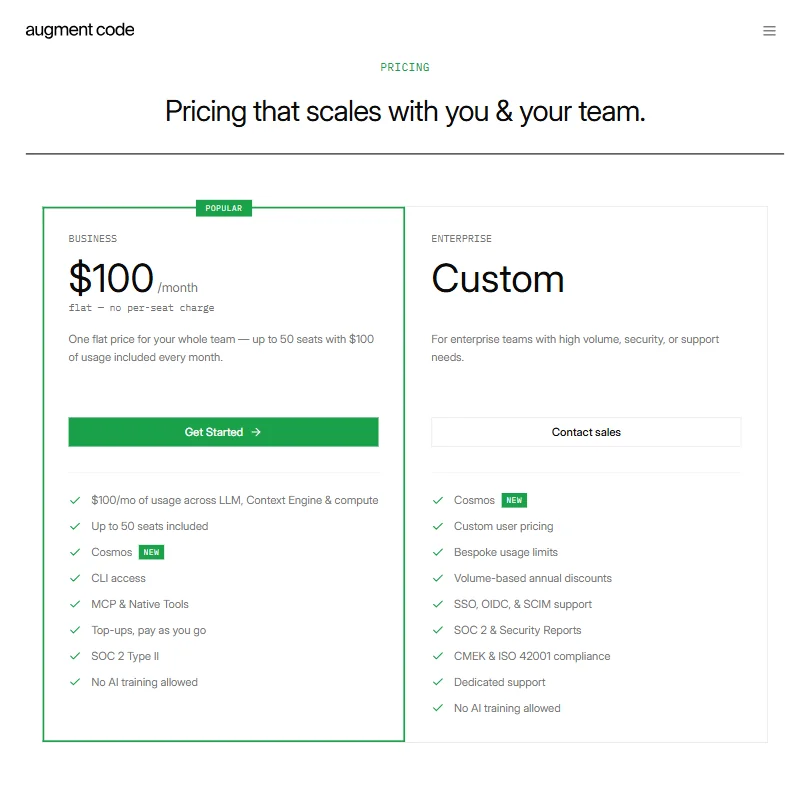
$100 per month flat for the Business plan. No per-seat charge. Up to 50 seats included, with $100 of usage across LLM, Context Engine, and compute bundled in. Top-ups are available on a pay-as-you-go basis if you exceed that. SOC 2 Type II and a no-AI-training policy are both included at that tier. Those are the real details from the pricing page, and they matter for buyers who are used to usage overages sneaking up on them.
No free plan, and no trial period is listed. You're committing money before you know whether it works for your codebase. Cursor starts at $20 a month, with no free tier. GitHub Copilot is $19 a month per seat. Augment's entry-level Standard plan starts at roughly the same price and asks you to trust vendor benchmark numbers before you've run a single agent against your own repo. That's a hard sell.
Enterprise pricing is custom, which is expected. Volume-based annual discounts, bespoke usage limits, CMEK and ISO 42001 compliance, and dedicated support are all listed as Enterprise-only. SSO, OIDC, and SCIM support also sit behind the Enterprise wall, which means Business plan teams should check that against their internal requirements before committing.
On refunds: Augment's terms state that credit purchases are generally final and non-refundable except where law or a separate agreement requires otherwise. There are limited prorated refunds available if Augment terminates a prepaid agreement without cause on their side. That's an asymmetric refund structure worth reading before you prepay anything. The kind of detail that turns up in cancellation conversations at the worst possible time.
Augment Code vs GitHub Copilot: Which AI Coding Tool Is Better?
Different tools solving different problems. That's the honest framing. GitHub Copilot is an IDE assistant. Augment Code is closer to an autonomous teammate. Copilot suggests lines and functions. Augment agents open PRs, run tests, and resolve incidents.
For a single developer who wants faster autocomplete, Copilot wins on price and simplicity. At $19 a month, the math is easy. For an engineering team trying to reduce review overhead and automate repetitive PR work, Augment's case gets more interesting. The Context Engine gives it structural depth that Copilot doesn't match on large multi-repo codebases.
Where Copilot has the clear edge is adoption and review density. Years of public feedback, active Reddit communities, and enough users that you can actually stress-test the claims. Augment is earlier. The feedback pool is thin. Not a knock on the product. Just a real uncertainty a buyer should sit with.
Who Should Use Augment Code? (And Who Shouldn't)
Enterprise engineering teams with large codebases. That's the fit. Teams where the bottleneck is review throughput, incident response time, or the cognitive load of understanding what calls what across dozens of repos. The $100 flat Business plan makes reasonable per-seat math if you're splitting it across 20 or more developers.
Solo developers. Not the fit. Full stop.
Security-first teams will find the data residency options and customer-managed encryption keys (CMEK) genuinely useful. Rarer than it should be in this category, and Augment seems to have taken it seriously.
Teams that have been uncertain about GitLab support should review the current CLI-based CI/CD documentation before writing the tool off. The support exists now for Code Review on GitLab and Bitbucket, though it's worth confirming the specific workflows your team needs are covered before reaching the pricing conversation.
Augment Code Review Verdict
Augment Code is doing something meaningfully different from most tools in this space. The Context Engine and the agentic PR workflow are real differentiators, not marketing language dressed up to look technical. The architecture is well-considered. The feature depth is serious. The pricing page shows a product that has thought about what enterprise buyers actually need, including no-AI-training guarantees and SOC 2 Type II at the Business tier.
The concerns are real too. Pricing transparency is thin before you hit the Enterprise tier. No free plan or stated trial period means the vendor's benchmarks are doing a lot of work before you've tested anything yourself. G2 feedback is nearly nonexistent, which makes independent verification hard. And the refund terms, once you read them, are not buyer-friendly on credit purchases.
For teams that can evaluate it properly and absorb the $20/month Standard-plan entry point, there's a real product here. For everyone else, the friction before you reach a confident answer is higher than it needs to be.
How Augment Code compares
Augment Code scores 6.3 out of 10 among the AI coding assistants we rate. These two do the same job and are the closest to it, compared on what each vendor publishes.
Tabnine
Augment Code's Standard plan costs $20 a month as a flat price for the whole team; Tabnine's Code Assistant plan runs $39 a month per developer, sold only as an annual subscription. Tabnine states your code is never stored, while Augment's retention is bounded by policy rather than zero. Augment reviews pull requests as a dedicated feature; that was not confirmed for Tabnine. Both promise not to train their AI on your code.
Pick Tabnine if you want as-you-type suggestions with a stated zero-storage code policy.
Pick Augment Code if your whole team wants one flat monthly price.
Cursor
Cursor Premium costs $30 a month per user and there is a free plan to start; Augment Code's Standard plan is $20 a month but priced flat for the whole team, with no free plan available. On Premium and up, Cursor lets you bring your own API key for OpenAI, Anthropic, Google, Azure or Bedrock, and its Privacy Mode can keep no copy of your code stored; Augment offers neither option. Both tools review pull requests and understand your whole codebase.
Pick Cursor if you want a free plan and control over your own API key.
Pick Augment Code if your whole team wants one flat price with no per-seat billing.
Frequently Asked Questions
Does Augment Code work with JetBrains IDEs?
Yes. Augment Code has a native JetBrains plugin alongside its VS Code extension. Teams split across both IDEs are covered. CLI access is included on both the Business and Enterprise plan tiers, which gives another entry point for developers who prefer working outside an IDE entirely.
Is there a free plan or trial for Augment Code?
No free plan. The Business plan starts at $100 per month flat, and there's no publicly stated trial period on the pricing page. That's one of the sharper edges on the product right now. If you want to evaluate how it handles your actual codebase before paying, you'll need to contact sales and see what they'll offer. Worth asking explicitly about trial access before committing to a prepaid credit purchase given the refund terms.
How does Augment Code's Context Engine differ from standard RAG approaches?
Most AI coding tools treat your codebase as a document collection and search it by keyword similarity. Augment's Context Engine maps structural relationships, tracking what calls what, which modules are active, and which ones have been abandoned. The claimed payoff is more accurate results on large, complex codebases and lower token usage. The 400,000+ file claim is notable. Whether it holds up on your specific codebase is something only a real evaluation will answer.







